
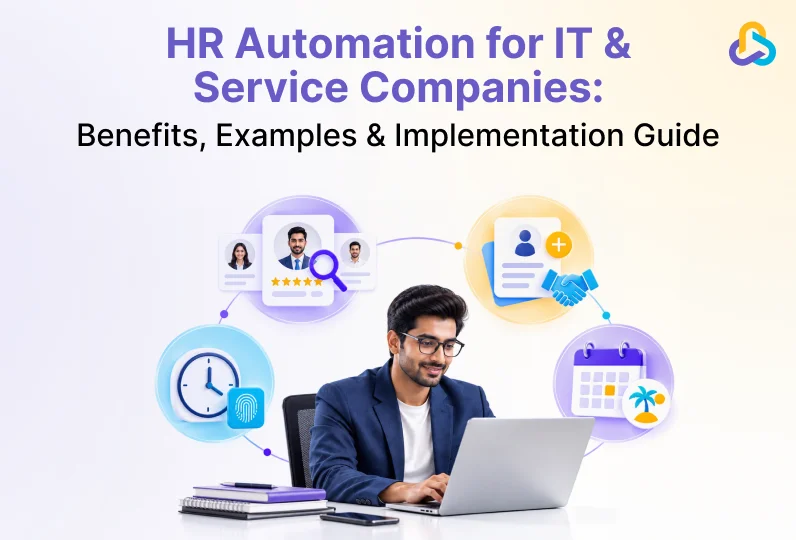
Manual HR processes work fine for a five-person team. They start to break at fifty. Every new hire means another spreadsheet update; another approval chased over email, another manual entry into payroll. As IT and service businesses scale across teams, projects, and locations, these small gaps compound into missed approvals, payroll errors, and compliance risk.
HR automation replaces these repetitive, manual steps with defined digital workflows across the employee lifecycle, from recruitment to payroll to offboarding. Gartner projects that automation and AI agents will handle a growing share of routine HR tasks over the next few years. This guide explains what HR automation is, why it matters for growing IT and service companies, the areas it typically covers, real workflow examples, and a step-by-step approach to implementing it.
Deloitte’s 2026 Global Human Capital Trends research found that a majority of C-suite leaders believe traditional back-office functions like HR must change how they operate, yet very few say they are actually making progress toward that shift. HR automation is one of the most direct, practical ways to start closing that gap.
Key Takeaways
- HR automation uses software and defined workflows to replace manual, repetitive HR tasks across the employee lifecycle.
- Coverage: it typically spans recruitment, onboarding, attendance, leave, payroll, performance management, and HR reporting.
- Judgment stays human: automation removes repetitive administrative work, so HR teams can focus on people’s decisions, not data entry.
- Growing companies benefit most, since manual processes do not scale cleanly with headcount, multiple locations, or compliance requirements.
- Momentum is real: research firms such as Gartner and Deloitte report accelerating enterprise adoption of AI-assisted HR workflows.
- Common examples include automated leave approvals, payroll calculations, onboarding checklists, and attendance tracking.
- Start small: implementation works best when companies automate high-impact, repetitive processes first rather than everything at once.
- Connected data matters: the right HR software should link HR data with the rest of the business, not just digitize paperwork.
What Is HR Automation?
HR automation is the use of software to carry out repetitive human resources tasks, such as leave approvals, payroll calculations, attendance tracking, and onboarding checklists, without manual, step-by-step intervention from an HR team member for each instance. Instead of an HR executive re-entering the same employee details into five different systems, an automated workflow captures the data once and pushes it wherever it is needed.
HR automation is not the same as simply digitizing HR. A company that moves employee records from paper files to a spreadsheet has digitized its data, but every update, approval, and calculation is still done by hand. Automation adds defined rules and triggers: when a leave request is submitted, it is automatically routed to the right approver; once approved, it updates the leave balance and reflects in payroll without anyone forwarding an email. Centralizing this within a single people management system helps HR teams maintain one source of truth instead of piecing information together from spreadsheets, chat threads, and inboxes.
It also helps to be clear about what HR automation is not. It is not the same as replacing HR staff, and it is not limited to large enterprises with dedicated IT budgets. Small and mid-sized IT and service companies often see the fastest returns, because they typically have the least redundancy to absorb manual errors and the most to gain from freeing HR time as they scale.
Why Do IT & Service Companies Need HR Automation?
Technology and service businesses face a specific set of pressures that make manual HR processes especially costly:
- Headcount growth: hiring in bursts around new projects or client’s means HR volume spikes unevenly, and manual processes cannot flex with it.
- Multi-location & remote teams: When HR, delivery, and finance teams sit in different cities or time zones, informal, email-based processes create delays and inconsistent decisions.
- Compliance complexity: As companies grow, managing payroll, employee records, leave, attendance, and statutory requirements manually become more difficult and increases the risk of errors. Changing regulations Keeping up with evolving labour laws, payroll rules, and statutory compliance requirements across locations adds another layer of complexity for HR teams.
- Project-based delivery: for service businesses, HR data connects directly to billing. Team allocation, timesheets, and attendance feed into project delivery and, eventually, invoicing and revenue, so gaps in HR data ripple into other parts of the business.
- Rising employee expectations: employees increasingly expect self-service access to leave balances, pay slips, and HR requests rather than raising a ticket or sending an email.
These pressures also carry a hidden cost. Every payroll figure that has to be manually rechecked, every leave balance that does not match across two spreadsheets, and every onboarding task that falls through the cracks adds hours of rework and, in some cases, compliance exposure. Individually, these gaps look minor. Across dozens of employees and multiple hiring cycles a year, they add up to a meaningful drag on HR capacity and a real business risk.
NASSCOM’s 2026 Technology Sector Strategic Review notes that hiring in India’s technology industry is expected to shift from volume toward the right skill mix as AI-driven productivity gains increase. That shift puts more pressure on HR teams to move fast and make consistent decisions, which is difficult without a scalable HR system behind them.
HR Automation vs. Manual HR Processes
The difference between manual and automated HR is best seen side by side. Manual processes depend on someone’s remembering to act; automated processes act on their own once a trigger occurs.
| Manual HR Process | Automated HR Process |
| Leave requests approved through email chains and forwarded manually. | Leave requests are routed automatically to the right approver based on defined rules. |
| Payroll figures calculated in spreadsheets from attendance registers. | Payroll calculated automatically from attendance, leave, and overtime data. |
| Onboarding tasks tracked across emails and shared documents. | Onboarding tasks assigned and tracked through a standardized digital workflow. |
| Employee data re-entered separately into HR, payroll, and project tools. | Employee data captured once and shared across connected modules. |
Benefits of HR Automation
A structured move toward automated HR workflows delivers measurable operational benefits, and it also supports the broader effort of streamlining HR operations as a company scales:
- Consistency: the same rules apply to every employee, every time, regardless of who is handling the request.
- Time savings: HR teams spend less time on repetitive data entry and more time on hiring decisions, employee support, and workforce planning.
- Reduced errors and compliance risk: automated payroll and statutory calculations reduce the manual mistakes that come from spreadsheet formulas and duplicate entry.
- Better employee experience: self-service access to leave balances, pay slips, and requests means employees are not waiting on HR for routine information.
- Data-driven decisions: centralized HR data makes it possible to track metrics like attrition, time-to-hire, and headcount cost accurately.
- Scalability: workflows that work for fifty employees continue to work for five hundred, without a proportional increase in HR headcount.
What to Look for in HR Automation Software
Not every HR tool labeled as “automation” software actually removes manual work. Before evaluating vendors, it helps to know what genuinely automated software looks like versus software that simply moves paperwork online.
- Rule-based workflows, not just forms: the software should route approvals, apply policies, and trigger the next step automatically, not just collect information into a digital form that a person still must act on.
- Connected modules: attendance, leave, payroll, and recruitment should share data with each other rather than sitting as separate tools that require manual exports and re-entry.
- Configurable, not rigid: approval chains, leave policies, and compliance rules vary by company and by country, so the software should let you configure these rather than forcing a fixed process.
- Self-service access: employees and managers should be able to complete routine tasks, like applying for leave or approving a request, without going through HR directly.
- Reporting built in: HR teams should be able to track attendance, leave, payroll, employee performance, and workforce trends through real-time reports and dashboards, without manually compiling data from multiple sources.
Key Areas of HR Automation
Most HR automation efforts fall into a defined set of workflow areas. Here is what each one typically covers.
1. Recruitment & Applicant Tracking
Automated recruitment workflows handle job requisition approvals, candidate sourcing, resume screening, and interview coordination. An applicant tracking system keeps every candidate’s status, feedback, and interview stage in one pipeline instead of scattered spreadsheets and inboxes.
2. Employee Onboarding
Once an offer is accepted, an automated onboarding checklist assigns document collection, IT provisioning, and payroll setup to the right owners with due dates, so a new hire first day does not depend on someone remembering every step.
3. Attendance & Time Tracking
Automated attendance systems capture clock-in and clock-out data through biometric devices, mobile apps, or geo-fenced check-ins, and flag exceptions like late arrivals or missed punches without manual reconciliation at month-end.
4. Leave Management
An leave management system automatically applies leave policies, routes approvals, and updates balances in real time, removing the back-and-forth of email-based leave requests.
5. Payroll Processing & Statutory Compliance
Automated payroll management pulls attendance, leave, and salary structure data directly into salary calculations, reducing manual formula errors.
For Indian companies, this extends to statutory compliance, where automated systems can calculate provident fund, professional tax, and other statutory deductions consistently every cycle.
6. Performance Management
Automated performance management workflows schedule review cycles, send reminders to managers and employees, and consolidate feedback and ratings in one place instead of relying on manually tracked spreadsheets.
7. Employee Self-Service & Document Management
Self-service portals let employees view payslips, apply for leave, update personal details, and access HR documents directly, cutting down the volume of routine requests that land in HR’s inbox.
8. Timesheets & Resource Allocation
For service businesses, automated timesheets connect employee hours directly to project tracking and billing. This is where HR data starts to touch the broader business chain: Lead to Deal to Project to Team to Delivery to Invoice to Revenue.
9. Offboarding
Automated offboarding workflows trigger access revocation, asset recovery, full-and-final settlement calculations, and exit documentation as soon as a resignation or termination is recorded, reducing the risk of loose ends after an employee leaves.
10. HR Analytics & Reporting
With HR data centralized, reporting on attrition, headcount cost, time-to-hire, and leave trends becomes a live dashboard rather than a manual month-end exercise pulled together from multiple files.
How to Implement HR Automation: Step-by-Step Guide
Learn how to automate HR processes, streamline employee management, reduce manual work, and build efficient HR workflows with this practical 7-step guide.
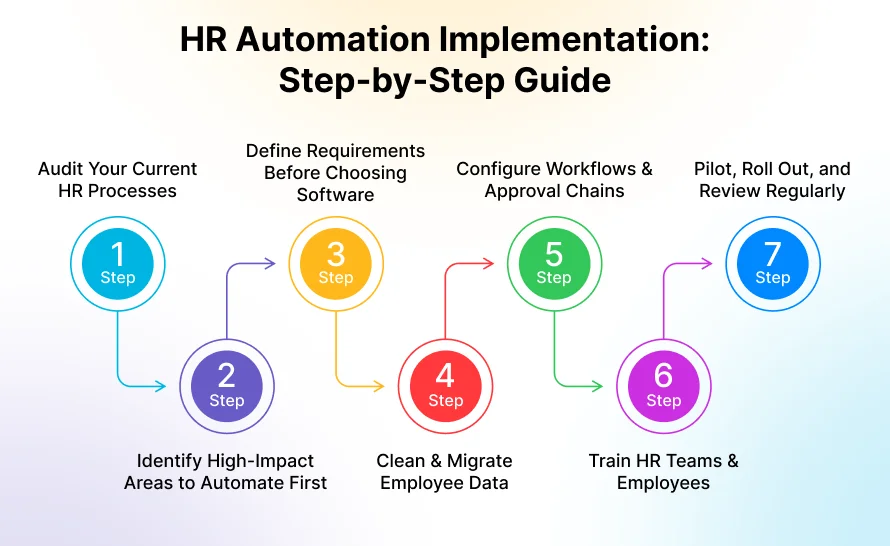
Step 1: Audit Your Current HR Processes
Document what happens today across recruitment, onboarding, attendance, leave, and payroll, not the process you wish you had. Note where delays, errors, or duplicate data entry happen most often, and talk to the people actually running these processes day to day.
Step 2: Identify High-Impact Areas to Automate First
Prioritize processes that are high-volume and repetitive, such as leave approvals or payroll calculations, over processes that are infrequent or highly judgment-based, like final candidate selection or disciplinary decisions.
Step 3: Define Requirements Before Choosing Software
List the workflows, approval chains, and integrations you need before evaluating tools. This prevents choosing software based on a long feature list when only a handful of those features actually apply to your processes.
Step 4: Clean & Migrate Employee Data
Automated workflows are only as reliable as the underlying data. Remove duplicate records, standardize formats, and reconcile leave balances and salary structures before migrating employee data into a new system.
Step 5: Configure Workflows & Approval Chains
Set up the specific rules for your organization: who approves what, what triggers each workflow step, and how exceptions are handled, rather than accepting a vendor’s default configuration as-is.
Step 6: Train HR Teams & Employees
Automation only delivers value when people actually use it. Train HR staff on managing and troubleshooting workflows, and train employees separately on self-service features like leave requests and pay slip access.
Step 7: Pilot, Roll Out, and Review Regularly
Start with one department, location, or process, gather feedback, and expand gradually rather than switching every team over at once. Review automated workflows periodically as team size, policies, and regulations change.
Examples of HR Automation in Practice
These common workflow examples show what HR automation looks like day to day, rather than an abstract concept.
- Automated leave approval: an employee applies for leave through a portal; the request is automatically routed to their manager, and once approved, the leave balance and payroll records update without manual intervention.
- Automated attendance & overtime calculation: Automated attendance tracking captures data from biometric devices, mobile apps, or web check-ins and calculates working hours, absences, overtime, and other attendance details based on company policies. This reduces manual work, improves accuracy, and ensures reliable data flows directly into payroll.
- Automated payroll run: salary calculations pull attendance, leave, and statutory deduction data automatically each cycle, reducing the manual spreadsheet work payroll teams typically repeat every month.
- Automated onboarding checklist: as soon as an offer is accepted, tasks for IT, HR, and the reporting manager are auto assigned with due dates, so nothing depends on someone remembering to follow up.
- Automated performance review reminders: review cycles trigger automatic reminders to managers and employees, keeping feedback on schedule without HR chasing every participant individually.
- Automated offboarding tasks: a resignation entry triggers access revocation requests to IT, asset-return checklists for admin, and full-and-final settlement calculations for payroll, all from a single recorded event instead of a scramble of separate emails.
A Simple HR Automation Rollout Plan
If you are planning your first rollout, this phased structure can serve as a practical starting point.
| Phase | Focus | What to Automate |
| Foundation | Centralize core employee data | Employee records, attendance, leave |
| Core HR Operations | Automate high-volume, repetitive tasks | Payroll, statutory compliance, onboarding |
| Advanced Workflows | Connect HR data to the wider business | Performance management, timesheets, HR analytics |
This is a starting structure, not a fixed rule. Companies should adapt the sequence to their own priorities and compliance requirements.
Common HR Automation Mistakes to Avoid
Companies moving toward HR automation often run into the same avoidable issues. Knowing them in advance makes the rollout smoother.
- Automating a broken process: automation speeds up whatever workflow you configure. If the underlying approval chain is unclear or inconsistent, automation just makes the confusion happen faster.
- Migrating messy data: duplicate employee records or outdated leave balances carried over from spreadsheets will produce inaccurate results in an automated system just as they did manually.
- Trying to automate everything at once: rolling out every workflow simultaneously overwhelms HR teams and employees alike. A phased rollout, starting with the highest-volume processes, adopts more smoothly.
- Skipping employee training: self-service tools only reduce HR’s workload if employees actually use them instead of still emailing HR out of habit.
- Treating it as a one-time project: policies, headcount, and regulations change. Automated workflows need periodic review, not a single setup and forget approach.
The CollabCRM Advantage
You can design the best HR workflows on paper, but they only create value once they are actually running day to day. This is where CollabCRM comes in.
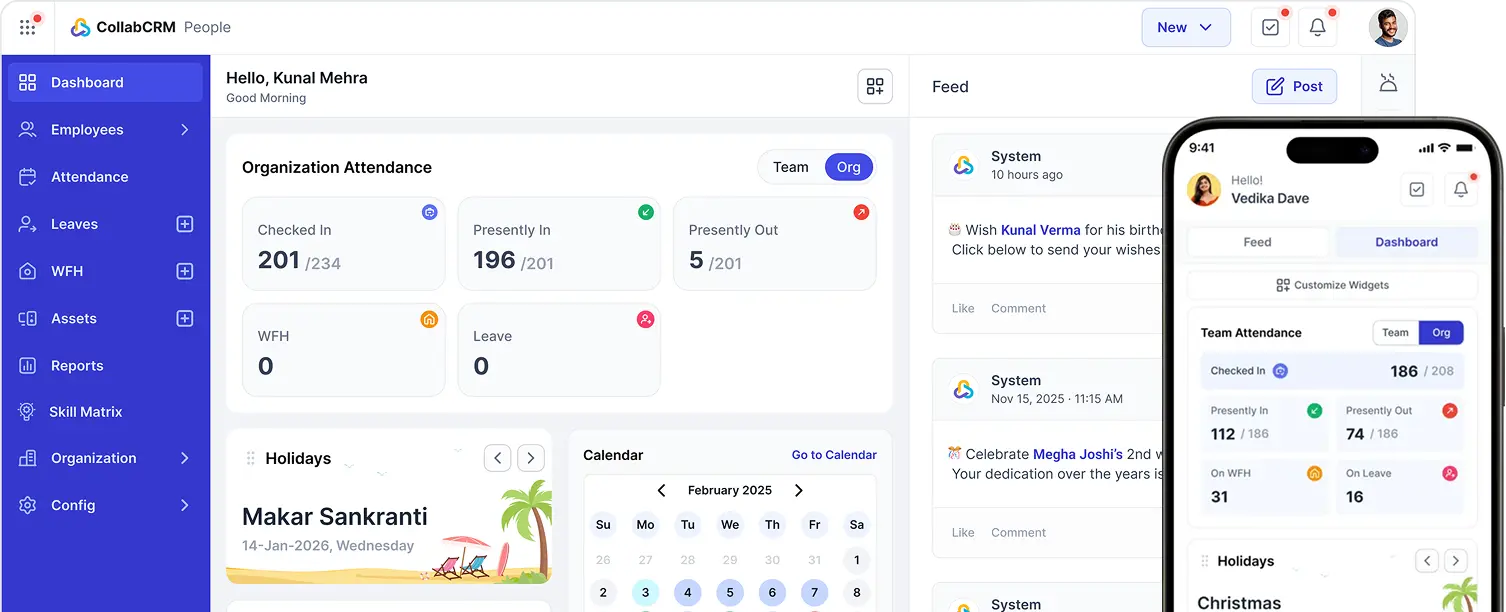
CollabCRM is an all-in-one business operating system for IT and service-based companies, connecting People, Projects, Sales, Invoicing, and Recruitment in one platform. For HR teams specifically, it helps operationalize the workflows covered in this guide:
- Centralized People Data: employee records, attendance, and leave live in one place instead of scattered spreadsheets.
- Automated Payroll Inputs: attendance and leave data flow directly into payroll processing, reducing manual reconciliation.
- Connected Recruitment: candidate pipelines, interview scheduling, and onboarding stay linked from the first application to day one.
- Reporting Across the Business: HR data connects with project and delivery data, supporting the Lead to Deal to Project to Team to Delivery to Invoice to Revenue chain that service businesses run on.
CollabCRM does not replace HR judgment. It removes the manual, repetitive work around it, so HR teams spend their time on people, not paperwork. Because People, Recruitment, Projects, and Invoicing sit within the same platform, HR data does not stay siloed. It feeds directly into the operational chain that service businesses run on: Lead to Deal to Project to Team to Delivery to Invoice to Revenue, giving leadership a clearer picture of how workforce decisions connect to business outcomes.
Conclusion
HR automation is not about removing HR from decision-making. It is about removing the repetitive, manual work that keeps HR teams from focusing on people’s decisions in the first place.
For growing IT and service companies, that means connecting recruitment, onboarding, attendance, leave, payroll, and performance data into workflows that scale with headcount instead of working against it. Starting with high-impact, repetitive processes and expanding gradually, backed by the right HR platform, gives HR teams a foundation that holds up as the company grows.
The companies that get the most value from HR automation tend to treat it as an ongoing discipline rather than a one-time software purchase. As team size, project load, and regulations change, the workflows behind HR need to be revisited just as often as the policies they support.
FAQs about HR Automation
HR automation is the use of software to perform repetitive human resources tasks, such as leave approvals, payroll calculations, attendance tracking, and onboarding checklists, through defined digital workflows rather than manual, step-by-step effort.
HR automation reduces manual errors, speeds up repetitive processes, improves compliance consistency, and frees HR teams to focus on hiring, employee support, and workforce planning instead of data entry.
Common areas include recruitment and applicant tracking, onboarding, attendance, leave management, payroll and statutory compliance, performance management, employee self-service, timesheets, offboarding, and HR reporting.
HR automation software is a platform that manages HR workflows digitally, applying defined rules to route approvals, calculating payroll, track attendance, and centralizing employee data across the employee lifecycle.
No. Growing small and mid-sized companies often benefit the most, since manual processes become harder to manage as headcount, locations, and compliance requirements increase.
Start by auditing current processes, identifying high-volume repetitive tasks, defining requirements, cleaning employee data, configuring workflows, training your team, and rolling out gradually with regular review.
No. Automation handles repetitive administrative tasks, but decisions involving judgment, such as candidate selection, performance conversations, and policy exceptions, still require HR involvement.
Yes. Automated payroll and statutory calculations apply the same rules consistently every cycle, reducing the manual errors that create compliance risk, though policies should still be reviewed with legal or compliance teams.
Timelines vary by company size and scope, but most organizations start seeing value from a phased rollout within a few weeks for high-volume processes like leave and attendance, with more complex workflows following subsequent months.
An HRMS (Human Resource Management System) is a software platform that stores employee data and manages HR processes. HR automation refers to the workflows and rules within that platform, or a connected system, that carry out tasks without manual, repetitive intervention.






 Priority Onboarding