Modern HR teams need more than a digital employee directory. They need connected HRMS modules that support hiring, onboarding, attendance, performance, workforce visibility, and employee exits without creating new data silos.
For IT companies, this matters even more. People data affects project staffing, skill availability, billable capacity, hiring plans, and delivery timelines. The right HRMS module stack helps businesses build a scalable HR system that brings these decisions into one connected system.
In this blog, we’re going to cover the top HRMS modules that enable you to operate your IT company people operations with ease, flexibility, and scale.
TL;DR Key Takeaways
- HRMS modules are connected components within HR software that manage distinct people operations, from recruitment to offboarding.
- For IT companies, the most useful modules include employee data management, recruitment, onboarding, attendance, leave, skills, performance, offboarding, and reporting.
- A strong HRMS module stack should share data across functions rather than forcing HR teams to maintain multiple spreadsheets and disconnected apps.
- The World Economic Forum reports that 39% of workers’ existing skills are expected to change or become outdated by 2030. This makes skill visibility and workforce planning especially important for technology businesses.
- CollabCRM connects people management with recruitment, projects, sales, administration, and reporting, making it a practical HRMS choice for software and IT services companies.
What are HRMS Modules?
HRMS modules are individual functional areas within Human Resource Management System software. Each module supports a specific HR activity, such as tracking attendance, managing candidates, approving leave, or monitoring employee performance.
Think of an HRMS as a connected workspace for people operations. The modules are the working parts inside it.
For example:
- The recruitment module manages job openings, applicants, interviews, and offers.
- The onboarding module helps new hires complete tasks, submit documents, and get ready for work.
- The attendance and leave modules track working time, absences, work-from-home requests, and approvals.
- The performance module helps managers track goals, feedback, and reviews.
- The reporting module turns workforce information into useful business insights.
The value is not simply having many HRMS software features. The real value comes from having those features connected through a shared source of employee data.
A recruitment decision should flow into onboarding. Onboarding data should support employee records. Attendance, skills, performance, project work, and exit records should all be visible when the business needs to make staffing or operational decisions
Why HRMS Modules Matter in 2026
HR is becoming more connected to business operations. This is particularly true in IT companies, where talent availability can directly affect delivery commitments and revenue.
A manual setup may work when a company has a small team. But as headcount grows, scattered spreadsheets, email approvals, attendance tools, applicant trackers, and project systems create friction. This is where streamlining HR operations becomes essential.
A modern HRMS module stack helps companies:
- Centralize employee and workforce information
- Improve visibility into attendance, leave, availability, and work patterns
- Create smoother hiring and onboarding workflows
- Reduce repetitive administrative work
- Support structured performance conversations
- Track employee skills and dependencies
- Make better resourcing decisions with current data
- Maintain more consistent processes during growth
The need for stronger skills visibility is growing. The World Economic Forum’s Future of Jobs Report 2025 found that employers expect 39% of workers’ current skill sets to be transformed or become outdated between 2025 and 2030. The report also found that 63% of employers view skill gaps as a major barrier to business transformation.
For IT leaders, this means HR data cannot remain separate from capacity planning and project delivery.
Essential HRMS Modules for IT Companies
Not every company needs every possible HR feature. The best approach is to prioritize the HRMS modules that solve real operational problems.
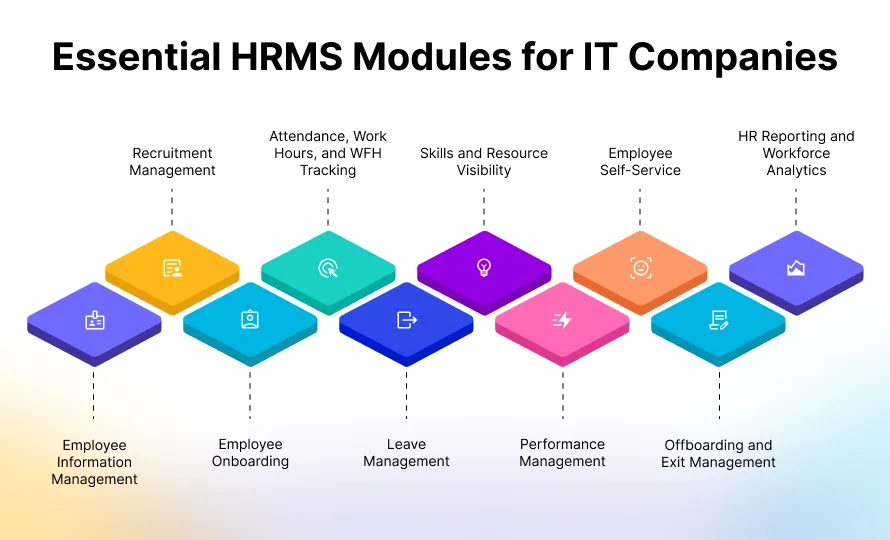
1. Employee Information Management
Employee information management is the foundation of an HRMS. It keeps workforce records in one secure place instead of across documents, folders, and spreadsheets.
A strong employee data module should help HR teams manage:
- Employee profiles and employment details
- Department, reporting, and role information
- Skills and competency records
- Documents and policy acknowledgments
- Employee status and lifecycle changes
- Role-based access permissions
For an IT company, a basic employee record is not enough. Leaders often need to know a person’s skills, current availability, project contribution, reporting structure, and organizational dependencies. This is why choosing the right HRMS software for IT companies matters
2. Recruitment Management
Recruitment is one of the most important HRMS modules for growing IT companies. It helps HR teams move candidates through a structured hiring process without losing context in email threads or separate trackers.
Useful recruitment features include:
- Job posting and requisition management
- Candidate pipeline tracking
- Resume and applicant information management
- Interview scheduling
- Interview feedback collection
- Offer workflow management
- Recruitment reporting
Technology firms often recruit for specialized roles. That means hiring teams need clear collaboration between HR, technical interviewers, and managers. A connected recruitment module makes the pipeline visible to the people involved in hiring.
3. Employee Onboarding
A good onboarding experience starts before the employee’s first day. The goal is simple: help a new hire become ready, informed, and productive without unnecessary back-and-forth. The right employee onboarding software helps teams standardize this process.
An onboarding module can coordinate:
- Offer acceptance and pre-joining tasks
- Document collection
- Employee profile creation
- Orientation checklists
- Policy sharing and acknowledgments
- Access, system, and device coordination
- Task ownership across HR, IT, admin, and managers
This cross-functional coordination is especially valuable in IT companies. A developer or consultant needs more than an employee ID. They may need a device, email account, tools, access permissions, project context, and a manager-led introduction plan.
4. Attendance, Work Hours, and Work-From-Home Tracking
Attendance tracking is no longer limited to office entry logs. Hybrid and distributed teams need a transparent way to record work hours, attendance patterns, late arrivals, remote work, and regularization requests.
Key HRMS software features in this area include:
- Web or mobile clock-ins
- Geo-tracking where appropriate and policy-compliant
- Daily attendance views
- Work-hour monitoring
- Late arrival and permission tracking
- Attendance regularization workflows
- Work-from-home requests and approvals
This data can help managers understand operational availability. It should not be used as a substitute for outcome-based performance management. In an IT environment, attendance information works best when viewed alongside project commitments, time allocation, and performance context.
5. Leave Management
Leave management is a core HRMS module because it affects workforce availability, project schedules, and employee experience.
The right leave management software should allow employees to request leave, managers to approve it quickly, and HR to maintain accurate balances and calendars.
Look for features such as:
- Leave request workflows
- Configurable leave types
- Leave balances and accruals
- Approval notifications
- Team and organization leave calendars
- Work-from-home request management
- Leave visibility for managers and HR
For IT services companies, leave visibility helps managers plan around delivery schedules. It also reduces the chance of over-allocating people to projects during planned absences.
6. Skills and Resource Visibility
Skills management is becoming a critical HRMS module for IT organizations. It helps leaders understand the capabilities they already have, where skill gaps exist, and which employees may be suitable for upcoming work.
An effective skills module can support:
- Skill matrices
- Employee skill profiles
- Role-based capability mapping
- Resource availability visibility
- Talent dependency tracking
- Internal staffing decisions
- Training and career planning discussions
This matters because skills are changing quickly. According to the World Economic Forum, AI and big data, networks and cybersecurity, and technological literacy are among the fastest-growing skill areas expected through 2030.
7. Performance Management
Performance management should support regular conversations, clear expectations, and aligned outcomes. It should not be limited to a once-a-year appraisal form.
A practical performance management module helps organizations manage:
- Goals and key results
- Review cycles
- Employee feedback
- Manager feedback
- Performance records
- Project contribution context
- Growth and development discussions
For IT companies, performance becomes more meaningful when it connects to actual delivery work. Managers may need to consider project contribution, utilization, skills, timelines, collaboration, and quality of work.
8. Employee Self-Service
Employee self-service reduces routine HR workload while giving employees more control over common actions.
Instead of sending emails for every small request, employees should be able to manage basic HR tasks through a single interface.
Common self-service capabilities include:
- Viewing attendance records
- Requesting leave or work-from-home days
- Updating basic employee information
- Checking leave calendars
- Managing daily to-dos
- Submitting attendance regularization requests
- Accessing assigned HR information
9. Offboarding and Exit Management
Offboarding is often overlooked, but it is an important part of employee lifecycle management. A consistent exit process protects business continuity and helps companies manage knowledge transfer, access removal, asset recovery, and final documentation.
An offboarding module should help with:
- Exit request and approval workflows
- Knowledge-transfer planning
- Asset and device handover
- Access and account closure coordination
- Exit documentation
- Final employee records
- Dependency tracking
For IT companies, offboarding must involve HR, IT, project managers, and admin teams. A rushed or manual process can create security and delivery risks.
10. HR Reporting and Workforce Analytics
Reporting is what turns HR activity into business intelligence. It helps leaders spot trends, identify bottlenecks, and make informed decisions.
Useful workforce reports may include:
- Headcount and employee status
- Attendance patterns
- Leave trends
- Hiring pipeline health
- Recruiter efficiency
- Interview outcomes
- Onboarding status
- Performance trends
- Skills and resource availability
- Project contributions and utilization indicators
As per a Gallup report published in Unleash, only 21% of employees worldwide were engaged at work in 2024, down from 23% in 2023. This makes consistent employee visibility, manager follow-through, and better workforce conversations more important, although software alone cannot solve engagement challenges.
How to Build the Right HRMS Module Stack
The best HRMS module stack is not the one with the longest feature list. It is the one that matches your company’s operational needs and can grow with your business.
Use this evaluation framework.
Yes, I’m working on it.
| Evaluation area | Questions to ask |
| Employee data | Can we maintain a complete, current employee record in one place? |
| Recruitment | Can hiring teams track candidates, interviews, feedback, and offers without separate tools? |
| Onboarding | Can HR, IT, admin, and managers coordinate new-hire readiness in one workflow? |
| Hybrid work | Does the platform support attendance, leave, work-from-home requests, and regularization? |
| Skills | Can we map employee skills and assess availability for future work? |
| Performance | Can managers connect employee outcomes with goals, feedback, and project context? |
| Reporting | Can leaders see workforce, recruiting, project, and operational insights together? |
| Integration | Does the platform connect HR with projects, sales, resource planning, and administration? |
| Usability | Will employees and managers actually use the system without extensive training? |
| Scalability | Can the platform support more employees, teams, locations, and workflows over time? |
Avoid choosing HRMS software only because it includes a popular feature. Start with business workflows.
For example, a software development company that struggles with project staffing may benefit more from connected skills, availability, people, project, and reporting capabilities than from a stand-alone HR tool with unrelated modules.
Why CollabCRM is Ideal for IT Companies
CollabCRM is an all-in-one business management system built for software and IT companies that need HR to work closely with recruitment, projects, sales, administration, and reporting. Instead of managing employee data across disconnected tools, teams can handle key workforce workflows in one connected system.
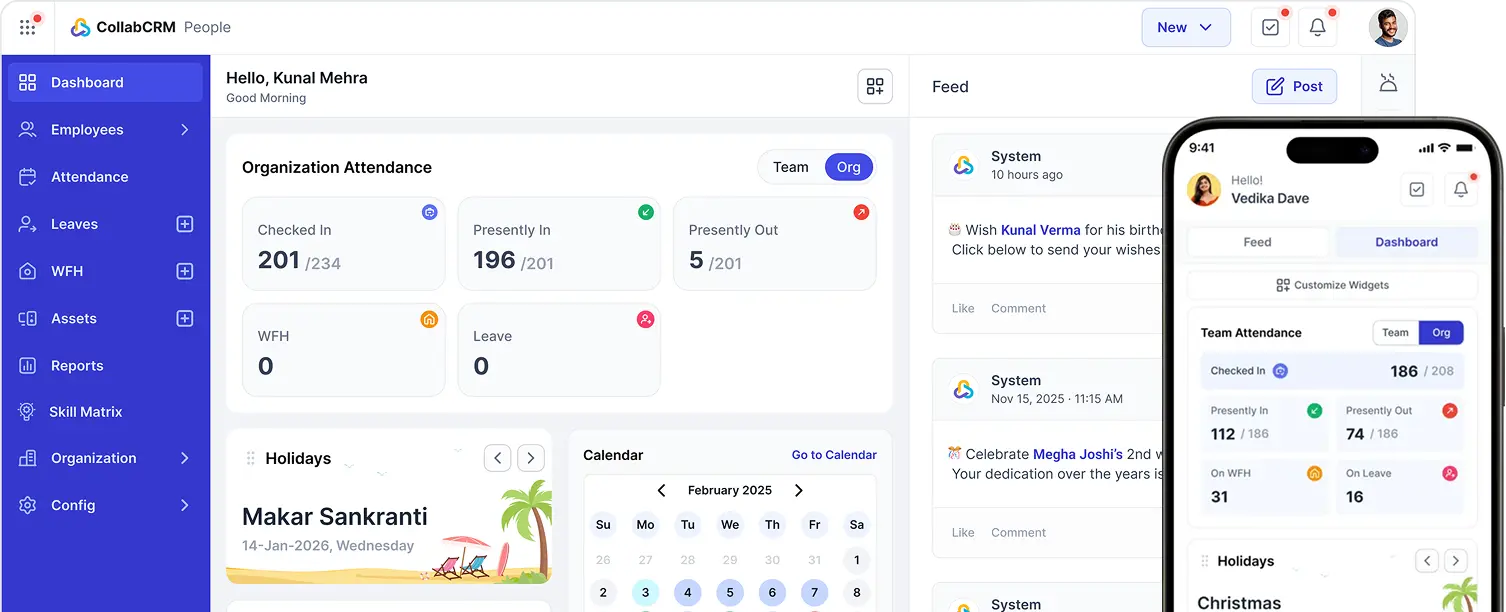
CollabCRM brings key HRMS modules together in one platform, helping IT companies manage people operations without relying on disconnected tools. Its HRMS module stack includes:
- People Management: Central employee records, skills, devices, policies, and employee lifecycle data
- Recruitment Management: Job openings, candidate pipelines, interviews, feedback, and offer workflows
- Employee Onboarding: Pre-joining tasks, documents, access coordination, and new-hire checklists
- Attendance Management: Clock-ins, work hours, late arrivals, permissions, and regularization
- Leave and WFH Management: Leave balances, approvals, calendars, and work-from-home requests
- Employee Self-Service: To-dos, attendance views, leave requests, and workforce updates
- Skills and Resource Visibility: Skill matrices, employee availability, and staffing insights
- Performance Insights: Performance-related workforce, timesheet, and project contribution visibility
- Offboarding Management: Exit workflows, asset handover, access management, and documentation
- Reporting: Real-time reports across employees, recruitment, attendance, projects, skills, and workforce performance
CollabCRM connects these HRMS software features with recruitment, projects, sales, administration, and reporting. This gives HR, delivery, and leadership teams a shared view of workforce availability, skills, employee activity, and project contribution, helping IT companies make more informed hiring and resource-planning decisions.
Final Wrap-Up
The top HRMS modules in 2026 are the ones that connect people operations to real business outcomes. For IT companies, that includes employee data, recruitment, onboarding, attendance, leave, skills, performance, offboarding, and reporting.
The right HRMS software features should not create another isolated system. They should create a connected view of your people, their skills, their availability, and their contribution to the business.
CollabCRM is a strong fit for IT companies that want more than a standard HRMS. It connects people management with hiring, project operations, sales, administration, and reporting so teams can make faster and better-informed decisions.
Frequently Asked Questions
An HRMS helps IT companies track attendance, work-from-home requests, leave, work hours, employee availability, and other workforce data. This gives managers clearer visibility into team capacity while supporting flexible work policies.
Yes. A skills management capability can help organizations create skill profiles, build skill matrices, identify gaps, and make better staffing decisions. This is particularly useful for IT companies working with specialized technical roles.
Not always. However, an integrated platform can connect HR and project data, so leaders can understand employee availability, project contribution, timesheets, skills, and performance in context. CollabCRM combines people, projects, recruitment, sales, and reporting in one system.
An HRMS recruitment module can centralize job postings, candidate details, interview scheduling, feedback, hiring workflows, and offer management. This reduces manual coordination and helps hiring teams track every candidate stage.
Onboarding helps new employees complete documents, receive access, understand policies, get assigned tasks, and become ready for work. A connected onboarding workflow also helps HR, IT, admin, and managers coordinate more effectively.
Enterprise clients should look for reports on headcount, attendance, leave, hiring pipeline, interview outcomes, onboarding status, employee skills, performance, resource availability, project contribution, and workforce trends.
CollabCRM is designed for software and IT companies that need connected workflows across people, recruitment, projects, sales, administration, and reporting. It supports employee lifecycle management, skills visibility, attendance, leave, performance-related insights, and workforce reporting in one integrated platform.


 Priority Onboarding