Running a software company means juggling more than just projects. You have to manage people, sales, hiring, and invoices too. Most teams end up stitching together five or six different apps to keep it all moving. That patchwork slows people down and hides where the real problems are.
This guide looks at 10 of the most popular workflow management software on the market in 2026. For each one, you will find the pros, the cons, and the features that matter most for day-to-day work management. No pricing comparisons here. Just a clear, honest look at what each tool does well and where it falls short, so you can pick the right fit for your team.
Quick Takeaways: 10 Workflow Management Tools at a Glance
| Tool | Best For | Standout Strength |
| CollabCRM | IT companies that want one system for projects, people, sales, and payroll | All-in-one Business Operating System, not just a task tracker |
| Monday.com | Cross-functional teams that want a highly visual workspace | Flexible boards with strong integrations |
| Wrike | Teams that need detailed reporting and granular permissions | Deep administrative controls and audit trails |
| Asana | Teams that want a clean, easy way to track tasks and timelines | Intuitive interface with multiple project views |
| ClickUp | Teams that want to customize almost every part of their workflow | Highly configurable views, docs, and goals in one workspace |
| Productive | Agencies and consultancies that bill clients by the hour | Combines project delivery with budgeting and profitability tracking |
| Trello | Small teams that want a simple, visual Kanban board | Easiest learning curve of any tool on this list |
| Jira | Software development teams running Agile sprints | Purpose-built Scrum and Kanban boards for engineering |
| Airtable | Teams that think in spreadsheets but need database power | Relational database with flexible views |
| Notion | Teams that want docs, wikis, and light task tracking together | Freeform workspace that blends notes and project tracking |
1. CollabCRM
CollabCRM is a business operating system built for IT and software companies. Instead of treating project management as a standalone problem, it connects projects to people, sales, hiring, and invoicing in one platform. This matters because in most IT companies, a delayed project, an idle resource, and an unpaid invoice are all part of the same story. CollabCRM is built to show you that story in one place.
Pros:
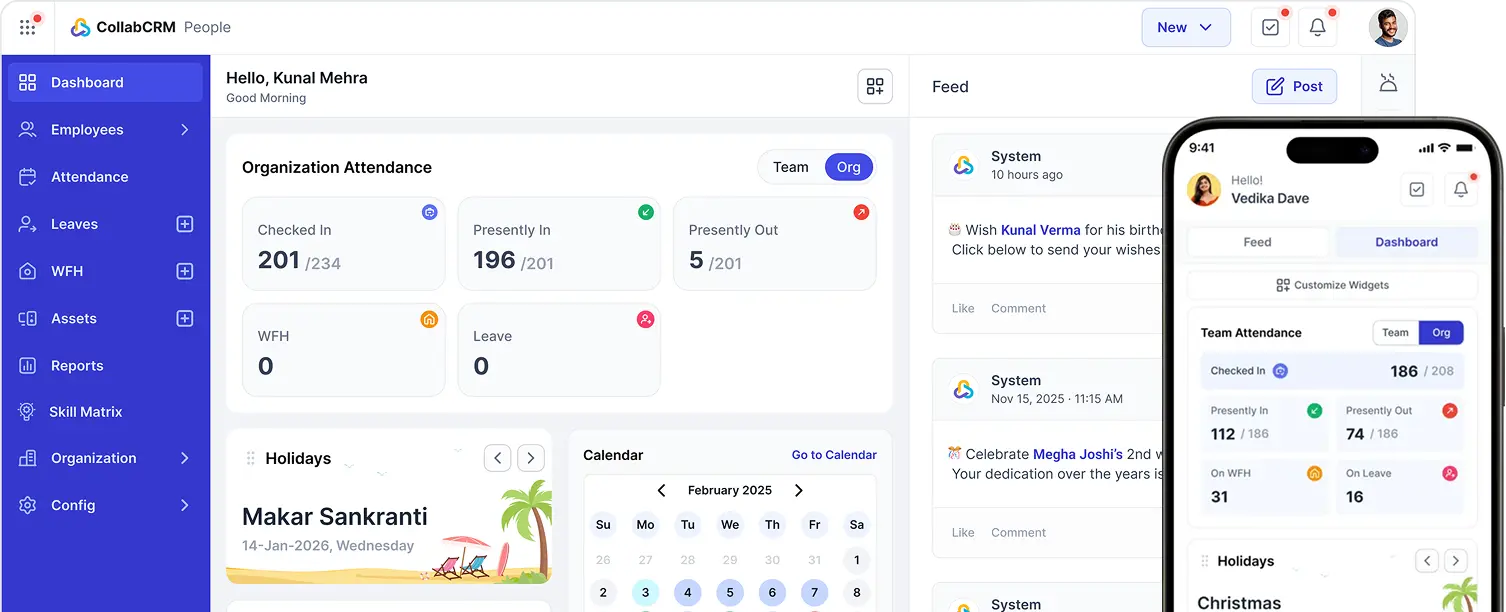
- Brings People, Project Management, CRM, Recruitment, Invoice, and Admin into a single system
- Purpose-built for how software and IT service companies actually run projects
- Resource occupancy report and availability charts help managers spot idle capacity before it becomes a revenue loss
- Recruitment module works as a full applicant tracking system, cutting time-to-hire
- Built-in revenue leak detection flags unbilled hours and stuck invoices before month-end
- Data hosted in India with encryption, data masking, and role-based access control
- CollabCRM Client Portal gives clients a clean view into project status without extra tools
- Real human support during working hours, with dedicated onboarding on every paid plan
Cons:
- Offer more capabilities than needed for teams looking only for basic task and workflow management
- Built specifically for IT and software companies, as well as for Digital & Creative Services, Consulting, Recruitment & Staffing; not the right fit for industries outside that space
- Newer to the market than some legacy workflow management tools, so its library of public reviews is still growing
Work Management Features:
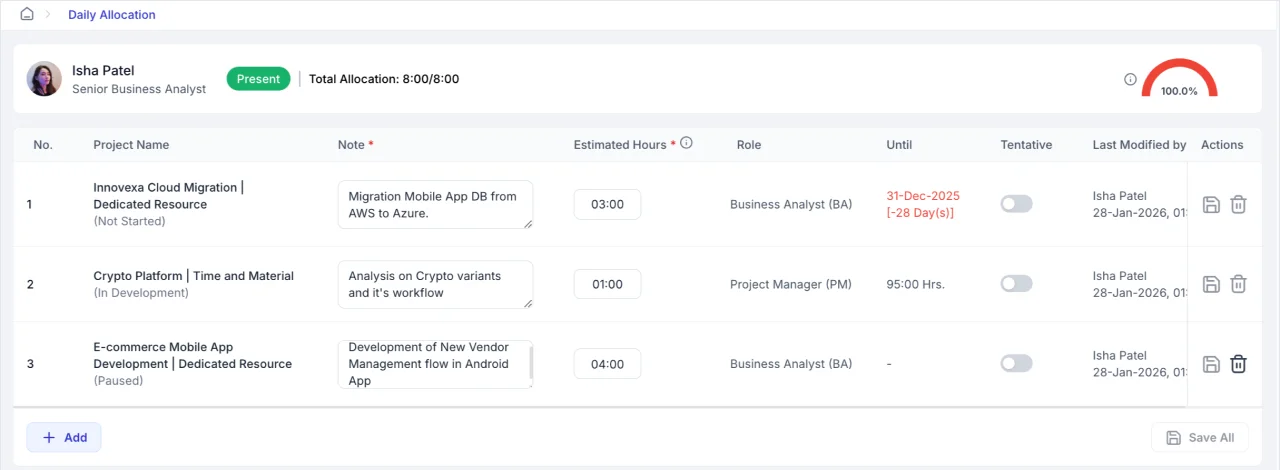
- Daily allocation boards that show who is working on what, without manual reports.
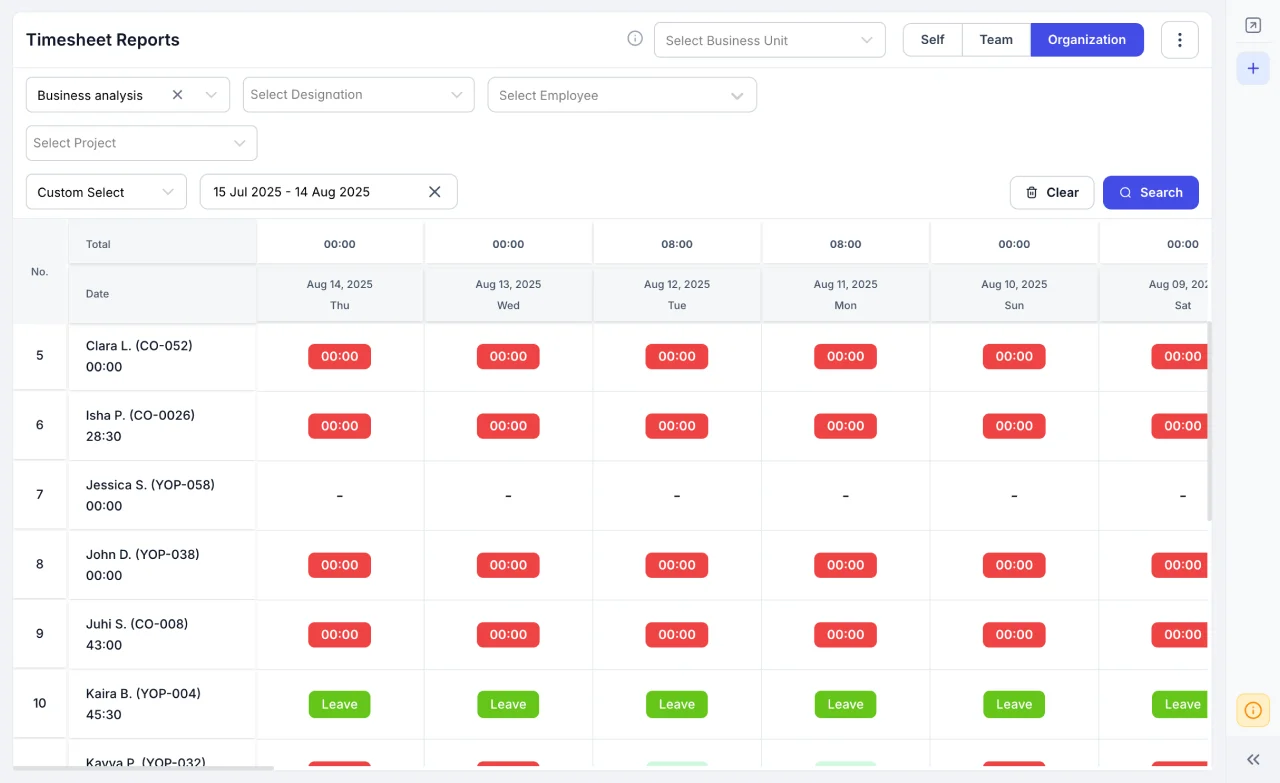
- Timesheet summaries and missing timesheet reminders to keep accountability tight
- Project health monitoring and occupancy reports for project managers and founders
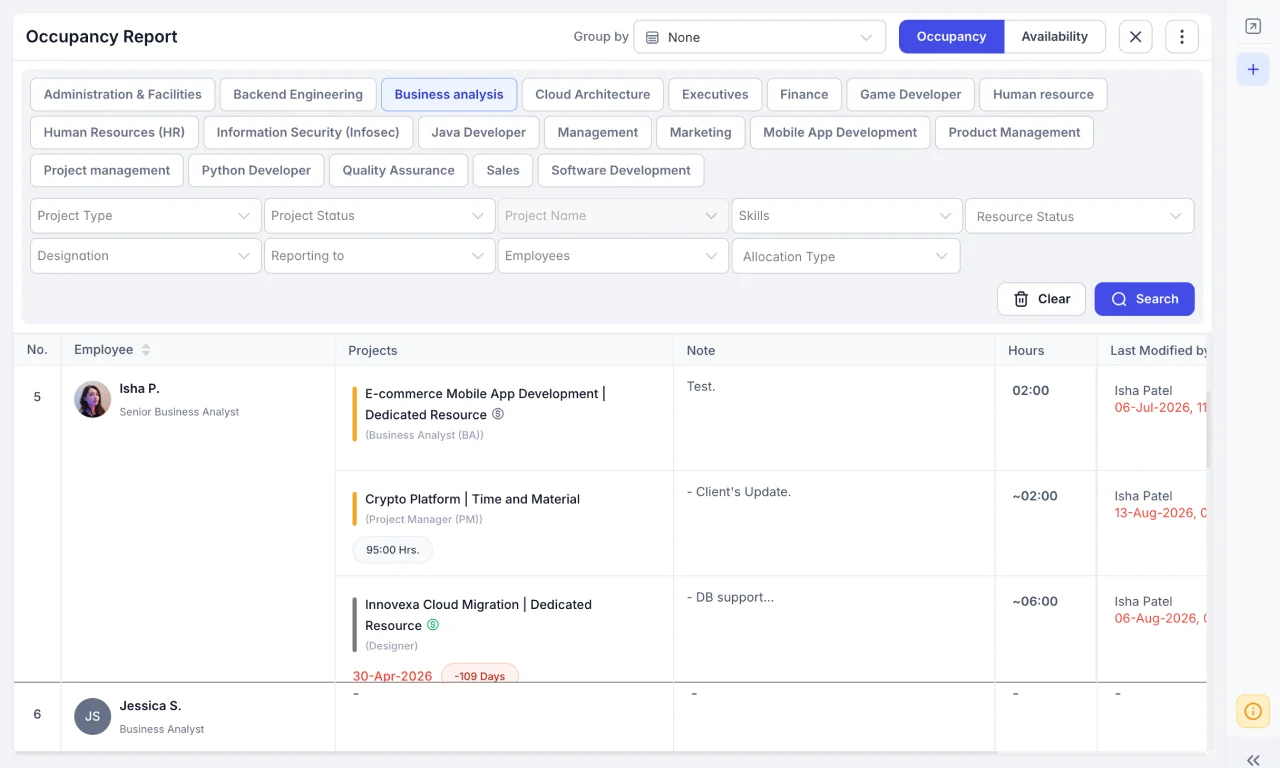
- Goal tracking and deal comparison for sales teams working alongside delivery teams
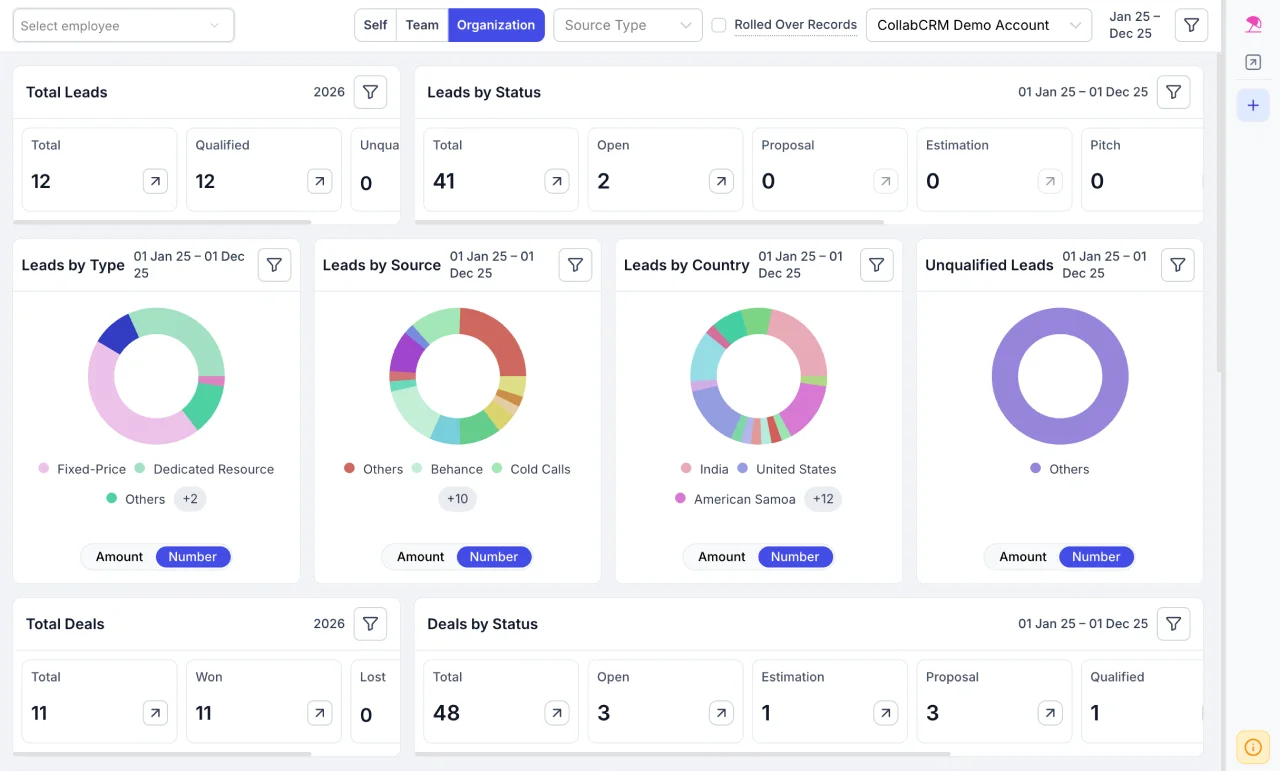
- Organization chart view to spot resourcing gaps across the whole company
What Users Say: Teams that have switched to CollabCRM often talk about getting one login and one source of truth instead of running three separate systems for HR, sales, and delivery. Founders and directors point to clearer visibility into resource utilization and revenue leaks as the biggest shift, along with the time saved by not switching between tools all day. CollabCRM has also picked up recognition from software review platforms including SoftwareSuggest, where it has been named a category leader and praised for its feature set and support.
2. Monday.com
Monday.com is one of the widely used workflow management software built around colorful, customizable boards. It is popular with marketing teams, IT departments, and project management offices that want a highly visual way to track work.
Pros:
- Very visual interface that makes it easy for teams to see progress at a glance
- Strong library of integrations with other business tools
- Simple drag-and-drop setup for boards and timelines
- Real-time collaboration, so multiple people can update the same board at once
Cons:
- Steep learning curve once you move past basic boards into more complex setups
- Gantt chart functionality is considered weaker than dedicated project management tools
- Some advanced features and automations are limited depending on your plan tier
- Can feel overwhelming for new users given the sheer number of options
Work Management Features:
- Multiple board views including timeline, calendar, and Kanban
- Workload views that show who is busy and who has spare capacity
- Managed Columns that keep status and label fields consistent across boards
- Candidate pipeline tracking, useful for lightweight recruitment tracking
What Users Say: Monday.com holds a strong 4.7 out of 5 rating on G2 across more than 15,000 reviews. Reviewers consistently point to the intuitive, visual interface and how it simplifies project tracking and team collaboration. The most common complaint is that the sheer number of options can feel like a lot to learn, especially for teams that are new to structured project management.
3. Wrike
Wrike is a project management platform known for its depth of administrative controls and reporting. It tends to attract teams managing complex, multi-department projects that need strict permissions and audit trails.
Pros:
- Strong administration and security controls, including granular permissions
- Multiple project views, including Gantt charts, boards, and lists
- Solid reporting tools with pre-built report templates
- Good fit for teams using structured Agile frameworks
Cons:
- Steep learning curve, with users reporting that complex setup takes real time
- Time tracking and scheduling features are limited on lower-tier plans
- Interface can feel dense, especially for non-technical users
- Storage limits may be tight for teams that work with large files
Work Management Features:
- Custom workflows and approval processes to standardize how work moves forward
- Real-time dashboards for spotting bottlenecks early
- Request forms to standardize how new work enters the pipeline
- Resource and workload planning tools for mid-sized and large teams
What Users Say: Wrike holds a 4.3 out of 5 rating on Capterra from around 2,400 reviews. Reviewers highlight the platform’s client management and time tracking as particularly strong, along with its audit trail for compliance-heavy work. The most repeated criticism is that onboarding takes longer than lighter tools, since the depth of the platform means more setup upfront.
4. Asana
Asana is one of the most established names in task and project management. It is known for a clean interface and flexible views that suit teams of almost any size. Let us see its consideration amongst top workflow management tools.
Pros:
- Intuitive layout that is genuinely easy to pick up, even for new users
- Multiple project views, including list, board, timeline, and calendar
- Generous free plan that covers unlimited tasks and projects
- Strong customizable templates for different types of workflows
Cons:
- No built-in time tracking, so teams need a separate tool for that
- Only one person can be assigned to a task, which can complicate team collaboration on shared work
- Advanced features like timelines and reporting sit behind higher-tier plans
- Client collaboration is limited compared to tools built for agency work
Work Management Features:
- Task dependencies and milestones to map out project sequencing
- Portfolios for tracking multiple projects at a program level
- Goals feature that links daily tasks back to company objectives
- Workload view to balance assignments across the team
What Users Say: Asana is widely reviewed on both G2 and Capterra, where users consistently call out the clean interface and flexible project views as reasons they stick with it. Founders and solopreneurs in particular mention that Asana’s free tier offers more functionality than most competitors. The most common frustration is around pricing tiers gating features like timelines and advanced reporting.
5. ClickUp
ClickUp markets itself as an all-in-one workspace for tasks, docs, and goals. It is one of the most customizable workflow management tools on this list, which is both its biggest strength and its biggest learning curve.
Pros:
- Deep customization across views, statuses, and fields
- Combines tasks, docs, and goals in a single workspace
- Generous free-forever plan with unlimited users
- Wide integration library covering most common business tools
Cons:
- Steep learning curve, with many new users reporting that onboarding takes real effort
- Interface can feel crowded and busy with so many features visible at once
- Some users report occasional performance lag on larger workspaces
- Mobile app functionality lags behind the desktop experience
Work Management Features:
- Custom statuses and fields tailored to how each team actually works
- Docs and wikis built directly into the workspace
- Multiple hierarchy levels for organizations with several departments
- Dashboards for tracking progress across projects at a glance
What Users Say: ClickUp has an overall rating built from more than 4,500 reviews on Capterra, with sentiment strongly positive. Reviewers consistently praise its flexibility and the fact that a single workspace can replace several point tools. The recurring con is that the platform’s flexibility can turn into decision paralysis for teams that want something simpler out of the box.
6. Productive
Productive is built specifically for agencies and consultancies that need to combine project delivery with financial tracking. It leans heavily into budgeting, forecasting, and profitability, alongside standard project management. Hence, it broadens the arena of workflow management tools.
Pros:
- Combines project management, time tracking, and financial reporting in one platform
- Strong forecasting tools that show project profitability in real time
- Covers the full agency workflow, from proposal through to payment
- Well-regarded customer support, according to multiple review platforms
Cons:
- Requires a minimum number of seats, so it is not built for solo users or tiny teams
- Interface requires more steps for certain actions compared to simpler tools
- Advanced financial features can feel like overkill for companies that just want basic task tracking
- No free plan for teams that want to test core features first
Work Management Features:
- Resource planning and workload management to allocate people across projects
- Time tracking tied directly to billable hours and budgets
- Task boards and lists for day-to-day project execution
- Sales pipeline tracking that connects to project delivery
What Users Say: Productive holds a 4.6 out of 5 rating on G2, with reviewers praising its ease of use for streamlining project management and budgeting together. Agency owners frequently mention that having project tracking, time logs, and financial forecasting in one place changed how they run their business. The main critique is that some workflows require more steps than competing tools, particularly around company and client data.
7. Trello
Trello is the tool most people picture when they think of a Kanban board. It is built around simple boards, lists, and cards, and it remains one of the easiest project management tools to learn.
Pros:
- Extremely easy to learn, with a flat learning curve for new users
- Clean, visual drag-and-drop interface
- Reliable mobile app that syncs well with desktop
- Real free plan with genuine functionality, not just a trial
Cons:
- No Gantt charts and very limited support for complex project planning
- Lacks native time tracking or workload management
- Advanced features require Power-Ups, which add setup complexity
- Not built for scaling into larger, more complex projects
Work Management Features:
- Kanban boards, lists, and cards for straightforward task tracking
- Checklists within cards to break down individual tasks
- Due dates with automated reminder notifications
- Power-Ups that connect Trello to tools like Slack and Google Drive
What Users Say: Trello is consistently recommended for small teams and individuals who want the simplest possible way to track work visually through workflow management tools. Reviewers across multiple platforms describe it as the easiest tool to onboard a new team onto, since the board and card structure needs almost no explanation. The most common limitation cited is that teams eventually outgrow it once projects need dependencies, detailed reporting, or resource planning.
8. Jira
Jira, built by Atlassian, is the standard workflow management tool for software development teams running Agile sprints. It is purpose-built for engineering workflows, from backlog grooming to bug tracking.
Pros:
- Purpose-built Scrum and Kanban boards for Agile teams
- Deep customization of workflows to match how engineering teams actually work
- Strong reporting, including burndown charts and velocity tracking
- Extensive library of integrations, especially within the Atlassian ecosystem
- Cons:
- Steeper learning curve than most tools on this list, especially for non-technical users
- Can feel like overkill for teams outside of software development
- Some users report bugs and occasional unresponsiveness
- Best value comes from pairing it with other Atlassian tools, which adds complexity
Work Management Features:
- Scrum and Kanban boards built specifically for sprint-based work
- Backlog management and issue linking to track dependencies
- Advanced roadmaps for visualizing work across multiple teams
- Custom workflows that mirror each team’s exact development process
What Users Say: Jira is widely reviewed by engineering and IT teams on Capterra, where reviewers describe it as highly adaptable for Agile project management, supporting Scrum, Kanban, and custom workflows. It remains one of the most trusted tools for managing engineering and QA work specifically. The most common complaint is complexity, both in initial setup and in day-to-day use for teams without a dedicated Jira administrator.
9. Airtable
Airtable blends the familiarity of a spreadsheet with the structure of a relational database. It works well for teams that need to organize data in flexible, connected ways rather than track tasks in a straight line.
Pros:
- Combines spreadsheet simplicity with real database structure
- Multiple views, including grid, Kanban, and calendar
- Strong for connecting related data across different tables
- Popular with marketing, content, and operations teams for tracking non-standard work
Cons:
- Steep learning curve for anyone unfamiliar with databases or relational data
- Can slow down as the amount of data grows
- Limited direct team collaboration features compared to dedicated project tools
- Pricing jumps noticeably once you move past the free plan
Work Management Features:
- Linked records that connect related data across multiple tables
- Custom task management with deadlines, ownership, and priority fields
- Templates to jumpstart common workflows like content calendars or inventory tracking
- Sync feature that keeps records consistent across multiple bases
What Users Say: Airtable reviewers frequently describe it as the most customizable database tool they have used, often comparing it favorably to plain spreadsheets. Marketing and operations teams in particular point to its flexibility for tracking things that do not fit neatly into a typical task list. The recurring con is a real learning curve, with several reviewers noting they felt overwhelmed by the number of ways to configure a single base.
10. Notion
Notion started as a note-taking app and has grown into a flexible workspace that blends documents, wikis, and lightweight project tracking. It suits teams that want documentation and task management to live in the same place.
Pros:
- Highly flexible, block-based system that adapts to many types of workflows
- Strong documentation and wiki capabilities, well beyond most project tools
- Generous free plan with unlimited pages for individuals
- Clean, modern interface that is genuinely pleasant to use daily
Cons:
- Project management features are less structured than dedicated tools built for execution
- Steep learning curve once you move into more advanced databases
- No offline mode, which can be a problem for teams working with unreliable internet
- Mobile app is noticeably slower than the desktop experience
Work Management Features:
- Databases that can be viewed as boards, tables, calendars, or lists
- Custom templates for recurring work like meeting notes or project trackers
- Wikis for centralizing team knowledge alongside active projects
- Linked and related databases for connecting tasks to broader documentation
What Users Say: Notion reviewers on Capterra consistently highlight its flexibility, calling out how the same tool can serve as a note-taking app, a database, and a light project tracker depending on what a team needs. Teams that lean heavily on documentation tend to prefer it over more rigid project management tools. The most common con is that its structure is looser than dedicated execution tools, so teams with strict workflows sometimes find themselves fighting the flexibility rather than benefiting from it.
Why CollabCRM Goes Beyond Workflow Management
Every tool above does one job well: helping a team track tasks and projects. CollabCRM was built to solve a bigger problem. In an IT company, projects do not exist in a vacuum. They depend on who is available, what a client owes, and who you are about to hire.
CollabCRM brings four things together that most teams manage separately:
- Project and Resource Management: Track tasks, timesheets, resource allocation, and project health in one place.
- HRMS (People Management): Manage attendance, leave, employee records, and the full employee lifecycle without a separate HR system.
- CRM (Sales and Client Management): Track leads, deals, and follow-ups, and give clients their own portal to see project status.
- Payroll and Invoicing: Monitor invoice status, catch unbilled hours, and connect financial visibility directly to project delivery.
This is why CollabCRM calls itself a Business Operating System rather than merely workflow management software. Instead of exporting timesheets into payroll, or manually checking who is free before staffing a new project, everything lives in one connected system. For founders, project managers, HR leaders, and operations leaders, that means fewer logins, fewer spreadsheets, and a single, accurate picture of how the business is actually running.
Wrapping Up
There is no single best workflow management tool for every team. Trello and Asana are great starting points if you want something simple. Jira and Wrike suit teams with more complex, technical workflows. ClickUp and Notion reward teams willing to invest time in customization. Productive fits agencies that live and die by billable hours.
But if you are running an IT or software company and you are tired of stitching together a project tool, an HR system, a CRM, and an invoicing app, that is exactly the gap CollabCRM was built to close.
One login. One team. One platform where IT companies finally work on one source of truth. CollabCRM is one system that grows with your business in 2026 instead of adding another tab to your browser.
FAQs
Workflow management software helps teams plan, assign, track, and complete work in an organized way. It typically includes task boards, timelines, reporting, and collaboration tools that replace scattered spreadsheets and email threads.
Project management software usually focuses on planning and tracking individual projects. Workflow management software often takes a broader view, covering recurring processes and, in some cases, connecting work to people, sales, and finance, the way CollabCRM does.
Trello and Asana both offer a low learning curve and strong free plans, which makes them popular starting points for small teams. As teams grow and need more than task tracking, an all-in-one platform like CollabCRM can reduce the number of tools required.
Jira is the most widely used tool for Agile software development, thanks to its Scrum and Kanban boards built for engineering work. CollabCRM complements this by connecting delivery work to resourcing, sales, and invoicing for the whole company, not just the engineering team.
Yes, for most use cases. Tools like Airtable and Notion are often used specifically to replace spreadsheets, while platforms like CollabCRM are built to replace not just spreadsheets but disconnected point tools such as separate HR, CRM, and invoicing software.
Not necessarily. Many companies run three or more separate tools for these functions, which creates data silos and extra manual work. CollabCRM was built specifically so IT companies can manage people, projects, sales, and invoicing without switching between systems.
Productive is built specifically for agencies that need to track billable hours and profitability alongside project delivery. CollabCRM’s Client Portal also gives clients direct visibility into project status without needing a separate tool.
This varies widely by tool. Simple tools like Trello can be set up in minutes, while platforms like Wrike, Jira, or ClickUp often take longer due to their depth of features. CollabCRM includes dedicated onboarding support and data migration assistance to help teams get started faster.
Most established platforms offer standard protections like encryption and role-based access. CollabCRM specifically follows GDPR-aligned practices, including data masking and role-based access control, with data hosted in India for teams that need regional compliance.
Start with what you are actually trying to solve. If you only need simple task tracking, a lighter tool may be enough. If you are an IT company managing projects, people, sales, and invoicing across multiple tools, a connected platform like CollabCRM is built to bring that all under one roof.






 Priority Onboarding