
Hours get logged every day, but that alone rarely tells a manager what is happening across the team. Someone might be buried in one project while another sits idle, and without clear visibility, that pattern stays invisible until deadlines start slipping.
This is exactly the gap the best time tracking software for managers is built to close, connecting logged hours to real project progress, workload, and billing accuracy.
Many teams already rely on project management software to plan and assign work, and the strongest time tracking tools now build directly into that same workflow instead of sitting apart from it.
This guide walks through 15 options built for exactly that need, followed by a simple breakdown of what to look for and how to choose the right fit for your team.
Key Takeaways:
- Time tracking software works best when it gives managers clear, ongoing visibility into hours, workload, and progress, not just a record of time logged after the fact.
- The right tool depends on your team type, whether that is remote, agency, enterprise, or a small budget conscious team.
- Simple tools like Clockify and My Hours suit teams that just need quick, reliable hour logging.
- Jibble and Hubstaff are strongest for attendance verification and remote or field team accountability.
- Monday.com, Wrike, ProofHub, and CollabCRM keep time tracking tied directly to project delivery and task progress.
- Bill4Time, TimeCamp, and My Hours support accurate billable hours tracking for agencies and consultants.
- Deltek Replicon, Kantata, Scoro, and Rocketlane fit larger teams needing utilization, compliance, and financial reporting at scale.
- Start with a small pilot before rolling out any tool fully, since early feedback prevents costly switching later.
- CollabCRM stands out for IT teams by tying time data directly to projects, staffing, and billing in one connected system.
Why Time Tracking Visibility Matters for Managers
Employees login hours of work but that alone tells very little about productivity. The data should explain the managers how work is moving, where capacity is being spent, and where delivery is quietly slipping behind schedule.
As teams grow more distributed and projects overlap across clients and departments, estimation becomes an expensive habit. Real-time tracking visibility turns scattered entries into a clear picture managers can act on immediately, not weeks later during a review.
- Spot Bottlenecks Early: See which tasks or projects are consuming more time than planned before deadlines slip.
- Improve Resourcing Decisions: Understand true workload across the team instead of relying on assumptions.
- Protect Margins and Billing Accuracy: Connect logged hours directly to budgets, client billing, and project costs.
- Support Team Productivity Visibility: Give managers a clear, ongoing view of how effort translates into progress across the whole team.
- Reduce Reactive Management: Avoid reports that only show what already happened. With the right report management software, get data in real-time, so decisions can be made while there is still time to act.
Best Time Tracking Software at a Glance
Before going into detail, here is a quick overview of all 15 tools. This summary is also useful for teams evaluating software for PMO for time management across several projects at once.
1. Project Integrated Time Tracking
These are best for managers who want time logged directly against tasks and projects, not tracked in a separate tool.
| Tool | Best For | Reporting Depth | Resource Utilization & Productivity Tracking |
| CollabCRM | IT companies wanting timesheets tied directly to projects, billing, and staffing | Occupancy reports, availability charts, and timesheet summaries in one dashboard | Yes, daily allocation and resource availability metrics show who is free and who is overbooked in real-time |
| Monday.com | Teams wanting time tied to visual project boards | Portfolio level dashboards across projects | Moderate, workload views show team capacity |
| Wrike | Teams tracking time within existing task workflows | Customizable reports across timelines and workloads | Moderate, workload charts show resource allocation |
| ProofHub | Teams needing timesheets tied to budgets and estimates | Project and budget focused reports | Limited, no dedicated utilization forecasting |
2. Simple, Lightweight Time Tracking
Teams that just need to log hours quickly, without extra project or billing complexity, tend to gravitate here.
| Tool | Best For | Reporting Depth | Resource Utilization & Productivity Tracking |
| Clockify | Freelancers and small teams logging hours simply | Basic time and project reports | Limited, shows hours worked but no utilization forecasting |
| T-Metrics | Budget conscious teams needing straightforward logging | Basic timesheet reports for payroll | Minimal, focused on hours rather than capacity |
| My Hours | Small teams managing project-based billing | Moderate, budget and time reports per project | Limited, tracks time against budgets, not team capacity |
3. Attendance & Location Verified Time Tracking
This category fits managers who need proof of when and where someone clocked in, not just how many hours they logged.
| Tool | Best For | Reporting Depth | Resource Utilization & Productivity Tracking |
| Jibble | Teams needing verified attendance across shifts | Detailed attendance and productivity dashboards | Yes, includes productivity insights tied to project efficiency |
| Hubstaff | Remote and field teams needing location tracking | Over 20 report types covering time and activity | Yes, includes productivity metrics based on activity levels |
4. Billable Hours & Client Invoicing
Agencies and consultants who need tracked time to be added to client invoices sit in this user group.
| Tool | Best For | Reporting Depth | Resource Utilization & Productivity Tracking |
| Bill4Time | Legal and professional service firms billing by hour | Detailed billing and trust accounting reports | Limited, focused on billing rather than capacity planning |
| TimeCamp | Teams tracking project costs and profitability | Customizable budget and labour cost reports | Moderate, highlights resource allocation and inefficiencies |
| My Hours | Small teams managing project-based billing | Moderate, budget and time reports per project | Limited, tracks time against budgets, not team capacity |
5. Enterprise PSA Time Tracking
Larger delivery teams that need time data tied to utilization, compliance, and financial reporting can use these tools.
| Tool | Best For | Reporting Depth | Resource Utilization & Productivity Tracking |
| Deltek Replicon | Enterprises needing compliance heavy timesheets | Advanced, audit ready compliance reports | Yes, strong utilization and workforce reporting |
| Kantata | Agencies managing resourcing across a large portfolio | Advanced, portfolio level utilization reports | Yes, built around resource forecasting |
| Scoro | Businesses linking time directly to margin and revenue | Advanced, financial and resourcing reports combined | Yes, ties utilization directly to profitability |
| Rocketlane | Professional services teams needing accurate utilization | Advanced, real-time utilization and billing reports | Yes, AI assisted anomaly detection on utilization data |
15 Best Time Tracking Software Options for Managers
Managing employee hours manually can lead to inaccurate tracking, missed deadlines, and reduced visibility into team productivity.
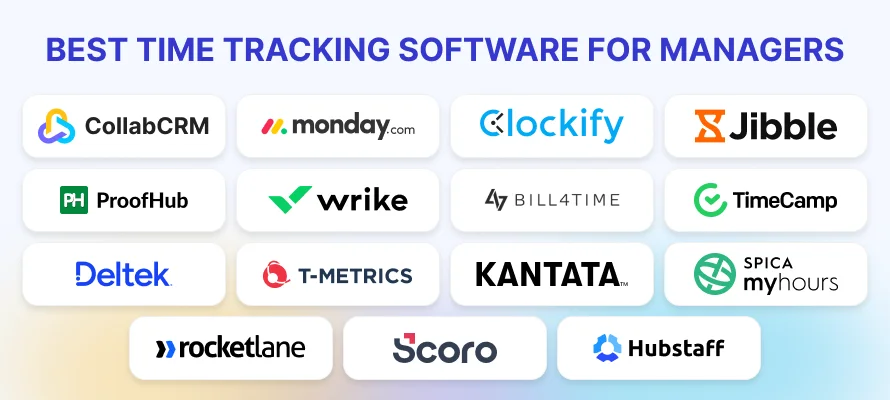
Here are 15 of the best time tracking software options to help managers monitor work hours, project progress, and resource utilization more effectively.
1. CollabCRM
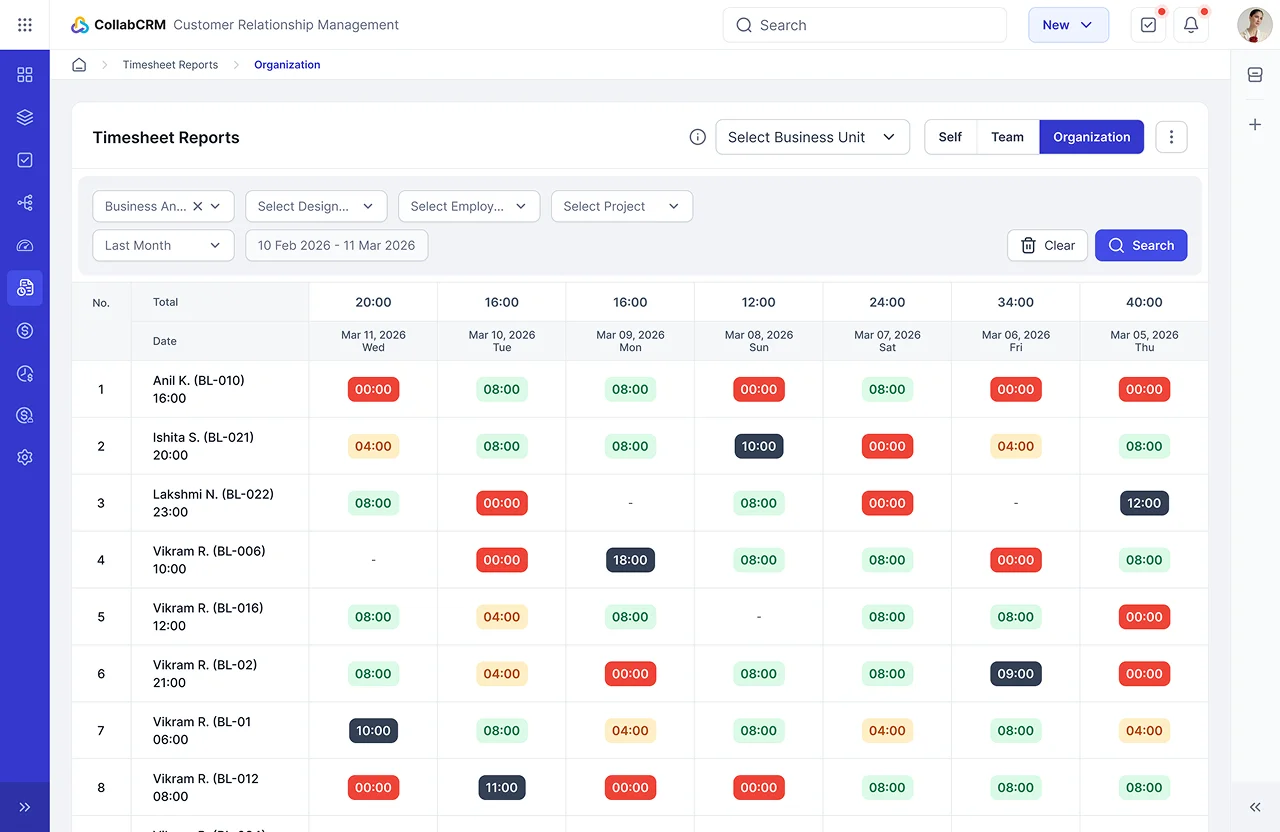
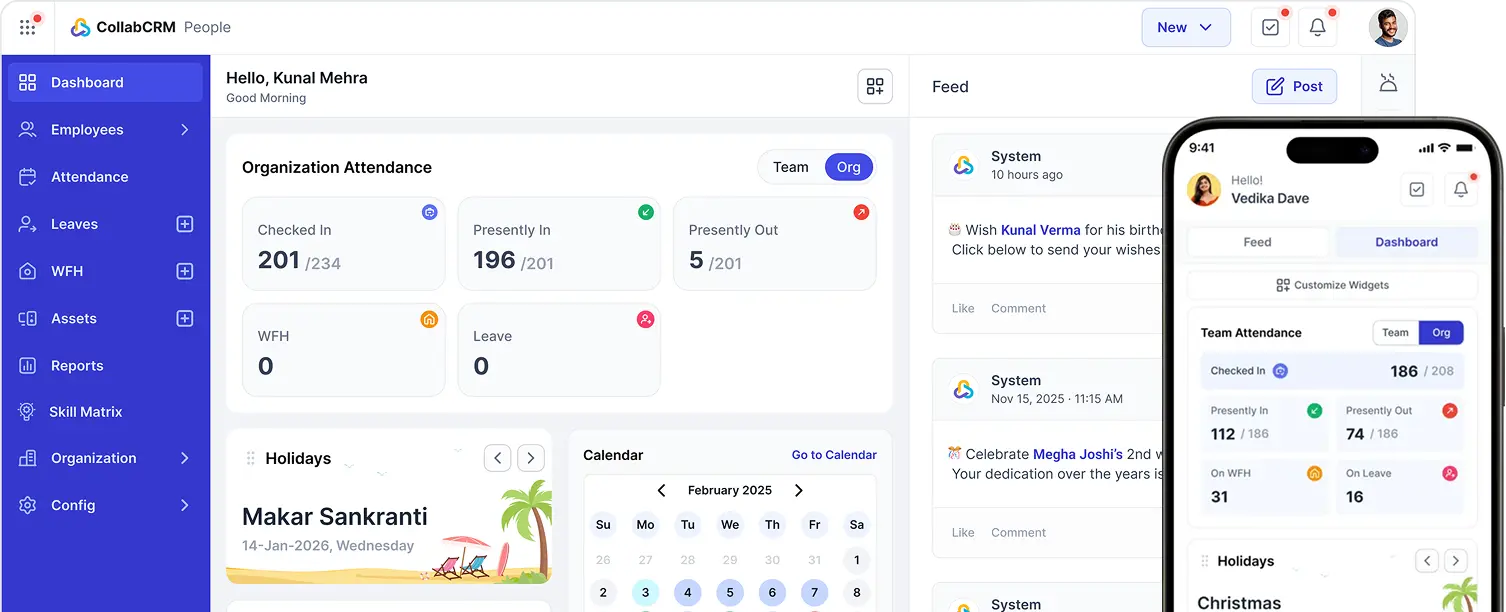
CollabCRM acts as a time tracking software for teams by helping them record work hours, monitor project effort, and improve productivity from one place.
Team members can log time against tasks, while managers can review timesheets, compare planned and actual effort, and track billable hours. This helps businesses improve IT operations and frees up time that would otherwise be spent collecting updates or managing spreadsheets.
With time tracking connected to projects, resources, and billing, teams gain better visibility into workloads and project progress.
Features of CollabCRM
- Login work hours and submit and manage employee timesheets for accurate work hour tracking.
- Record task-wise work logs with hours spent and work descriptions.
- Compare spent hours vs. billable hours to support accurate client billing.
- Monitor resource utilization and project logs to improve workload planning and profitability.
2. Monday.com
Monday.com offers native time tracking through a time tracking column, available only on Pro and Enterprise plans.
It enables the managers and team members can click a play or stop timer directly on any task or add time manually if needed. All logged hours roll up into dashboard widgets, and the data can be exported to Excel for further review.
Time tracking lives on the same work items being planned, assigned, and delivered, so effort and progress stay connected. This matters to managers who need to juggle several projects at once, since it becomes easier to spot which projects are pulling more resources than expected and where workload pressure is building before it turns into a delay.
Features of Monday.com
- Log time with a simple timer or manual entry, right on the task being worked on, so no hours get lost between tools.
- Build live, shareable dashboards that pull timelines, workloads, and progress together into one clear view for the whole team.
- Use the workload view to see who is stretched thin and shift priorities before deadlines are put at risk.
- Export time data to Excel whenever a deeper breakdown or a report for stakeholders is needed.
3. Clockify
Clockify is a time tracker and timesheet app built to track work hours across projects, teams, and clients. Its free plan supports unlimited users, making it a common starting point for small teams and freelancers who want simple, reliable time logging without a budget hit.
For managers, it allows easy view of where time goes. Hours can be grouped by project or team member, so it becomes simple to spot which tasks are taking longer than expected or which projects are quietly running over.
Weekly and detailed reports give a clear read on how the team is spending its time, without needing to chase down individual timesheets or piece together updates manually.
It positions itself less as a single purpose tracker and more as a budget friendly hub for the time and cost data a growing team needs to stay on track.
Features of Clockify
- Track time with a timer or manual entry, then organize it clearly by project, task, or client.
- See team activity and hours logged across the week in one simple, shared view.
- Turn tracked hours into invoices directly, cutting out manual billing work.
- Review profitability by comparing tracked time and costs against project budgets.
4. Jibble
Jibble is built for businesses, remote teams, field workers, and freelancers. Instead of relying on manual timesheets, it focuses on proving when and where someone clocked in, which makes it a strong fit for field service teams, construction crews, and hourly workforces where accountability matters most.
The platform leans heavily on location-based tracking and identity verification, using AI powered facial recognition and GPS geofencing to confirm that the right person clocked in at the right place.
For managers, this removes the guesswork around attendance and prevents common issues like buddy punching, so time records stay reliable even across teams that never sit in the same office.
Features of Jibble
- Assign time entries to specific clients, projects, or activities to get clear, granular productivity data.
- Keep timers, screenshots, and entry logs working offline, with everything syncing automatically once back online.
- Use facial recognition and GPS geofencing to confirm real clock-ins and stop time theft before it starts.
- Track time directly inside Slack or Microsoft Teams, so logging hours never breaks the flow of work.
5. ProofHub
Just like CollabCRM, ProofHub is a project management tool with time tracking feature built in to help teams and managers who want clear visibility into ongoing work. It offers customizable timesheets that support customer invoicing, employee payroll, and project or budget estimation, all from one place.
Because timesheets can be found inside the same tool, teams tend to log hours more consistently, with far less context switching between apps.
Managers benefit from this setup too, since active timers and daily hour totals make it easy to spot who is stretched thin and who has room for more work. Every logged hour ties back to a specific task, so it becomes simple to see exactly which parts of a project consumed the most time.
Features if ProofHub
- Start or pause timers directly from a task card or add hours manually after the work is done.
- Compare estimated time against actual hours logged to make future project planning more accurate.
- View all timesheets in one place, filterable by project, person, or date.
- Mark hours as billable or non-billable and export clean reports for invoicing and record keeping.
6. Wrike
Wrike is a project and workflow management tool which includes time tracking as its part of its system. Teams organize work into tasks, folders, and project timelines, and time is logged directly on the same tasks being planned and managed, which keeps effort and progress connected throughout the project.
Wrike gives managers a clearer view across complex projects with multiple moving parts. Gantt charts and drag and drop scheduling make timelines easy to follow, while workload dashboards show team capacity in a brief.
That combination helps managers spot overallocation early, adjust assignments before deadlines slip, and keep a real-time read on how work is progressing across departments.
Features of Wrike:
- Log hours directly on tasks and projects to track effort alongside daily progress.
- View team capacity and workload dashboards to prevent overallocation and scheduling conflicts.
- Use Gantt charts and drag and drop scheduling to manage project timelines with less manual work.
- Automate task assignments, approvals, and status updates to keep coordination running smoothly.
7. Bill4Time
Bill4Time is a specialized time tracking tool built for professionals and agencies in the legal industry. It combines time tracking, billing, invoicing, and case and task management in one place, helping lawyers and legal teams run their practice without juggling separate tools for hours and billing.
The platform is built specifically around how legal professionals work, with features like trust accounting and conflict checkers available on its Pro plans. This focus makes it a strong fit for solo practitioners and independent firms that need to track billable and non-billable hours accurately while keeping cases and projects organized.
Features of Bill4Time
- Track billable and non-billable hours directly against specific cases and clients.
- Log expenses alongside time, so nothing gets missed when invoices go out.
- Turn tracked hours into invoices without re-entering data in a separate billing tool.
- Keep cases and tasks organized alongside time records for a clear, complete case history.
8. TimeCamp
TimeCamp is an all-in-one, cloud-based time tracking and productivity management tool built around automated background tracking rather than manual timers.
Instead of asking employees to start and stop a clock, it quietly tracks application usage, website visits, and document activity in the background, then sorts that activity into projects automatically.
This approach gives managers a more honest picture of where time goes, since it does not depend on someone remembering to log hours. Detailed timesheets and productivity reports break down time by project, application, and individual, making it easier to spot where focus is strong and where work is getting fragmented across too many tools.
For teams juggling several projects, this level of automatic detail removes a lot of the manual reporting that usually falls on managers.
Features of TimeCamp
- Track time automatically in the background, without relying on manual timers.
- Categorize time by application, website, and document activity with no extra effort from the team.
- Generate detailed timesheets that break work down clearly by project and person.
- Review productivity reports to see time distribution and spot patterns across the team.
9. Deltek Replicon
Deltek Replicon is an AI-powered platform for business that are project based. It unifies project time tracking, workforce management, and global leave management.
Employees log billable and non-billable hours across projects, tasks, and clients, and the platform consolidates all of this into structured timesheets ready for approval and reporting.
What sets it apart is how seriously it treats compliance. Multi-level approval workflows make sure every timesheet follows organizational policy; with a full audit trail managers can rely on during reviews or audits. This makes it a strong fit for organizations where accurate time records directly affect billing, payroll, and regulatory reporting.
Features of Deltek Replicon
- Capture billable and non-billable hours across projects, tasks, and clients in structured digital timesheets.
- Route timesheets through multi-level approval workflows with a complete audit trail for compliance.
- Track expenses and project costs alongside time for accurate financial reporting
- Integrate tracked time directly with payroll systems to reduce manual reconciliation work.
10. T-Metrics
TMetric is a cloud-based time tracking and productivity tool built for freelancers, agencies, and client facing teams. It sits between simple hour logging and the core business tasks that depend on it, connecting daily time entries directly to client billing, project budgets, and employee payroll.
For managers, this means time tracking is not just about knowing how many hours were worked. It becomes a way to keep budgets on track and billing accurate, since every logged hour can be tied back to a specific client or project.
Reports break down time clearly enough to catch scope creep early and to confirm that billed hours match the work done, which matters most for teams that bill clients by the hour.
Features of T-Metrics
- Track time with a simple timer or manual entry, tied to specific clients and projects.
- Set billable rates and turn tracked hours directly into client invoices.
- Compare tracked time against project budgets to catch overruns before they grow.
- Sync with tools like Asana, Trello, and Jira to keep time logged where work already happens.
11. Kantata
Kantata is a professional services automation platform built to manage project delivery, resource planning, and financial performance in one system. It connects project management, time tracking, staffing, and financial forecasting, giving services focused organizations a single view of delivery operations and project profitability.
Consultants log billable and non-billable hours across projects and tasks, and these timesheets feed directly into project budgets, billing workflows, and utilization reporting.
This connection between time and financials is what sets Kantata apart, since managers are not just seeing hours logged, they are seeing exactly how those hours affect revenue and staffing decisions.
Features of Kantata
- Record billable and non-billable hours that flow straight into budgets and billing workflows.
- View capacity dashboards to allocate consultants based on availability and required skills.
- Connect time tracking directly to project financials and revenue recognition.
- Monitor real-time client and team sentiment through Kantata Pulse alongside delivery progress.
12. My Hours
My Hours is a cloud-based project time tracking and timesheet tool built mainly for freelancers, consultants, and small to medium teams. The platform keeps its focus narrow and clear, making it simple to log, review, and bill hours without unnecessary complexity.
Team members can track time with a live stopwatch timer or log hours after the fact using a quick, keyboard friendly weekly timesheet, whichever fits the way they work. What stands out for managers is the billing side.
Hourly rates can be set per person, per project, or per task, and the platform automatically calculates total costs and profit margins from tracked time. This turns simple hour logs into a clear read on whether a project is staying profitable.
Features of My Hours
- Switch between a live stopwatch timer and a fast, weekly timesheet, so logging hours fits how each person prefers to work.
- Break down tracked time by team member, project, or task, making it easy to see exactly where hours are going across multiple projects at once.
- Let the platform automatically calculate total project costs and profit margins the moment hours are logged, with no manual math needed.
- Pull clean, client ready reports straight from tracked time data, cutting out the extra step of formatting hours before sending them out.
13. Rocketlane
Rocketlane is an agentic professional services automation platform with time tracking built in, designed for enterprise onboarding, implementation, and consulting teams.
At the centre of its time tracking is Nitro Time Guardian, an AI agent that checks time entries automatically as they are logged, flagging allocation overruns, missing task codes, and weekend logs before they reach a manager’s approval queue.
This automatic validation cuts down manual review significantly, since managers are no longer chasing down every questionable entry themselves. Rocketlane also connects project delivery, time entries, and billing in one system, so there is no need to reconcile data between separate project and finance tools.
Features of Rocketlane
- Let Nitro Time Guardian catch overruns, missing task codes, and unusual entries automatically, before they ever reach a manager’s approval queue.
- Track time inside the same platform used for delivery and billing, removing the need to reconcile separate project and finance tools.
- Separate billable from non-billable hours clearly, keeping client billing accurate and easy to explain.
- Share tracked time directly with clients through a Time Tracking Widget in the Customer Portal, building trust through full transparency.
14. Scoro
Scoro is a comprehensive work management and professional services automation platform with time tracking built in, alongside real-time staff utilization monitoring and automated time billing. Teams can log work using a live stopwatch timer, weekly grid timesheets, or manual entries linked directly to specific project tasks, whichever fits how they work best.
The weekly timesheet grid is a standout feature for managers, showing the whole week as a colour coded matrix where yellow means scheduled, blue means completed, and red flags overtime. This makes it easy to spot problems briefly instead of digging through individual entries.
Billable and non-billable hours are separated automatically, keeping client invoicing accurate, and automated reminders make sure no timesheet slips through unsubmitted, so managers always have a complete picture of the team’s time.
Features of Scoro
- Start, pause, and stop a live timer directly from the task view or a quick action menu.
- Read the week briefly through a colour coded grid showing scheduled work, completed work, and overtime.
- Separate billable from non-billable hours automatically for accurate client invoicing and performance tracking.
- Send automated reminders to team members who have not yet submitted their timesheets.
15. Hubstaff
Remote work demands a different level of visibility, and Hubstaff is built directly around that need. It pairs detailed activity monitoring with payroll automation, creating a system that works well for organizations that need strict accountability and clear compliance documentation, especially across distributed teams.
Hubstaff has focused on transparency, giving managers and team members real control over how tracking works rather than forcing a one size fits all approach.
Optional screenshots and activity monitoring show what work looked like during tracked hours, while GPS and geofencing support field teams that move between job sites throughout the day. This combination gives managers confidence that logged hours reflect real work, without needing to follow up constantly to confirm it.
Features of Hubstaff
- Track time with optional screenshots and activity levels, giving a clear view of work happening during tracked hours.
- Use GPS and geofencing to confirm accurate clock-ins for field teams working across different locations.
- Automate payroll directly from tracked time, cutting down manual calculation and reconciliation work.
- Let team members control their own tracking settings, keeping monitoring transparent rather than intrusive.
What to Look for in Time Tracking Software for Managers?
Choosing the best time tracking software for managers comes down to more than just logging hours.
The right tool should give managers a clear, ongoing view of how work is progressing, not just a record of what happened after the fact. Here are the five features that matter most.
1. Real-time Dashboards and Reporting
A good reporting software should help managers to see time data as it happens, not days later. Live dashboards turn scattered time entries into a clear picture of project progress, so problems can be caught early instead of during a review that comes too late to act on.
2. Integration with Your Project Management or CRM Stack
Time tracking works best when it lives alongside the tools already in use. Strong integrations mean hours logged on a task or client record stay connected to the actual work, avoiding duplicate entries and reducing manual reconciliation.
3. Resource and Capacity Views for Workload Balance
Good resource allocation software shows who is overbooked and who has room for more work. This visibility helps managers balance workloads before burnout or missed deadlines become a problem.
4. Security and Compliance
Time and billing data is sensitive. The tool of your choice should offer encryption, role-based access, and compliance support such as GDPR, especially for teams handling client billing or regulated work.
5. Scalability from Small Teams to Enterprise Portfolios
A tool that works for five people should still hold up at fifty or five hundred. Reliable billable hours tracking and reporting should scale smoothly as the team and its projects grow.
How to Choose the Right Time Tracking Tool for Your Team: 5 Tips
With so many options available, picking the right employee timesheet software can feel overwhelming. The good news is that the decision gets much easier once you match the tool to how your team works, not just its feature list.
1. Start With your Team Type, Not the Feature List
Before comparing dashboards or pricing, think about who will be using the tool every day. A remote team spread across time zones has very different needs from an in-office team or a group of field workers moving between job sites. Matching the tool to your team type first makes every other decision easier.
2. Match Tracking Style to How Work Actually Gets Done
Some teams need a simple timer on tasks, while others need location verified clock-ins or automatic background tracking. Forcing the wrong tracking method onto a team usually leads to inconsistent logging, which defeats the purpose of tracking in the first place.
3. Prioritize Billing Accuracy if You Invoice Clients
If your team bills hours to clients, look closely at how the tool separates billable from non-billable time and how easily that data flows into invoices. This single feature often matters more than flashy dashboards for agencies and consultants.
4. Check How Well It Fits your Existing Tools
The best time tracking software for managers rarely works in isolation. Look for tools that connect cleanly with your project management, CRM, or payroll systems, so time data does not become one more thing to manually reconcile every week.
5. Test it With a Small Group Before Rolling It Out Fully
Run a short pilot with a small group before committing the whole team. This surfaces friction points early, whether that is confusing timesheets or missing integrations, and gives you real feedback instead of guessing what will work at scale.
How Can CollabCRM Help IT Teams With Time Tracking Visibility?
Every tool covered in this blog offers solid time tracking on its own. What sets CollabCRM apart is how closely that tracking is tied to the way IT teams deliver work.
Built specifically for software companies, it connects time data directly to projects, staffing, resource utilization, and billing, giving managers far more context than a standalone timesheet.
Employees can log work hours, submit timesheets, and record task-wise work logs, while managers compare spent and billable hours, monitor workloads, and review project effort from a single platform.
Here is why this fits IT teams specifically:
- Reflects how IT delivery cycles run, not a generic workflow
- Ties timesheets directly to project health and staffing decisions
- Flags overbooked or idle resources across development teams instantly
- Connects billable hours to client invoices without manual reconciliation
- Supports remote and hybrid dev teams with real-time visibility
- Built around the resourcing and delivery patterns unique to software companies
FAQs
Yes, time tracking is good for employees. It helps to understand how they spend their work hours, improve accountability, highlights productivity trends, and ensures accurate billing or payroll.
Employee time tracking gives managers clear visibility into how work gets done, not just how many hours are logged. It helps spot workload imbalances early, keeps project budgets on track, and ensures billing stays accurate, turning scattered hours into data managers can act on.
Use time tracking software with timers, manual entries, or automatic tracking, depending on your team’s needs. Look for tools offering dashboards, workload views, and reports, so logged hours turn into clear visibility rather than just raw numbers.




 Priority Onboarding