
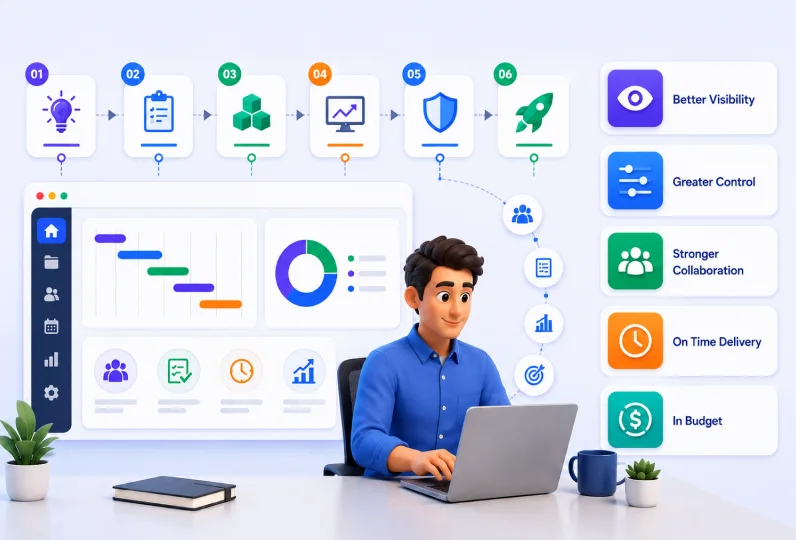
Most projects fail because the execution was not planned well enough.
A strong project implementation plan is what separates teams that deliver on time from those that are constantly firefighting delays, scope changes, and budget overruns. An implementation plan gives every team member a clear picture of what needs to be done, who is responsible, and what success looks like at every stage of the project.
Pair that with a project management tool, and your team gains the visibility needed to catch problems early, make faster decisions, and keep stakeholders informed without chasing updates manually.
But having a plan is only half the work. The other half is execution, and that is where most teams struggle. Disconnected tools, missed updates, and poor visibility turn even well-planned projects into stressful deliveries.
This guide covers everything you need to know about project implementation, including the key steps, plan components, real-world examples across four industries, and how using CRM in project management can bring your entire delivery process into one connected platform.
Key Takeaways:
- Project implementation is the phase where plans turn into action and results are delivered.
- A project implementation plan covers few core components, from objectives and scope to hypercare and handover.
- A step-by-step implementation process helps teams stay on schedule, within budget, and aligned with client expectations.
- Real-world examples across industries show how the same framework applies to IT, eCommerce, healthtech, and digital twin projects.
- AI and automation tools are changing how teams plan, track, and report during implementation.
- A post-implementation review is the final step that separates one-time delivery from a repeatable, improving process.
What is a Project Implementation Plan?
A project implementation plan is a structured action plan that provides steps, timelines, and resources required to complete a project right from ideation to delivery.
It differs from a simple project plan as it focuses on aligning project goals, tasks, resources, risks and monitoring into a single blueprint.
Here are the reasons why project implementation plan is important for any IT business:
- Reduced Uncertainty: Since it is a central reference point, it helps everyone to stay on the same page.
- Minimizes Disruption: A project implementation plan helps in managing necessary organizational changes smoothly.
- Improves Accountability: It helps in setting boundaries and expectations for team members which clearly sets up accountability.
- Resource Mapping: The clarity provided by the plan helps in mapping both human and material resources.
- Shared Baseline: It serves as a shared baseline for the team and stakeholders which keeps execution aligned, measurable, transparent, and easier to manage.
What Should a Project Implementation Plan Include?
The main components of a project implementation plan include end objective, schedule, available and required resources, scope, risk management approach, quality assurance, communication strategy and delivery.
Below is the full list of components that your project implementation includes:
1. Objectives and Goals
This sets context of what the project is supposed to achieve. It connects the work effort to the real outcome expected in the end.
For example, a company is migrating its customer data to a new CRM system. The objective is to complete the migration within 90 days, with zero data loss and full team adoption by go-live.
This gives both the IT team and the business stakeholders a common definition of success.
2. Scope and Deliverables
This outlines exactly what work will be done and what will be handed over at the end of the project. It also clearly states what is not included, so there is no confusion later.
For instance, for a software implementation project, the scope includes installing the platform, configuring user roles, and running training sessions. It does not include custom integrations with third-party tools.
Writing this down protects the team from being asked to do extra work that was never agreed on.
3. Work Breakdown and Milestones
This breaks the full project implementation process into smaller phases, tasks, and checkpoints. It helps the teams manage workload and spot any timeline conflicts before they become problems.
For example, an IT team launching a new help desk system might breakdown the project into four phases i.e., system setup, data import, user testing, and go-live. Each phase has a milestone date. If the data import phase falls behind, the team can see early that user testing will also be affected and adjust before it is too late.
4. Schedule and Dependencies
This component is necessary as it helps to map out the project timeline and shows which tasks rely on other tasks being finished first. It is especially useful when client approvals or third-party inputs are important to move on to the next step.
For instance, during a cloud infrastructure upgrade, the team cannot begin testing until the new servers have been provisioned by the vendor. The schedule shows this dependency clearly, so the project manager can follow up with the vendor early and avoid a delay that pushes back the entire timeline.
5. Budget and Resources
Defining budget and required resources helps to connect time, people and money in one place. It helps to ensure that the activities planned move as per the budget and spending does not cross what the project can support.
This connects time, people, and money in one place. It ensures that the effort planned matches the budget available and helps the team avoid spending more than the project can support.
For example, a web development team building a client portal estimates 400 hours of developer time at an agreed rate. The budget component maps these hours against each project phase.
If the design phase runs over by 30 hours, the project manager can see immediately how that affects the remaining budget and decide whether to adjust scope or request additional funding.
6. Team Roles and Responsibilities
This assigns clear ownership to every task and deliverable. When everyone knows what they are responsible for, there is less duplication and fewer tasks that fall through the gap.
Let us take for instance an ERP implementation project. The project plan assigns the database administrator as the owner of data migration, the business analyst as the owner of requirements sign-off, and the project manager as the owner of client communication. This way each person knows their role and does not wait for someone else to act.
7. Quality Gates and Acceptance Criteria
Your project quality gates and acceptance criteria are important in defining how the will be reviewed at key points and what the standard is for signing off that something is complete.
It helps to reduce the chance of rushed fixes or rejected deliverables at the end of the project.
For example, in case of a new employee onboarding portal, the team sets three quality gates such as design review before development begins, an internal QA check before user testing, and a formal UAT session with the client before go-live.
Each gate has a written checklist. Work does not move to the next phase until the checklist is signed off. This keeps quality consistent throughout the project, not just at the end.
8. Communication Plan and Stakeholder Approvals
This sets how often the team will update stakeholders, through which channels, and who needs to approve what before work can move forward. By setting a communication plan and hierarchy, it ensures that everyone is aligned and prevents decisions from being delayed because the right person was not informed.
For instance, on a cybersecurity software rollout, the plan states that the project manager will send a written status update every Friday, a steering committee meeting will be held every two weeks, and any change requests require written approval from the IT director before implementation begins.
Everyone knows the rhythm, so there are no surprises and no bottlenecks caused by missed communication.
Project Implementation Steps
To make a robust IT project implementation plan, you need to follow a step-by-step process. Here is how you can use CollabCRM to setup and implement your IT project effectively.
Step 1: Define Project Scope & Objectives
Start by clearly defining the project scope, goals, deliverables, stakeholders, timelines, and expected outcomes.
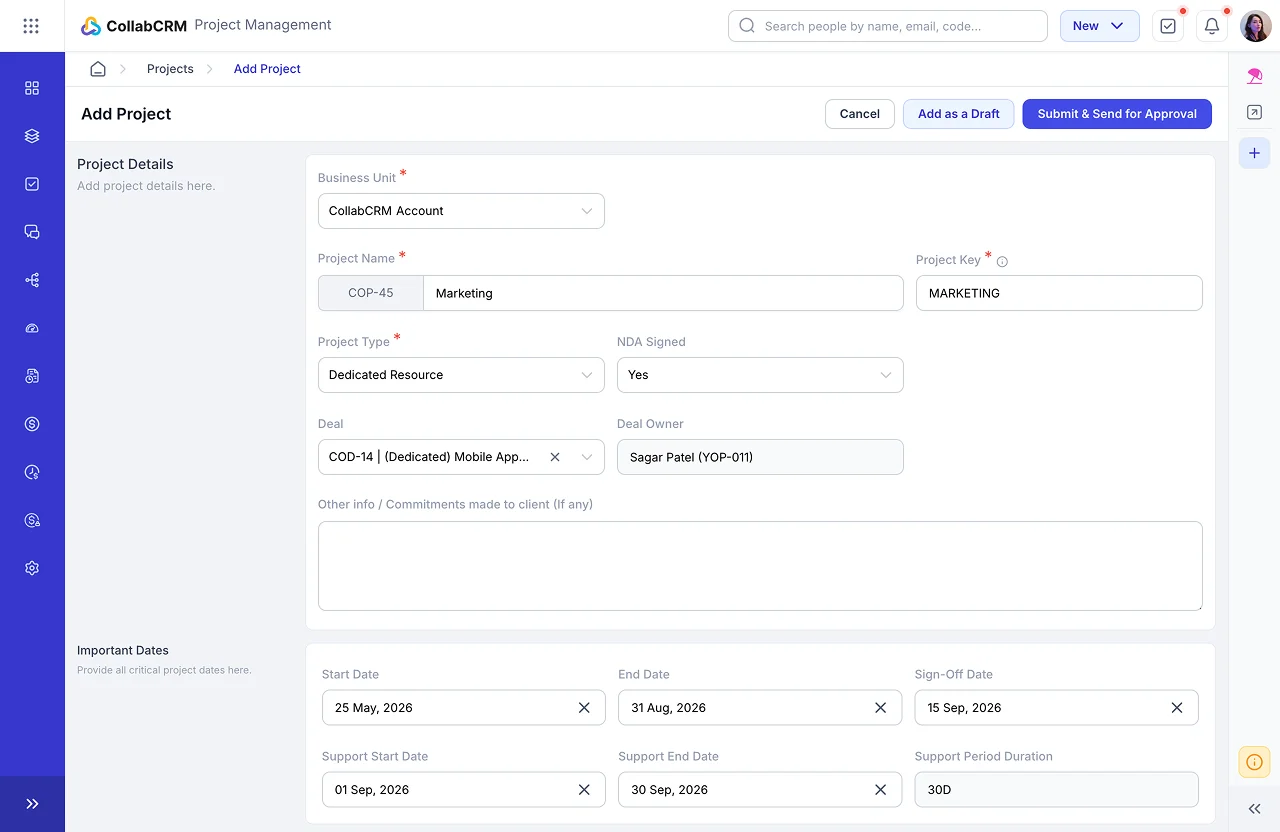
In CollabCRM, teams can begin after converting a deal into a project or directly creating a project and entering project details, milestones, timelines, and requirements.
Why it matters?
A project without clearly defined objectives creates confusion, missed expectations, and poor execution. This step ensures teams align on what needs to be delivered before implementation begins.
Step 2: Break the Project into Milestones & Repeatable Actions
Divide the implementation into structured phases such as planning, setup, execution, testing, training, and deployment. Then convert those phases into tasks, milestones, or sprint activities with clear actions and timelines.
Why it matters?
Large implementations fail when work remains vague. Breaking projects into repeatable milestones creates a standardized process that teams can reuse across future projects and improves delivery predictability.
Step 3: Assign Resources & Ownership
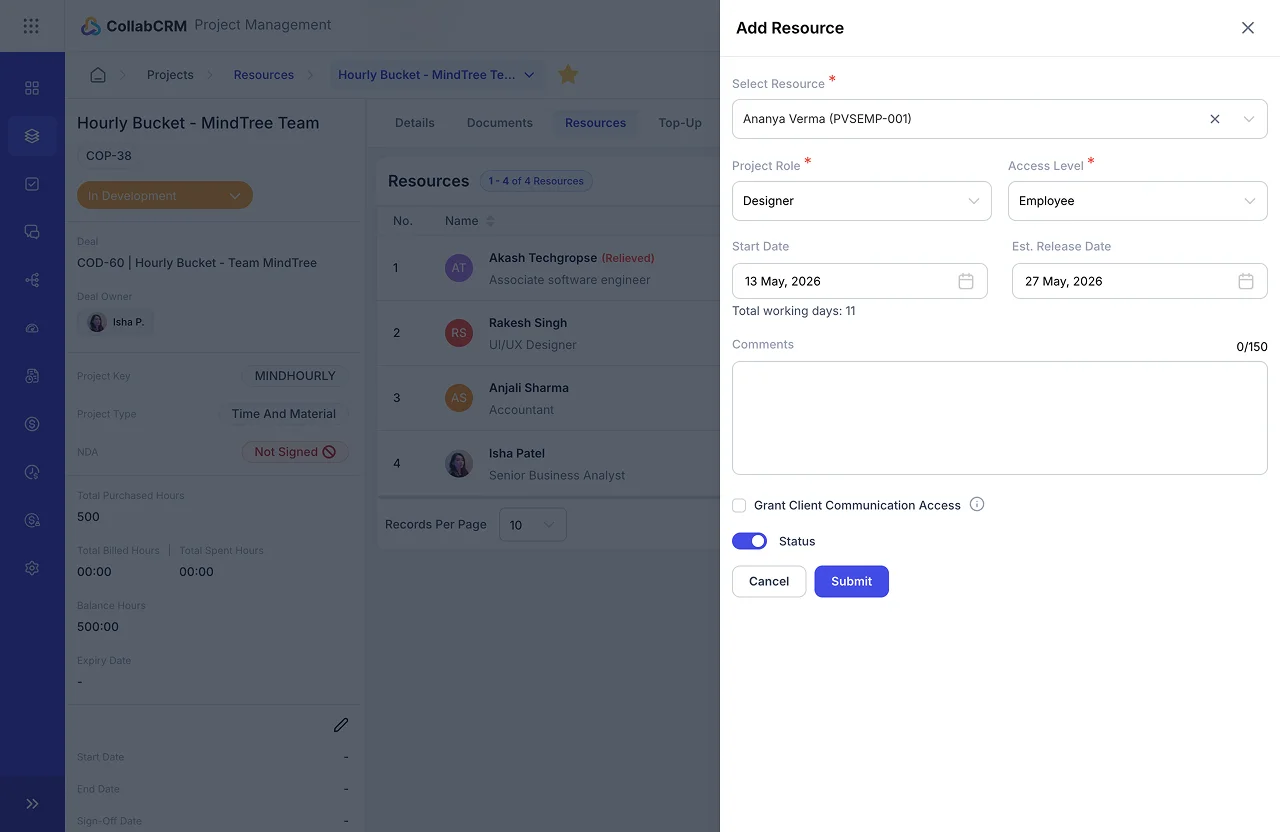
Assign the right people to implementation tasks based on skill, role, availability, and project requirements. Teams can allocate employees, define access, estimated release dates, billing type, and responsibilities inside the project.
Why it matters?
Implementation delays often happen due to unclear ownership or overloaded teams. Proper resource allocation improves accountability, balances workload, and ensures the right expertise is available at the right stage.
Step 4: Define Task-Level Actions & Dependencies
Convert your goals into smaller and more actionable items with owners, deadlines, priorities, and dependencies. The teams can create issues, assign tasks, track status, and log work as implementation progresses.
Why it matters?
As repeatable implementation depends on operational clarity, small, measurable tasks help reduce confusion. They help teams move faster and prevent execution gaps from delaying delivery.
Step 5: Build a Communication & Review Process
Create a communication workflow for implementation updates, stakeholder reviews, follow-ups, approvals, and progress discussions. You can leverage communication portal so that your teams can document activity, track notes, maintain follow-ups, and centralize communication.
Why it matters?
Most implementation failures come from poor communication, delayed approvals, and disconnected updates. Centralized visibility keeps everyone aligned and reduces misunderstandings.
Step 6: Track Time, Effort & Budget
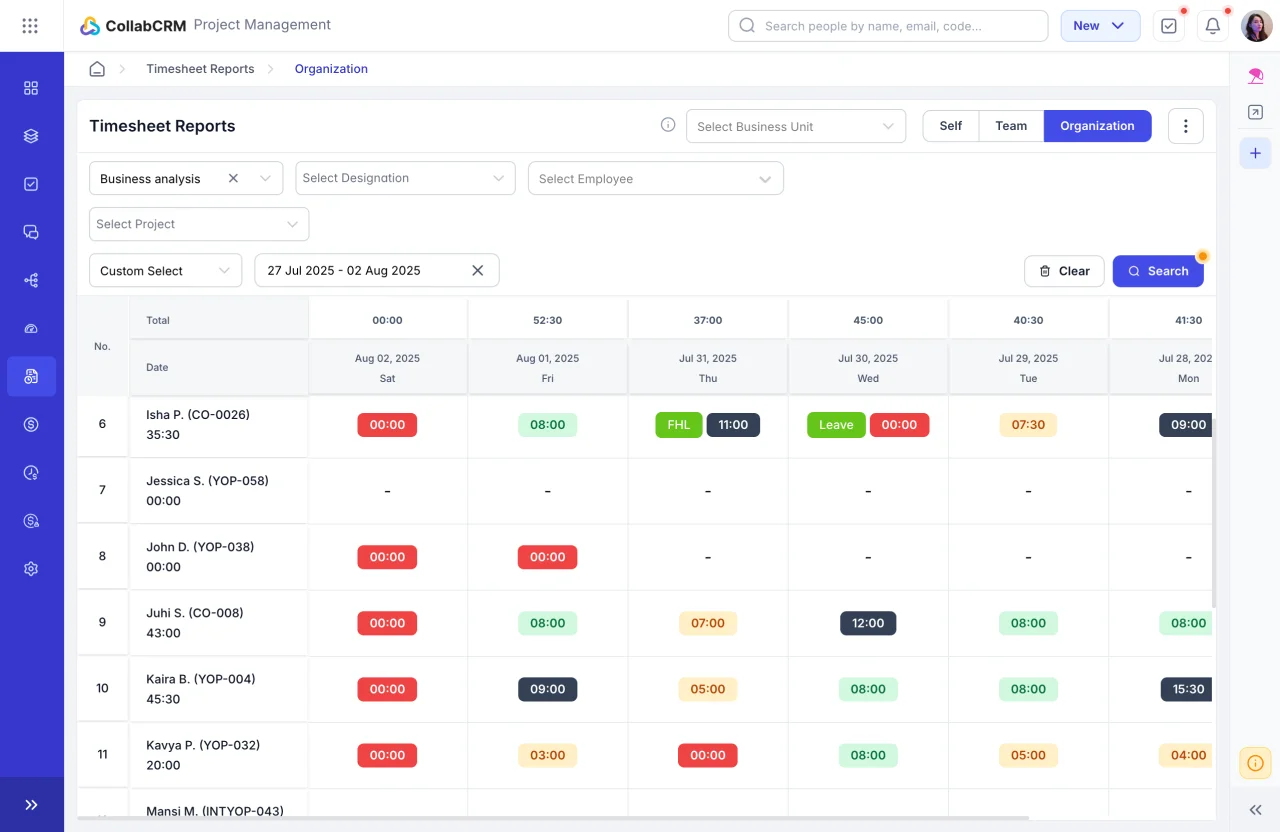
Track estimated versus actual effort using timesheets, billed hours, work logs, and resource time allocation. Teams can also monitor budget-related performance through billable hours, spent effort, project costing visibility, and invoicing workflows.
Why it matters?
Projects often exceed budgets when time, utilization, and costs are not monitored. Tracking effort and billing helps control overspending, identify revenue leakage, and maintain project profitability.
Step 7: Monitor Risks, Delays & Dependencies
Continuously track blockers, pending approvals, technical dependencies, and resource issues throughout implementation. Teams can manage dependencies and issues while following up on unresolved tasks.
Why it matters?
Small blockers quietly become project delays. Early visibility into risks helps managers take corrective action before implementation timelines are affected.
Step 8: Centralize Project Documents & Decisions
You can store requirement documents, meeting notes, approvals, contracts, implementation files, and deliverables inside the project for easy access. This prevents scattered communication across emails and folders.
Why it matters?
A centralized information system improves collaboration, reduces version confusion, and helps teams quickly access project context during implementation.
Step 9: Review Milestones & Measure Progress
At each implementation phase, review completed work, pending actions, delays, resource effort, and delivery progress. Managers can use project dashboards, milestone visibility, sprint tracking, and reports to evaluate performance.
Why it matters?
Regular reviews improve implementation predictability, help teams adjust plans early, and ensure projects stay aligned with deadlines and business objectives.
Step 10: Standardize & Reuse the Process
After implementation, document successful workflows, recurring steps, timelines, templates, lessons learned, and dependencies so teams can replicate the process in future projects.
Why it matters?
Standardization transforms implementation from reactive execution into a repeatable system, helping businesses scale delivery faster with fewer mistakes.
Examples of Project Implementation Plan Across Industries
Different industries follow different implementation approaches based on their goals, workflows, timelines, and risks. Here are examples of how implementation plans vary across sectors.
| Plan Component | Hospitality IT Integration | eCommerce | Healthtech |
| Objectives and goals | Integrate hotel PMS, POS, and in-room IoT systems into one platform to reduce manual check-in time by 40% and improve guest satisfaction within 6 months. | Migrate online store from a legacy platform to a headless commerce stack, targeting 25% faster page load speed and a 15% increase in checkout conversion within 90 days. | Deploy a remote patient monitoring platform that collects real-time vitals from wearable devices and alerts clinical staff to abnormal readings, reducing hospital readmission rates by 20% within one year. |
| Scope and deliverables | Includes PMS-POS API integration, IoT sensor setup, staff training, and a guest-facing mobile app. Excludes loyalty program development and booking engine changes. | Includes storefront rebuild, product catalogue migration, and payment gateway integration. Excludes ERP integration and custom recommendation engine development. | Includes wearable onboarding, data ingestion pipeline, clinical dashboard, and alert logic. Excludes EHR integration and billing system changes. |
| Work breakdown and milestones | Phase 1: system audit and API mapping (weeks 1–3). Phase 2: integration build and IoT setup (weeks 4–10). Phase 3: testing (weeks 11–13). Phase 4: staff training and go-live (weeks 14–16). | Phase 1: discovery and design (weeks 1–4). Phase 2: front-end development (weeks 5–10). Phase 3: data migration and QA (weeks 11–13). Phase 4: UAT and launch (weeks 14–16). | Phase 1: clinical requirements and compliance review (weeks 1–4). Phase 2: platform build and device onboarding (weeks 5–12). Phase 3: pilot with 50 patients (weeks 13–16). Phase 4: rollout (weeks 17–24). |
| Schedule and Dependencies | IoT installation depends on facility access. PMS API documentation must be received before integration starts. | Front-end development begins only after design sign-off. Product migration depends on clean data exports from the legacy system. | Platform build depends on regulatory approval. Device onboarding starts only after wearable procurement is complete. |
| Team roles and responsibilities | Integration lead owns API development. IoT engineer manages setup and testing. Hotel IT manager coordinates access. Project manager manages reporting and communication. | Front-end lead owns storefront development. Data migration specialist manages exports/imports. QA engineer handles testing. Project manager oversees timelines and updates. | Clinical lead manages requirements validation and pilot oversight. Backend engineer owns ingestion and alert logic. Compliance officer handles approvals. Project manager coordinates delivery. |
| Risk register and mitigation | Risk: PMS vendor delays API access. Mitigation: escalate to vendor manager and use mock APIs during development. | Risk: incomplete or inconsistent product catalogue data. Mitigation: conduct data audits and cleansing before migration. | Risk: delayed regulatory approval. Mitigation: run non-clinical testing in parallel to reduce idle time. |
| Change control process | Scope changes submitted through a formal request form. Project manager evaluates cost and timeline impact before approval. | Client submits changes through a shared request log. Impact assessment completed within two business days. | Change requests pass through clinical review and compliance approval before implementation. |
| Quality gates and acceptance criteria | API integration tested successfully, IoT sensors report accurately, training completed, and guest check-in time reduced to target levels. | Design approved, migration error rate below threshold, performance benchmark achieved, and UAT sign-off completed. | Security and privacy review completed, devices validated, alert logic tested, and pilot monitoring goals achieved. |
| Communication plan and stakeholder approvals | Weekly project updates, bi-weekly meetings, and written approval from hotel leadership for changes. | Bi-weekly updates, shared project board visibility, and milestone approvals before phase transitions. | Weekly reports, monthly steering committee meetings, and documented approval for patient data handling changes. |
Project Implementation Plan Template
You can use the free project implementation plan template below to get started. For better visibility and ongoing execution, set it up within your project management tool so the plan stays updated as tasks, timelines, and progress evolve.
| Plan Component | Details |
| 1. Project Name | [Enter project name] |
| 2. Objectives & Goals | What are you trying to achieve? Add measurable goals, timelines, and expected outcomes. |
| 3. Scope & Deliverables | Define what is included and excluded in the project. |
| 4. Work Breakdown & Milestones | Break the project into phases and milestones. |
| 5. Schedule & Dependencies | Mention important deadlines, task dependencies, approvals, or blockers that could impact delivery. |
| 6. Budget & Resources | Define estimated budget, resource allocation, tools, team members, and operational costs. |
| 7. Team Roles & Responsibilities | Assign ownership for each major activity. Define who manages execution, approvals, testing, communication, and delivery. |
| 8. Risk Register & Mitigation | List possible risks, their impact, and mitigation plan. |
| 9. Change Control Process | Define how scope changes will be reviewed, approved, documented, and implemented. |
| 10. Quality Gates & Acceptance Criteria | Define success criteria, QA checkpoints, testing standards, and approval conditions before go-live. |
| 11. Communication Plan & Stakeholder Approvals | Define update frequency, reporting method, meetings, stakeholder communication, and approval process. |
| 12. Progress Tracking | Track status, completed tasks, pending items, blockers, and milestone completion percentage. |
| 13. Post-Implementation Review | Document lessons learned, final outcomes, challenges, and process improvements for future projects. |
You can copy this template and customize it for any implementation project across industries.
AI and Automation Tools in Project Implementation
AI in project implementation means using intelligent software tools and automated workflows to handle tasks that would otherwise take a project manager hours to do manually.
Rather than replacing the project manager, these AI-powered CRM tools in project management remove the administrative burden so the team can focus on decisions, relationships, and delivery quality.
The shift is already well underway. According to PMI’s Pulse of the Profession report, which surveyed 2,841 project professionals globally, only around 20% of project managers currently report having strong practical AI skills, which means there is a significant opportunity for teams that act now to gain a clear advantage over those still working manually.
A mid-sized IT team managing a cloud migration project for a retail client reduced hours of manual coordination after adopting Microsoft Copilot alongside its project platform.
Instead of spending time collecting updates and preparing reports, the project manager received automated meeting summaries, real-time task updates, and dependency alerts. With routine work automated, more time was spent on stakeholder communication, risk management, and smoother project delivery.
Key benefits:
- Automated progress reports and meeting summaries reduce time spent on administrative tasks each week.
- Predictive scheduling tools flag timeline risks before they affect dependent tasks or milestones.
- Budget anomaly detection alerts the project manager when spend is tracking above forecast, before it becomes a serious problem.
- Workflow automation handles routine task assignments, approval nudges, and deadline reminders without manual chasing.
- AI-generated dashboards give stakeholders a real-time view of project health without the project manager preparing a separate report.
- Risk scanning tools monitor project communications and activity patterns for early signs of scope drift or team blockers.
While AI plays a key role in project implementation plan, it is important that your underlying project plan is solid. A well-structured implementation plan with clear objectives, defined roles, and documented risks gives AI tools accurate data to work with.
Without that foundation, automation simply speeds up a process that is already unclear.
How to Manage Risks, Changes and Progress During Project Implementation
Managing risks, changes, and progress is not a one-time task. It is something the project manager and team do continuously throughout the project implementation process. The teams that handle this well are the ones that see problems early and respond before the damage is done.
Here are six best practices to help you stay in control of your project implementation from the beginning.
1. Keep a Live Risk Register and Review It Every Week
Write down every known risk at the start of the project, assign an owner to each one, and set a trigger date that tells the team when to act.
Then review the register every week in your team meeting. Do not wait until a risk becomes a real problem before discussing it.
For example, an IT team building a new client portal identifies a risk that a third-party payment provider may take longer than expected to grant API access. The risk owner checks in with the provider every Monday.
However, when it becomes clear the access will be delayed by two weeks, the team shifts to a different workstream in the meantime and avoids losing any productive time.
2. Use a Simple Change Request Process for Every Scope Change
Any change to the project scope, should go through a proper process. This includes writing down the requested change, impact on cost and time, and collaborative decision making before the updated scope is accepted and applied.
For instance, a client asks the development team to add a new reporting feature that was not in the original agreement.
Before starting the work on the new feature, the project manager raises a change request, estimates the additional effort at 12 hours, and gets written approval from the client before the team picks it up. This protects both the budget and the relationship.
3. Track Only Four Core Metrics
Tracking too many metrics can make analysis and decision making difficult. Instead, just focus on less but critical numbers that tell you whether the project is healthy.
You can track the following metrics:
- budget burn rate
- forecast to complete
- number of open blockers
- variance to the original plan
These four give you everything you need to find a problem early.
For example, a project manager running a software migration notices that burn rate is 20% above forecast at the halfway point. This triggers a conversation with the team that highlights an unlogged dependency that has been silently wasting up hours. The issue is fixed before it affects the go-live date.
4. Share One Dashboard with Everyone
One of the most common sources of tension in the project implementation journey is when the client or a senior stakeholder is surprised by news the internal team already knew.
A shared, real-time project management dashboard eliminates this kind of communication gap. When everyone is looking at the same data, there are fewer misunderstandings and faster decisions.
Take the case of a delivery team which shares a live project board with their client every Monday morning. The client can see task progress, budget status, and open risks without waiting for a formal report. This builds trust and reduces the number of check-in calls needed each week.
5. Separate Urgent Issues from Ongoing Risks
Teams that treat every issue as urgent burn out quickly and lose the ability to focus on what matters. Therefore, you need to create a simple two-tier system:
- Tier 1: Urgent issues that need action within 24 hours
- Tier 2: Tracke risks that need monitoring but not immediate action
For example, during a system integration project, a team member reports a minor UI bug and a broken API connection in the same meeting. The broken API connection is blocking three other tasks and gets escalated immediately as tier one emergency.
The UI bug is logged, assigned, and scheduled for the following sprint. This keeps the team focused and calm.
6. Hold a Quick Weekly Check-In with the Full Team
A short, structured weekly meeting that covers what was completed, what is coming next, and what is blocked gives the project manager a clear view of where things stand. It also gives team members a regular space to raise concerns before they escalate.
Keep this meeting to 30 minutes. Use a fixed agenda so it stays focused.
Project managers should hold a 30-minute call at least once every week. Each team member answers three questions:
- What did you complete this week?
- What are you working on next?
- Is anything blocking you?
These routine catches blockers two to three days earlier than they would otherwise surface, which consistently keeps the project on schedule.
Post Implementation Project Review: Things to Keep in Mind
A post-implementation review, often called a PIR, is a structured conversation amongst the teams that helps in understanding what worked, what did not, and what to do differently next time.
Running a proper review after every project is one of the habits that separates high-performing teams from the rest.
Here is what you should keep in mind in every post-implementation project review:
1. Do It at the Right Time
Run the review two to four weeks after go-live, not the day after. The team needs enough time to see how the delivered solution is performing in the real world before they can give honest feedback.
For example, a team that launched a new HR platform waits three weeks before running their PIR. By then, the client’s staff had used the system daily and could clearly identify which features worked well and which needed adjustments. This made the review far more useful than it would have been on day two.
2. Compare What You Delivered Against What You Planned
Go back to the original project implementation process and measure actuals against the baseline. Look at time, budget, scope, and quality. Be honest about where things drifted and why.
For instance, a development team planned a 12-week delivery and finished in 14 weeks. The review revealed that two weeks were lost waiting for client approvals that were not factored into the original schedule.
This becomes a learning for the next time that, build approval wait times into the plan from the start.
3. Capture Lessons and Store Them Where the Team Can Find Them
Lessons learned are only useful if they are written down and stored somewhere the team will check before starting the next project. A shared document, a training or a dedicated section in your project management tool works well.
4. Include the Client in the Conversation
A PIR is not just an internal team exercise. Invite the client to share their perspective on what went well and what could have been better. Their view of the project implementation process is often very different from the internal team’s view, and both are valuable.
For example, an IT team believed their communication during a network upgrade project was strong. When they included the client in the PIR, the client mentioned they often felt unclear about what was happening during the testing phase.
This feedback led the team to add a dedicated testing update to their weekly status report on all future projects.
How Can CollabCRM help in Successful Project Implementation?
CollabCRM’s Project Management module brings everything together in one connected platform, including tasks, timelines, resource allocation, timesheets, and billing, so nothing gets lost across disconnected tools.
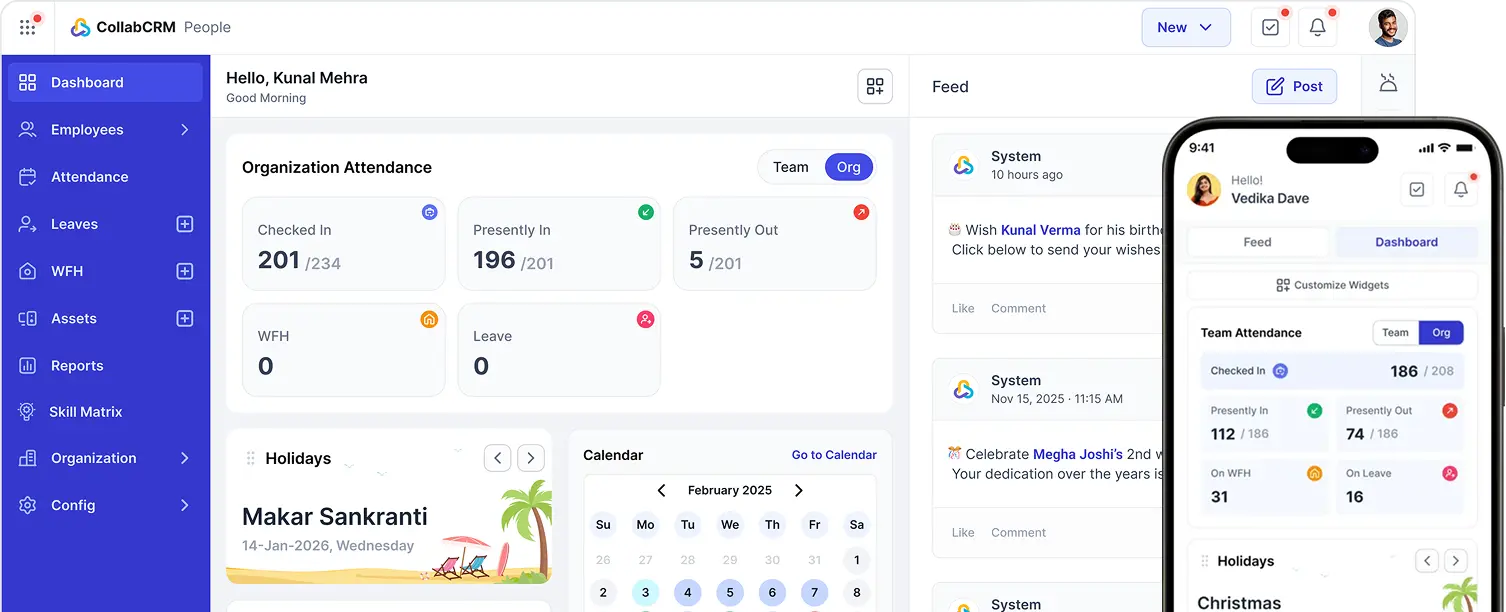
It provides project managers with real-time visibility into every milestone, resource allocation, and time log from a single dashboard. This makes it easy for them to spot delays, track budget burn, and act before small problems become big ones.
For agile teams, CollabCRM supports sprint planning, backlog management, and Kanban boards, keeping every team member aligned throughout the project implementation process.
The platform also provides smart resource allocation, showing who is available, who is overbooked, and who has the right skills for each task, which directly reduces the resource conflicts that delay implementations.

FAQs
The key steps in project implementation include defining objectives and scope, breaking work into milestones, assigning roles, building a schedule, setting a budget, logging risks, defining quality gates, managing changes, creating a communication plan, tracking progress through key metrics, and conducting a post-implementation review after go-live.
An implementation plan is important because it creates a clear roadmap for project execution, keeps stakeholders aligned on goals, minimizes uncertainty and risks, and improves the likelihood of completing the project on time and within budget.
The implementation plan is mostly developed by the project manager in collaboration with stakeholders, team leads, and subject-matter experts to ensure goals, responsibilities, timelines, and requirements are clearly aligned.
The most common reasons include unclear objectives, poor scope definition, resource conflicts, lack of a change control process, and weak communication between the team and stakeholders. Most implementation failures are preventable when teams have a structured plan, defined roles, regular risk reviews, and a consistent status reporting cadence in place.





 Priority Onboarding