

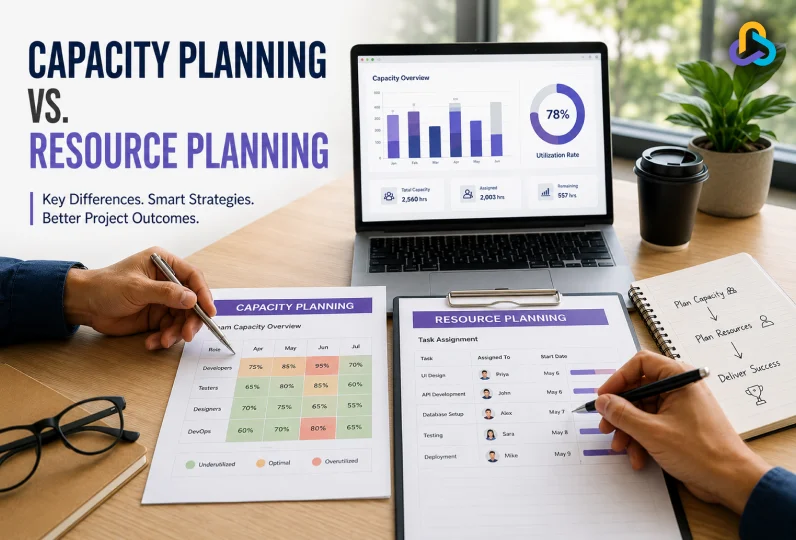
Most IT project managers face two questions before starting a new project. Can the team take on this project? And who exactly will do each task? These questions sit at the center of the capacity planning vs resource planning discussion.
Many teams confuse the two, but understanding the difference between capacity planning and resource planning can save your projects from delays, burnout, and missed deadlines.
This guide breaks down both concepts with simple examples.
Key Takeaways
- Capacity planning and resource planning are two connected but different processes, and most teams need both to run projects smoothly.
- Capacity planning checks if your team has enough hours or headcount, while resource planning decides who works on what.
- Capacity planning works at the team level and looks months ahead.
- Resource planning works at the individual level and looks days or weeks ahead.
- Use the formula Utilization Rate equals Assigned Hours divided by Available Hours to check if workloads are balanced.
- Common resource planning strategies include top-down, bottom-up, rolling, and scenario-based planning.
- Poor capacity planning leads to overcommitted teams, while poor resource planning leads to uneven workloads and burnout.
- Capacity planning should always come first, followed by resource planning to turn that decision into an actual schedule.
- Capacity and resource planning software bring occupancy tracking, skill matching, and utilization reports together to simplify both processes.
Capacity Planning vs. Resource Planning
Imagine a mid-sized IT office that won three new client projects. While it’s great for business, the project manager is worried about project workforce planning. They must figure out whether the developers, testers, and designers have enough bandwidth to handle all three projects at once.
This is where capacity planning comes in. It helps to see whether the team has the capacity to take on new work or whether there is a need to hire more or push back timelines.
Once the capacity is confirmed, the next question is which developer should be allocated to the project? Should the senior React developer split time across all three clients, or focus on just one?
This is resource allocation, the process of assigning the right person to the right task at the right time. Without it, even a team with plenty of free hours can end up with the wrong people on the wrong projects, causing delays anyway.
| Capacity planning tells you if you have enough people. Resource allocation tells you how to use them well. |
Difference Between Capacity Planning and Resource Planning: A Quick Glance
| Aspect | Capacity Planning | Resource Planning |
| Core question | Do we have enough people, skills, or hours to take on this project or this new client work? | Once we know we can take on the work, who exactly should do each task, and when should they do it? |
| What it measures | The total available hours or bandwidth of a team, department, or role group over a set period | The specific skills, availability, and workload of each individual person on the team |
| Focus level | Looks at the team or department. For example, it asks if the “backend development team” has enough hours this quarter | Looks at each person one by one. For example, it asks if “John” is free on Tuesday to work on the client demo |
| Time horizon | Usually long term. Teams often plan capacity for the next quarter, six months, or even a full year ahead | Usually short term. Resource plans are often built for the coming week, sprint, or a specific project timeline |
| Main output | A clear decision, either the team can take on the new work as it stands, or it needs more hires, contractors, or a delayed timeline | A detailed schedule showing which person is assigned to which task, along with start dates and expected hours |
| Who owns this process | Usually resource managers, delivery heads, or department leaders who oversee hiring and overall workload | Usually, project managers or team leads who manage the daily execution of a specific project |
| Data it depends on | Total team size, average working hours, planned time off, and expected project demand for the coming months | Individual skills, current task load, availability calendars, and deadlines of ongoing projects |
| Common tools used | Workforce planning tools, headcount forecasting spreadsheets, or dashboards that track team utilization rates | Task boards, project management software, sprint planners, or simple assignment sheets |
| Example question in IT | Can our QA team handle testing for four new mobile app releases planned for next quarter? | Which QA tester should test the payment module of Client A’s app this week? |
| What happens if this is done poorly | The company may promise more work than the team can realistically deliver, leading to missed deadlines across projects | Individual team members get overloaded or left idle, even if the team overall has enough hours on paper |
What is Capacity Planning?
Capacity planning in project management is a process of ascertaining the resources, such as team members, machinery, and technology, that an IT team needs to meet future product or service demand.
With capacity planning, you can ensure that the workflows operate efficiently, preventing improper utilization or missed deadlines.
Benefits of Capacity Planning
When you adopt the capacity planning process, you start to see the following benefits in your project planning and management:
- Cost Optimization: Capacity planning prevents overproduction and idle resources. This means you avoid unnecessary expenses tied to overstaffing or underused hours.
- Customer Satisfaction: When you plan capacity well, you always have the right resources ready to meet customer demand on time. This builds trust and keeps clients happy.
- Scalability: Capacity planning helps leaders know exactly when to hire new people, expand facilities, or upgrade technology to support growth. You make these decisions with data, not guesswork.
- Better Work Balance: You stop guessing and start balancing workloads properly. Teams get a steady rhythm of work instead of sudden rushes followed by slow periods.
- Reduced Burnout: You can spot workload spikes before they overwhelm your team. This helps you act early and protect your team from constant pressure and long hours.
- Smarter Business Decisions: With real data on team capacity, you know exactly when to take on new projects and when to wait. This leads to fewer overcommitments and better outcomes overall.
How to Calculate Capacity Planning?
Calculating capacity requirements may seem to be a complex endeavour; however, this simple formula will help you.
| Team Capacity = (Hours Available × Rate of Utilization) − Time Off |
Here are the steps to calculate the team capacity:
Step 1: Fix your Total Available Hours
Identify the number of required workforce and the period of engagement you are planning for.
For instance, 4 people working 40 hours a week give a total of 160 hours per week.
Step 2: Fix a Utilization Rate
It is not possible for all the employees to be productive all the time. You need to account for meetings, coffee breaks, administrative obligations, too much documentation and more unproductive events.
For example, let us assume a utilization rate of 80% for the sake of understanding.
160 X 0.8 = 128 hours of usable time.
Step 3: Reduce the Time Off
Identify the already known time off, such as public holidays and estimated personal leave, from the total.
For example, if two team members take a day off each, that’s 16 hours less, leaving 112 hours of available capacity.
Step 4: Match Capacity to Demand
Now that you are aware of your available capacity, you can put it up against your project workload.
For instance, if your upcoming sprint requires 128 hours of work but your team only has 112 hours of capacity, you’re 16 hours short. This means you need to reprioritise, hire new developers or push the timelines.
Capacity Planning Strategies
To manage capacity and estimating demand, an IT organization can follow any strategy like Lead, Lag, Match, or Adjustment.
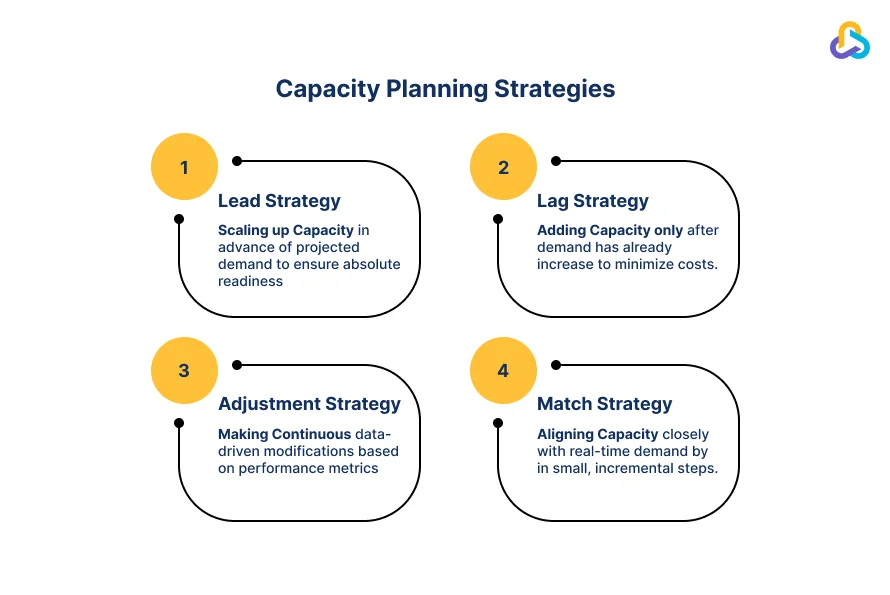
These capacity management strategies help businesses make smarter decisions, reduce last-minute scrambles, and deliver projects on time.
Example of Capacity Planning in an IT Software Team
Let us look at a simple example to understand how capacity planning works in real life.
An IT software company is planning several projects for the next quarter. The company has three types of consultants on its team, each with a different role.
| Role | Number of Consultants | Monthly Capacity per Consultant | Total Capacity |
| Solution Architects | 3 | 18 person days | 54 person days |
| Cloud Engineers | 5 | 18 person days | 90 person days |
| Data Specialists | 4 | 18 person days | 72 person days |
Here, person days simply means the number of working days one person can contribute in a month. So, if a Solution Architect can work 18 days in a month, and there are 3 of them, the team has 54 person days of total capacity for that role.
Now the company looks at the expected workload for the quarter. This is often called demand, since it shows how much work each project needs.
| Project | Architects Needed | Cloud Engineers Needed | Data Specialists Needed |
| ERP Implementation | 20 person days | 35 person days | 25 person days |
| Cloud Migration | 15 person days | 40 person days | 10 person days |
| Data Integration Project | 10 person days | 15 person days | 30 person days |
| Total Demand per Role | 45 person days | 90 person days | 65 person days |
Capacity planning simply compares this demand with the available capacity for each role. This comparison tells the company exactly where it stands before any project begins.
Quick Analysis
- Solution Architects have 54 person-days available, but the projects only need 45. This leaves a buffer of 9 person days, so this role has room to spare.
- Cloud Engineers have exactly 90-person days available, and the projects need exactly 90. This role is fully booked with zero buffer, so any delay or sick leave could cause a problem here.
- Data Specialists have 72 person-days available, but the projects need only 65. This leaves a small buffer of 7 person days.
- Overall, the Cloud Engineer role is the one to watch closely, since it has no extra capacity left for the quarter.
What is Resource Planning?
Resource planning is the process of identifying, allocating, and scheduling an organizations assets such as finances, personnel and equipment. The objective of resource planning is to make sure that the right resources are available at the right time to complete the projects on time and in budget while preventing burnout.
Benefits of Resource Planning
Resource planning brings its own set of advantages to how teams execute projects. Here are the key ones.
- Budget Control: Resource planning helps you map out exactly what you need in advance. This avoids scope creep and prevents unexpected costs to come up mid project.
- Optimal Utilization: Team members stay neither overworked nor underutilized. Everyone gets a fair and realistic workload, which keeps burnout and idle time both in check.
- Efficiency: Resource planning predicts future needs ahead of time. This reduces last- minute hiring, material shortages, or emergency purchases that often disrupt project timelines.
- Projects Stay on Track: The right people with the right skills end up in the right place at the right time. This keeps every project moving forward without unnecessary delays.
- Early Bottleneck Detection: You can spot where workloads or approvals are piling up before they stall progress. This gives teams time to fix issues before they become real problems.
- Balanced Workloads: Resource planning helps balance work across the team. Your top performers do not get overloaded while others sit with little to do.
How to Calculate Resource Planning?
The math to calculate resource requirements might seem complicated, is easy and direct. Here is how you can ascertain the resource requirement for your project.
Step 1: Map Your Workload
List every major task or deliverable along with its estimated effort in hours or story points. Then group these tasks by role, such as designers, developers, copywriters, or QA testers.
This step gives you a clear picture of the type of work you need to plan for before you assign any names. It sets the foundation for everything that comes next in the resource planning process.
Step 2: Check Your Available Resources
Now move on to identify who is free, for how long, and what else they are already working on. Watch for resource conflicts and overlaps.
A person might show 20 free hours on paper, but if half that time goes into meetings or switching between tasks, their real availability is much lower. Using a live workload chart helps you see who has room to spare and who is already stretched thin.
Step 3: Allocate Resources Based on Skills and Priorities
This is the core of resource planning, where you match the right people to the right tasks based on their skills, experience, and deadlines.
Make sure that you avoid the trap of giving work to whoever is free at that moment. It may feel faster, but it often leads to rework or burnout later. When resources are limited, assign your most critical tasks first, especially the ones with client visibility or dependencies, then work outward from there.
Step 4: Calculate Resource Utilization
Once tasks are assigned, check your utilization rate to see if the workload is balanced. Use this formula:
| Utilization Rate= (Assigned Hours /Available Hours) X 100 |
For example, if a designer is booked for 32 hours in a 40 hour week, they are at 80% utilization, which is a healthy level. If someone stays above 95% regularly, it is time to redistribute their work.
Resource Planning Strategies
Once you know your workload and available resources, the next step is choosing how to build your resource plan. Different teams use different approaches based on their project size, industry, and how much certainty they have about future work.
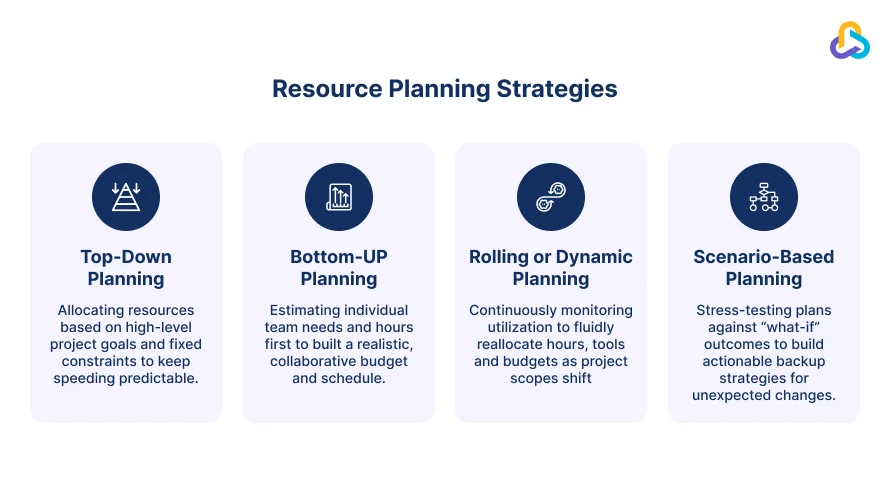
These four approaches cover most situations teams face. Top-down planning sets fixed budgets first. Bottom-up planning builds from individual needs. Rolling planning adjusts continuously. Scenario based planning prepares backup strategies for unexpected changes. Pair any of these with people management software to put the strategy into action.
Example of Resource Planning in an IT Software Team
Now, let us take the same IT software team from our earlier capacity planning example and see how resource planning works at a more detailed level.
Once the company confirms it has enough overall capacity, the next step is to assign specific consultants to specific projects. This is where resource planning takes over.
| Consultant | Role | Project | Allocation |
| Maria | Solution Architect | ERP Implementation | 10 person days |
| Daniel | Solution Architect | Cloud Migration | 15 person days |
| Sofia | Cloud Engineer | Cloud Migration | 20 person days |
| Lucas | Cloud Engineer | ERP Implementation | 15 person days |
| Amir | Data Specialist | Data Integration Project | 20 person days |
| Nina | Data Specialist | ERP Implementation | 15 person days |
Quick Analysis
- Maria and Daniel, both Solution Architects, together account for 25 person-days, matching closely with the 20 person-days of architect demand for these two projects combined.
- Sofia is allocated 20 person-days on Cloud Migration alone, which is a large single assignment and worth watching for overload if any other task comes up for her.
- Lucas and Sofia together cover 35 person-days as Cloud Engineers, showing how the team splits a high demand role between two people.
- Amir carries the full 20 person-days for the Data Integration Project by himself, making him a single point of dependency for that project.
- This table shows that even when a role has enough total capacity, resource planning is still needed to confirm no single person is overloaded while others have room to spare.

Resource Planning vs Capacity Planning: Which one to Use?
By now, you understand both processes well. However, the question remains, should you use capacity planning or resource planning for your situation?
The truth is, capacity planning vs resource planning is not really a choice. Most teams need both, just at different stages.
| Scenario | What You Are Facing | What You Need | Why |
| Deciding on a new project | You are evaluating whether to accept a new client project or a large piece of work | Capacity Planning | It tells you if your team has enough overall hours or headcount before you commit to a deadline |
| Assigning confirmed work | A project is already approved and you need to decide who does what | Resource Planning | It helps you assign specific people to specific tasks based on skills and current workload |
| Team feels overworked | Your team constantly feels stretched, but you are not sure why | Capacity Planning | It checks if the team as a whole has enough available hours, which is a bigger structural issue |
| Uneven workloads | Some team members are overloaded while others have free time | Resource Planning | Your team may have enough total hours, but the work is not distributed evenly across individuals |
| Planning hiring or budgets | You are preparing for the next quarter and deciding on new hires or investments | Capacity Planning | It works at a longer time horizon and helps leaders plan ahead of expected demand |
| Building a weekly schedule | You are running a live project and need to know who works on what this week | Resource Planning | It works at a short term, day to day level to build the actual task schedule |
How Can Capacity Planning and Resource Planning Work Together?
Capacity planning and resource planning are not separate systems that run on their own. They work best as two steps in the same process, one leading naturally into the other.
Capacity planning always comes first as it helps determine if your team has the bandwidth, personnel, and skills for the new job. This step happens before you commit to a client, a deadline, or a new project. It protects your business from promising more than your team can realistically deliver.
Once capacity planning confirms that the work can be taken on, resource planning takes over. It answers the detailed question of who does what and when. This step turns a high-level yes into an actual working schedule, with real names assigned to real tasks.
For instance, capacity planning tells you that your Cloud engineering team has 90 person-days available this quarter, and your projects need exactly 90 person-days. This is a green light, but a tight one.
Resource planning then decides that Sofia takes the Cloud Migration project while Lucas takes the ERP implementation, based on their individual skills and current workload. Without resource planning, that 90-person-day capacity could still get poorly distributed, leaving Sofia overloaded while Lucas sits idle.
The two processes also support each other. If resource planning shows that a specific role is overallocated across too many projects, this signals that your original capacity numbers may have been too optimistic. This feedback helps you correct your capacity plan for the next quarter, making the whole cycle more accurate over time.
In short, capacity planning sets the boundaries of what is possible, and resource planning works inside those boundaries to get the actual work done.
Teams that treat these as one connected process, rather than two separate tasks, are far more likely to hit their deadlines without burning out their people.
Using CollabCRM for Capacity and Resource Planning
Effective capacity and resource planning ensures the right people work on the right projects at the right time. Without it, teams get overloaded, deadlines slip, and profitability takes a hit.
CollabCRM solves this resource planning vs capacity planning debate by giving managers real-time visibility into availability, workloads, and project demand, all in one platform.
Before assigning work, managers can check occupancy and leave schedules to confirm capacity, then use the Skill Matrix to match the right expertise to each project. When employees juggle multiple projects, CollabCRM supports better workload management by showing current assignments clearly, helping managers redistribute tasks before burnout sets in.
Timesheets replace guesswork with actual effort data, improving future resource forecasting and project estimates. As pipelines grow, CollabCRM helps compare current capacity against upcoming demand, making hiring decisions easier. Utilization reports then reveal underused or overloaded resources at a glance.
Together, these features help teams optimize resource allocation, prevent burnout, and deliver projects on time with confidence.
FAQ:
Capacity planning checks if a team has enough overall hours or headcount to take on new work, usually looking months ahead at the team level. Resource planning decides who does each specific task and when, usually looking days or weeks ahead at the individual level. In short, capacity planning answers whether you can take on the work, while resource planning answers who will actually do it.
Yes, but it is risky. Without capacity planning, you might assign people to tasks even when the team lacks enough total hours. This can lead to overcommitted teams, missed deadlines, and burnout, since no one checked the bigger picture first.
Resource planning and project scheduling are different. Resource planning focuses on assigning the right people to the right tasks based on skills and availability. Project scheduling then builds a timeline around those assignments, showing when each task starts and finishes.







 Priority Onboarding