

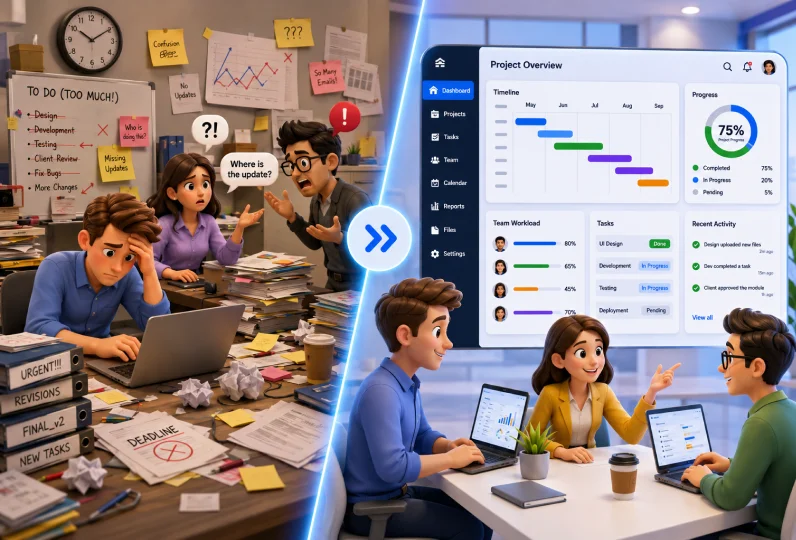
Imagine managing a project where designers are waiting for developer updates, developers are unclear about priorities, and clients keep asking for progress reports. Deadlines start slipping, communication becomes messy, and the entire team feels overwhelmed.
This is exactly where effective team management becomes important in project management. No matter how skilled your employees are, projects can quickly become disorganized without proper coordination, communication, and planning.
In this guide, we will explain what team management in project management means, why it is important, the key elements involved, common challenges teams face, and the best practices businesses can follow to manage projects more effectively.
Key Takeaways:
- Team management in project management helps teams stay organized, aligned, and focused on achieving project goals efficiently.
- Clear roles, responsibilities, and communication reduce confusion and improve accountability across teams.
- Proper workload and resource planning help prevent bottlenecks, delays, and employee burnout.
- Strong team communication in project management improves collaboration, visibility, and faster problem solving.
- Tracking project progress regularly helps managers identify risks and solve issues before they impact delivery timelines.
- Using project management and resource management tools like CollabCRM.
- helps businesses manage teams, workloads, and project performance more effectively.
What Is Team Management in Project Management?
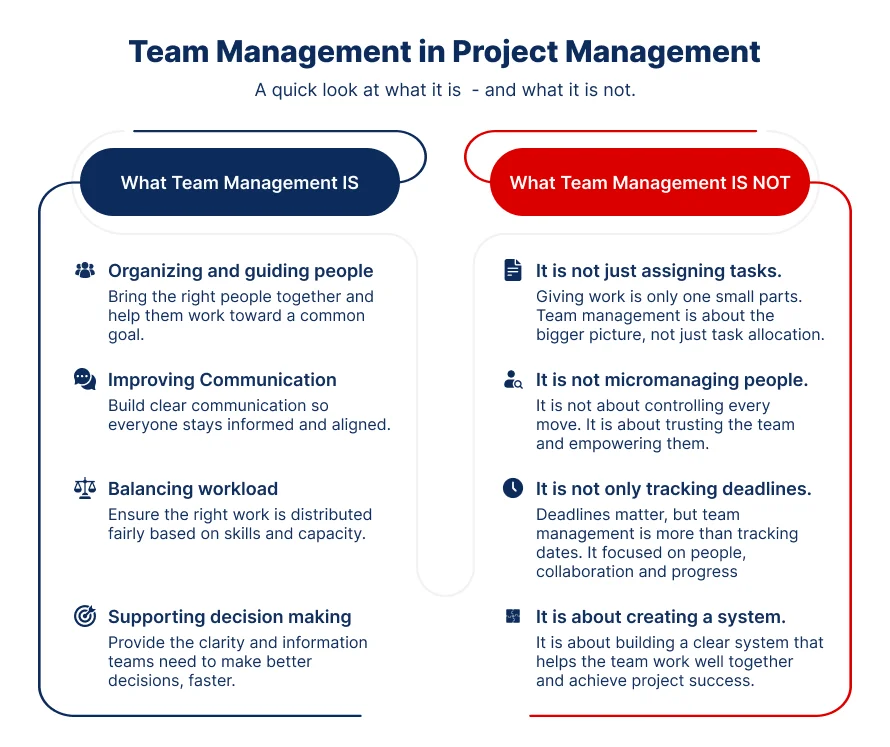
Team management meaning in project management refers to the process of organizing, guiding, and supporting teams so projects can achieve their goals on time and within scope.
It helps teams stay focused, work together smoothly, and complete tasks without confusion.
In project management, team management includes:
- defining roles
- assigning responsibilities
- balancing workload
- improving communication
- helping teams make decisions quickly
All these activities help create a clear structure for the team. When people know what they need to do, who they report to, and how work should move forward, projects become easier to manage and execute.
In simple terms, this means project managers use planning, communication, and collaboration to help teams work efficiently from the beginning of the project to the final delivery.
For example, imagine a software company building a mobile banking app. The design team creates the app interface, developers build the features, testers check for bugs, and the marketing team prepares the launch campaign. Without proper team management, deadlines can overlap, communication can break down, and important tasks may be missed.
Project managers play a critical role here. They make sure every team member understands what they need to do and how their work connects to the larger project goal. They ensure that everyone is aligned through regular updates, clear ownership, and proper planning. This creates better collaboration, fewer delays, and a smoother path to project success.
What is the Importance of Team Management in Project Management?
Team management plays a major role in the success of any project. Even with skilled employees and clear goals, projects can fail if teams are not managed properly. Good team management helps people stay aligned, communicate clearly, manage workloads efficiently, and complete tasks on time.
Below are some of the key reasons why team management is important in project management.
1. Team Management Improves Focus
Team management in project management helps in improving focus. When roles, responsibilities, and priorities are clearly defined, team members know exactly what they need to work on. This reduces confusion and prevents people from spending time on unnecessary tasks.
For example, in a website development project, designers can focus on user experience while developers work on functionality instead of overlapping work or waiting for instructions.
Clear direction helps teams stay aligned and focused with project goals and deliver work faster.
2. Team Management Prevents Bottlenecks and Burnout
Team management in project management can help you in preventing bottlenecks and employee burnout. This prevents some employees from becoming overloaded while others remain underutilized.
Proper planning also helps businesses create realistic project timelines. When workloads are managed effectively, projects move smoothly without putting constant pressure on the team.
3.Team Management Helps in Strengthening Communication
Strong and untethered team communication in project management helps teams collaborate more effectively. Regular updates, meetings, and progress tracking reduce misunderstandings and missed handoffs between departments.
For instance, imagine a software testing team finds a payment failure bug in an ecommerce application before launch. Instead of waiting until the weekly review meeting, the testers immediately inform the developers and project manager through the project communication system.
The developers quickly fix the issue, and the updated version is tested again before release. This fast communication prevents customer complaints, launch delays, and revenue loss for the business.
4. It Supports Better Project Outcomes
Projects are more likely to succeed when teams work in a structured and organized way. Clear ownership, collaboration, and proper planning help teams adapt even when priorities change during the project lifecycle.
For instance, during a product launch project, a company may suddenly need to change marketing priorities because of customer feedback or competitor activity.
When roles, timelines, and communication channels are already well managed, the team can quickly adjust responsibilities and update deliverables without disrupting the entire project.
This flexibility helps businesses maintain quality, meet deadlines, and achieve better project outcomes even during unexpected changes.
Key Elements of Team Management in Project Management
Successful team management depends on a few core elements that help teams stay organized, productive, and aligned with project goals.
When these elements are managed properly, teams can work more efficiently, communicate clearly, and handle challenges with less confusion.
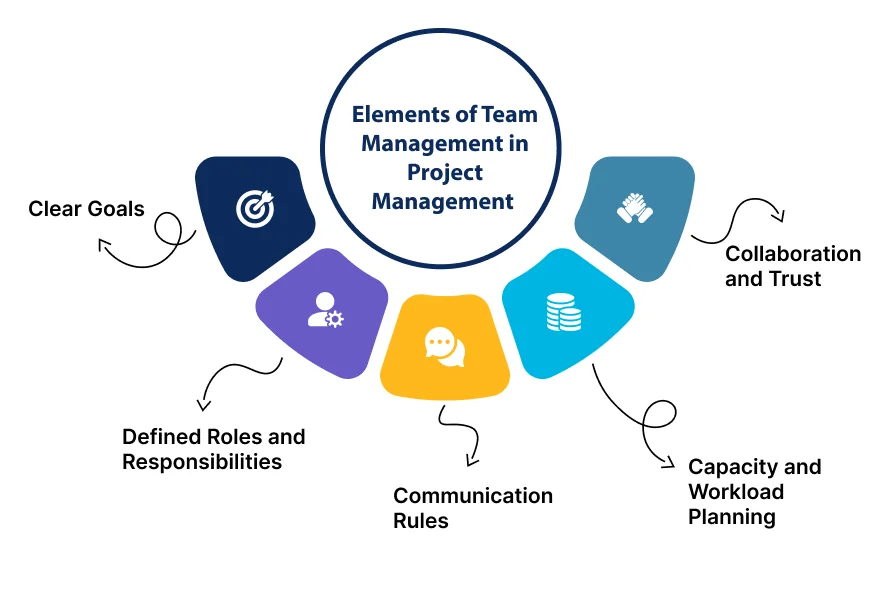
Below are the key elements of effective team management in project management.
1. Clear Goals
Team members need to understand what the project is trying to achieve and what success would look like in the end. Properly setting project goals, help employees focus on the right priorities and avoid wasting time on tasks that do not contribute to the outcome.
Project managers should connect daily work with larger project deliverables. Goals should also be measurable and easy to understand.
For example, instead of saying “improve customer experience,” a project manager can define a specific target such as reducing customer response time by 30% within three months.
When goals are clearly defined, teams can make better decisions and track progress more effectively.
2. Defined Roles and Responsibilities
Projects become difficult to manage when employees are unsure about their responsibilities. Clear role definition helps teams understand who owns each task, who approves decisions, and who needs to stay informed throughout the project lifecycle.
Many project managers use tools like team charters or RACI charts to define responsibilities. This reduces duplicate work and prevents confusion between departments.
For example, in a software development project, designers may handle user interface creation, developers may build features, and testers may manage quality checks. When responsibilities are clearly assigned, teams can work faster and avoid delays caused by overlapping tasks.
3. Communication Rules
Without proper communication, projects often face delays, misunderstandings, and missed deadlines.
Project managers should establish clear communication rules from the beginning. This includes deciding how often teams will meet, who should receive project updates, and how approvals will be handled.
For example, a project team may conduct daily progress meetings, weekly client updates, and monthly performance reviews. Simple and structured communication makes it easier for teams to stay aligned and quickly resolve issues before they grow into larger problems.
4. Capacity and Workload Planning
Good workload planning helps teams maintain productivity without creating unnecessary pressure on employees. Project managers must balance assignments based on team capacity, deadlines, and individual skill sets.
Assigning too many high priority tasks to one employee can create bottlenecks and increase burnout risk. At the same time, assigning work based on employee strengths improves efficiency and project quality.
Realistic workload planning helps projects move smoothly while maintaining employee performance and morale.
5. Collaboration and Trust
Strong collaboration and trust help teams perform better during challenging situations. Your employees should feel comfortable sharing ideas, asking questions, and reporting issues early without fear of blame.
Project managers can build trust by encouraging open communication, recognizing team contributions, and supporting collaboration across departments. When people trust each other, teams become more adaptable, motivated, and solution focused throughout the project lifecycle.
How to Manage a Project Team Step by Step
Managing project teams can be daunting task if you do not have a structured process in mind. Here are six simple team management steps to help you drive your workforce together.
Step 1: Define Project Goals and Expectations
Team management starts with clearly defining the project goals, deliverables, deadlines, and success metrics. Every member in all your teams should understand what the project is trying to achieve and what is expected from them.
Clear expectations reduce confusion and help teams stay focused on the right priorities.
For example, in a mobile app development project, the project manager may define the goal as launching the app within six months with features like secure login, online payments, and customer support chat.
Mobile App Development Project Task Distribution With Scope and Timeline
| Team | Scope of Work | Timeline | Expected Outcome |
| UI/UX Design Team | Create app wireframes, user interface designs, and user journey flow | Week 1 to Week 4 | Finalized mobile app design ready for development |
| Development Team | Build login system, payment gateway, dashboard, and chat functionality | Week 5 to Week 16 | Functional mobile application with core features |
| Testing Team | Perform bug testing, security testing, and performance checks | Week 17 to Week 20 | Stable and error free application |
| Content Team | Prepare app content, onboarding screens, and help documentation | Week 10 to Week 18 | User friendly in app content and guides |
| Marketing Team | Create launch campaign, social media creatives, and app store listings | Week 16 to Week 22 | Product launch readiness and audience awareness |
| Project Manager | Monitor progress, manage communication, and track deadlines | Throughout project | Smooth coordination and timely project delivery |
Designers, developers, testers, and marketing teams are each given specific deliverables and timelines. This clarity helps every department understand their responsibilities and work toward the same business objective.
Step 2: Assign Roles and Responsibilities
After defining the project goals, the next step is to assign clear roles and responsibilities to each team member. Every employee should understand what tasks they are responsible for, who they report to, and how their work contributes to the project outcome.
Project managers should assign work based on employee skills, experience, and capacity. This helps teams work more efficiently and reduces delays caused by confusion or overlapping responsibilities. It is also important to define who will approve decisions, review progress, and share updates with stakeholders.
When ownership is clearly defined, teams become more accountable, communication becomes smoother, and projects move forward without unnecessary duplication of work.
For example, in an ecommerce website project, the design team may handle website layouts, developers may build payment and product features, and the content team may upload product descriptions and banners.
The project manager oversees timelines and approvals while clients receive weekly progress updates. Since every team understands their responsibilities from the beginning, work moves smoothly without repeated tasks or confusion between departments.
Sample Ecommerce Website Project Reporting Structure
| Role | Responsibilities | Reports To |
| Client / Stakeholders | Approve project scope, provide feedback, review final deliverables | Project Manager |
| Project Manager | Manage timelines, coordinate teams, track progress, handle approvals, share updates with clients | Client / Stakeholders |
| UI/UX Design Lead | Manage website design, user experience, wireframes, and visual layouts | Project Manager |
| UI/UX Designers | Create page designs, banners, mobile responsiveness, and design assets | UI/UX Design Lead |
| Development Lead | Supervise website development, integrations, and technical delivery | Project Manager |
| Front End Developers | Build website interface, responsive layouts, and user interactions | Development Lead |
| Back End Developers | Develop payment gateway, database, product management, and server-side functionality | Development Lead |
| Content Manager | Plan website content, product descriptions, banners, and SEO content | Project Manager |
| Content Executives | Upload products, write descriptions, optimize website content | Content Manager |
| QA / Testing Team | Perform bug testing, functionality testing, and quality checks | Project Manager |
| Digital Marketing Team | Prepare launch campaigns, SEO setup, social media promotions, and email marketing | Project Manager |
Simple Project Hierarchy
| Client / Stakeholders ↓ Project Manager ↓ Design Lead | Development Lead | Content Manager | QA Team | Marketing Team ↓ Designers | Developers | Content Executives | Testers | Marketing Executives |
Step 3: Create a Communication Plan
Without proper communication, project teams can face confusion, missed deadlines, repeated work, and delayed decision making.
According to the 2024 Communication Statistics Report by Project.co, 70% of employees said they wasted time because of communication issues at work, while 55% reported missing important messages due to poor communication systems.
A communication plan helps teams stay aligned throughout the project lifecycle and ensures that no message is missed.
Project managers should define communication rules at the beginning of the project. This includes deciding how often teams will meet, how progress updates will be shared, which communication tools will be used, and who should receive approvals or reports.
A communication plan also improves transparency between departments, clients, and stakeholders. Instead of relying on random messages or scattered emails, teams follow a structured communication process that keeps everyone informed.
For example, in a website redesign project, the project manager may schedule daily internal stand-up meetings, weekly client review calls, and monthly progress reports for stakeholders.
Designers, developers, and content teams use a shared project management platform to track updates and report blockers. Because communication is structured and transparent, the team can quickly resolve issues, avoid delays, and keep the project moving smoothly.
Step 4: Plan Workload and Resources
Effective workload and resource planning helps teams maintain productivity without overwhelming employees. Project managers should distribute tasks based on employee skills, availability, and project priorities. This prevents bottlenecks where too much work depends on one person or department.
Businesses should also use resource management tools to track team capacity, monitor workloads, and identify scheduling conflicts early. Realistic planning helps team’s complete tasks on time while maintaining quality and employee performance throughout the project lifecycle.
For example, in a software development project, a project manager may assign complex backend tasks to senior developers while junior developers handle smaller feature updates.
Using resource management tools, the manager can monitor team availability and redistribute tasks if deadlines become overloaded. This keeps the project balanced and prevents burnout.
| Balance workloads, track team availability, and allocate resources smarter. Try CollabCRM for HR Management |
Step 5: Track Progress and Solve Problems Early
Project managers should regularly monitor project progress to ensure tasks are completed on time and teams remain aligned with project goals.
Progress can be tracked through daily meetings, status reports, milestone reviews, centralized CRM dashboards, and project management tools. Regular tracking helps teams identify delays, resource issues, risks, or communication gaps early before they affect the entire project timeline or budget.
Quick problem solving helps projects move forward smoothly and reduces costly mistakes.
For example, during an ecommerce website development project, the project manager notices through the project dashboard that the payment gateway integration is delayed because the development team is waiting for client approval.
Instead of waiting until the next review meeting, the manager immediately contacts the client, gets approval faster, and reallocates some development tasks temporarily. This quick action prevents delays in testing and keeps the website launch timeline on track.
Step 6: Review Performance and Improve Processes
After completing important project milestones or the final delivery, project managers should review team performance, project outcomes, and overall workflows. This helps businesses understand what worked well and where improvements are needed.
Performance can be tracked through project reports, KPI analysis, client feedback, delivery timelines, quality checks, and team review meetings. Continuous evaluation helps teams improve productivity, communication, and decision making in future projects.
- Timeline KPIs show whether tasks and milestones were completed on time.
- Productivity KPIs measure how much work was completed within a specific period.
- Quality KPIs identify the number of bugs, errors, or revisions during the project.
- Resource utilization KPIs show whether team workloads were balanced efficiently.
- Client satisfaction KPIs measure feedback, approval rates, and overall customer experience.
- Communication KPIs help identify delays caused by approval gaps or missed updates.
For instance, after completing a mobile application project, the project manager conducts a review meeting with designers, developers, testers, and marketing teams. The team discovers that approval delays during the testing phase increased delivery time.
To improve future projects, they introduce a faster approval workflow and automated status updates. These process improvements help the company reduce delays, improve collaboration, and manage future projects more efficiently.
Common Challenges in Project Team Management
Managing a project team is not always easy. Even skilled teams can face problems that affect communication, productivity, and project delivery. If these challenges are not addressed early, they can lead to delays, budget issues, and reduced team performance.
Below are some of the most common challenges in project team management.
1. Miscommunication
When teams do not receive clear updates, instructions, or feedback, they may work with incorrect information or misunderstand project requirements. This often results in mistakes, repeated work, missed deadlines, and reduced productivity.
According to Grammarly’s State of Business Communication report, ineffective communication costs U.S. businesses up to $12,506 per employee every year. Another report by Forbes found that 49% of employees experience productivity loss because of poor communication, while many employees say it negatively affects their job satisfaction.
For example, imagine a client requests changes to an ecommerce website homepage after the design phase is completed. If the updated requirements are not properly shared with the development team, developers may continue building the old version of the website.
Later, the team may need to redo major parts of the work, increasing project costs and delaying delivery timelines.
2. Unclear Ownership
Projects often face delays when team members are unsure about who is responsible for specific tasks or approvals. Without clear ownership, tasks may be duplicated, ignored, or completed incorrectly.
For instance, in a software implementation project, both the testing team and development team may assume the other team is responsible for security checks. As a result, important testing activities may be delayed until the final stages of the project.
Similarly, in a website redesign project, the content team may assume the SEO team will optimize product pages, while the SEO team believes content writers will handle it. This confusion can leave important pages unoptimized before launch, affecting website visibility and delaying project completion.
Clearly assigning responsibilities helps teams stay accountable and reduces confusion during project execution.
3. Conflict and Low Trust
Conflict between team members can slow project progress and negatively affect team morale. Disagreements may happen because of workload pressure, communication gaps, or unclear expectations. If conflicts are ignored, collaboration becomes difficult and productivity decreases.
Project managers should address conflicts early through open discussions, clear communication, and problem solving. Early conflict resolution helps teams rebuild trust and focus on project goals instead of personal disagreements.
For example, if designers and developers disagree about feature feasibility, the project manager can arrange a joint discussion to align technical limitations with design expectations before the disagreement affects delivery timelines.
4. Uneven Workload
Uneven workload distribution is another common challenge in project team management. Sometimes a few employees become overloaded with high priority tasks while others have limited work assignments. This creates bottlenecks, delays, and employee burnout.
Proper capacity planning and workload management help project managers distribute tasks more evenly based on skills, deadlines, and employee availability.
For example, if one developer is handling multiple critical modules alone, project timelines may suffer if that employee becomes unavailable or overloaded. It will also increase the chances of error due to burnout.
5. Weak Visibility into Progress
Without proper project tracking, managers may struggle to identify delays, risks, or performance issues early. Weak visibility often leads to unexpected problems during the final stages of the project.
Using project management dashboards, status reports, and regular review meetings helps teams monitor progress in real time and take corrective action before issues become larger problems.
For example, in a mobile app development project, the project manager notices through weekly progress reports that the testing team is falling behind schedule because of unresolved development bugs.
Since the issue is identified early, additional developers are assigned to fix critical bugs immediately. This helps the testing team continue their work on time and prevents delays in the final product launch.
Best Practices for Team Management in Project Management
Managing a project team successfully requires more than assigning tasks and tracking deadlines. Following the right team management practices helps businesses improve productivity, reduce delays, and achieve better project outcomes.
Below are some of the most effective best practices for project team management.
1. Set Clear Goals and Expectations
Every project should begin with clearly defined goals, timelines, and deliverables. Team members should understand what success looks like and how their work contributes to the overall project outcome.
For example, in a software development project, the project manager may define a target to launch a customer portal within four months with specific features and testing milestones. Clear goals help teams prioritize tasks and avoid confusion during execution.
2. Assign Work Based on Skills
Effective project managers should assign responsibilities according to employee strengths, experience, and availability. Matching the right people with the right tasks improves productivity and reduces errors.
For instance, an experienced developer may handle critical backend integrations while junior developers focus on smaller feature updates. This balanced approach improves efficiency and ensures high priority work is managed by the right resources.
3. Maintain Strong Communication
Clear communication is one of the most important parts of successful team management in project management. Teams should know how updates will be shared, how issues should be escalated, and when review meetings will happen.
For example, a marketing project team may conduct daily stand-up meetings, weekly progress reviews, and monthly stakeholder presentations. Structured communication helps teams stay aligned and solve issues faster.
4. Use Project and Resource Management Tools
Modern project teams often manage multiple deadlines, departments, and workloads at the same time. Using project management and resource management tools helps businesses track tasks, monitor team capacity, and improve visibility across projects.
For example, in a software implementation project, a project dashboard may show that the testing team is overloaded while the development team has available capacity.
The project manager can quickly reassign resources, adjust timelines, and resolve bottlenecks before delays impact the final deployment schedule or client delivery commitments.
5. Encourage Collaboration and Accountability
Strong collaboration helps teams work more efficiently, especially during high pressure projects. Project managers should create an environment where employees feel comfortable sharing ideas, raising concerns, and asking for support when needed.
At the same time, accountability is equally important. Every team member should clearly understand their responsibilities and deadlines.
For example, during a product launch campaign, designers, developers, and marketing teams may need to collaborate closely to ensure all launch activities are completed on schedule. Clear ownership and teamwork help projects move smoothly and reduce last minute confusion.
6. Continuously Review and Improve Processes
Successful teams regularly review project performance and identify opportunities for improvement. Reviewing timelines, client feedback, communication gaps, and project outcomes help businesses improve future project execution and team efficiency.
For example, after completing an ecommerce website project, the team may review delivery timelines, client feedback, and internal communication challenges. They may discover that delayed approvals slowed the testing phase.
To improve future projects, the company introduces automated approval workflows and clearer reporting processes, helping team’s complete future projects faster and more efficiently.
Using AI Tools for Team Management in Project Management
AI in Team Management is helping businesses improve productivity, communication, workload planning, and project visibility. AI powered tools help managers automate repetitive work, identify risks early, and make faster decisions using real time data.
Below are some of the most common ways businesses use AI in project team management today.
1. AI Powered Project Management Tools
Modern platforms like CollabCRM combine project management, workload planning, team communication, and reporting features into a single system. AI powered dashboards help managers monitor project progress, improve resource planning, and make faster operational decisions.
However, businesses should remember that AI works best when it supports human decision making, not replaces it. Strong leadership, communication, and collaboration remain essential for successful project team management.
2. AI for Workload and Resource Planning
AI tools can analyze employee workloads, project timelines, and team availability to help managers allocate resources more efficiently. Instead of manually tracking capacity in spreadsheets, AI systems can identify overloaded employees, scheduling conflicts, or underutilized resources automatically.
For example, in a software development company, AI powered resource management tools can detect that one developer is handling too many critical tasks while another developer has available capacity.
The system can recommend workload adjustments before delays or burnout affect the project timeline. This helps businesses improve team productivity while maintaining realistic workloads.
3. AI for Project Tracking and Reporting
Many project managers spend significant time collecting updates, preparing reports, and tracking project progress manually. AI tools can automate much of this process by generating real time dashboards, project summaries, and status updates.
For example, in a marketing campaign project, AI software can automatically collect progress updates from different departments and create a performance report for stakeholders. Managers can quickly identify delayed tasks, missed approvals, or upcoming project risks without manually reviewing every activity.
This improves visibility and helps teams respond to problems faster.
4. AI for Team Communication and Collaboration
AI tools are also improving communication and collaboration across project teams. Features like automated meeting summaries, smart notifications, and AI generated action items help employees stay aligned without missing important information.
According to a 2026 Harvard Business Review article, executives expect the use of AI in team meetings to more than triple over the next few years because it can improve meeting quality and team decision making.
For example, after a client review meeting, AI meeting assistants can automatically summarize discussion points, assign action items, and share updates with designers, developers, and project managers. This reduces communication gaps and improves accountability across teams.
How can CollabCRM Help in Team Management in Project Management?
CollabCRM helps businesses improve team management in project management by connecting workforce planning, resource allocation, attendance, skills, and project execution in one platform.
Managers can use CollabCRM people management to track employee availability, workload, occupancy, leave, and work-from-home requests in real time, making it easier to assign the right people to the right projects.
The platform also supports skill matrix management, helping organizations identify employee strengths and close skill gaps before they affect delivery. With integrated timesheets, task tracking, and project collaboration features, teams gain better visibility into progress, productivity, and deadlines.
CollabCRM further simplifies cross-functional coordination by connecting HR, recruitment, and project workflows, enabling companies to manage resources efficiently, reduce bottlenecks, improve accountability, and ensure smoother project delivery with better operational visibility.
FAQs
A project manager is responsible for planning, coordinating, and guiding the project team throughout the project lifecycle. They assign responsibilities, manage communication, track progress, solve problems, and ensure the project stays on schedule and within scope.
Popular project team management tools include project management software, communication platforms, and resource management tools. Solutions like CollabCRM help businesses manage workloads, track team capacity, monitor project progress, streamline communication, and improve resource planning from a single platform.
Team management is the process of organizing, guiding, and supporting people to achieve project or business goals efficiently. It includes task management, communication, workload planning, collaboration, and performance tracking.







 Priority Onboarding