
Spreadsheets are everywhere in IT businesses, and for good reason. They’re easy to use, flexible, and feel cost-effective. From tracking sales pipelines to managing projects and forecasting revenue, they often become the default system for running operations.
But here’s the real question: are spreadsheets actually saving your business money, or quietly costing you more than you realize?
For C-suite leaders and decision-makers, the challenge isn’t just managing data; it’s ensuring accuracy, speed, and scalability across the organization. What works for a small team can quickly become a bottleneck as the business grows.
The truth is, spreadsheets were designed as tools, not as systems to run complex, cross-functional operations. And when businesses rely on them beyond their limits, hidden costs of spreadsheets begin to surface in the form of errors, inefficiencies, and missed opportunities.
This blog breaks down those hidden costs of IT business operations, what the challenges of modern IT businesses are, and what they need instead to operate smarter and scale faster.
TL;DR
- Spreadsheets feel free until they start costing you growth
- Hidden costs of spreadsheets include data errors, time drain, poor collaboration, lack of real-time visibility, limited scalability, security risks, data silos, and hidden financial losses
- Spreadsheets are holding you back if reporting is slow, data is unreliable, and teams are misaligned
- Scalable operations require centralized data, real-time insights, automation, and seamless collaboration
- Replace spreadsheets step-by-step by centralizing data, automating workflows, and enabling real-time reporting
- Growth happens when you move from managing spreadsheets to running operations on integrated systems
- CollabCRM is a unified platform that brings visibility, control, and scalability by managing your entire business in one place
Why IT Teams Still Rely on Spreadsheets?
IT teams rely on spreadsheets because they are simple, flexible, and readily available.
However, this ease of use comes with a hidden trade-off. What starts as a quick solution often becomes a long-term dependency. As more teams adopt spreadsheets, data gets scattered, processes become inconsistent, and maintaining accuracy requires increasing effort.
Over time, spreadsheets stop being a productivity tool and become an operational crutch.
The Hidden Costs of Spreadsheets in IT Operations
The hidden costs of spreadsheets stem from manual processes, limited integration, and limited scalability.
These inefficiencies compound over time, leading to delayed decisions, misaligned teams, and missed opportunities. And because these issues build gradually, they often go unnoticed until they start affecting revenue, customer experience, or operational efficiency.
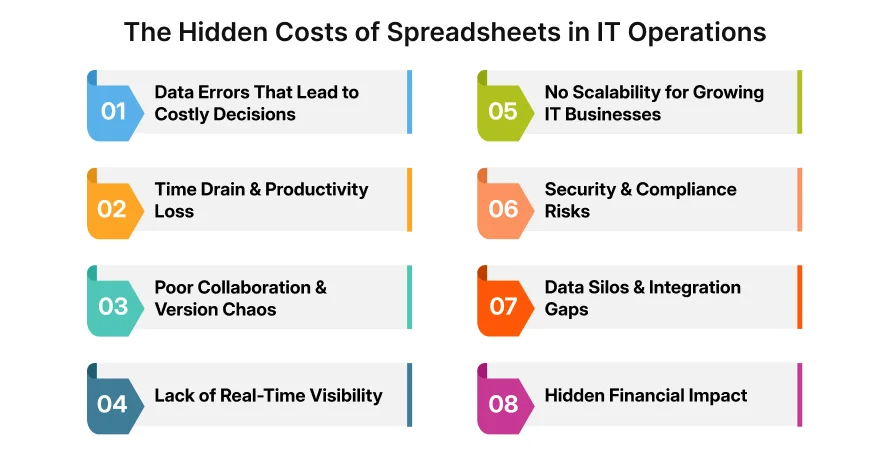
In the following sections, we break down the most critical hidden costs that IT businesses face when relying heavily on spreadsheets.
Cost #1: Data Errors That Lead to Costly Decisions
One of the biggest risks of using spreadsheets in IT operations is the high likelihood of data errors. Whether it’s a broken formula, an incorrect data entry, or a copy-paste mistake, even small errors can have significant consequences.
Unlike modern systems, spreadsheets lack built-in validation, automation, and safeguards. This means errors often go undetected, and once they exist, they can easily spread across multiple sheets and reports.
For decision-makers, this creates a serious problem: decisions are only as good as the data behind them.
Inaccurate data can lead to:
- Misguided financial forecasts
- Incorrect resource allocation
- Faulty sales projections
- Poor strategic decisions
In fast-moving IT environments, even minor discrepancies can snowball into larger operational issues.
Cost #2: Time Drain & Productivity Loss
Spreadsheets don’t just risk errors; they quietly consume time across your organization.
What seems like a simple tool often requires hours of manual effort to keep things running. Teams spend significant time updating data, fixing formulas, consolidating multiple sheets, and verifying accuracy. As operations grow, this effort multiplies.
For IT businesses, where speed and execution are critical, this becomes a serious bottleneck.
Instead of focusing on strategic work, teams get pulled into repetitive tasks like:
- Manual data entry and updates
- Reconciling data across multiple sheets
- Generating reports from scratch
- Fixing inconsistencies and errors
Cost #3: Poor Collaboration & Version Chaos
As IT businesses grow, collaboration becomes more complex, and spreadsheets often fail to keep up.
What starts as a single file quickly turns into multiple versions shared across teams. Files get duplicated, edited simultaneously, or saved under different names. Before long, no one is certain which version is accurate or up to date.
This creates a common scenario:
- Different teams are working on different versions of the same data
- Conflicting reports in meetings
- Time wasted verifying “which file is correct?”
Cost #4: Lack of Real-Time Visibility
Spreadsheets lack real-time visibility because they depend on manual updates and static data.
This limitation leads to:
- Delayed decision-making
- Missed opportunities in sales or operations
- Reactive problem-solving instead of proactive planning
For example, a delay in updating a sales sheet could mean leadership is reviewing inaccurate pipeline numbers. Similarly, outdated project data can lead to missed deadlines or poor planning.
Find the Complete Guide to Resource Planning Process: Step-by-Step
In contrast, modern IT operations require live dashboards and instant access to accurate data across teams.
Without real-time visibility, businesses are essentially making decisions in the past, while competitors operate in the present.
Cost #5: No Scalability for Growing IT Businesses
Spreadsheets work well in the early stages of a business, but they begin to break down as complexity increases.
As IT companies grow, so do their data volumes, workflows, and team dependencies. What was once a simple spreadsheet turns into a network of interconnected files, tabs, and manual processes that are difficult to manage and even harder to scale.
Spreadsheets were never designed to handle:
- Large datasets across multiple teams
- Complex workflows and approvals
- Cross-functional dependencies
- High-frequency updates
Cost #6: Security & Compliance Risks
Data security becomes increasingly critical as IT businesses grow and spreadsheets introduce significant risks in this area.
Spreadsheets are easy to share, download, and duplicate. Without strict access controls, sensitive data can quickly end up in the wrong hands. Whether it’s financial data, employee information, or customer records, the lack of structured security makes spreadsheets vulnerable.
Additionally, spreadsheets offer limited audit capabilities. It’s often difficult to track:
- Who accessed the data
- What changes were made
- When those changes occurred
Cost #7: Data Silos & Integration Gaps
Spreadsheets create data silos because they do not integrate seamlessly with other business systems.
This leads to:
- Inconsistent data across departments
- Time-consuming manual syncing
- Limited visibility into overall business performance
Without integration, decision-makers lack a complete and accurate picture. Insights become fragmented, and strategic alignment becomes harder to achieve.
In contrast, modern operations rely on interconnected systems where data flows automatically, eliminating silos and improving accuracy.
Cost #8: Hidden Financial Impact
The most overlooked cost of spreadsheets is their direct impact on the bottom line.
While spreadsheets themselves appear inexpensive, the inefficiencies they introduce translate into real financial losses over time.
These costs show up in ways that are easy to miss:
- Lost deals due to delayed or inaccurate sales data
- Poor resource allocation leading to wasted budgets
- Inefficient processes increase operational costs
- Missed opportunities due to a lack of timely insights

Signs Your IT Business Has Outgrown Spreadsheets
Most IT businesses don’t make a conscious decision to rely on spreadsheets; they simply evolve into it. The real challenge is recognizing when those spreadsheets stop supporting growth and start slowing it down.
For C-suite executives and decision-makers, the shift is subtle but critical. What once felt efficient begins to create friction across teams, processes, and decision-making.
Here are the most common signs your business has outgrown spreadsheets:
- Reporting takes too long
Teams spend hours or even days compiling reports instead of accessing insights instantly
- Data cannot be fully trusted
Frequent errors, inconsistencies, or mismatched numbers across reports
- Too many versions of the same file
Confusion over which version is accurate leads to delays and misalignment
- Dependency on specific individuals
Only certain team members understand or manage critical spreadsheets
- Data is scattered across tools and files
No centralized view of operations, making it difficult to make informed decisions
What Modern IT Operations Need Instead of Spreadsheets?
Modern IT operations need centralized, real-time, and automated systems to function efficiently at scale.
Here are the core capabilities growing IT businesses should prioritize:
- Centralized Data System
A single source of truth where all business data- sales, projects, HR, and finance- lives in one place, eliminating duplication and inconsistencies
- Real-Time Dashboards
Live visibility into key metrics, enabling faster and more informed decision-making without waiting for manual reports
- Workflow Automation
Automation of repetitive tasks such as data updates, approvals, and notifications, reducing manual effort and human error
- Cross-Team Collaboration
Seamless coordination across departments with shared visibility and aligned data
- Role-Based Access Control
Secure access to data based on roles and responsibilities, ensuring both usability and compliance
- Seamless Integrations
Ability to connect with other tools and systems, ensuring smooth data flow across the organization
The shift here is fundamental: eliminating the hidden cost of using disconnected multiple software tools and spreadsheets, and moving to integrated systems that run the business.
For decision-makers, this isn’t just a technology upgrade; it’s an operational upgrade that directly impacts speed, accuracy, and scalability.
How to Fix the Spreadsheet Problem (Step-by-Step Approach)
The best way to fix spreadsheet dependency is to gradually replace it with a centralized and automated system.
Here’s a practical, step-by-step approach:
1. Audit Current Spreadsheet Usage
Start by identifying where and how spreadsheets are being used across your organization.
Look for:
- Critical processes dependent on spreadsheets
- High-risk areas like finance, sales forecasting, or project tracking
- Files that are frequently updated or shared
This step helps uncover inefficiencies and hidden dependencies.
2. Identify Critical Workflows
Not all spreadsheets need immediate replacement. Focus on high-impact workflows such as:
- Sales pipeline management
- Project health monitoring and delivery
- HR operations and employee data
- Financial planning and reporting
Prioritizing these areas ensures maximum ROI from your transition.
3. Eliminate Duplication & Silos
Consolidate scattered data across teams and remove redundant files.
This includes:
- Merging duplicate datasets
- Standardizing data formats
- Aligning teams on a single data structure
The goal is to reduce confusion and create consistency.
4. Move to a Centralized Platform
Replace fragmented spreadsheets with a unified system that connects your business functions.
Instead of managing separate tools for sales, projects, and HR, a centralized platform brings everything into one place, creating a single source of truth.
5. Automate Repetitive Processes
Identify manual tasks that consume time and automate them.
Examples include:
- Data updates and syncing
- Task assignments and approvals
- Notifications and reporting
Automation reduces errors and frees up teams to focus on strategic work.
6. Enable Real-Time Reporting
Shift from static reports to live dashboards that update automatically.
This allows leadership to:
- Monitor performance in real time
- Make faster decisions
- Respond proactively to issues
Fixing spreadsheet dependency isn’t just about replacing a tool; it’s about building a more efficient and scalable way to run your business
Conclusion: From “Managing Sheets” to “Running a Business”
Spreadsheets may help you get started, but they’re not built to support growing IT operations. As complexity increases, they introduce errors, slow down decisions, and limit visibility.
For business leaders, the shift is simple: move from managing data in spreadsheets to running operations on integrated systems.
The result is greater clarity, faster decision-making, and a foundation that scales with your business.
Key Benefits of Using Unified Platforms like CollabCRM
CollabCRM is an all-in-one platform to manage business operations. As your business transitions from spreadsheets, CollabCRM offers a more scalable and efficient alternative, bringing multiple functions into a single unified system.
Here’s what that shift enables:
- Single Source of Truth- All business data across employees, projects, reporting, sales & CRM- is centralized, eliminating inconsistencies and duplication.
- Real-Time Visibility– Live dashboards provide instant insights across sales, projects, HR, and invoicing.
- Improved Collaboration– Teams work on the same system with shared data and clear ownership
- Faster Decision-Making– Accurate, up-to-date information allows leaders to act quickly and confidently
- Scalable Operations– Systems grow with your business, supporting more users, data, and complexity without breaking
Instead of managing multiple spreadsheets and disconnected tools, businesses can run their entire operations from one platform, creating clarity, control, and efficiency.
FAQs
Spreadsheets are not inherently bad; they are useful for simple tasks and early-stage operations. However, they become inefficient and risky when used to manage complex, large-scale business processes.
A company should move beyond spreadsheets when:
• Data errors become frequent
• Reporting takes too long
• Teams struggle with version control
• Decision-making is delayed due to a lack of real-time visibility
Modern alternatives include unified business platforms that combine CRM, project management, HR, and reporting into a single system- offering automation, real-time data, and better collaboration.
Unified platforms eliminate manual work, reduce errors, and provide real-time insights. This helps teams move faster, stay aligned, and make better decisions.
Yes. Even small businesses can benefit by improving efficiency, reducing manual work, and setting a strong foundation for future growth.
The biggest risks include data errors, lack of real-time visibility, poor collaboration, and security vulnerabilities. These issues can lead to delayed decisions and financial losses.
Spreadsheets fail because they operate in silos. They don’t provide a unified view across departments like sales, HR, and finance, making coordination and decision-making difficult.
The transition timeline depends on business size and complexity. However, most organizations can start seeing improvements within weeks by migrating critical workflows first.