
You post a job on Monday. By Friday, you have 300 applications and one recruiter to sort through them. This is the reality for most hiring teams today, and it’s exactly the problem an applicant tracking system was built to solve.
If you’ve ever typed “what is ATS” into a search bar or wondered how big companies manage to review thousands of resumes without losing their minds, this guide is for you. We’ll cover what an applicant tracking system does, how it works behind the scenes, why so many companies rely on one, and how to pick the right applicant tracking software for your team and build a more structured recruitment policy.
TL;DR: Key Takeaways
- An applicant tracking system (ATS) is software that helps HR teams post jobs, collect and organize applications, screen candidates, and manage hiring from one place.
- More than 90% of employers use some form of applicant tracking software to make an initial cut of candidates, according to a 2021 Harvard Business School and Accenture study.
- An ATS does not “reject” people on its own. It applies filters and rules that recruiters set, which is why poorly configured criteria can screen out good candidates.
- The average cost per hire in the U.S. is about $4,700 as per SHRM’s Human Capital Benchmarking Report. A well-run ATS helps bring both numbers down.
- Companies of every size use an ATS: startups, staffing agencies, and large enterprises alike, though the features they need differ.
- The best applicant tracking systems today go beyond hiring. Platforms like CollabCRM combine ATS functionality with the rest of your HR and business operations.
What is an Applicant Tracking System (ATS)?
An applicant tracking system, or ATS, is software that manages the recruitment process from job posting to hire. Think of it as the command center for hiring. Instead of a recruiter juggling resumes in email inboxes and spreadsheets, an ATS pulls everything into one dashboard: open roles, applicants, resumes, interview notes, and hiring status.
So what is ATS in simpler terms? It’s the recruiting equivalent of a CRM. A CRM helps sales teams track leads through a pipeline. An ATS helps recruiters track candidates through a hiring pipeline, from “applied” to “hired.”
You’ll also see this called application tracking system or applicant tracking software. All three phrases point to the same category of tool, and people search for each version, so we’re using them interchangeably here too.
How Does an Applicant Tracking System Work?
An ATS works by automating the repetitive parts of recruitment while keeping humans in control of the actual decisions. Modern recruitment management software can bring many of these activities into a single workflow. Here’s the typical flow, step by step.
- Job requisition and posting: A hiring manager creates a job requisition, and the ATS pushes the listing to the company career page and external job boards at once.
- Application collection and resume parsing: As applications come in, the ATS pulls structured data out of each resume, name, experience, education, skills, and stores it in a searchable candidate profile.
- Screening and ranking: The system compares each application against the criteria the recruiter has set, such as required skills, years of experience, or keywords from the job description, and ranks or flags candidates accordingly.
- Candidate communication: Automated emails keep applicants updated on their status, while recruiters message shortlisted candidates directly from the platform.
- Interview scheduling and collaboration: Interviewers get calendar invites, leave feedback, and score candidates in one shared space instead of scattered emails.
- Offer and handoff: Once a candidate is selected, the ATS generates the offer letter and, in more advanced platforms, hands the new hire’s data off to onboarding and HR systems automatically. Teams can then use an employee onboarding checklist to make sure everything is ready before the new hire’s first day.
- Reporting and analytics: Throughout the process, the ATS tracks metrics like time to fill, source of hire, and drop-off rates so HR teams can see what’s working.
It’s worth being clear about one thing here: an ATS does not decide who gets hired. It organizes and filters based on rules a human sets. That distinction matters, and we’ll come back to it.
Key Features of Applicant Tracking Software
Not every ATS looks the same, but most reliable platforms share this core feature set.
- Resume parsing and candidate database: Automatically extracts resume data and builds a searchable talent pool you can revisit for future openings.
- Job posting distribution: Publishes a listing to multiple job boards and your careers page from a single form.
- Keyword and skills-based search: Lets recruiters filter thousands of applications down to a shortlist in seconds.
- Interview scheduling: Syncs with calendars and removes the back-and-forth emails to lock in interview slots.
- Collaborative hiring tools: Shared scorecards, notes, and ratings so hiring managers and interviewers stay aligned.
- Candidate portal: Gives applicants a way to check their application status without emailing the recruiter.
- Reporting and analytics: Dashboards for time to fill, cost per hire, source effectiveness, and pipeline health.
- Compliance and data security: Helps HR teams stay aligned with data protection and equal opportunity hiring requirements.
- Integrations: Connects with HRMS, payroll, background check vendors, and video interview tools so data doesn’t have to be re-entered.
Who Uses an Applicant Tracking System?
ATS platforms serve a wide range of users, though the priorities shift depending on who’s using it.
Corporate HR teams
In-house HR and talent acquisition teams use an ATS to manage hiring for their own organization, post openings on the company careers page, run employee referral programs, and screen candidates against role requirements.
Staffing and recruitment agencies
Agencies place candidates with multiple clients at once. Their ATS needs to handle high application volume, client-specific pipelines, and fast candidate-to-client matching.
Startups and small businesses
Smaller teams often don’t have a dedicated recruiter. A simple ATS keeps a handful of open roles organized without adding administrative overhead.
Enterprises and IT companies
Larger organizations, especially IT and software companies hiring across multiple departments and locations, need an ATS that can scale, integrate with existing HR systems, and support structured, compliant hiring at volume.
Benefits of Using an Applicant Tracking System
The case for an ATS comes down to time, cost, and consistency.
- Faster hiring: Automating job posting, parsing, and initial screening cuts down the manual hours recruiters spend per hire.
- Lower cost per hire: SHRM’s Human Capital Benchmarking Report puts the average U.S. cost per hire at roughly $4,700. Reducing manual admin work and agency dependence through an ATS helps bring that number down.
- Better candidate experience: A clear application process and timely updates make a company look organized, which matters to candidates deciding between offers.
- Centralized data: Every resume, note, and interview score lives in one place instead of scattered inboxes, so nothing gets lost when a recruiter is sick or leaves the company.
- Data-backed hiring decisions: Reporting on time to fill, source of hire, and pipeline drop-off helps HR leaders spot bottlenecks instead of guessing.
- More consistent, standardized screening: Using the same criteria for every applicant reduces the risk of inconsistent, ad hoc decisions creeping into the process.
Common ATS Myths, Debunked
A lot of what people believe about applicant tracking systems isn’t quite accurate. Two claims come up constantly, so let’s set the record straight.
Myth: “75% of resumes are rejected by ATS before a human sees them.”
This number gets repeated everywhere, but it traces back to an old, unverified source and has been widely disputed by HR researchers. What’s actually true is more nuanced, and it comes from real research.
What the research actually shows
A 2021 study by Harvard Business School and Accenture, titled “Hidden Workers: Untapped Talent,” surveyed more than 2,250 executives and over 8,000 workers across the U.S., U.K., and Germany. It found that more than 90% of employers use some kind of applicant tracking or recruiting system to make an initial cut of candidates.
It also found that 88% of employers agreed that qualified, higher-skilled candidates sometimes get filtered out simply because their resumes don’t exactly match the wording of the job description.
The key detail people miss: this filtering happens because of criteria a recruiter configured, like a hard cutoff on employment gaps or a specific keyword requirement, not because the software is randomly discarding applications. The same research estimated that around 27 million U.S. workers fall into this “hidden worker” category, qualified people who get screened out before anyone reviews their application.
The takeaway for hiring teams: an ATS is only as fair or effective as the rules you build into it. Loose, overly rigid filters cost you good candidates. Thoughtful, skills-based criteria don’t.
How to Choose the Right Applicant Tracking System
Picking an ATS is less about finding the flashiest tool and more about matching software to how your team actually hires. Run through this checklist before you commit.
- Know your hiring volume: A five-person startup and a 500-person enterprise need very different levels of complexity.
- Map your existing workflow: Understand how candidates move through your pipeline today before you try to force that process into new software.
- Check integration options: Your ATS should connect cleanly with your HRMS, payroll, and background check tools, not create another data silo.
- Test ease of use: If recruiters and hiring managers find it clunky, they’ll work around it, and you’ll lose the value of having it at all.
- Confirm mobile access: Hiring managers review candidates between meetings, often from a phone, so mobile usability isn’t optional anymore.
- Review data security and compliance support: Recruitment data is sensitive. Make sure the platform supports the data protection and compliance standards your business operates under.
- Look at total cost, not just the sticker price: Factor in implementation time, training, and any per-user fees before comparing platforms.
ATS vs. HRMS vs. CRM: What’s the Difference?
These three tools often get lumped together, but they solve different problems.
- ATS (Applicant Tracking System): Manages the hiring process, from job posting to offer letter.
- HRMS (Human Resource Management System): Manages employees after they’re hired, covering payroll, attendance, performance, and benefits.
- CRM (Customer Relationship Management): Manages relationships with customers and prospects, not candidates.
Historically, companies bought all three as separate tools that didn’t talk to each other. That’s changing. More businesses now look for a single platform that covers hiring, HR, and operations together, including employee lifecycle management, which is exactly the gap CollabCRM was built to close.
CollabCRM: A Smarter Applicant Tracking System for IT Companies
Most standalone ATS tools solve hiring and stop there. Once a candidate becomes an employee, you’re back to juggling a separate HRMS, a separate project management tool, and a separate payroll system, each with its own login and its own data.
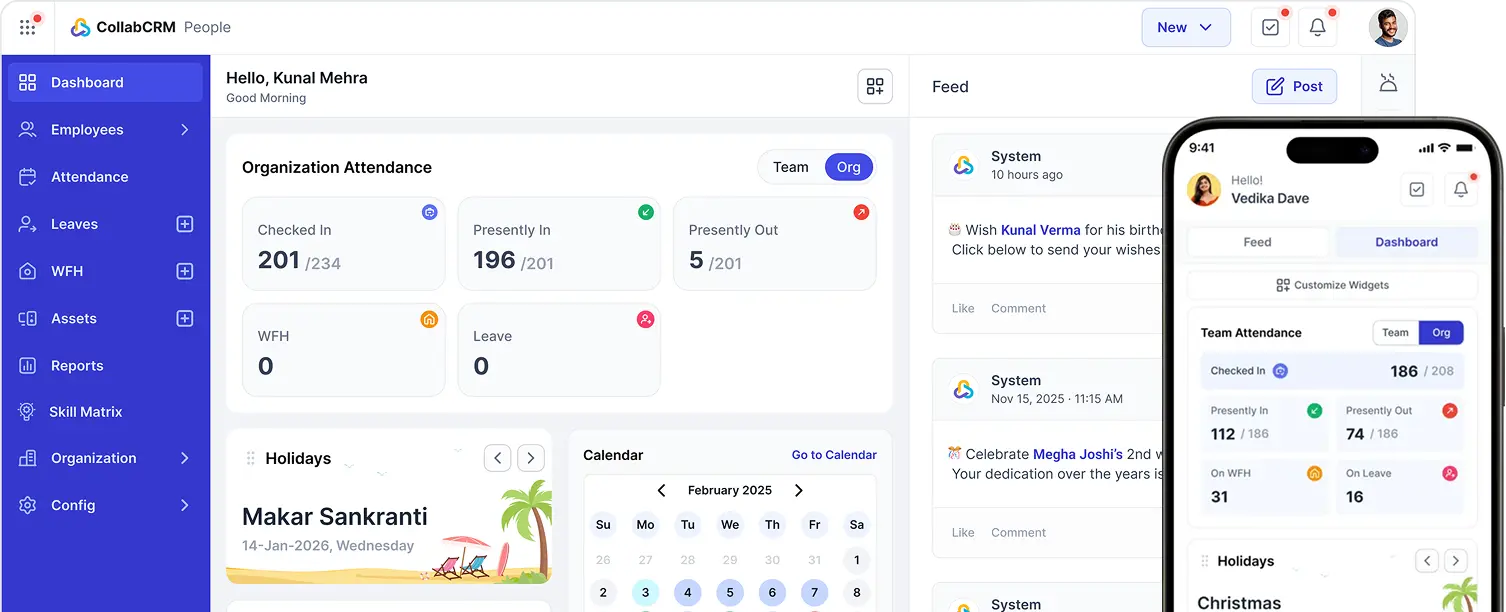
CollabCRM takes a different approach. It’s a business operating system built specifically for IT companies, and applicant tracking is one part of a connected system that also covers HR, project management, and payroll. Its human resource management platform connects recruitment with the broader employee journey.
With CollabCRM, a candidate’s information doesn’t disappear into a different tool the moment they’re hired. It flows directly into onboarding, HR records, and project staffing, all inside the same platform your team already works in. For IT companies scaling their hiring while also managing distributed teams and multiple client projects, that connection saves the kind of manual re-entry and data mismatch that standalone ATS tools can’t avoid.
If you’re evaluating applicant tracking software and want hiring to plug directly into the rest of how your company runs, CollabCRM is worth a look.
Wrapping Up: Is an ATS Worth It?
An applicant tracking system isn’t just a filter that stands between recruiters and candidates. Used well, it’s the infrastructure that lets a hiring team move faster, stay organized, and make decisions based on data instead of gut feel. Used carelessly, with rigid filters and no oversight, it can quietly cost you strong candidates.
The fix isn’t avoiding ATS software. It’s choosing a platform that fits how your team actually hires, setting screening criteria that reflect real skills instead of arbitrary keywords, and picking a system that connects to the rest of your HR and business operations rather than sitting off on its own.
Frequently Asked Questions
It’s software that helps HR teams post jobs, collect resumes, screen candidates, and manage the hiring process from one place instead of using email and spreadsheets.
An ATS is used to organize job applications, screen candidates against role requirements, schedule interviews, and track hiring metrics like time to fill and cost per hire.
Not exactly. An ATS focuses on tracking applicants through the hiring pipeline. Recruiting software is broader and often includes additional features like sourcing, candidate relationship management, and email marketing on top of ATS functionality.
No. An ATS applies filters and ranking rules that a recruiter configures. It doesn’t make hiring decisions on its own, and it doesn’t reject resumes without criteria a human has set up in advance.
There’s no universal signal, since every company configures its ATS differently. The most reliable approach is matching your resume’s language closely to the job description and using a clean, standard format the software can parse correctly.
It depends on hiring volume. A business filling one or two roles a year may manage fine without one, but any team hiring regularly benefits from the organization and time savings an ATS provides.
Pricing varies widely based on company size, number of users, and features, ranging from lightweight tools for small teams to enterprise platforms with custom pricing. It’s best to request quotes directly from vendors for an accurate estimate.
Most modern ATS platforms support integrations with HRMS and payroll tools. Some platforms, like CollabCRM, build hiring, HR, and payroll into a single connected system instead of requiring separate integrations.
An ATS manages candidates through the hiring process. A CRM manages relationships with customers and prospects. Some modern platforms combine ATS functionality with broader business tools, but the two solve different core problems.
If your current system creates more manual work than it saves, doesn’t integrate with your other tools, or can’t scale with your hiring volume, switching is usually worth evaluating. Map your workflow needs first, then compare platforms against that list.




 Priority Onboarding