

Hiring is no longer a process that HR can manage through spreadsheets, inboxes, and scattered interview notes. For IT companies, recruitment directly affects delivery capacity, project timelines, client commitments, and revenue growth.
Before teams can manage hiring efficiently, they also need a clear recruitment policy that defines how candidates are sourced, assessed, selected, and hired.
A recruitment management system brings the hiring journey into one structured workflow. It helps teams create jobs, manage candidates, coordinate interviews, collect feedback, release offers, and move selected candidates toward onboarding without losing visibility at any stage.
For technology businesses, the value goes beyond faster hiring. A well-designed recruitment management software helps HR, recruiters, interviewers, delivery leaders, and management work from the same data. That means fewer delays, more consistent evaluations, and clearer hiring decisions.
TL;DR: Key Takeaways
- A recruitment management system centralizes job creation, candidate tracking, interview coordination, evaluations, offers, and recruitment reporting.
- It replaces disconnected spreadsheets, email threads, manual follow-ups, and inconsistent feedback processes with a visible hiring workflow.
- This matters because hiring remains difficult. SHRM reported that 56% of recruiting executives identified talent shortages as a challenge in 2025. Its research also found a median time-to-fill of roughly one and a half months for both executive and non-executive positions.
- The best recruitment management software supports structured hiring, not just applicant storage. It should help teams define roles, track stage movement, schedule interviews, capture scorecards, automate offers, and analyze bottlenecks.
- IT companies need extra control over technical evaluation, multi-round interviews, recruiter accountability, and coordination between HR, delivery managers, and interview panels.
- CollabCRM is designed for in-house IT recruitment. Its Recruitment Module supports job and candidate management, multi-round interview scheduling, role-specific scorecards, offer-letter automation with DigiSign, pipeline analytics, and a connected move from hiring to onboarding.
What is a Recruitment Management System?
A recruitment management system, also called RMS, is software that helps organizations plan, manage, track, and improve their recruitment process from job opening to a candidate’s joining process.
It acts as a central workspace for everyone involved in hiring. Instead of candidate details sitting across spreadsheets, emails, calendars, and individual recruiter files, the recruiting team works from a shared system.
A typical recruiting management system helps organizations manage:
- Job requisitions and open positions
- Job descriptions and role requirements
- Candidate applications and profiles
- Recruitment stages and status changes
- Resume review and candidate shortlisting
- Interview scheduling and panel coordination
- Role-based interview scorecards
- Candidate communication and follow-ups
- Offer creation, approval, signing, and tracking
- Hiring metrics, source performance, and pipeline reports
- Candidate handover from recruitment to onboarding
In simple terms, an RMS turns recruitment from a series of disconnected tasks into a measurable business process.
Recruitment management system example
Consider an IT company hiring five software developers for a new client project.
Without a centralized system, the recruiter may receive resumes through job portals, referrals, LinkedIn, and email. Interview feedback may come through Slack, WhatsApp, or separate documents.
The hiring manager may not know which candidates are awaiting review. A selected candidate may wait days for an offer because the approval process is unclear.
With a recruitment management system, the recruiter can create the job, assign ownership, define the required skills, add candidates, schedule technical rounds, collect structured panel feedback, move selected candidates toward offers, and see exactly where the process is delayed.
That visibility is the core value of recruitment management software.
Why Recruitment Management Software Matters in 2026
Hiring teams are expected to fill roles faster while maintaining quality, fairness, candidate experience, and operational discipline. This is particularly demanding in IT, where businesses often compete for developers, testers, cloud specialists, data professionals, project managers, and niche technical talent.
The external hiring environment remains challenging. According to SHRM’s 2025 recruiting research, 51% of organizations reported too few applicants, 50% struggled with losing talent to competitors, and 41% cited increased candidate ghosting.
These issues create real operational risks:
- A delayed hire can postpone project onboarding.
- A missed interview feedback deadline can cost a high-quality candidate.
- A poor handoff between recruitment and HR can create a weak joining experience.
- Inconsistent scorecards can lead to unclear or difficult-to-defend hiring decisions.
- Untracked sourcing data can lead to repeated spending on channels that do not deliver strong candidates.
A recruitment management system helps teams respond to these challenges with structure. It does not replace recruiter judgment or hiring-manager expertise. Instead, it removes unnecessary friction around coordination, documentation, follow-ups, and reporting.
Recruitment is a business process, not only an HR task
For an IT company, recruitment is connected to more than headcount.
It affects:
- Project staffing and delivery readiness
- Billable capacity planning
- Bench management
- Client commitments
- Resource allocation
- Team productivity
- Revenue opportunities
- Employee workload and burnout risk
This is why a modern recruiting management system should give relevant stakeholders the right information at the right time. Recruiters need pipeline control. Interviewers need schedules, resumes, and scorecards. Leaders need visibility into open roles, hiring velocity, bottlenecks, and source quality.
How a Recruitment Management System Works
A strong RMS supports the full recruitment lifecycle. The exact workflow differs by organization, but most structured hiring processes follow the stages below.
1. Create and approve the job opening
The process begins when a department identifies a hiring need.
The recruiter or hiring manager creates a job record that can include:
- Job title and department
- Employment type
- Required experience
- Technical and functional skills
- Number of open positions
- Recruiter ownership
- Hiring priority
- Expected joining date
- Interview rounds
- Evaluation criteria
This creates a clear starting point. It also ensures the recruiter, interviewer, hiring manager, and leadership team understand what the business needs before sourcing begins.
2. Build a structured candidate pipeline
Once the role is active, recruiters add candidates from different sources, such as referrals, job portals, career pages, direct outreach, agencies, or internal databases.
Candidates are then moved through defined stages. For example:
- Application received
- Recruiter screening
- Technical assessment
- Technical interview
- Managerial interview
- HR discussion
- Offer released
- Offer accepted
- Joined
A structured pipeline gives teams a real-time view of every candidate. It also reduces the risk of candidates being forgotten after an interview or left waiting for an update.
3. Schedule and coordinate interviews
Interview scheduling often creates avoidable delays. Recruiters must coordinate candidate availability, interviewer calendars, meeting links, reminders, rescheduling, and panel feedback.
A recruitment management system makes this process easier by keeping interview details in the candidate record and supporting multi-round interview scheduling, panel coordination, online or offline interview modes, calendar invitations, and virtual meeting links.
For IT teams, this is especially valuable because a candidate may need to complete several evaluation rounds involving technical specialists, project managers, engineering leaders, and HR.
4. Evaluate candidates consistently
A resume alone does not provide enough evidence to make a hiring decision. This is where structured scorecards matter.
Role-specific scorecards help interviewers evaluate candidates using defined criteria. For a software engineer, this may include programming fundamentals, debugging ability, system design, framework knowledge, communication, collaboration, and problem-solving.
Consistent scorecards improve decision quality because they make feedback more comparable. They also prevent hiring teams from relying only on vague comments such as “good candidate” or “not a culture fit.”
A sound process should focus evaluations on the skills and competencies that are genuinely relevant to the job.
5. Make decisions and manage offers
Once the team selects a candidate, the recruitment management system should make the offer process visible and trackable.
This can include:
- Offer-letter generation
- Approval coordination
- Digital signing
- Offer status tracking
- Accepted and declined offer reporting
- Tentative joining date capture
The goal is simple: reduce the gap between selection and offer acceptance. A slow or unclear offer process can weaken the candidate experience and create room for competing employers to act first.
6. Move selected candidates toward onboarding
Recruitment does not end at offer acceptance.
After a candidate accepts an offer, HR, IT, admin, reporting managers, and project teams may need to prepare documents, assets, accounts, access, orientation, and role readiness through a structured employee onboarding checklist.
A connected platform reduces duplicate data entry and gives the next team the information needed to prepare for the new hire.
Essential Recruitment Management System Features
Not every recruitment management software is equally useful. A basic system may store candidate records, while a comprehensive RMS helps teams manage the actual work of hiring.
Here are the essential features to evaluate.
Centralized job and candidate management
A recruiting management system should provide one place to manage jobs, candidates, recruiters, interview stages, and hiring activity.
Look for capabilities such as:
- Open, draft, and closed job status tracking
- Candidate profiles and searchable records
- Candidate filtering and sorting
- Stage-wise status tracking
- Recruiter ownership and reassignment
- Candidate timelines and activity history
- Bulk candidate imports for high-volume hiring
Centralization improves visibility and reduces time spent searching across tools.
Customizable recruitment workflows
Every organization has a different hiring process. A sales role, software engineer role, HR role, and leadership role may each require different interview stages and evaluation criteria.
The system should allow teams to define workflows that reflect their real hiring process. This is particularly important for IT firms managing technical screening, coding assessments, peer reviews, client rounds, and managerial discussions.
Interview scheduling and panel coordination
Recruiters should not need to manage every interview through long email chains.
A useful RMS should support:
- Multiple interview rounds
- Panelist assignment
- Interview dates and times
- Interview mode selection
- Rescheduling
- Meeting links for virtual interviews
- Calendar invitations
- Feedback reminders
Role-specific scorecards
Structured evaluation should be a priority for enterprise hiring teams.
A good recruitment management system allows organizations to create scorecards based on the role. This helps interviewers assess candidates using consistent criteria and helps decision-makers compare feedback more objectively.
For IT roles, scorecards can be designed around the relevant technical requirements rather than using one generic form for every position.
Offer-letter automation
The offer stage should be fast, documented, and easy to track.
Look for offer management capabilities that support templates, approval workflows, digital signing, offer status tracking, and joining-date updates.
Recruitment dashboards and analytics
Recruitment data should help teams improve, not simply document activity.
Useful reports and dashboards may include:
- Open jobs and vacancies
- Candidate count by stage
- Stage conversion rates
- Average time spent in each stage
- Candidate drop-off points
- Offer acceptance rates
- Source performance
- Recruiter activity and performance
- Interview feedback completion
- Hiring trends over time
Role-based access and audit visibility
Recruitment involves sensitive candidate information. Recruiters, interview panels, department heads, and leadership teams do not all need the same access.
Role-based access helps protect data while keeping each stakeholder focused on the tasks relevant to them. Candidate and job histories also support transparency by showing stage changes, interviews, and decision points.
Benefits of a Recruitment Management System
The benefits of recruitment management software are not limited to automation. The real impact comes from making hiring more visible, repeatable, and measurable.
Faster movement through the hiring pipeline
When job creation, candidate tracking, interview scheduling, feedback collection, and offer management happen in one system, recruiters can identify delays earlier.
For example, if candidates are waiting too long after technical interviews, the team can see the pending feedback and act before the candidate loses interest.
SHRM’s 2025 research places median time-to-fill at roughly a month and a half. That benchmark shows why reducing avoidable internal delays matters, especially for high-demand roles.
Better recruiter and hiring-manager collaboration
Recruitment often slows down because responsibility is unclear. Recruiters may wait for hiring-manager feedback, while interviewers may not know which feedback is pending.
A shared dashboard, candidate timeline, scorecard, and reminder system give every stakeholder a clearer view of their responsibilities.
More consistent hiring decisions
Structured scorecards help teams evaluate candidates against role-specific requirements. This improves consistency across interviewers and creates clearer documentation for final hiring decisions.
It is also a better practice than relying only on informal notes, memory, or unstructured opinions.
Improved candidate experience
Candidates notice when hiring processes are disorganized.
Late interview confirmations, repeated requests for the same information, unclear next steps, and long waiting periods can damage an employer’s reputation. These are among the common HR and recruitment mistakes that can weaken both candidate trust and long-term hiring outcomes.
A recruiting management system helps teams maintain timely communication, reliable scheduling, and transparent candidate status handling.
This does not mean every candidate needs a personal call after every stage. It means the organization should have a deliberate communication process rather than an accidental one.
Stronger source and funnel insights
Recruiters need to know more than how many applications they received. They need to understand which sources bring relevant candidates, which stages lose candidates, and where the process needs improvement.
For example, if referral candidates consistently progress further than job-board candidates, the company can examine whether the referral program deserves more investment. If candidates drop off after the first technical round, the team can assess whether scheduling, evaluation criteria, communication, or interview design needs work.
Easier high-volume recruitment
High-volume recruitment becomes difficult when candidate records are managed manually.
Bulk imports, stage updates, filtering, recruiter ownership, and centralized records help teams manage larger candidate pools without losing control.
Better continuity from recruitment to onboarding
The candidate experience does not reset after the offer is accepted. A connected hiring and onboarding process helps the business prepare before Day 1.
Recruitment Management System vs. Traditional Hiring
Traditional hiring often relies on disconnected tools. A job may be listed in one place, resumes stored in another, interview schedules managed through calendars, feedback collected by email, and offer documents tracked separately.
This can work for a few occasional hires. It becomes risky when an organization manages multiple roles, departments, locations, recruiters, or interview panels.
| Area | Traditional recruitment process | Recruitment management system |
| Candidate records | Stored in spreadsheets, email folders, or separate files | Centralized candidate profiles and recruitment timelines |
| Job management | Manual job tracking with limited visibility | Structured job records with defined ownership and status |
| Candidate stages | Updated inconsistently or not at all | Real-time stage-wise tracking |
| Interview scheduling | Managed through email chains and individual calendars | Coordinated scheduling, panel invites, and interview records |
| Feedback | Informal notes, messages, or delayed emails | Role-based scorecards and tracked feedback |
| Offer process | Separate documents and manual follow-ups | Offer generation, digital signing, and status tracking |
| Reporting | Time-consuming manual reporting | Pipeline, source, stage, and recruiter analytics |
| Accountability | Difficult to identify who owns the next action | Clear assignments, reminders, and role-based access |
| Candidate experience | Can vary by recruiter or department | More consistent communication and process flow |
| Scalability | Becomes harder as application volume grows | Supports bulk actions, filters, and structured workflows |
The biggest difference is not simply automation. It is operational clarity.
Recruitment Management System vs. ATS
The terms RMS and ATS are often used interchangeably, but they are not always identical.
An applicant tracking system, or ATS, is generally focused on collecting applications and tracking candidates through hiring stages.
A recruitment management system can include ATS functionality, but it typically covers a broader set of workflows. This may include job management, recruiting operations, interview collaboration, scorecards, offer processes, reporting, and connections to onboarding or employee management.
| Capability | Applicant tracking system | Recruitment management system |
| Application collection | Core function | Core function |
| Candidate pipeline tracking | Core function | Core function |
| Resume and candidate management | Usually included | Included |
| Job requisition and hiring workflow | May be available | Typically more comprehensive |
| Interview coordination | May be basic | Often structured for multi-round collaboration |
| Evaluation scorecards | May be available | Often role-specific and workflow-based |
| Offer management | Varies by platform | Common RMS capability |
| Recruitment analytics | Varies by platform | Typically more operational and funnel-focused |
| Recruitment-to-onboarding handoff | Often requires an integration | Can be native in a connected platform |
For buyers, the label matters less than the actual capabilities. Ask whether the system supports the entire hiring process your team uses today and the process it will need as the organization grows.
How to Choose Recruitment Management Software
Choosing a recruitment management system is not about finding the longest feature list. It is about finding a system that solves your actual hiring problems.
Use the following checklist during evaluation.
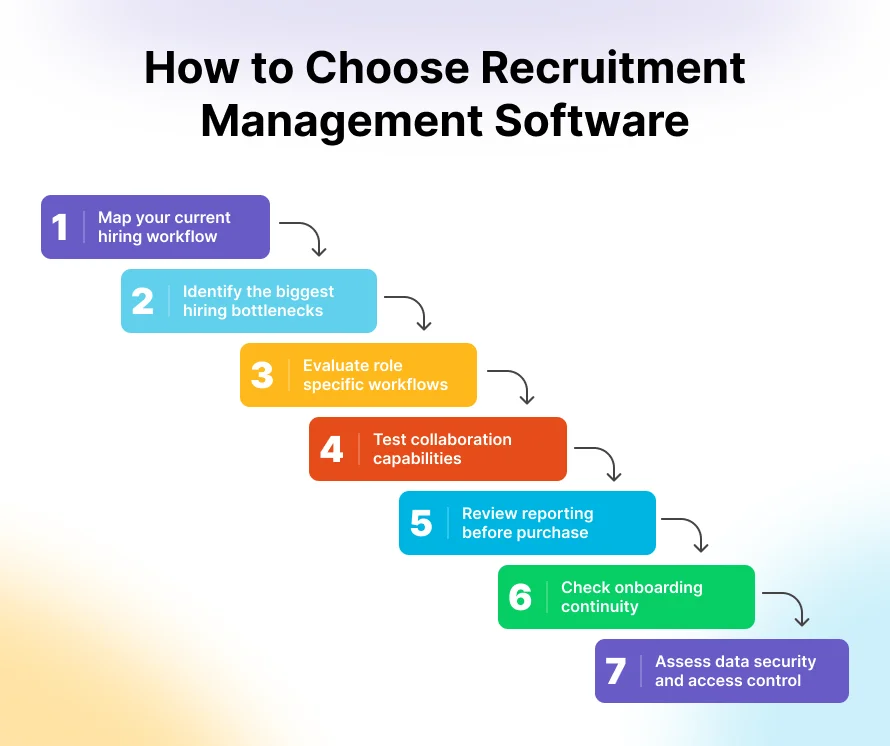
1. Map your current hiring workflow
Document how a role moves from a staffing requirement to a new joiner.
Identify:
- Who requests a new position
- Who approves the job
- Where candidates come from
- How candidates are screened
- How interviews are scheduled
- How feedback is collected
- Who approves offers
- How candidates move into onboarding
This exercise often reveals process gaps before software evaluation even begins.
2. Identify the biggest hiring bottlenecks
Look for recurring issues, such as:
- Delayed interview feedback
- Unclear candidate ownership
- Duplicate candidate records
- Candidate drop-off after interview rounds
- Slow offer approvals
- Poor visibility into job status
- Inability to measure source quality
- Lack of technical evaluation consistency
- Repeated data entry after offer acceptance
Prioritize a system that addresses the bottlenecks with the highest business impact.
3. Evaluate role-specific workflows
A single generic workflow may not be enough for IT organizations.
Ask whether the recruitment management software can support different hiring paths for:
- Junior and senior engineering roles
- Quality assurance positions
- DevOps and cloud roles
- Project and delivery managers
- Sales and business development roles
- Leadership hiring
- Campus or high-volume recruitment
The system should add structure without forcing every role through the same process.
4. Test collaboration capabilities
Ask recruiters, hiring managers, and interviewers to test the system using a real hiring scenario.
Evaluate whether they can:
- Find candidate information quickly
- View relevant interview details
- Access resumes and role requirements
- Submit feedback easily
- See pending actions
- Receive reminders
- Understand candidate movement through the pipeline
Adoption matters. Even the most feature-rich platform will fail if the hiring team finds it difficult to use consistently.
5. Review reporting before purchase
Do not wait until after implementation to assess reporting.
Ask to see dashboards for:
- Candidates by stage
- Time spent in each stage
- Job status
- Source performance
- Offer acceptance
- Candidate drop-offs
- Recruiter workload
- Panel feedback completion
- Hiring trends
Good reporting should help leadership ask better questions, not create more manual reporting work for recruiters.
6. Check onboarding continuity
For IT companies, a hired candidate may need equipment, access credentials, project allocation, orientation, and HR documentation before joining.
Consider whether the recruitment management system connects with your onboarding or employee management process. A connected platform can reduce duplicate data entry and make the transition from candidate to employee smoother.
7. Assess data security and access control
Candidate data is sensitive. Ask about access permissions, audit trails, data handling practices, and the ability to control visibility by role.
Organizations using automated screening tools should also ensure that their hiring process remains fair, job-related, and appropriately documented. Employment discrimination laws still apply to automated selection processes, even where technology is supplied by a third-party vendor.[natlawreview][theaitable]
Why IT Companies Need a Different Recruitment Approach
IT recruitment is usually more complex than filling a general role.
Technology companies often hire for specialized skills, project-specific needs, global client requirements, and fast-changing technical stacks. A candidate may be assessed for coding ability, frameworks, domain expertise, system design, communication, project suitability, and team collaboration.
This makes unstructured recruitment especially costly.
Common IT recruitment challenges
- Multiple interview rounds across technical, managerial, and HR panels
- Delayed feedback from busy engineering leaders
- Difficulty defining consistent technical evaluation criteria
- High candidate competition for niche skills
- Hiring requirements tied to new projects or client deadlines
- Limited visibility into recruiter workload and job progress
- Candidate data split across job portals, spreadsheets, and email threads
- Lack of connection between hiring decisions and workforce planning
A specialized recruitment management system helps solve these issues by making the process visible and repeatable.
The goal is not to make hiring robotic. It is to remove administrative friction so teams can spend more time assessing real capability and candidate fit.
Why CollabCRM Works for IT Recruitment
CollabCRM is a recruitment management system built for IT companies that need a structured, visible hiring process. It helps internal hiring teams manage job openings, candidate pipelines, interviews, evaluations, offers, and recruitment reporting from one workspace. This reduces dependence on spreadsheets, scattered email threads, and disconnected recruitment tools.
IT hiring often involves multiple technical rounds, busy interview panels, role-specific evaluation criteria, and urgent project staffing requirements. CollabCRM supports multi-round interview scheduling, online meeting links through Google Meet and Microsoft Teams, custom job-based scorecards, panel feedback, and automated reminders. This helps recruiters move candidates forward while giving technical teams a clearer way to evaluate skills consistently.
CollabCRM also works as an all-in-one platform for IT operations. It connects recruitment with people management, projects, sales, administration, invoicing, and reporting, creating a connected business operating system for growing IT companies.
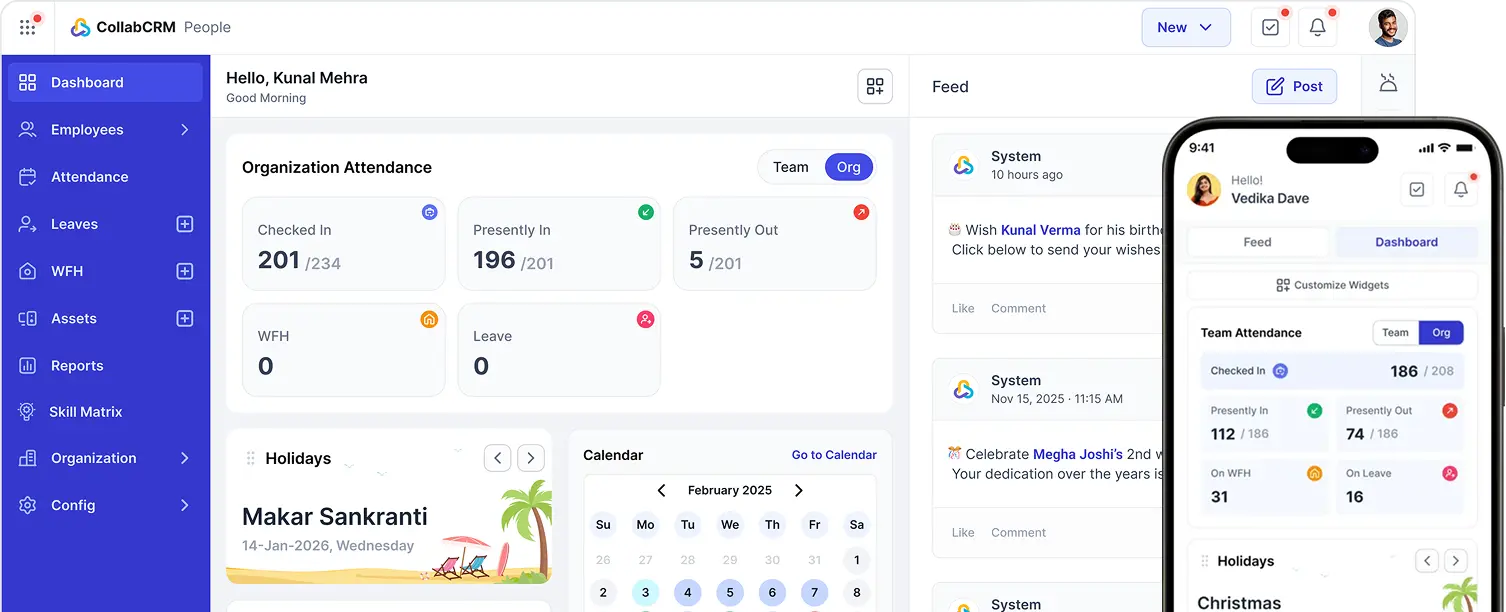
So, once a candidate accepts an offer, their information can move toward onboarding through the People portal, helping teams avoid duplicate entries and prepare for the employee’s first day more efficiently.
Key CollabCRM Recruitment Capabilities
- Job creation, recruiter assignment, and vacancy tracking
- Centralized candidate profiles, timelines, filtering, and stage-wise pipeline tracking
- Bulk candidate imports, status updates, and recruiter ownership transfers
- Multi-round interview scheduling with virtual meeting links
- Custom scorecards for technical and role-specific evaluations
- Interview-panel feedback, follow-up reminders, and deadline visibility
- Offer-letter generation, DigiSign support, and real-time offer acceptance tracking
- Recruitment funnel reports, stage conversion data, source intelligence, and recruiter insights
- Connected handover from recruitment to onboarding and employee lifecycle workflows
Recruitment Management System Implementation Tips
Implementing a new recruiting management system should not begin with importing data. It should begin with process clarity.
1. Standardize the hiring stages
Define the stages each candidate will move through. Keep them clear enough for every recruiter and hiring manager to use consistently.
Avoid creating unnecessary stages. Every additional stage should have a business purpose.
2. Define ownership at every stage
Clarify who owns:
- Job creation
- Candidate screening
- Technical interview coordination
- Feedback submission
- Final selection
- Offer approval
- Candidate communication
- Pre-joining preparation
The system can provide visibility, but ownership must still be clear.
3. Build useful scorecards
Create role-specific scorecards with measurable criteria.
Avoid overly broad questions and vague ratings. Focus on observable evidence related to the role.
For example, instead of asking “Is the candidate technically strong?” use criteria such as “Demonstrates understanding of REST API design” or “Explains trade-offs in database indexing decisions.”
4. Start with priority roles
Do not try to redesign every hiring workflow on Day 1.
Start with a few high-volume or business-critical roles. Learn from recruiter and interviewer feedback, then improve the workflow before expanding it across the organization.
5. Use data to improve the process
Review your funnel and stage-duration reports regularly.
Questions to ask include:
- Which stage takes the longest?
- Where do strong candidates drop out?
- Which sourcing channels create the best outcomes?
- Are interviewers submitting feedback on time?
- Which roles have the lowest offer acceptance rate?
- Are certain recruiters or teams facing workload constraints?
A recruitment management system becomes more valuable when teams use its data to improve the process continuously.
Final Thoughts
A recruitment management system is not simply a digital filing cabinet for resumes. It is a structured way to manage one of the most important business processes in any growing organization: hiring the people who will build, deliver, support, and scale the business.
For IT companies, recruitment needs to move quickly without sacrificing evaluation quality, collaboration, visibility, or candidate experience. The right recruitment management software helps teams create a consistent process from job opening to offer acceptance and beyond.
CollabCRM gives IT companies a connected recruitment workflow with candidate pipelines, multi-round interview scheduling, custom technical scorecards, offer automation, funnel analytics, role-based access, and a smooth transition from recruitment to onboarding.
If your hiring team is still relying on spreadsheets, inboxes, and scattered interview notes, it may be time to build a recruitment process that is easier to manage, easier to measure, and ready to scale.
Frequently Asked Questions
Not always. An ATS primarily tracks applicants and their movement through the hiring pipeline. A recruitment management system may include ATS capabilities but often supports broader workflows such as job management, interview collaboration, evaluation scorecards, offer processes, recruitment analytics, and onboarding handover.
Enterprise teams should look for centralized candidate management, customizable workflows, multi-round interview scheduling, role-specific scorecards, offer automation, source and funnel analytics, role-based access, audit visibility, bulk data actions, and integration or native continuity with onboarding workflows.
It reduces administrative delays by centralizing candidate information, making interview scheduling more organized, sending feedback reminders, tracking pending actions, automating offer workflows, and highlighting bottlenecks in the pipeline. It does not eliminate the need for thoughtful decisions, but it helps teams move qualified candidates through the process more efficiently.
Yes. A strong RMS can support technical hiring by enabling multiple interview rounds, assigning technical panelists, creating custom scorecards, documenting structured feedback, and tracking each candidate’s movement across complex hiring stages.
Yes. Features such as bulk candidate imports, candidate filtering, bulk status changes, recruiter assignment, automated reminders, and stage-wise tracking help teams handle larger application volumes with better control. CollabCRM supports bulk candidate imports, status updates, and ownership transfers.
Important metrics include time-to-fill, time spent at each stage, stage conversion rates, candidate drop-off rate, offer acceptance rate, source performance, recruiter workload, interview feedback completion, open requisitions, and hiring trends over time.
CollabCRM connects its Recruitment Module with the People portal. After an offer is accepted, candidate data can move into the next stage of the employee lifecycle, helping HR, IT, admin, and managers prepare for onboarding without duplicate manual data entry.
CollabCRM’s Recruitment Module is designed primarily for in-house hiring teams at IT companies. It is built to support internal recruitment workflows and connect selected candidates with the organization’s People portal and broader operational processes.



 Priority Onboarding