

Your team is busy. The last thing they need is to spend hours pulling data from different tools, building spreadsheets, and waiting for reports that are already outdated by the time they land in someone’s inbox.
In 2026, the best reporting tools do the heavy lifting for you. They connect to your existing systems, update in real time, and help you get business insights without the manual effort.
But with so many options available, choosing the right business reporting software for IT companies is not straightforward. This guide compares 10 of the best reporting tools in 2026, covering what each tool does best, who it is built for, and what to look for before you decide.
Key Takeaways:
- Business reporting tools have moved well beyond spreadsheets. Modern platforms automate data collection and deliver AI-powered insights, saving teams hours of manual work every week.
- CollabCRM is built specifically for IT companies that need CRM, project, HR, and invoicing reports in one place.
- Zoho Analytics is the most accessible self-service BI tool for small and mid-sized teams, with a free plan and 500+ data connectors.
- Productive and Celoxis work best for project-heavy businesses that need financial and project reporting together in one platform.
- Domo and Salesforce CRM Analytics are the strongest options for enterprise teams managing large data volumes.
- Tableau leads on data visualisation. HubSpot is the strongest choice for teams managing sales and marketing reporting from a single CRM platform.
- ClickUp suits project teams that want basic reporting without a separate BI tool. QuickBooks is the go-to for small business financial reporting.
- No single tool fits every team. The right choice depends on your team size, data sources, budget, and reporting goals.
What Are Reporting Tools and Why Do They Matter in 2026?
Reporting tools are software applications that collect, organize, and present data in a way that is easy to understand. They help businesses turn raw information into reports, dashboards, charts, and visual summaries.
Instead of manually gathering data from spreadsheets, emails, or multiple systems, reporting tools bring everything together in one place.
These tools can track sales performance, project progress, customer activity, financial metrics, marketing campaigns, and many other business operations. Most modern reporting tools can also automate report generation and deliver updates in real time.
For example, a project manager can use a reporting tool to see which tasks are delayed, while a sales leader can monitor revenue trends without creating spreadsheets manually. Business leaders can use dashboards to make faster and more informed decisions.
Importance of Reporting Tools
Here are the three reasons why reporting tools matter in 2026:
Reporting tools matter because businesses generate more data than ever before. Without clear reports, teams can miss delays, hidden costs, and growth opportunities.
Modern reporting tools provide real time visibility into operations and help managers make decisions based on facts instead of assumptions. They also reduce manual work and improve collaboration between departments.
Whether you run a startup or an enterprise, reporting tools help you understand performance, identify problems early, and keep everyone aligned with business goals. Better visibility leads to better decisions and better results.
Types of Reporting Tools – Which Category Do You Need?
Different businesses have different reporting needs. Some need deep analytics, while others need project visibility or automated reports. Understanding the main categories can help you choose the right report management system.
1. Business Intelligence Platforms
Business Intelligence platforms help organizations analyze large volumes of data and turn them into visual dashboards, charts, and reports. They combine information from multiple sources to reveal trends and patterns.
These tools are useful for strategic planning, forecasting, and data driven decision making across sales, finance, marketing, and operations.
2. Project and Team Reporting Tools
Project and team reporting tools focus on tracking work, tasks, resources, and team performance. They provide visibility into project status, deadlines, workloads, and bottlenecks. Managers can monitor progress and identify delays early.
These tools are ideal for agencies, software teams, consulting firms, and service-based businesses.
3. Automated Reporting Platforms
Automated reporting platforms generate reports without manual effort. They collect data from connected systems and deliver reports on a schedule or in real time. This saves time and reduces errors.
Businesses that need regular updates on sales, marketing campaigns, finances, or operations benefit the most from these tools.
4. Enterprise Reporting Software
Enterprise reporting software is designed for large organizations that handle data across multiple departments and locations. These solutions offer advanced analytics, governance, compliance, and customization capabilities.
They support complex reporting requirements and help leaders maintain visibility across finance, operations, sales, customer service, and other business functions.
Which Type of Reporting Tool Is Right for You?
| Reporting Tool Type | Best For | Problems It Solves |
| Business Intelligence Platforms | Medium and large businesses, data driven organizations | Disconnected data, lack of insights, poor decision making |
| Project and Team Reporting Tools | Agencies, software companies, consulting firms, service businesses | Missed deadlines, resource overload, lack of project visibility |
| Automated Reporting Platforms | Small and medium businesses, marketing teams, sales teams Enterprises and large organizations | Manual reporting, repetitive work, inconsistent reports |
| Enterprise Reporting Software | Enterprises and large organizations | Complex reporting needs, compliance requirements, data spread across departments |
| Combination of Multiple Types | Growing businesses with diverse teams | Need for both operational visibility and strategic insights |
10 Best Reporting Tools in 2026
Choosing the right reporting tools for business depends on your goals, team size, and reporting requirements. Here are ten leading solutions that help businesses track performance, automate reporting, and make better decisions.
1. CollabCRM
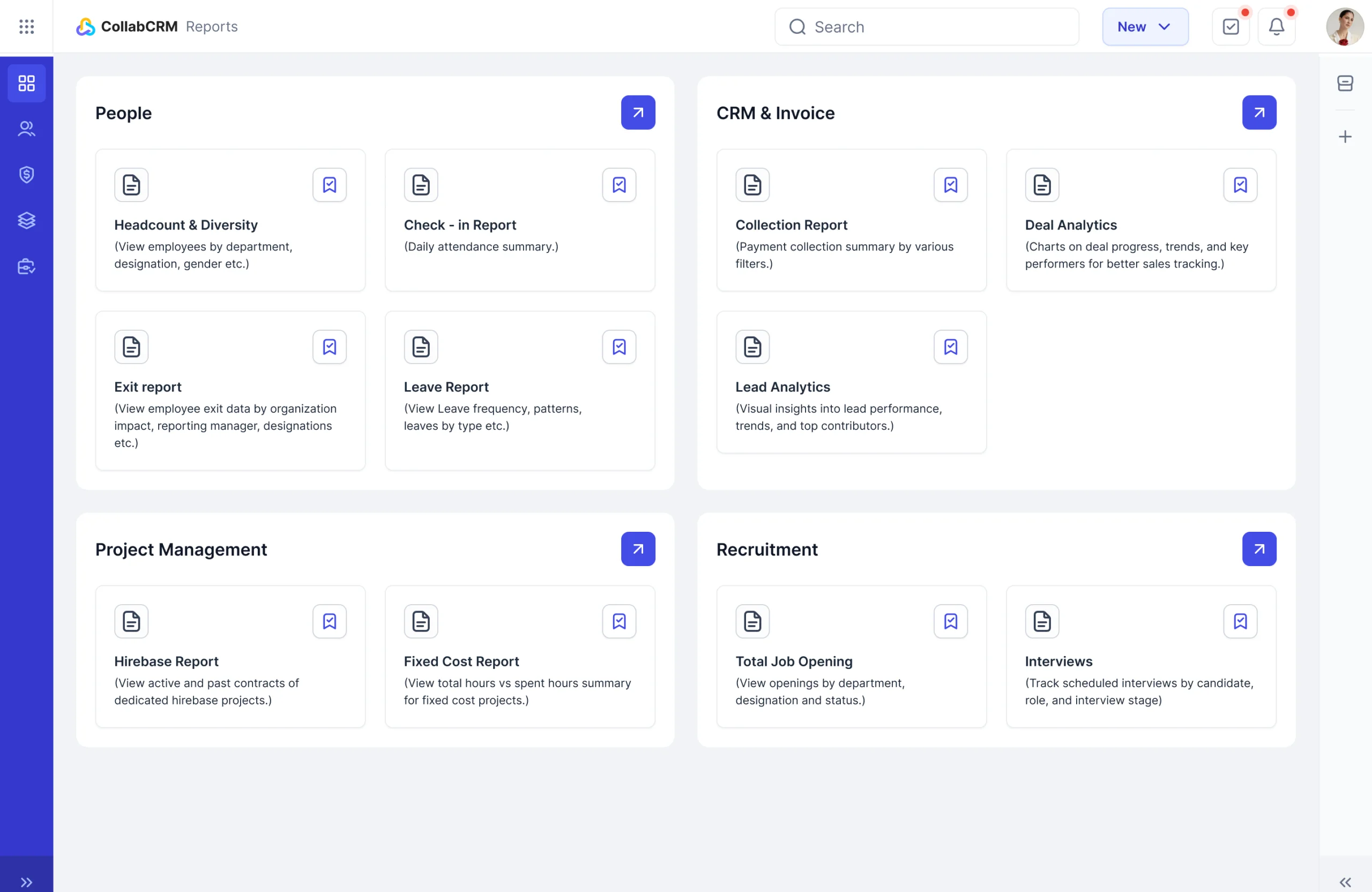
CollabCRM is a business operations system built specifically for IT companies. Its reports module brings data from HR, sales, project teams, recruitment, invoicing, and marketing into a single dashboard.
This means that instead of exporting data from five different tools and building spreadsheets, your teams can get real-time reports across all departments in one place. IT business owners, operations lead, and project managers use it to track resource utilisation, project health, revenue trends, and team performance without any manual effort.
Key highlights:
- Unified Reporting Across Departments: Get real-time reports covering people, CRM, recruitment, and project management, all from one platform, so no team is working from outdated data.
- Project Performance at a Glance: Track billable hours, purchased vs. spent hours, fixed cost vs. hourly models, and timesheet summaries to see the true financial health of every project.
- Role-based Access: Business owners, admins, and team leads each see the reports relevant to their role, keeping data secure while keeping everyone informed.
- Built for IT Operations: From recruiter efficiency and open position summaries to deal tracking and payment collection, CollabCRM covers reporting scenarios that general BI tools often overlook.
2. Zoho Analytics
Zoho Analytics is a business intelligence and reporting platform capable of connecting more than 500 data sources, including databases, business apps, cloud storage, and data warehouses.
It is used by team in sales, marketing, finance, and project management to build interactive dashboards without needing a data analyst. It is available both on the cloud and as an on-premise installation. Both options run on a subscription model.
One standout feature of Zoho Analytics is its AI assistant, Zia, which lets users ask questions in plain language and get answers as reports instantly.
Key highlights:
- Multiple Data Source Connections: Pull data from business apps, databases, files, and cloud platforms into one place without manual exports or custom code.
- AI-powered Analysis with Zia: Ask questions in natural language and get automated insights, trend summaries, and anomaly alerts without writing a single query.
- Drag-and-Drop Dashboard Builder: Build and customise dashboards using 50+ chart types with no technical background required.
- Secure Sharing with Role-based Permissions: Share reports with specific teams or stakeholders using fine-grained access controls and row-level security.
3. Productive
Productive is a professional services management platform which helps you with insights that assist you decide your next step.
Its reporting module is one of the strongest reasons teams choose it over standalone automated reporting tools. You can ask the built-in AI to generate reports for you instantly, such as projected revenue for next quarter, team utilisation by person, or profitability per project.
It requires minimum setup and manual configuration. Productive also comes with over 50 pre-built reports covering, so most teams get useful data from day one without building reports from scratch.
Key highlights:
- AI-generated Reports on Demand: Type what you need, and the AI builds the report for you without any manual configuration.
- 50+ Pre-built Reports: It has ready-made reports covering project profitability, billable hours, budgets, and resource planning without starting from scratch.
- Financial and Project Data in One View: Track budgets, invoices, forecasts, and project progress together, so there is no need to switch between tools.
- Built for Service Businesses: It is designed specifically for agencies, IT firms, and consultancies that need reporting tied directly to client work and profitability.
4. ClickUp
ClickUp though not a dedicated reporting tool, includes a useful set of reporting and dashboard features that work well for teams who want project visibility without switching to a separate BI tool.
You can build custom dashboards using 60+ widgets, track completed tasks, monitor billable hours, run agile reports, and view team workload across projects.
ClickUp Brain, its AI layer, can answer questions like “What is at risk this week?” and automatically send out status reports on a set schedule.
Key highlights:
- Custom Dashboards With 60+ Widgets: Combine charts, workload views, time tracking, and task data into a single dashboard tailored to each team, project, or client.
- AI-powered Reporting with ClickUp Brain: Ask questions about your data in plain language and get automated status reports delivered on a schedule without manual effort.
- Actionable Dashboards: Update task statuses, reassign work, and close items directly from the dashboard without opening a separate screen.
- Agile and Workload Reporting: Track sprint progress, estimated vs. tracked time, and team availability in one place to keep projects on schedule.
5. Tableau
Tableau is one of the most widely used data visualisation tools for businesses around the world. Analysts, data scientists, business leaders, and finance teams all can use it to turn raw data into interactive dashboards and charts.
Its drag-and-drop interface translates user actions into data queries without requiring any coding.
In 2026, Tableau has expanded into agentic analytics, meaning it can now surface insights and trigger actions automatically within existing workflows.
Key highlights:
- Best-in-Class Data Visualisation: Build interactive charts, maps, and dashboards using a drag-and-drop interface that requires no coding or SQL knowledge.
- Agentic Analytics: Tableau uses AI agents to highlight trends, flag anomalies, and push insights directly into the workflow where decisions happen.
- Connects to Virtually any Data Source: Pull data from databases, cloud platforms, spreadsheets, Salesforce, and hundreds of other sources into one unified view.
- Scales from Analyst to Enterprise: Available as Tableau Cloud, Tableau Server, or Tableau Desktop, so teams can deploy it in the way that fits their infrastructure.
6. Domo
Domo is a cloud-based business intelligence platform built around self-service analytics, real-time dashboards, and mobile-first reporting. It connects to over 1,000 data sources and is recognised for its BI platforms.
What makes Domo stand out is how it combines data integration, reporting, AI, and team collaboration into a single platform. Business users can ask questions in plain language, receive scheduled reports in their inbox, and export dashboards to PDF, Excel, or PowerPoint without involving a data analyst or IT team.
Key highlights:
- Self-service Analytics for All Users: Business teams can query data in plain language, explore dashboards, and get instant answers without writing SQL or formulas.
- Mobile Reporting App: You can view dashboards, share insights, and act on data from any device, making it practical for teams that are not always at a desk.
- Scheduled and Exportable Reports: Receive automated dashboard updates by email on a set schedule and export reports to CSV, Excel, PDF, or PowerPoint.
- AI-powered Anomaly Detection: Domo automatically highlights trends and flags unusual patterns in your data, so your team focuses on what needs attention.
7. Celoxis
Celoxis is a project portfolio management platform which goes well beyond basic project tracking by offering reporting across projects, portfolios, budgets, and resources in one place.
Its AI assistant, Lex, lets you interact with your project data using natural language commands, surface real-time insights, and get recommendations without digging through reports manually.
Celoxis is available on both cloud and on-premise, and is supports over 400 integrations.
Key highlights:
- AI Assistant Lex for Project Insights: Ask questions about your data in plain language and get instant answers, trend analysis, and actionable recommendations without opening multiple reports.
- Portfolio and Budget Reporting in One View: Track project schedules, profit margins, revenue forecasts, and resource utilisation across your entire portfolio from a single customisable dashboard.
- Custom Drill-down Reports: It allows to build reports using custom fields and formula fields, drill into specific records, and download them as PDFs or schedule them for automatic email delivery.
- Jira and Azure DevOps Integration: You can pull development progress and resource data directly into Celoxis so project managers and engineering teams work from the same information.
8. Quickbook Online
QuickBooks is a financial reporting and accounting platform built for small and mid-sized businesses. It covers everything from profit and loss statements and balance sheets to cash flow summaries and overdue invoice tracking, all within a single platform.
You can filter reports by customer, product, project, or location, and share them directly with your accountant or bookkeeper.
Key highlights:
- Filter Reports your Way: Slice your financial data by customer, product, project, or location to get the exact view your business needs at any given time.
- Company Snapshot Dashboard: See income trends, outstanding payments, and account balances at a glance so you always know where your business stands financially.
- Bookkeeper and Accountant Access: Invite your accountant directly into QuickBooks so they can prepare and deliver custom reports without any back and forth over email.
- Custom Balance Sheets: Build your own financial summary report showing your business’s assets, debts, and long-term liabilities, to support smarter business decisions.
9. Quickbook Online
QuickBooks is a financial reporting and accounting platform built for small and mid-sized businesses. It covers everything from profit and loss statements and balance sheets to cash flow summaries and overdue invoice tracking, all within a single platform.
You can filter reports by customer, product, project, or location, and share them directly with your accountant or bookkeeper.
Key highlights:
- Filter Reports your Way: Slice your financial data by customer, product, project, or location to get the exact view your business needs at any given time.
- Company Snapshot Dashboard: See income trends, outstanding payments, and account balances at a glance so you always know where your business stands financially.
- Bookkeeper and Accountant Access: Invite your accountant directly into QuickBooks so they can prepare and deliver custom reports without any back and forth over email.
- Custom Balance Sheets: Build your own financial summary report showing your business’s assets, debts, and long-term liabilities, to support smarter business decisions.
10. HubSpot
HubSPot is a CRM and marketing platform with a useful reporting and dashboard module which lets sales, marketing, and service teams build reports from a single platform without needing a separate BI tool.
With the Breeze Assistant, teams can describe the report you need in plain language and HubSpot builds it from your actual data. It works best for teams that already use HubSpot as their CRM and want reporting built directly into the same platform where they manage contacts, deals, and campaigns.
Key highlights:
- AI-powered Report Building: HubSpot’s AI model Breeze helps you get reports by just describing what you need in plain language. HubSpot builds it from your actual data, with no manual configuration required.
- Pre-built Dashboard Templates: You can start quickly with ready-made dashboards for marketing, sales, revenue, and service teams, then customise the layout using a drag-and-drop editor.
- Role-based Dashboard Access: Give leadership the high-level view they need to make decisions and equip rest of your team with focused dashboards that keep them on track.
- Automated Stakeholder Reports: You can schedule and share automatic, recurring stakeholder reports via Slack or email, all within HubSpot.
Best Reporting Tools for 2026: Quick Comparison Table
| Feature | CollabCRM | Zoho Analytics | Celoxis | Domo | ClickUp |
| Best For | IT companies and service teams | SMBs and marketing teams | Project portfolio management | Enterprise BI and real-time analytics | Project management teams |
| Pre-built Reports | Yes | Yes | Yes | Yes | Yes |
| Real-time Dashboards | Yes | Yes | Yes | Yes | Yes |
| Mobile App | Yes, People management module only | Yes | Yes | Yes | Yes |
| Data Source Integrations | HR, CRM, projects, invoicing | 500+ sources | Jira, Azure DevOps, 400+ apps | 1,000+ sources | Limited |
| Scheduled Report Delivery | No | Yes | Yes | Yes | Yes |
| Deployment | Cloud | Cloud and On-premise | Cloud and On-premise | Cloud | Cloud |
How to Choose a Reporting Tool
Choosing the right business reporting software depends on more than just features. Here are the key things to evaluate before you decide:
- Know your Use Case First: A sales team needs pipeline reports. An IT firm needs project and resource reports. Define what you need to track before you look at any tool.
- Check Data Source Compatibility: Your reporting tool should connect to the systems you already use, such as your CRM, project management platform, or accounting software, without complex manual setup.
- Consider Who will Use It: If your team has no data analyst, choose a self-service tool with pre-built templates. Powerful tools are only useful if your team can operate them.
- Evaluate Real-time vs. Scheduled Reporting: Operations and project teams often need live dashboards. Finance and leadership teams may only need weekly or monthly scheduled reports delivered to their inbox.
- Look at AI Capabilities: Most modern tools now include AI features. Check whether the AI generates useful insights from your actual data or simply adds visual noise to your dashboard.
- Assess your Project Reporting Software Needs: General BI tools are built for data analysis. If you manage client projects, billable hours, or team utilisation, you may need a tool built specifically for project reporting.
- Test With your Real Data: Always run a trial using your own data sources, not the vendor’s demo data. Integration issues and data gaps only show up when you test with real information.
- Factor in Total Cost: Look beyond the per-user price. Add up connector fees, storage costs, onboarding time, and the cost of any training your team will need before the tool becomes useful.
Common Mistakes When Choosing a Reporting Tool
Avoid these mistakes before you sign up for any reporting tool or commit your team to a new platform:
- Choosing a Tool Based on its Feature List: A long feature list looks impressive, but most teams use only a fraction of it. Focus on whether the tool solves your specific reporting problem.
- Ignoring the Learning Curve: A tool that your team cannot figure out will not get used. Always check onboarding support, training resources, and the average time it takes new users to get started.
- Skipping the Real Data Test: Vendor demos always look clean and fast. Test the tool with your actual data sources to find out whether integrations work and whether reports load as expected.
- Assuming Real-Time Data Dashboards: Live dashboards are valuable for operations and project tracking. However, if your team only reviews report weekly, paying a premium for real-time data dashboards may not be justified.
- Underestimating Total Cost: Per-user pricing seems affordable at first. Add connector fees, storage limits, premium support costs, and onboarding time, and the total cost can be significantly higher than expected.
How CollabCRM Supports Your Reporting Needs?
Most reporting tools are built for general use. CollabCRM is different. It is designed specifically for IT companies and functions as a business operating system that connects people management, CRM, projects, recruitment, and invoicing into a single reporting platform.
Instead of pulling data from five different tools and building reports manually, your HR, sales, and project teams all work from one shared source of truth. You get real-time visibility into workforce performance, deal pipelines, billable hours, resource utilisation, and revenue health, all from one place.
Whether you are a startup tracking your first hires or an SMB managing multiple client projects, CollabCRM gives every department the reporting view they need without the manual effort.
FAQs:
A reporting tool is software that collects data from one or more sources, processes it, and displays it as structured reports or dashboards. Teams use reporting tools to track performance, monitor KPIs, and share insights across departments.
BI tools are built for data analysis at scale. They pull from multiple systems and produce cross-functional insights. Project reporting tools are focused on team-level metrics: task progress, resource use, budgets, and timelines. Many teams use both.
Yes. Cloud-based reporting tools are accessible from any device or location. Most also support scheduled report delivery via email, which is practical for teams across multiple time zones.





 Priority Onboarding