


Every business wants to grow without losing control. When a company expands, everyday tasks become harder to track. You must manage people, organize files, talk to clients, and watch your budget all at the same time. If you use separate tools for each job, your team will waste hours switching between tabs and copying data.
This is why modern businesses use unified systems to handle their daily workflows. Finding the right software helps your team communicate better, cuts down on human errors, and stops your revenue from leaking away.
This guide breaks down the top operations management software available in 2026. Whether you run a small local shop or a global tech company, this list will help you pick the perfect tool for your budget and workflow.
Key Takeaways:
- Operations management software brings all your daily business processes into one central platform to make your workflows faster, clearer, and more efficient.
- Operations management systems focus on continuous, long term daily processes, while project management software tracks temporary tasks with fixed start and end dates.
- Resource management tools help managers schedule staff hours accurately, balance employee workloads, and monitor project labour costs effectively.
- Modern operational platforms use artificial intelligence to automate manual data entry, predict warehouse stocking needs, and route customer service requests.
- Selecting the right business platform depends heavily on identifying your specific operational bottlenecks, calculating user license budgets, and testing the system for ease of use.
What is Operations Management Software?
Operations Management Software (OMS) is a centralized digital platform built to streamline, automate, monitor, and improve an organization’s everyday business operations such as sales, invoice, resource management, scheduling, project updates, and more.
Unlike project management tools that handle time-bound tasks and deadlines, OMS serves as the operational backbone of a business, helping teams manage continuous workflows and recurring processes across multiple departments.
Good operations management tools handle several business needs at once:
- Resource Allocation: Seeing who is busy and who is free so nobody gets burnt out.
- Task Automation: Letting the computer handle repetitive work like sending reminder emails or creating invoices.
- Real Time Dashboards: Showing managers exactly how much money and time a project is using before it is too late to fix a problem.
There are several operations management solutions that businesses can access to improve efficiency and visibility. However, different businesses have different needs. Let us look at some of the top options to consider.
Top Operations Management Software Systems
Here is a quick look at the best operations management tools for 2026. Each tool serves a unique business setup.
- CollabCRM: A business operating system built for IT and service companies to manage sales, projects, CRM, invoice, people, marketing and recruitment in one single screen.
- Monday Work Management: A highly visual platform that brings people, workflows, and AI agents together to let teams track any kind of operational workflow.
- ServiceNow: An enterprise platform designed to automate complex IT service workflows and employee service requests.
- Asana: A clean task management tool that focuses on team collaboration and mapping out project goals.
- Jira: It is a tool built specifically for software developers and technical support teams to help align goals and priorities, collaborate and track work.
- Zendesk: A customer support platform focused on tracking client issues and managing service operations.
- Trello: A simple digital board system that uses visual cards to track basic everyday tasks.
- Wrike: A robust work management tool designed for marketing teams and agencies that handle complex client projects.
- Oracle NetSuite: A large enterprise resource planning system that handles finance, inventory, and global business operations.
- Zoho One: A massive bundle of over 45 business apps that cover everything from sales to human resources.
- Odoo: An open-source business software system that lets companies pick and choose exact operational modules as they grow.
- Microsoft Dynamics 365: A powerful corporate platform that connects business data with deep artificial intelligence insights and Microsoft Office tools.
- Teamwork: A platform designed specifically for agencies and service businesses to track project profitability, billable hours, and team capacity.
- Freshworks: A user-friendly collection of tools for customer support, sales, and employee management.
- Basecamp: A straightforward communication and project hub focused on remote team collaboration.
15 Top Operations Management Software Systems for Your Business
1. CollabCRM
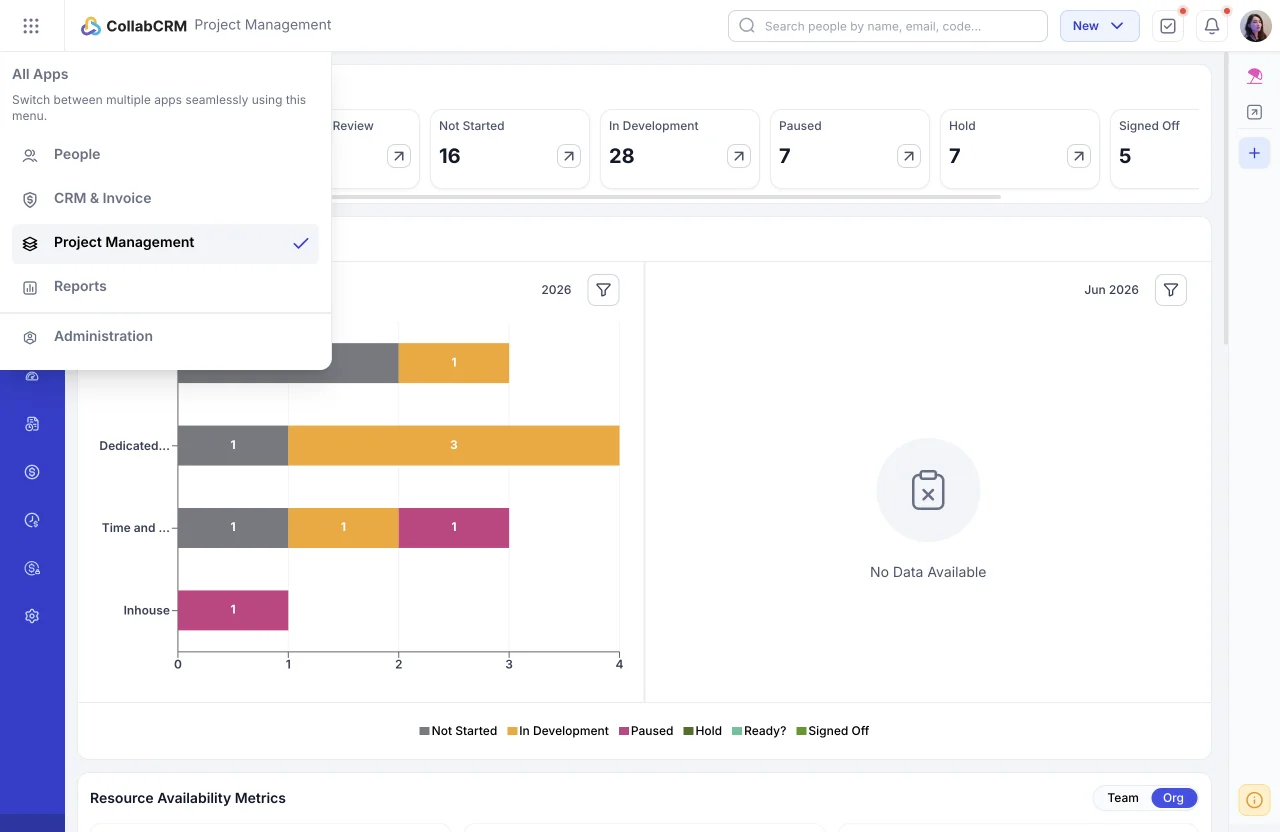
CollabCRM is an operations management software built for IT companies, software development firms, consulting businesses, and project-driven organizations.
Many platforms separate customer management from operational execution. CollabCRM keeps them together.
For instance, when a sales deal closes, the CollabCRM instantly converts that deal into an active operational project. This means your delivery team knows exactly what the customer bought without reading long email threads.
Key Features of CollabCRM:
- Centralized Workflow Management: Connect sales, projects, HR, invoicing, and delivery workflows in one platform to reduce operational silos and improve cross-functional coordination.
- Project & Resource Management: Manage project execution, task tracking, milestones, team allocation, resource occupancy, timesheets, and delivery visibility to keep projects on time and within budget.
- People & Workforce Operations: Track attendance, leave, employee skills, hiring, utilization, and workforce availability to improve staffing decisions and operational efficiency.
- Reports, Billing & Operational Visibility: Monitor performance through dashboards, timesheets, invoicing, billable hours, payment tracking, and reports for better budgeting, accountability, and decision-making.
2. Monday Work Management
Monday work management built on monday.com helps to consolidate work across the teams.
It provides a flexible, customizable workspace with minimal coding requirements while giving leadership clear visibility to connect day-to-day operations with broader business goals.
You can customize columns to track status, priorities, timelines, and budgets. It is widely used across marketing departments, construction operations, and creative agencies looking for the best Monday.com alternatives to centralize their workflows.
Key Features of Monday Work Management:
- Flexible Board Layouts: Set up task boards using over fifteen visual styles, including columns, timelines, and calendars, to match how your staff prefers to work.
- Multi Project Tracking: Connect different corporate projects into a single master view to help managers balance workloads across resources.
- Reliable Planning Tools: Stay on schedule by setting task orders, marking major milestones, and viewing critical paths to completion on your charts.
- Custom Reporting Dashboards: Build clean executive tracking screens easily by dragging and dropping simple data blocks into place.
- Connected Digital Documents: Move from planning to execution with built-in docs where employees can type together and embed live task boards.
3. ServiceNow
ServiceNow is an operation management software that has been designed for large enterprises that need assistance to manage complex internal operations and large-scale workflows, with particularly strong capabilities in IT Service Management.
Its IT Operations Management (ITOM) suite uses AI-powered tools to centralize and automate IT infrastructure management across physical, virtual, and cloud environments.
By bringing everything into one central platform, it helps IT teams reduce downtime, optimize resources, identify issues early, and respond proactively.
Key Features of ServiceNow:
- Automatic Equipment and Software Scanning: The system constantly scans your entire company network to find every computer, server, software application, and cloud storage system you own so you always have an accurate inventory.
- Business Service Mapping: It connects your IT infrastructure directly to the specific business services to show tech teams exactly which business operations will slow down if a specific server fails.
- Smart Alert Sorting: The platform uses AI to filter out repetitive digital background noise. It groups thousands of minor computer alerts into a few critical issues so your IT team can focus on the most urgent problems.
- Unified Cloud Control: The tool standardizes how your business requests, sets up, and manages resources across different cloud platforms, helping you control corporate spending and maintain strict security rules from one dashboard.
4. Asana
Asana allows teams to organize small daily tasks alongside large, company-wide strategic goals. It focuses heavily on accountability by showing exactly who is doing what by when.
You can map out large corporate initiatives and break them down into small, actionable subtasks that are assigned to specific individuals and teams. This eliminates confusion about project ownership and ensures that deadlines are not missed because of poor communication.
The clean interface along with robust communication options, allowing employees to comment directly on tasks, attach relevant files, and send status updates without leaving the work environment
Key Features of Asana:
- Task Dependency Mapping: You can link related tasks together so team members know exactly which assignments must finish before the next phase can begin.
- Timeline Views: The platform provides interactive horizontal charts to help managers schedule project steps and monitor real time progress.
- Custom Request Forms: Internal teams can create standardized intake forms to collect complete information for incoming operational requests.
- Goal Progress Tracking: The tool allows executives to connect daily employee tasks directly to high level corporate targets.
5. Jira
Jira is a technical operations management solution built specifically for software engineering and technical operations teams. It helps developers track issues, manage bugs, and run agile development cycles seamlessly.
It provides deep customization options for tracking code changes, managing software testing environments, and measuring the overall development speed of your engineering department.
Jira uses agile frameworks like Scrum and Kanban to organize complex code releases into manageable development sprints. However, one major drawback of Jira is that it’s interface can feel overwhelming for non-technical employees like sales or human resources teams.
Key Features of Jira:
- Agile Scrum Boards: Engineering teams can plan sprints, rank backlog tasks, and manage technical workflows easily using customizable columns.
- Advanced Bug Tracking: It separately records detailed technical errors and assigns them to developers for quick resolution.
- Release Management Tracking: Managers can monitor software version releases and track ready deployment code across different environments.
- Detailed Velocity Charts: The reporting engine measures how much work a development team completes during a single work cycle to improve future planning.

6. Zendesk
Zendesk is a customer service platform that organizes client facing operations by converting incoming communications into structured tickets. It helps support teams handle high volumes of customer requests efficiently across multiple digital channels.
Sometimes businesses need to serve your clients when they experience problems. Zendesk connects your customer support workflows directly to your operational tracking.
When a customer sends an email, submits a web form, or launches a live chat, the system builds a ticket that tracks the issue until it is resolved.
This keeps your client facing agents organized even when receiving thousands of daily messages. It also provides managers with data regarding response times, which helps businesses maintain high service quality.
Key Features of Zendesk:
- Multi-Channel Ticket Ingestion: Zendesk system gathers customer queries from email, phone calls, social media, and live chat into a single agent workspace.
- Automated Help Centres: Businesses can build self-service knowledge bases to help customers find answers without talking to an agent.
- Macro Response Shortcuts: Support agents can use pre-written message templates to reply instantly to common customer questions.
- Agent Performance Metrics: The dashboard tracks support resolution times, customer satisfaction scores, and individual agent workloads.
7. Trello
Trello is a straightforward task management application that uses a visual board system to organize linear workflows. It provides a clear overview of daily responsibilities without requiring complex training or software configurations.
Trello uses a digital card system modelled after a physical whiteboard with sticky notes. You create custom columns that represent different stages of your operational process, and then you drag cards across these columns as work progresses.
It is perfect for straightforward, linear operational workflows like content pipelines, basic order fulfilment, or simple event planning.
Because it lacks the heavy data reporting and complex financial tracking features of enterprise software, it remains incredibly lightweight and can be mastered by anyone in less than fifteen minutes.
Key Features of Trello:
- Drag and Drop Cards: Users can represent tasks as digital cards and move them across custom lists like To Do, Doing, and Done.
- Card Checklists: You can break down large card assignments into smaller subtasks with individual progress bars.
- Automated Butler Triggers: The built-in automation engine performs actions like moving cards automatically when a checklist is completed.
- Multi-User Tagging: Managers can assign specific team members to cards to maintain clear accountability for individual tasks.
8. Oracle NetSuite
Oracle NetSuite is a comprehensive cloud enterprise resource planning suite that manages core business operations including finances, inventory, manufacturing, and global supply chains from a single database.
This massive platform is engineered for multi-million dollar businesses that need to track operations across multiple countries and subsidiaries. NetSuite brings every major business department into a single shared software environment, meaning that when an item is manufactured, your inventory records, warehouse schedules, and financial ledgers update instantly.
While implementation can take several months and requires a substantial capital investment, it provides corporate executives with unmatched visibility into company profitability, procurement efficiency, and international resource deployment.
Key Features of Oracle NetSuite:
- Real Time Inventory Tracking: The software monitors stock levels across multiple international warehouses to prevent shortages.
- Global Financial Management: The platform automates accounting processes across different currencies, tax jurisdictions, and corporate subsidiaries.
- Supply Chain Optimization: Automated tools track supplier performance and calculate optimal purchasing schedules based on historical demand.
- Procurement Automation: The system streamlines purchase orders and vendor approvals to lower overall corporate procurement costs.
9. Zoho One
Zoho One is a large suite of interconnected business applications that runs every part of a company. It gives teams access to tools for sales, accounting, human resources, and project delivery under a single subscription. Zoho One provides an alternative to buying multiple individual software subscriptions that do not talk to each other.
When you purchase Zoho One, you unlock dozens of different business applications that feature native, out of the box data connections. For example, when a salesperson updates a customer record in the CRM app, that data flows automatically into the invoicing app and the support desk application.
It offers incredible value for growing companies looking to consolidate their technology stack into a unified administrative environment.
Key Features of Zoho One:
- Cross App Data Integration: Information flows naturally between applications, allowing customer data from the CRM to update the accounting tool instantly.
- Centralized Admin Panel: IT administrators can manage user permissions, security protocols, and software access from a single dashboard.
- Custom App Creator: Businesses can use low code tools to build unique operational applications tailored to their specific workflows.
- Unified Search: Users can search for a single client name or order number across every application in the entire corporate suite.
10. Odoo
Odoo is an open-source business management platform that lets companies choose specific applications based on their current needs. It allows businesses to add new functional modules as they scale.
Odoo relies on a unique app store model where you start with a basic framework and install individual modules over time.
For example, a small startup might begin using Odoo solely for basic customer invoicing. As the business grows, they can install the warehouse module to track physical goods, the manufacturing module to control assembly lines, and the HR module to manage employee timesheets.
This modular structure ensures that your employees only see the features they use, which keeps the system clean and easy to navigate.
Key Features of Odoo:
- Modular App Ecosystem: You can start with basic invoicing and gradually install apps for warehouse management, manufacturing, or human resources.
- Double Entry Inventory System: The tracking module treats warehouse stock movements like financial transactions to eliminate inventory errors.
- Integrated Manufacturing Scheduling: The platform links raw material inventory directly to active assembly lines and machinery schedules.
- Automated Customer Invoicing: The system generates bills automatically based on sales orders, delivery statuses, or employee timesheets.
11. Microsoft Dynamics 365
Microsoft Dynamics 365 is an enterprise level suite of business applications that connects operational data with artificial intelligence.
It integrates deeply with existing Microsoft office infrastructure to deliver intelligent corporate insights. This platform is built for mid-sized to large organizations that are already using Microsoft tools. It allows employees to access, edit, and update central operational data directly from familiar applications like Excel, Word, and Outlook.
Dynamics 365 has advanced predictive abilities, helping companies look ahead to avoid operational disruptions. For example, its supply chain module can read external market signals to predict shipping delays before they impact your warehouse production.
In addition, it has heavy support for complex field operations, allowing companies to schedule off site technicians and manage corporate physical equipment efficiently.
Key Features of Microsoft Dynamics 365:
- Predictive Supply Chain Insights: Built in AI analyses external market data to warn operations managers about upcoming logistics delays.
- Field Service Scheduling: The system matches incoming service requests with available technicians based on travel distance and skill level.
- Connected Asset Management: IoT sensors feed data directly into the platform to trigger maintenance tickets before machinery breaks down.
- Unified Microsoft Connectivity: Employees can view and update operational database records directly inside Microsoft Teams or Outlook.
12. Wrike
Wrike is an advanced work management platform designed to help mid-sized organizations manage complex project portfolios. It focuses heavily on resource scheduling, time management, and team capacity tracking.
It provides project management teams and leaders with the analytical depth required to manage hundreds of active client projects simultaneously. Its primary strength lies in its powerful resource management engine, which gives operations managers a clear view of individual employee workloads across the entire company.
This helps you in spotting team bottlenecks instantly and redistribute tasks before workers experience burnout.
In addition, it includes advanced proofing and approval tools, making it an excellent operational choice for creative departments, marketing agencies, and professional service firms evaluating Wrike alternatives for better operational visibility and workload management.
Key Features of Wrike:
- Dynamic Resource Allocation: Live charts show manager workloads across the company to help redistribute tasks before bottlenecks occur.
- Custom Work Management Fields: Teams can create specific data columns to track unique operational metrics like project risk levels or exact expenses.
- Automated Proofing Tools: The platform streamlines creative asset approvals by letting stakeholders leave visual comments directly on files.
- Cross Project Calendars: Unified calendar views show milestone deadlines across different corporate departments simultaneously.
13. Airtable
Airtable is a cloud platform that combines the user-friendly look of a spreadsheet with the structural power of a relational database. It allows non-technical teams to build custom data tracking applications without writing code.
If your operations managers are comfortable using standard grid spreadsheets but find enterprise software too rigid, Airtable provides the ideal middle ground. You can build custom data fields that hold rich media like checkboxes, drop down menus, barcodes, and file attachments.
More importantly, you can link different tables together to create a powerful database. For example, you can connect a table of warehouse inventory to a table of corporate suppliers, which connects directly to a table of customer purchase orders.
Key Features of Airtable:
- Relational Data Linking: You can connect rows in an inventory sheet to specific customer accounts or individual employee profiles.
- Custom Interface Designer: Users can build clean dashboards that display database records as interactive charts, maps, or forms.
- Advanced Content Filtering: The system lets you sort complex operational data using nested logical rules.
- Rich Field Varieties: Data rows can hold distinct asset types including star ratings, barcodes, currency calculations, and multi file attachments.
14. Freshworks
The Freshworks platform provides user friendly operational applications for customer support, IT service desks, and sales management. It emphasizes fast deployment speeds and minimal training requirements for modern operational teams.
The Freshworks suite splits its capabilities into dedicated products like Freshdesk for consumer support operations and Freshservice for internal company technology management. It avoids the heavy setup times and confusing configurations that plague traditional enterprise software suites.
Freshworks focuses on creating clean, intuitive user interfaces that allow new hires to learn the platform within days instead of weeks. It also infuses artificial intelligence into its service modules to help automate simple internal employee requests, allowing your staff to focus on high value operational tasks.
Key Features of Freshworks:
- Unified Agent Workspaces: Support teams can view customer ticket histories alongside internal IT asset data on a single screen.
- AI Service Chatbots: Automated assistants handle simple tier one employee questions to free up human service desk staff.
- No Code Automation Builders: Managers can design automated assignment rules using simple visual logic trees.
- Multi Asset Management: The IT module tracks corporate hardware lifecycles from initial purchase down to final disposal.
15. Basecamp
Basecamp organizes work into self-contained project pages that keep all relevant information together on a single screen.
It takes a minimalist approach to operations management by intentionally avoiding complex data metrics, heavy charts, and nested tracking folders. Instead, it believes that successful business operations depend on simple, transparent team communication.
Every project workspace inside Basecamp features a standard toolkit including a message board for announcements, a basic to do checklist, a shared schedule, and a text document repository.
This simple layout eliminates clutter and digital confusion, making it an exceptional operational solution for remote companies and small creative teams.
Key Features of Basecamp:
- Central Message Boards: Teams can publish formal announcements and project updates to replace long, disorganized internal email chains.
- Automatic Check in Questions: The system asks team members regular, automated status questions to gather updates without holding meetings.
- Shared Project Schedules: Every project page features a dedicated calendar that displays upcoming deadlines and key milestones.
- Unified Document Repositories: Teams can create text files or organize files into neat folders directly inside the relevant workspace.
Overview of Operations Management Software Systems
While we have discussed 15 operations management tools, here is a quick comparison of top 5 tools that can help you enhance your business operations.
| Parameter | CollabCRM | Monday Work Management | Asana | Trello | ServiceNow |
| Primary Focus | Operational management and workflow visibility for IT service-driven businesses. | Highly visual and custom workflow creation for diverse business departments. | Tracking team task accountability, timelines, and high-level goals. | Simple, linear progress tracking using a digital cardboard. | Enterprise IT service automation and complex corporate infrastructure management. |
| Best Suited For | Small to medium businesses looking to eliminate manual handovers between teams. | Mid-sized to large teams requiring maximum process layout flexibility. | Teams focused on managing heavy project deadlines and clear ownership. | Micro teams or individuals seeking straightforward, lightweight task lists. | Massive corporations running complex networks, servers, and multi cloud environments. |
| Setup and Onboarding Speed | Fast: Designed for quick migrations away from spreadsheets. | Moderate to Fast: Simple interface but custom workflows require initial layout planning. | Fast: Highly intuitive task views allow teams to start working within hours. | Instant: Users can master the basic card system in less than fifteen minutes. | Slow: Requires months of structured implementation and certified administrators. |
| User Interface Complexity | Low: Clean, direct, and easy for non-technical employees to navigate. | Low to Moderate: Visually clear but can get busy with heavy data columns. | Low: Straightforward navigation focused purely on task lists and grids. | Very Low: Highly accessible drag and drop system with zero learning curve. | High: Deeply technical interface designed for specialized IT professionals. |
| Resource and Capacity Management | Tracks individual staff availability relative to newly closed client contracts. | Provides dedicated Workload views to balance capacity across teams. | Monitors individual workload metrics to prevent employee burnout. | Lacks native resource tracking tools without buying outside add ons. | Features advanced enterprise asset tracking and global infrastructure mapping. |
| External Integration Options | Focuses on essential business integrations with Zapier. | Connects seamlessly with hundreds of tools like Outlook, Teams, and Slack. | Links directly with primary office software suites and cloud file storage apps. | Connects to basic everyday productivity apps through individual board Power Ups. | Integrates deeply with major corporate networks, security tools, and monitoring software. |
Benefits of Operations Management Software System
Investing in an operations management tool provides distinct competitive advantages. Here are the core benefits that companies experience after implementing a system.
1. Clear Process Visibility
Without a central tool, business owners never truly know what their staff is working on. Tasks slip through the cracks, and deadlines pass unnoticed.
An operations management platform gives everyone a clear view of the business. Managers and clients can log in and see the exact status of any client deliverable within seconds.
2. Data Accuracy and Automation
Manual data entry creates errors. A worker typing customer addresses from an email into a spreadsheet will eventually make a mistake.
According to a comprehensive data accuracy study by the Dartmouth Institute, human error rates in manual data entry sit around 1 percent to 4 percent depending on the complexity of the data.
By automating data movement through software, you lower this error rate to nearly zero percent.
3. Faster Employee Onboarding
When your business operations are documented inside a software system, training new hires becomes simple. Instead of having them shadow an old employee for weeks, you can point them to the software workflows.
The tool guides them through their tasks step by step, ensuring consistency across your team.
How to Select the Right Operations Management Software System?
Do not just buy a platform because it looks pretty or because a famous company uses it. Follow these steps to find the perfect match for your specific organization.
Step 1: Identify Your Core Business Bottleneck
Identify exactly where your current process breaks down, such as lost customer emails or inaccurate inventory counts.
Step 2: Calculate Your Total Software Budget
Count your total number of users and multiply that by the monthly cost per user, keeping an eye out for hidden onboarding fees.
Step 3: Test the Interface via a Free Trial
Have your least technical team member test the software during a free trial period to ensure it is easy to navigate.
Step 4: Check Key Integration Capabilities
Ensure the new system connects smoothly with your existing essential tools, like your current email provider or business bank account.
How can CollabCRM Help in Business Operations Management?
CollabCRM simplifies how growing businesses handle everyday workflow tracking. One of its greatest strengths is managing project timeline milestones from a single, unified corporate dashboard.
Instead of forcing teams to bounce between siloed project boards and separate messaging apps, the platform brings communication, resource scheduling, and delivery dates together.
It provides an end-to-end visibility which helps teams identify potential delays early and adjust schedules before missing a client delivery. Managers can look at active workloads to see exactly who is on track and which assignments need extra support.
By centralizing communication, your staff spends far less time writing internal update emails. Employees always know exactly what task to focus on next, while executives get real time data updates regarding overall company progress.
This reliable approach keeps your business moving forward smoothly, improves team accountability, and protects your project profit margins.
FAQs:
Operations management software is built to handle your business’s permanent, daily workflows. It focuses on keeping core business processes and resources running smoothly over a long period of time. Project management software is different because it is designed to manage temporary tasks that have a clear start date and end date. It helps teams plan, execute, and track specific, one-time initiatives rather than ongoing daily business activities.
The primary goal of operations management is to improve efficiency in delivering goods and services while ensuring they consistently meet customer needs and expectations.
Resource management software helps operations management by giving you clear tools to schedule your employees and assign their hours to specific business tasks. It allows managers to track hourly work rates easily and create custom data fields to monitor unique company needs.
By using these features, you can make sure your staff’s time is used efficiently while maintaining clear production schedules for both your current and future corporate projects.
Yes, most modern operations management software supports seamless integration with ERP systems and other business tools through APIs and built-in connectors. This helps businesses create a connected technology ecosystem, improve data flow between systems, and reduce the need for extensive custom development.






 Priority Onboarding