

A project is delivered on time. The client is happy. The team worked hard all month. But when the invoice goes out, the numbers don’t add up.
Some hours were never logged. A few client calls were missed. Small tasks were done but not recorded. The result is simple. You delivered more value than you billed for.
This is a common situation in IT businesses. And it usually comes down to one thing. A lack of clarity around what are billable hours and how to track them properly.
Understanding the billable hours meaning is not just an operational detail. It directly impacts your revenue, margins, and growth.
In this guide, you will learn how to define, calculate, and track billable hours so you can capture the full value of your team’s workforce planning.
TL;DR
- Billable hours = revenue-driving work
- Poor tracking = lost revenue
- Utilization rate is a key metric
- Real-time tracking improves accuracy
- Tools > spreadsheets
- Better tracking = better margins
- CollabCRM helps you capture every billable hour accurately by connecting time tracking with projects, teams, and billing in one place
What Are Billable Hours?
Billable hours are the hours your team spends on work that can be charged to a client. This includes any task that directly contributes to delivering a project or service.
If you are wondering what are billable hours in practical terms, think of the time spent on coding, testing, client meetings, or fixing issues. If the work adds value to a client project and is agreed upon in the contract, it is billable.
Key Characteristics:
- Directly linked to client work
- Pre-defined hourly rate or pricing structure
- Tracked and recorded for billing
- Included in invoices
- Measurable and auditable
These characteristics define the true billable hours meaning in a business context. It is not just about time spent, but time that can be converted into revenue.
| Clarity: Billable Hours ≠ Working Hours |
It is important to understand that billable does not mean all working hours.
Your team may work 8 hours a day, but only a portion of that time may be billable. Activities like internal meetings, training, or admin work do not usually count.
So while all billable hours are working hours, not all working hours are billable.
Understanding this difference is the first step toward better tracking and better financial control.
Billable vs Non-Billable Hours
Understanding the difference between billable and non-billable time is key to managing revenue and efficiency. Many IT businesses struggle here, which leads to confusion in tracking and billing.
Billable Hours
These are the hours you can charge your clients for. They are directly tied to project delivery and client value.
Common examples:
- Software development and coding
- Testing and quality assurance
- Client meetings and consultations
- Bug fixing and maintenance
- Project-specific documentation
A simple billable hours example would be a developer spending 5 hours fixing a client-reported issue. Since this work directly supports the client, it is billable.
Non-Billable Hours
These are necessary for running the business, but cannot be charged to clients.
Examples include:
- Internal meetings
- Team training and onboarding
- Administration tasks
- Sales and marketing activities
- Recruitment and interviews
These activities support growth but do not generate direct revenue.
The difference between billable hours vs non-billable hours is not about importance. Both are essential. The goal is not to eliminate non-billable work. Instead, it is to manage it efficiently while maximizing billable time.
When you clearly define and track both, you get better visibility into team performance, project costs, and overall profitability.
Why Billable Hours Are Critical for IT Leaders
For IT leaders, billable hours are not just a tracking metric. They are directly tied to revenue, efficiency, and long-term growth. When tracked correctly, they give you clear visibility into how your business is performing.
1. Revenue & Profitability Driver
Billable hours are the core source of revenue for most IT services businesses. Every billable hour contributes directly to what you earn.
If hours are missed or underreported, you lose revenue without even realizing it. This is why understanding what are billable hours and tracking them accurately is critical.
2. Resource Utilization & Capacity Planning
Not all team members contribute equally to billable work. Tracking helps you measure utilization.
Utilization rate shows how much of your team’s time is spent on billable work versus total available time.
This helps you:
- Identify underutilized resources
- Prevent overloading high performers
- Plan hiring and project allocation better
3. Accurate Client Billing & Transparency
Clear tracking ensures that every billed hour is backed by actual work.
This helps:
- Reduce billing disputes
- Build trust with clients
- Improve transparency in communication
Clients are more confident when they can see exactly what they are paying for.
4. Forecasting & Financial Planning
When you know how many billable hours your team generates, you can predict future revenue more accurately.
This supports:
- Better budgeting
- Smarter pricing decisions
- Reliable financial forecasting
5. Performance Measurement
Billable hours also help evaluate team and project performance.
You can:
- Track productivity at individual and team levels
- Compare planned vs actual work
- Identify inefficiencies in workflows
Business Impact of Improving Billable Hours Tracking
When businesses improve how they track billable hours, the impact is immediate and measurable.
- Increase in billable utilization
More of your team’s time is spent on revenue-generating work
- Reduction in revenue leakage
Fewer missed or unrecorded hours
- Faster invoicing cycles
Accurate time logs make billing quicker and smoother
- Improved project margins
Better tracking helps control costs and increase profitability
In simple terms, better tracking does not just improve operations. It strengthens the entire financial health of your business.
Common Challenges in Tracking Billable Hours
Even when businesses understand what are billable hours, tracking them consistently is not easy. Many IT companies face common challenges that lead to inaccurate data and lost revenue.
1. Manual Tracking Errors
The hidden cost of spreadsheets or relying on memory-based logging often leads to mistakes.
Employees may forget to log time or enter incorrect hours later. Over time, these small errors add up and affect billing accuracy.
2. Time Leakage (Missed Entries)
Not every task gets recorded.
Quick client calls, minor fixes, or short discussions are often skipped. These gaps may seem small, but they result in significant revenue loss over weeks or months.
3. Multi-Project Complexity
IT teams usually work on multiple projects at the same time.
Switching between tasks makes it harder to track time accurately. Without a structured system, hours can be misallocated or missed entirely.
4. Lack of Real-Time Visibility
When tracking is delayed or inconsistent, leaders do not get a clear view of ongoing work.
This makes it difficult to:
- Monitor project progress
- Track team utilization and resource optimization strategies
- Identify delays early
5. Employee Resistance to Tracking
Many employees see time tracking as extra work or micromanagement.
If the process is not simple and clear, adoption becomes a challenge. This leads to incomplete or inaccurate data.
6. Inconsistent Billing Practices
Different teams or managers may follow different rules for what counts as billable.
This creates confusion and leads to:
- Inconsistent invoices
- Client disputes
- Revenue gaps
Most of these challenges are not about intent. They are about systems and processes.
Without a structured approach or a reliable billable hours tracker, even well-performing teams struggle to track time accurately.

How to Calculate Billable Hours
Understanding how to calculate billable hours is essential for tracking revenue, measuring performance, and improving profitability. It gives you a clear view of how much value your team is generating.
Basic Formula
At the most basic level, calculating billable hours is simple:
| Billable Hours × Hourly Rate = Revenue |
For example, if a developer logs 100 billable hours at a rate of $50 per hour, the total revenue generated is $5,000.
This is the simplest way to understand the billable hours meaning from a financial perspective.
Utilization Rate
Utilization rate shows how effectively your team’s time is being used.
| Formula: (Billable Hours / Total Available Hours) × 100 = Utilization Rate |
If an employee works 160 hours in a month and 120 of those are billable, the utilization rate is 75%.
This metric helps you:
- Measure productivity
- Identify underutilized resources
- Improve resource planning process and allocation
Other Metrics
Tracking billable hours alone is not enough. You also need supporting metrics to understand overall performance.
Realization Rate- This measures how many billable hours actually get invoiced.
It highlights:
- Lost revenue due to write-offs
- Discounts or unbilled work
Effective Hourly Rate- This shows the actual revenue earned per hour.
It helps you:
- Evaluate pricing strategies
- Understand true earning potential
Project Margin- This measures the profit generated after covering costs.
It helps you:
- Identify profitable projects
- Control expenses
- Improve pricing decisions
Why These Metrics Matter
Together, these metrics give a complete picture of business performance.
They help leaders:
- Make data-driven decisions
- Improve efficiency
- Maximize revenue from existing resources
| Billable Hours Example (IT Agency) Let’s look at a simple billable hours example to understand how this works in a real IT business scenario. Scenario A software developer works for an IT services company.Total working hours in a month: 160Billable hours: 120Hourly rate: $40 Step 1: Calculate Revenue Billable Hours × Hourly Rate120 × 40 = $4,800This means the developer generates $4,800 in revenue for the business in that month. Step 2: Calculate Utilization Rate (Billable Hours / Total Hours) × 100 (120 / 160) × 100 = 75% This shows that 75% of the developer’s time is spent on billable work. Step 3: Analyze the Insight – 40 hours are non-billable – These could include meetings, admin tasks, or internal work This insight helps answer important questions: – Can non-billable time be reduced? – Is the developer underutilized or balanced? – Are there missed billable opportunities? What This Means for IT Leaders This simple billable hours example shows how tracking helps you: – Understand revenue contribution at an individual level – Identify gaps in time utilization – Improve project planning and workload management & distribution Without this visibility, it is difficult to measure performance or optimize resources. |
Step-by-Step Guide to Track Billable Hours Effectively
Tracking billable hours is not just about logging time. It is about building a system that ensures accuracy, consistency, and visibility across projects and teams.
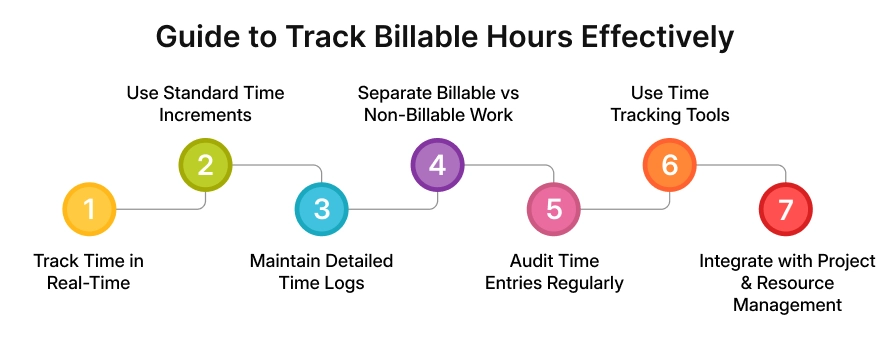
Here is a practical step-by-step approach.
1. Track Time in Real-Time
Encourage your team to log time as they work, not at the end of the day or week.
Real-time tracking:
- Reduces errors
- Prevents missed entries
- Improves accuracy
Delaying entries often leads to guesswork and lost billable hours.
2. Use Standard Time Increments
Define a standard format for logging time. For example, 10 or 15-minute intervals.
This helps:
- Maintain consistency across teams
- Simplify reporting
- Improve billing accuracy
3. Maintain Detailed Time Logs
Each time entry should include a short description of the task.
For example: “Fixed login bug” or “Client call for requirement discussion.”
Clear logs:
- Justify billing
- Improve transparency
- Help during audits or disputes
4. Separate Billable vs Non-Billable Work
Make it easy for teams to categorize their time.
This allows you to:
- Track revenue-generating work
- Analyze non-billable activities
- Improve overall efficiency
Without this separation, reporting becomes unclear.
5. Audit Time Entries Regularly
Review time logs weekly or bi-weekly.
This helps:
- Catch missing entries early
- Correct errors
- Maintain consistency across teams
Regular audits ensure that your data stays reliable.
6. Use Time Tracking Tools
Manual tracking often leads to errors and inefficiencies.
A dedicated billable hours tracker helps:
- Automate time logging
- Reduce manual effort
- Improve accuracy
- Generate reports instantly
As your business grows, tools become essential.
7. Integrate with Project & Resource Management
Time tracking should not work in isolation.
When integrated with project and resource management:
- Time is linked to tasks and deliverables
- Workloads become visible
- Operational planning becomes easier
This gives leaders a complete view of how time, work, and revenue connect.
Most tracking issues are not due to a lack of effort. They happen due to a lack of systems.
A structured approach, supported by the right billable hours tracker, can significantly improve accuracy, visibility, and business outcomes.
Best Practices to Maximize Billable Hours
Maximizing billable hours is not about making your team work longer. It is about helping them spend more time on the work that generates revenue.
Here are some practical ways to improve it.
1. Improve Project Scoping
Unclear requirements often lead to rework and unbilled effort.
Define scope clearly at the start:
- Set expectations with clients
- Outline deliverables in detail
- Align on what is billable
This reduces confusion and prevents revenue loss.
2. Reduce Unnecessary Meetings
Too many internal meetings can consume valuable time.
Keep meetings:
- Short
- Structured
- Purpose-driven
This frees up more time for billable work.
3. Automate Administrative Tasks
Admin work takes up a large portion of non-billable time.
Automate where possible:
- Reporting
- Time tracking reminders
- Invoicing
This allows your team to focus more on client work.
4. Minimize Context Switching
Switching between multiple tasks or projects reduces efficiency.
Try to:
- Assign focused blocks of work
- Limit frequent task changes
- Plan workloads more effectively
This improves productivity and increases billable output.
5. Train Teams on Time Tracking Discipline
Even the best systems fail without proper usage.
Educate your team on:
- What are billable hours
- Why tracking matters
- How to log time correctly
When teams understand the impact, adoption improves.
6. Use Data to Rebalance Workloads
Regularly review tracking data to identify patterns.
You can:
- Shift work from overloaded team members
- Increase billable allocation for underutilized resources
- Optimize team performance
Increasing billable hours is not about pushing teams harder. It is about removing inefficiencies and improving focus.
When done right, it leads to better productivity, higher revenue, and healthier teams.
Billable Hours in Different IT Business Models
Billable hours are relevant across all IT business models. The way they are used may differ, but tracking them remains essential for understanding performance and profitability.
1. Fixed Price Model
In a fixed price model, clients pay a set amount for the entire project. Even though billing is not based on hours, tracking billable hours is still important.
It helps you:
- Measure actual effort vs estimated effort
- Track project profitability
- Identify scope overruns
Without tracking, it is difficult to know if a project is truly profitable.
2. Time & Material Model
In this model, clients are billed directly based on the time spent. This is where understanding “what are billable hours” becomes critical.
Every hour logged contributes to revenue, so accurate tracking ensures:
- Correct billing
- Transparency with clients
- No revenue loss
3. Retainer Model
In a retainer model, clients pay a fixed fee for ongoing services. Billable hours are used to track how much value is being delivered.
This helps you:
- Compare effort against the retainer value
- Avoid over-servicing clients
- Maintain profitability
4. Staff Augmentation Model
In this model, resources are billed based on the hours they work for a client. Here, billable hours directly reflect resource utilization.
Tracking helps you:
- Monitor productivity
- Ensure accurate billing
- Manage client expectations
Even when billing is not directly tied to hours, tracking billable hours provides critical insights. It helps IT leaders to control costs, improve efficiency, and make better business decisions.
Tools for Tracking Billable Hours
As IT businesses grow, tracking billable hours manually becomes difficult and error-prone. The right tools can simplify this process and improve accuracy.
1. Manual Tracking (Spreadsheets)
Many teams start with spreadsheets. They are easy to set up but come with limitations:
- High chances of manual errors
- No real-time visibility
- Difficult to manage across multiple projects
- Time-consuming reporting
As complexity increases, spreadsheets become hard to scale.
2. Time Tracking Software
Dedicated tools are built specifically to track time. A good billable hours tracker helps:
- Log time in real-time
- Categorize billable and non-billable work
- Generate accurate reports
- Reduce missed entries
These tools improve consistency and reduce dependency on manual input.
3. Project Management Tools
Some project management platforms include time tracking features. They allow teams to:
- Track time directly against tasks
- Link work with specific projects
- Improve visibility into progress and effort
This creates better alignment between work done and time recorded.
Key Capabilities to Look For in a Billable Hours Tracker
When choosing a tool, focus on features that support both tracking and decision-making.
Look for:
- Real-time tracking- Helps reduce errors and missed entries
- Project-wise time allocation- Gives clarity on where time is being spent
- Reporting dashboards- Provides insights into utilization and performance
- Invoice integration- Simplifies billing and speeds up invoicing cycles
The goal is not just to track time, but to understand how time impacts revenue. Using the right billable hours tracker can help you move from basic tracking to better control, visibility, and growth.
How CollabCRM Helps You Track Billable Hours Smartly
Tracking billable hours becomes challenging when teams rely on multiple tools and scattered spreadsheets. This often leads to missed entries, poor visibility, and revenue gaps.
CollabCRM is a company resource management system, that solves this by bringing everything into one unified system. It acts as a complete business operating system that gives you real-time visibility across projects, teams, and finances.
Here is how it helps you track billable hours more effectively.
1. Automated Accountability and Discipline
One of the biggest issues in time tracking is inconsistency. CollabCRM ensures that every team member stays accountable.
- Automatic reminders notify employees and managers when timesheets are not filled
- Managers can enforce mandatory daily time logging for key team members
- Color-coded status makes it easy to see who has completed, partially filled, overworked, or missed their entries
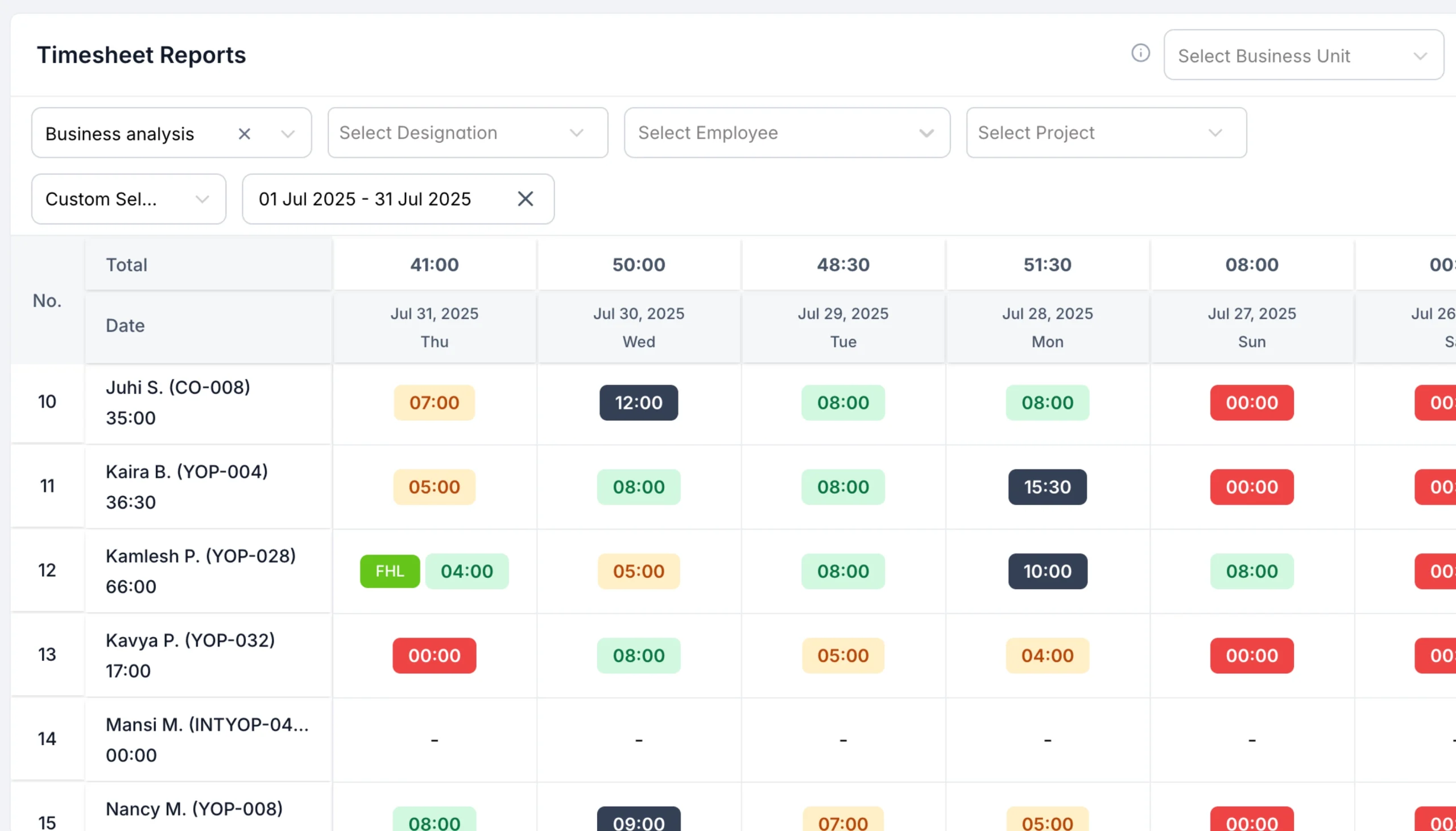
This reduces missed logs and improves overall tracking discipline.
2. Integrated Work Logging at Task Level
CollabCRM connects time tracking directly with actual work.
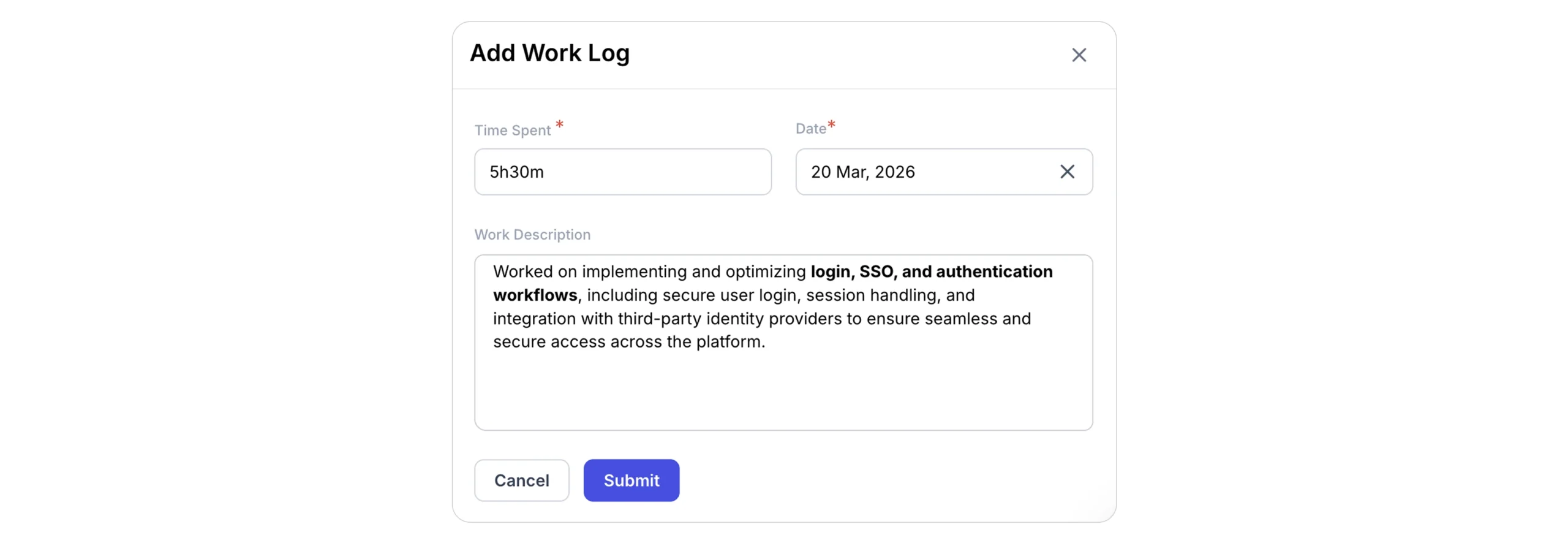
- Team members can log time within tasks along with detailed descriptions
- Daily work allocation helps capture planned effort from the start of the day
- TimeSpent reports show how much time is spent across projects and activities
This ensures that every entry is accurate, contextual, and easy to track.
3. Real-Time Financial Monitoring
Tracking time is only useful when it connects to financial outcomes. CollabCRM provides clear visibility into project-level financials:
- Hourly reports show purchased vs used hours in real time
- Fixed-cost reports compare estimated effort with actual time spent
- Top-up tracking helps manage additional hours and budget changes
This helps prevent overuse of hours and keeps projects aligned with budgets.
4. Seamless Billing and Client Transparency
CollabCRM makes it easy to convert tracked time into revenue.
- Timesheet entries can be directly converted into invoices
- The system identifies missed or underbilled hours before they impact revenue
- Clients can access live timesheet data through secure links for full transparency
This improves trust while ensuring accurate and faster billing.
5. Centralized System, Less Manual Work
Instead of switching between tools, everything is managed in one place.
By centralizing time tracking, project management, and billing, teams can:
- Reduce manual effort
- Avoid duplicate work
- Save time on reporting
On average, businesses save several hours each week per employee that would otherwise be spent on manual updates.
CollabCRM is more than just a billable hours tracker. It helps you bring structure, visibility, and accuracy to how time is managed across your business.
When every hour is tracked, connected, and accounted for, it becomes easier to improve utilization, reduce revenue leakage, and make better business decisions.
Wrap Up: Turning Time Into Revenue
Billable hours are the foundation of revenue in IT businesses. But their true value comes from how well you track and manage them.
When you clearly understand what are billable hours and track them consistently, you reduce revenue loss, improve utilization, and make smarter decisions.
In the end, growth is not about working more. It is about making every hour count.
FAQs
In IT services, the billable hours meaning refers to the time your team spends on client-related work that generates revenue. It excludes internal or administrative activities.
A good utilization rate typically ranges between 70% to 80%. It ensures that teams are productive without being overworked.
Businesses lose billable hours due to missed time entries, manual tracking errors, unclear scope, and lack of proper tools or processes.
The most effective way is to use a dedicated billable hours tracker that allows real-time logging, task-level tracking, and automated reporting. This improves accuracy and reduces revenue leakage.
Revenue leakage often happens due to missed time entries, untracked small tasks, delayed logging, or work done outside the defined scope but not billed.
Ideally, teams should log time in real-time or at least daily. Delayed entries reduce accuracy and increase the chances of missed billable work.
Yes. Overtracking or overbilling without clear justification can lead to disputes and loss of trust. This is why detailed time logs and transparency are important.
Utilization rate measures how much of the available time is spent on billable work. Realization rate measures how much of that billable work is actually invoiced and paid.
Focus on reducing non-billable work, improving planning, and eliminating inefficiencies. Better allocation and fewer distractions can increase utilization without increasing workload.







 Priority Onboarding