


Sales is often described as a pipeline. A clear flow from lead to deal. Each stage follows the next, with defined actions and outcomes. But in practice, that flow is rarely smooth.
Leads come from different sources and are stored in multiple places. Conversations happen across emails and chats. Updates are tracked manually. As the process grows, it becomes harder to keep everything aligned.
This is when common gaps start to appear: leads slipping through the cracks, too many disconnected tools, limited visibility into the pipeline, and time spent on manual reporting.
These issues make it difficult to track progress and act at the right time.
A system like CollabCRM helps bring structure to this flow. In this blog, we will see how it connects each stage of the sales process in one place, making it easier to manage, track, and move deals forward consistently.
TL;DR: Top 10 CollabCRM Features
- Centralized Leads:– All contacts and interactions in one place
- Visual Pipeline:– Clear view of deals across stages
- Lead-to-Deal Conversion:– Move leads forward without data loss
- Client Interviews:– Structured tracking of client interactions
- Smart Follow-ups:– Never miss a task or reminder
- Proposals & Quotes:– Manage proposals within the same system
- Project Handover:– Convert deals to projects with full context
- Real-Time Dashboard:– Track deals, activities, and performance
- Performance Tracking:– Monitor goals and team progress
- Custom Workflows:– Adapt and scale as your process grows
What Defines a Smooth Sales Workflow?
A smooth sales workflow is not just about moving leads from one stage to another. It is about having a clear, connected process where every action is intentional and easy to track.
In a well-structured guide to sales management, sales teams do not have to guess what comes next. They can see where each deal stands, what actions are pending, and how close they are to closing. This clarity helps reduce delays and keeps the entire team aligned.
It is a process that is structured, visible, and consistent, with minimal manual effort.
Key Components of a Sales Workflow
Lead Capture: Leads come in from different sources, such as websites, referrals, or campaigns. These need to be captured and stored in one place for easy access.
Lead Nurturing: Not every lead is ready to convert immediately. Consistent follow-ups and relevant communication help move them forward.
Deal Conversion: Once a lead shows intent, it is converted into a deal and tracked more closely through the pipeline.
Client Management: All interactions, updates, and requirements are documented to maintain context and avoid miscommunication.
Retention: The process does not end at closure. Maintaining relationships opens up opportunities for repeat business and referrals.
When these stages are connected, the workflow becomes predictable and easier to manage.
Common Bottlenecks in Traditional Systems
- Many teams struggle not because of a lack of effort, but because their systems are not built to support this flow.
- Information is spread across multiple tools, making it hard to find and update data
- Follow-ups depend on manual reminders, which can be missed or delayed
- There is no real-time visibility into the pipeline, making forecasting difficult
- Reporting takes time and often relies on outdated data
- Sales and delivery teams work in silos, leading to gaps during handover
These bottlenecks slow down the process and create unnecessary friction.
A smooth sales workflow removes these gaps by bringing structure, visibility, and consistency into every stage of the process.
Top 10 CollabCRM Features for a Smooth Sales Workflow
CollabCRM brings together all the essential parts of the sales process into one connected system. Each feature is designed to remove friction, improve visibility, and help teams move deals forward without confusion.
| Must Read: How to Use CollabCRM & Its Workflows. |
Instead of managing leads, follow-ups, proposals, and reports in separate places, everything works together within a single workflow. Here are the 10 key features that make it possible.
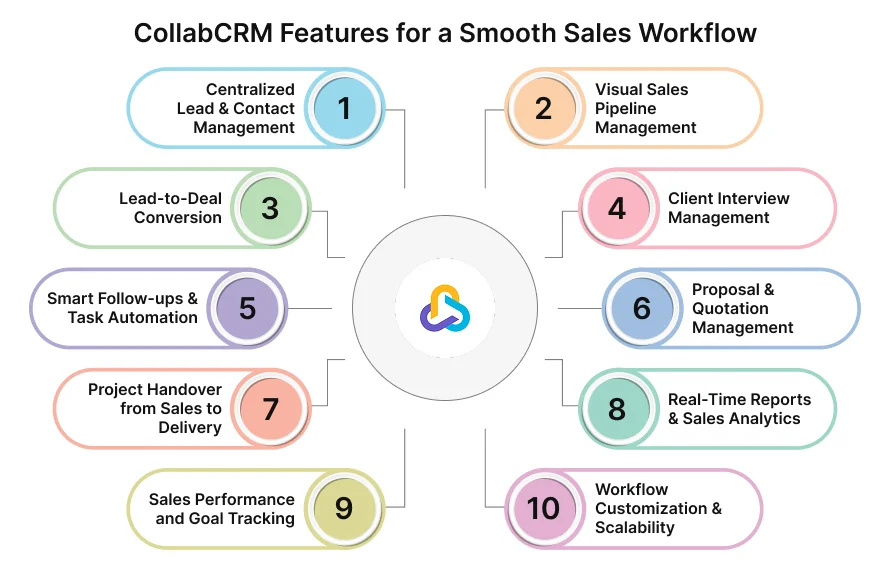
1. Centralized Lead & Contact Management
CollabCRM brings all your leads and contacts into one structured database. Instead of switching between tools, your team can access everything from a single screen.
Each lead profile includes key details such as source, contact information, past interactions, notes, and activity history. This gives full context before every conversation.
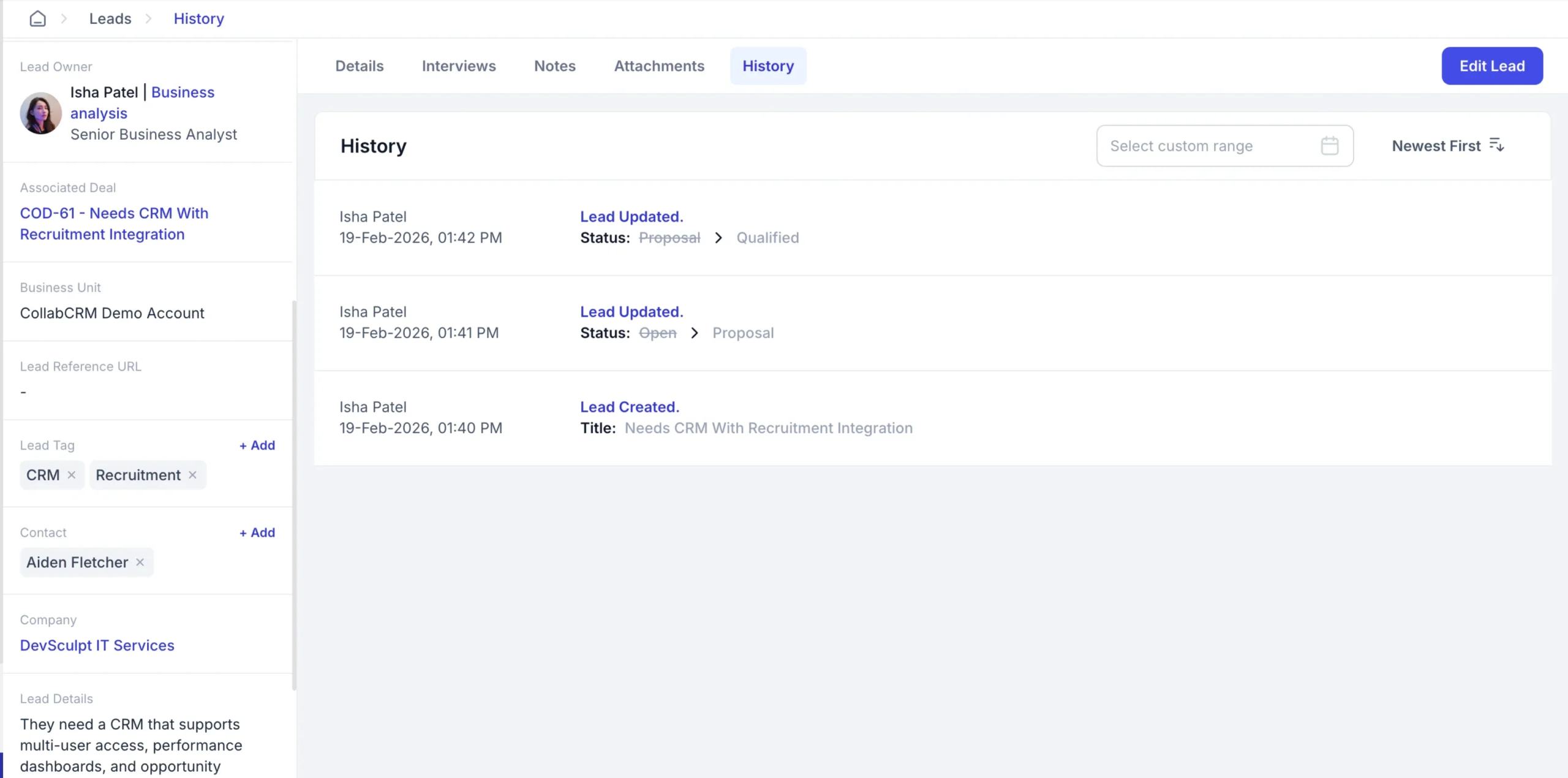
It also helps teams:
- Avoid duplicate or scattered data
- Track lead ownership clearly
- Maintain a complete history of communication
2. Visual Sales Pipeline Management
The pipeline view gives a clear picture of all ongoing deals. Each deal is placed in a stage, making it easy to track progress from initial contact to closure.
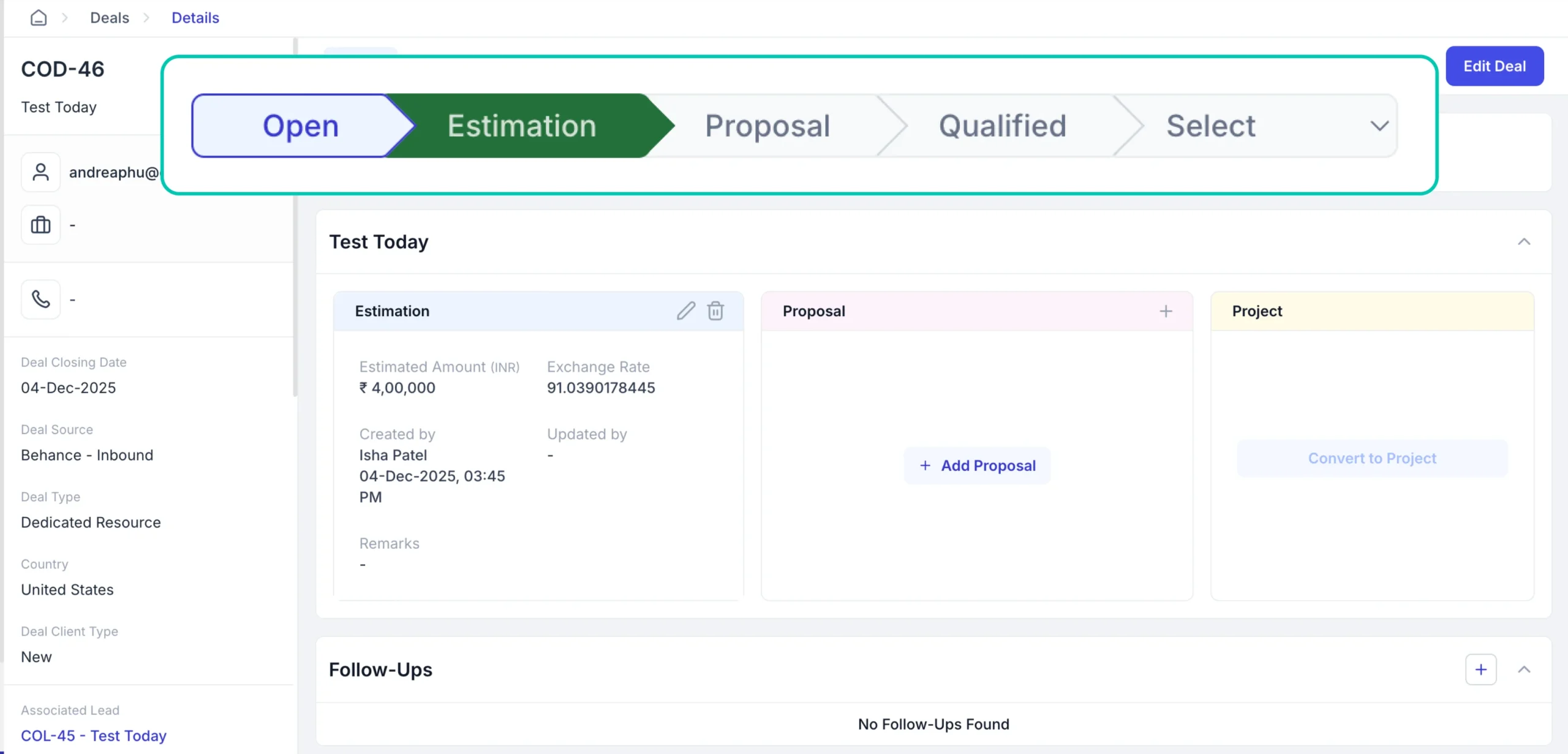
Sales teams can quickly:
- See how many deals are in each stage
- Identify stalled or delayed deals
- Focus on high-priority opportunities
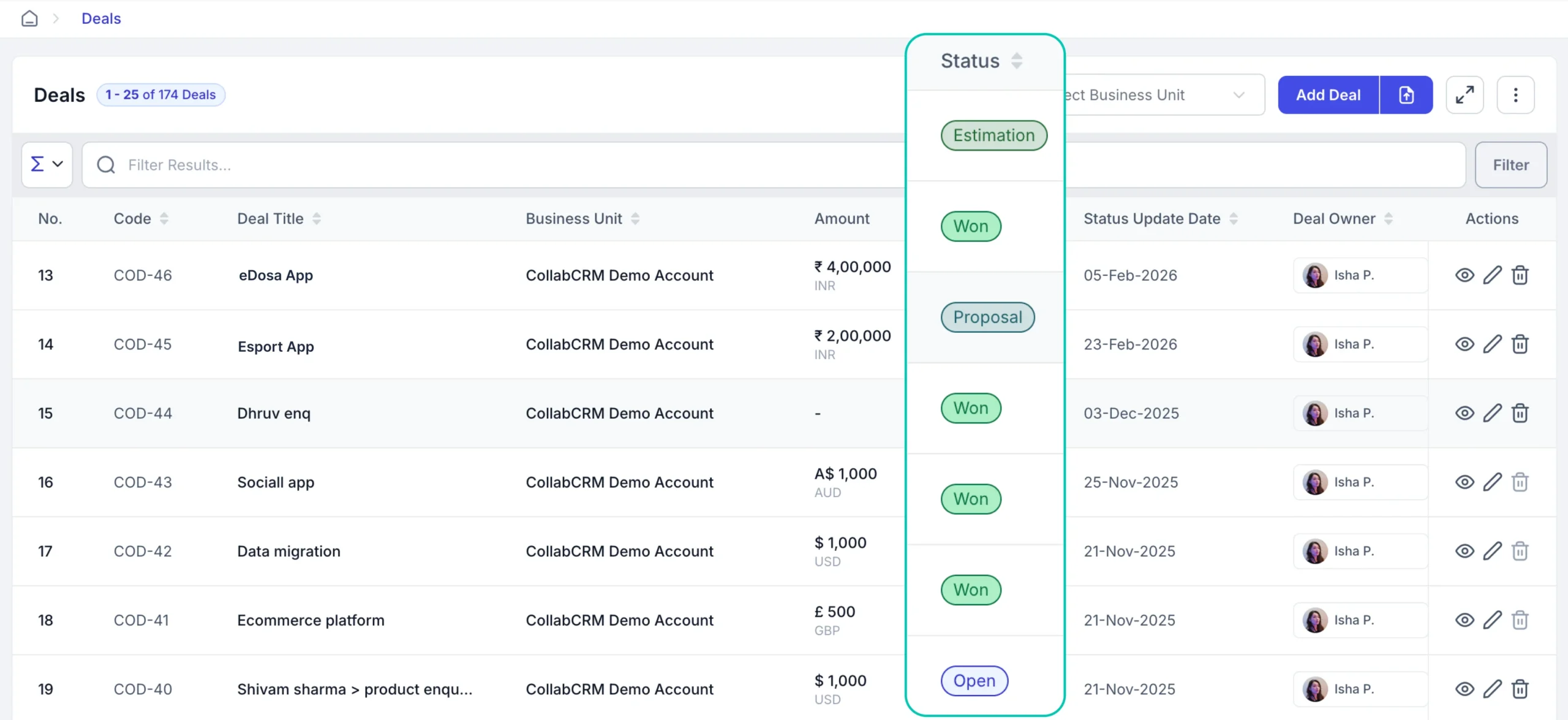
Managers can use this view to understand pipeline health and forecast outcomes more accurately.
3. Lead-to-Deal Conversion
When a lead is qualified, CollabCRM allows instant conversion into a deal without re-entering data. All information is carried forward automatically.
This ensures:
- No data loss during transition
- Faster movement in the pipeline
- Consistency in deal tracking
It also reduces manual work and errors that often happen during handoffs between stages.
4. Client Interview Management
For teams that involve client discussions, demos, or evaluations, this feature helps structure those interactions.
You can:
- Schedule interviews or meetings
- Assign internal stakeholders
- Record notes, feedback, and outcomes
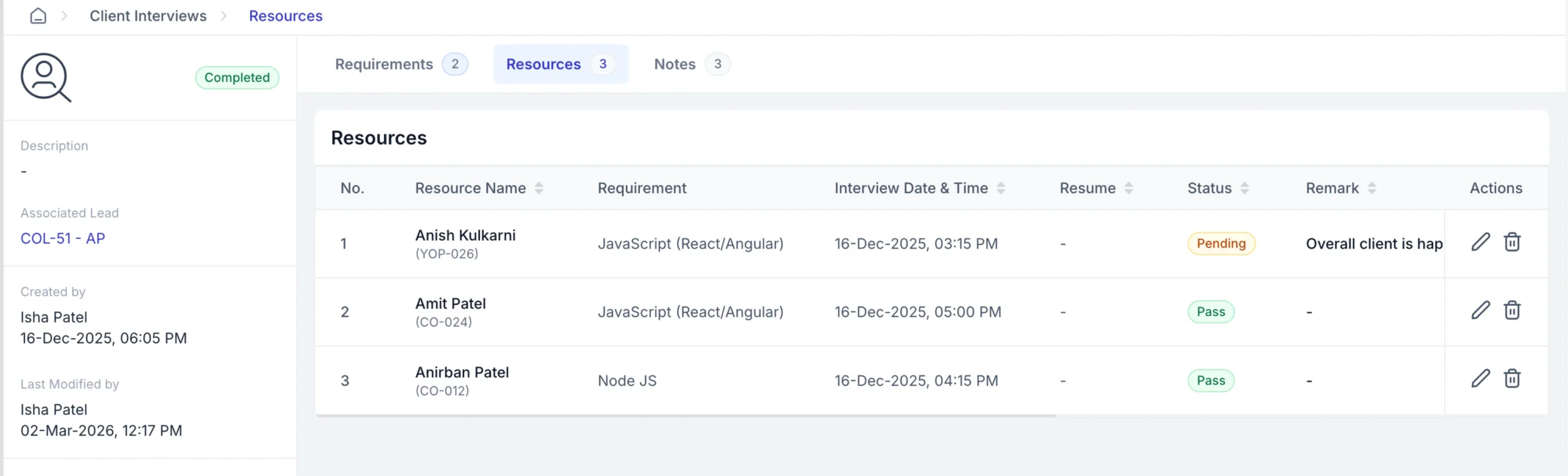
This is especially useful for IT services or hiring-based models where multiple rounds of interaction are common.
It ensures that every discussion is documented and accessible to the team.
5. Smart Follow-ups & Task Automation
Follow-ups are often missed when tracked manually. CollabCRM automates this by creating tasks and reminders based on deal activity or stage.
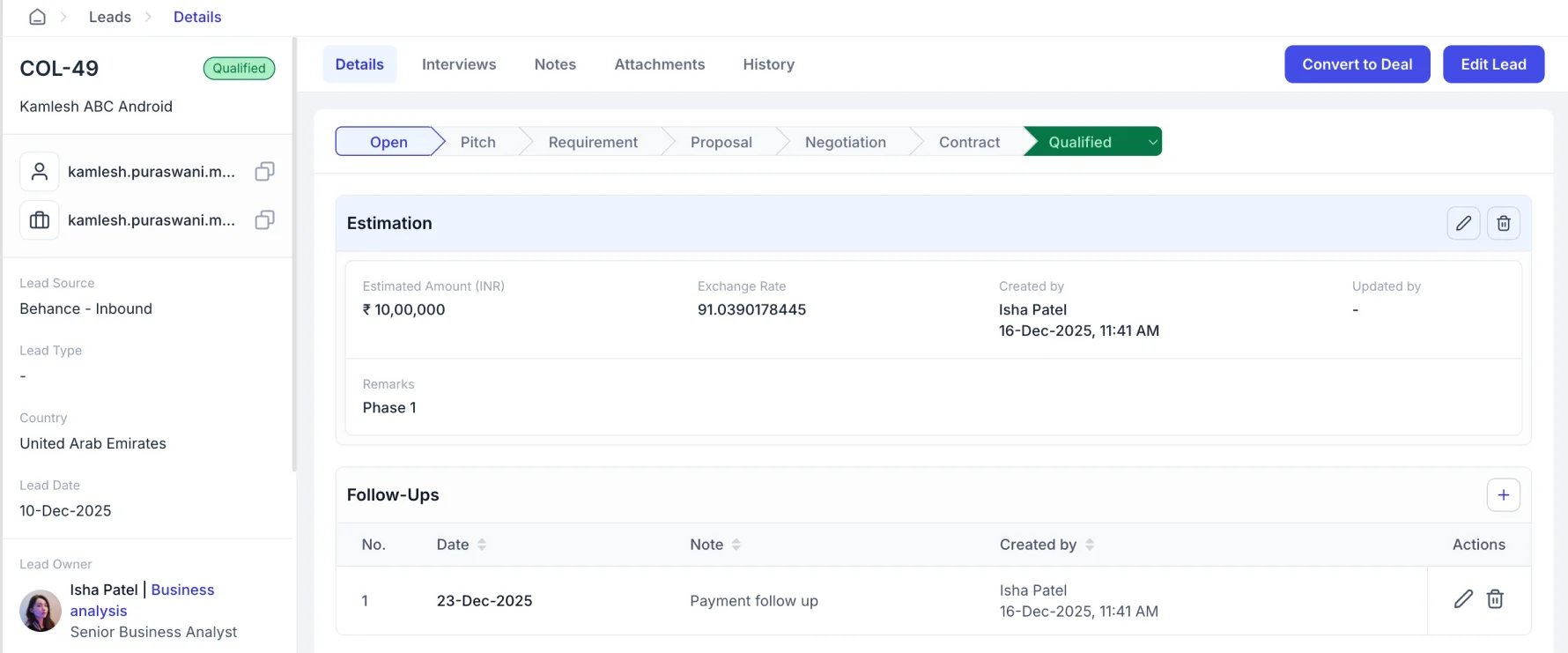
Teams can:
- Set follow-up reminders for calls or emails
- Assign tasks to team members
- Track pending and completed activities
This keeps deals moving and ensures no opportunity is forgotten.
6. Proposal & Quotation Management
CollabCRM allows sales teams to create and manage proposals directly within the system, keeping all deal-related information in one place.
You can generate proposals and quotations based on deal details, ensuring consistency and reducing manual effort. Since proposals are linked to deals, it becomes easier to access and update them when needed.
This helps teams:
- Maintain organized records of all proposals
- Reduce back-and-forth between tools
- Ensure consistency in pricing and deal information
While follow-ups still depend on your sales process, having proposals stored and managed within the same system makes it easier to stay on top of conversations and move deals forward.
7. Project Handover from Sales to Delivery
Once a deal is closed, all related information can be converted into a project within CollabCRM.
This includes:
- Client details
- Scope of work
- Agreed terms and timelines
The delivery team gets complete context without needing separate handover meetings or documents.
This reduces delays and ensures a smoother start to execution.
8. Real-Time Reports & Sales Analytics
CollabCRM provides a centralized dashboard where you can view all leads, deals, and follow-ups in one place. You can quickly check the status of each deal and track ongoing activities.
This level of visibility is often highlighted in a lead management software guide, as real-time reporting helps teams monitor pipeline health and sales performance without manual tracking.
It helps teams:
- Monitor deal stages and pipeline status
- Track follow-ups and sales activities
- Get visibility into the team and overall performance
With real-time updates, there is no need for manual tracking or switching between tools.
9. Sales Performance and Goal Tracking
CollabCRM allows teams to set targets for goal management and track performance at both individual and team levels.
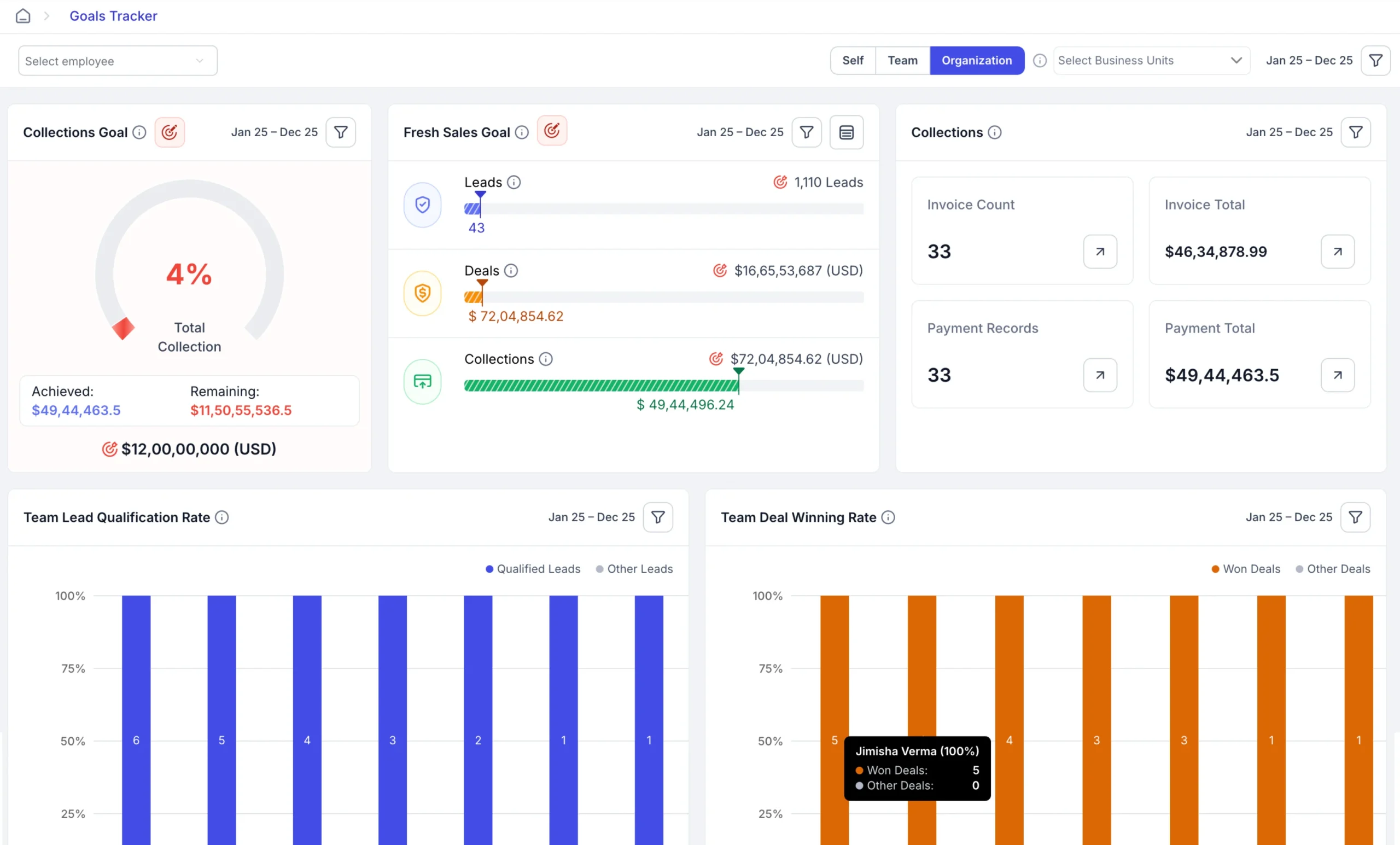
Sales Managers can:
- Monitor deal closures per sales representative
- Compare performance against goals
- Identify top performers and gaps
This creates visibility and accountability across the team.
10. Workflow Customization & Scalability
Every sales process is different. CollabCRM allows you to customize your setup based on your business needs.
You can:
- Define lead and deal types
- Set sources and pipeline stages
- Track the reasons
- Export leads, deals, companies, and contacts anytime
- View a complete timeline of all activities
This ensures your sales process stays structured, transparent, and easy to manage.
As your team grows, the system adapts without adding complexity. None of these features works in isolation. They are connected, which is what makes the overall workflow smooth and efficient.
How These Features Work Together (End-to-End Flow)
Here is how a typical sales process works within CollabCRM:
1. Lead Capture and Organization
Leads enter the system and are stored in a centralized database. The team can view details, assign ownership, and start tracking interactions from the beginning.
2. Lead Nurturing and Follow-ups
Follow-ups, tasks, and activities are managed within the system. This ensures consistent communication and keeps leads engaged.
3. Lead-to-Deal Conversion
Once a lead is qualified, it is converted into a deal without losing any information. The deal is then tracked in the sales pipeline.
4. Pipeline Tracking and Deal Progression
Deals move through different stages, making it easy to track progress, identify delays, and prioritize actions.
5. Proposal Management and Closure
Proposals are created and managed within the deal. This keeps all information in one place and supports smoother deal closure.
6. Project Handover
After closing the deal, it is converted into a project with all relevant details. The delivery team can start work with the full context.
What This Means for Your Team:
- No switching between multiple tools
- No loss of information between stages
- Clear visibility at every step
- A structured and predictable sales process
By connecting every stage, CollabCRM ensures that your sales workflow stays smooth, consistent, and easy to manage.
Why CollabCRM for Sales Teams & IT Businesses
Sales processes in IT and service-based businesses are often more complex than standard sales cycles. They involve multiple interactions, different pricing models, and close coordination between sales and delivery teams.
CollabCRM is designed to support these requirements.
Built for IT & Service-Based Businesses
It supports different engagement models such as hire-based, hourly, and fixed-cost projects. This makes it easier to manage deals that vary in scope and structure.
Features like client interview management and project handover are especially useful for teams that work closely with clients before and after deal closure.
All-in-One System
Instead of using separate tools for CRM, communication, tracking, and reporting, CollabCRM brings everything into one platform. It is rightly known as the business operating system for IT.
This reduces dependency on multiple tools and keeps all data and activities connected.
What This Means for Your Business:
- Faster deal cycles due to better visibility and follow-ups
- Improved conversion rates with a structured process
- Better team productivity with reduced manual work
- Reduced revenue leakage by tracking every stage clearly
By combining sales, operations, and collaboration, CollabCRM helps teams manage their entire workflow in a more organized and efficient way.
Wrap Up
A smooth sales workflow is not just about closing deals. It is about having a clear, structured process that your team can follow consistently.
When your leads, deals, follow-ups, and handovers are managed in one place, it becomes easier to stay organized and take action at the right time.
CollabCRM is your company resource management system that brings this structure by connecting every stage of the sales process. From the first interaction to project execution, everything stays aligned and visible.
This helps teams reduce manual effort, avoid missed opportunities, and work with better clarity.
Over time, this consistency leads to better performance, stronger client relationships, and more predictable growth.
FAQs
CollabCRM goes beyond basic lead and contact management. It connects the entire sales workflow, including follow-ups, deal tracking, client interactions, and project handover, in one system.
Yes. CollabCRM is designed to support IT businesses and service teams that manage different types of projects and client interactions throughout the sales cycle.
By centralizing data and automating follow-ups, CollabCRM reduces manual work. This allows sales teams to focus more on selling and less on tracking tasks.
Yes. CollabCRM provides a visual pipeline where you can view and manage all deals across different stages in one place.
Yes. Once a deal is closed, it can be converted into a project with all relevant details, making it easier for the delivery team to get started.
Yes. You can customize pipeline stages, fields, and workflows based on your business process.
CollabCRM allows you to set reminders and track tasks, ensuring that follow-ups are planned and completed on time.






 Priority Onboarding