


Plans fail when execution lacks clarity. This is a common challenge for IT leaders, project managers, and development teams.
An action plan turns ideas into structured, actionable steps. It defines what needs to be done, who is responsible, and when each task must be completed. Without it, projects drift, priorities clash, and accountability weakens.
In fast-moving IT environments, knowing how to create an action plan is essential. Whether you are managing client deliverables, launching a product, or improving internal workflows, a clear action plan helps teams stay focused and aligned.
This guide breaks down what an action plan is, its purpose, and how to create a plan in 2026 that actually drives results. You will also see practical examples tailored for IT teams and business leaders.
TL;DR
- An action plan is a simple way to break a goal into small tasks so teams know exactly how to move forward.
- It is different from project plans and to-do lists in scope and usage
- Its purpose is focused execution, accountability, and alignment
- It is useful for IT leaders, project managers, and developers
- Core elements include tasks, timelines, ownership, and tracking
- Action plans are created by defining goals, allocating resources, identifying & prioritizing tasks, setting milestones, and continuously monitoring them
- Tools like CollabCRM help teams execute and track action plans efficiently
What is an Action Plan?
An action plan is a clear, step-by-step document that outlines how a goal will be achieved. It translates high-level objects into specific tasks, assigns ownership, and sets execution as per project management timelines.
Unlike a strategy or a project vision, an action plan focuses on execution. It answers practical questions like what needs to be done, who will do it, and by when. This makes it easier for teams to move from discussion to action without confusion.
In IT and project management, action plans are used to manage product launches, client deliverables, system upgrades, and process improvements. They help teams stay aligned, reduce ambiguity, and track progress in real time.
Simply put, an action plan is the bridge between planning and results. It ensures that goals are not just defined but actively worked on and completed.
Action Plan vs Project Plan vs To-do List
An action plan focuses on execution, a project plan defines the overall roadmap, and a to-do list tracks individual tasks.
| Action Plan | Project Plan | To-do List |
| Clear steps to reach a goal.Defined tasks and owners.Set timelines and milestones.Regular progress tracking.Built for execution and accountability. | Big-picture project roadmap.Defined scope and phases.Dependencies and risks mapped.Clear deliverables and timelines.Guides direction, not daily execution. | Simple list of tasks.Usually individual-focused.No defined ownership or priorities.Flexible deadlines or none.Helps organize work, not strategy. |
Who Needs an Action Plan?
Anyone responsible for outcomes needs an action plan. In IT environments, this includes leaders, managers, and execution teams who must deliver results within fixed timelines and project budgets.
IT entrepreneurs use action plans to turn business goals into executable steps. Whether it’s launching a product, onboarding clients, or scaling operations, action plans help maintain focus and momentum.
Project managers rely on action plans to assign ownership, track progress, and keep teams aligned. They reduce ambiguity, improve accountability, and make it easier to manage changing priorities.
Developers and technical teams benefit from action plans by gaining clarity on what to build, when to deliver, and how their work connects to the larger goal.
In short, if your role involves planning, executing, or delivering work, an action plan helps ensure nothing falls through the cracks.
What is the Purpose of an Action Plan?
The purpose of an action plan is to convert goals into clear, actionable steps. It defines what needs to be done, who is responsible, and when tasks should be completed.
For IT teams, action plans reduce confusion and improve execution. They help teams stay aligned, adapt to change, and consistently move work toward measurable outcomes.
Benefits of an Action Plan in Project Management
An action plan benefits project management by improving task clarity, reducing delays, and ensuring accountability across teams.
- Improves workload management by breaking work into clear, manageable tasks
- Increases accountability with clear ownership
- Helps teams meet deadlines through structured timelines
- Reduces execution gaps and last-minute delays
- Makes progress easier to track and review
- Supports better decision-making when priorities change
- Keeps projects aligned with business goals
Key Elements of an Action Plan
An effective action plan is built on a few essential components that keep execution clear and measurable. These elements help IT teams stay organized, accountable, and focused on outcomes.
1. Tasks
Tasks define the specific actions required to achieve the goal. Each task should be clearly written, actionable, and easy to understand. Well-defined tasks reduce ambiguity and help teams move forward without constant clarification.
2. Timelines
Timelines set expectations for when tasks should start and finish. They help teams prioritize work, manage dependencies, and avoid delays. Clear timelines also make it easier to spot risks early and adjust plans when needed.
3. Responsible Parties
Every task must have an owner. Assigning responsible parties ensures accountability and prevents work from being overlooked. In IT projects, clear ownership improves coordination across teams and roles.
4. Resources Needed
Resources include people, tools, budget, and information required to complete tasks. Identifying resources upfront helps teams avoid bottlenecks and plan work realistically.
5. Progress Tracking
Progress tracking shows how work is moving against the plan. Regular updates help teams identify issues early, measure performance, and keep stakeholders informed.
How to Create an Action Plan? [Step-by-Step Guide]
Creating an action plan is about clarity and structure. According to a report by Geneca, only 55% of employees understand their organization’s objectives, highlighting the need for structured and well-defined planning.
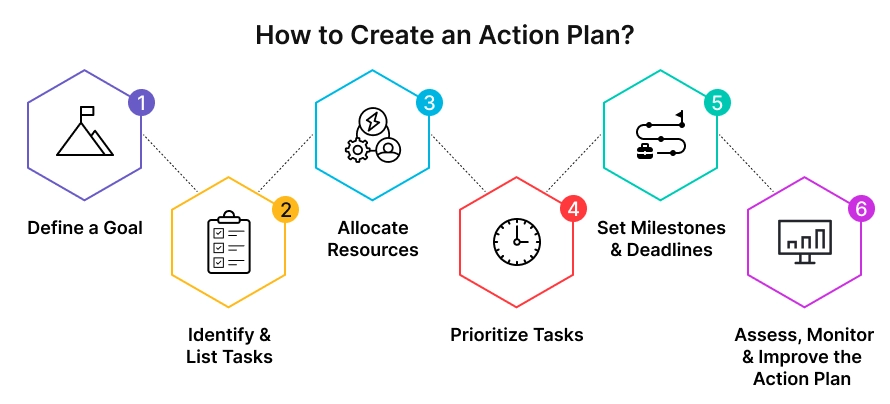
Follow these steps to make an action plan in the year 2026. Ensure your plan is practical, measurable, and easy for teams to execute.
Step 1: Define a Goal
Start with a clear and specific goal. The goal should explain what you want to achieve and why it matters. Avoid vague objectives and focus on outcomes that can be measured. For IT teams, this could be improving delivery time, launching a feature, or streamlining a process.
Step 2: Identify & List Tasks
Break the goal into smaller, actionable tasks. Each task should represent a concrete piece of work that contributes directly to the goal. Clear task definitions make it easier for teams to understand expectations and avoid overlap.
Step 3: Allocate Resources
Identify the people, tools, and budget required for each task. Proper resource planning prevents bottlenecks and helps teams plan work realistically. This step is critical in IT projects where tools and skills vary across tasks.
Step 4: Prioritize Tasks
Not all tasks carry the same importance. Prioritize tasks based on impact, urgency, and dependencies. This helps teams focus on what matters most and maintain momentum.
Step 5: Set Milestones & Deadlines
Define milestones to track progress and set realistic deadlines for each task. Milestones help teams measure progress over time and identify risks early.
Step 6: Assess, Monitor & Improve the Action Plan
Regularly review progress and adjust the plan as needed. Monitoring ensures tasks stay on track, while continuous improvement helps teams adapt to changes without losing focus.
Action Plan Example [With Template]
Below is a simple action plan example tailored for an IT team. It shows how goals are broken down into tasks with clear ownership and timelines.
| Action Plan Example Goal: Launch a new customer dashboard feature within 60 days. |
| Task 1: Finalize feature requirementsOwner: Product ManagerTimeline: Week 1Resources: Product docs, stakeholder inputsProgress Tracking: Requirements sign-off |
| Task 2: Design UI and UXOwner: UI/UX DesignerTimeline: Weeks 2–3Resources: Design tools, user feedbackProgress Tracking: Design approval |
| Task 3: Develop backend and frontendOwner: Development TeamTimeline: Weeks 4–6Resources: Dev tools, APIsProgress Tracking: Sprint completion |
| Task 4: Testing and bug fixesOwner: QA TeamTimeline: Week 7Resources: Test cases, staging environmentProgress Tracking: QA sign-off |
| Task 5: Production releaseOwner: DevOps EngineerTimeline: Week 8Resources: Deployment pipelineProgress Tracking: Successful release |
Here is an action plan template that can be reused for business action plans, IT initiatives, or project-specific execution.
| Simple Action Plan Template Goal: Tasks: Responsible Parties: Timelines: Resources Needed: Progress Tracking Method: |
How to Implement a Successful Action Plan [Pro Tips]
Creating an action plan is only the first step. Successful implementation depends on how consistently it is used and reviewed.
1. Keep goals realistic and focused
Overly ambitious plans lead to delays. Set achievable goals that teams can execute without burnout.
2. Assign clear ownership
Every task should have one accountable owner. This avoids confusion and improves follow-through.
3. Break work into small, actionable tasks
Smaller tasks are easier to track and complete, especially in complex IT projects.
4. Review progress regularly
Schedule frequent check-ins to track progress and address issues early.
5. Adapt the plan as priorities change
IT projects evolve quickly. Update tasks, timelines, and resources without losing sight of the goal.
6. Use a single system to track execution
Centralized tracking improves visibility and keeps teams aligned.
7. Communicate updates clearly
Transparent communication helps stakeholders stay informed and reduces last-minute surprises.
Final Thoughts: Turning Action Plans into Results
Action plans work only when they are executed consistently. Clear tasks, defined ownership, and realistic timelines help IT teams move from planning to results.
By treating action planning as an ongoing process, leaders can improve alignment, accountability, and execution across projects and business initiatives.
How CollabCRM Helps Teams Execute Action Plans Better?
Creating an action plan is easier when execution is visible. CollabCRM helps IT teams turn action plans into day-to-day execution by bringing tasks, timelines, ownership, and progress tracking into one connected workspace.
It is an all-in-one hub for business operations that keeps projects, sales, people, recruitment, and reporting together under an umbrella for IT businesses.
With centralized project views, clear task ownership, and real-time updates, teams can monitor progress without constant follow-ups. This makes it easier for leaders to stay aligned with goals, identify bottlenecks early, and keep action plans moving forward.
For IT entrepreneurs and project managers, CollabCRM supports structured execution at scale, helping teams stay focused on outcomes, not just planning.
FAQs
An action plan should be created once goals are defined and before execution begins, and it should be updated whenever priorities, scope, or resources change.
An action plan should be detailed enough to guide daily execution but simple enough to update quickly as requirements evolve.
Action plans fail when tasks are vague, ownership is unclear, timelines are unrealistic, or progress is not reviewed regularly.
IT teams typically review action plans on a weekly basis or whenever key milestones are reached.
Yes, action plans complement agile workflows by providing clarity on goals, ownership, and priorities outside sprint planning.
Action plans create transparency by showing what is being worked on, who owns it, and expected delivery timelines.
Using a centralized system helps teams track multiple action plans without losing visibility or accountability.







 Priority Onboarding