


Website projects may look straightforward. But behind every successful launch is a complex web of planning, coordination, and execution.
From aligning stakeholders to managing designers, developers, content teams, and vendors, website projects move fast and break easily. Missed requirements, unclear timelines, or poor communication can delay launches and inflate costs.
Website project management brings structure to this chaos. It helps teams define scope, assign ownership, track progress, and make informed decisions at every stage of the project lifecycle.
For project managers, IT entrepreneurs, and SaaS leaders, effective website project planning and management is not optional. It’s what ensures websites launch on time, stay within budget, and support real business goals, not just design expectations.
This guide walks you through the core phases of website project management, proven methodologies, and practical steps to manage workloads, timelines, and communication. Whether you’re building a marketing site, a SaaS product, or a client portal, these principles will help you deliver with confidence and control.
TL;DR
- Website project management ensures websites are planned, built, launched, and maintained effectively
- The core phases include discovery, design & development, testing & deployment, and ongoing maintenance
- Effective website project management combines smart resourcing, a tight schedule, cost control, and clear team-wide visibility.
- Top website project management methodologies: Kanban, Agile, Scrum, Waterfall, CPM
- The right methodology depends on project complexity, requirement stability, team structure, stakeholder involvement, and time-budget flexibility.
- Clear goals, defined scope, milestone-based execution, user-first design, risk tracking, and centralized visibility drive successful website projects.
- CollabCRM turns complex website projects into clear, manageable workflows. It gives teams full control with centralized visibility and streamlined execution.
What Is Website Project Management?
Website project management is the process of planning, organizing, and controlling all activities required to build, launch, and maintain a website.
It covers everything from defining goals and scope to managing timelines, budgets, resources, and risks. The goal is simple: deliver a functional, high-quality website that meets business objectives without delays or cost overruns.
Unlike general project management, website projects involve cross-functional teams. Designers, developers, content writers, SEO specialists, QA teams, and stakeholders must work in sync. Website development project management ensures everyone knows what to do, when to do it, and how their work connects to the bigger picture.
A strong website project management approach helps teams:
- Translate business requirements into clear tasks
- Manage dependencies between design, development, and content
- Track progress across multiple phases
- Identify risks before they impact delivery
- Maintain consistency from planning to post-launch support
In short, website project management turns ideas into structured execution. It replaces guesswork with visibility and ensures websites are built with purpose, not pressure.
What Are the Main Phases of Website Project Management?
The four main phases of project management of website development are planning, design & development, testing & deployment, and maintenance & support.
Website project management follows a structured lifecycle that helps teams move from concept to launch with fewer surprises. Each phase has a clear purpose and set of outcomes. Skipping or rushing any phase often leads to delays, rework, or budget overruns.
1. Project Planning and Discovery
This phase sets the foundation for what the website is being built to achieve and how it will be delivered. Teams gather business requirements, define goals, identify target users, and align on success metrics, timelines, and budgets.
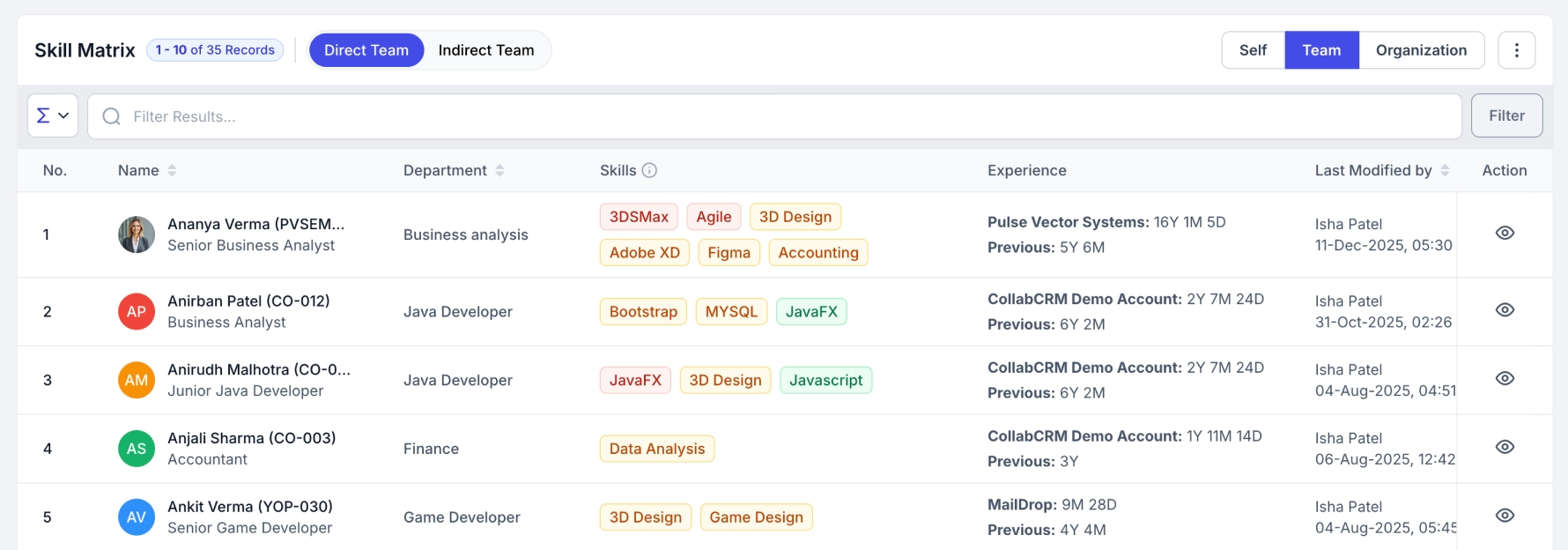
An effective workforce planning phase also involves assigning the right people to the right work. Using a global skill view, project managers can map required competencies to available expertise, ensuring the project starts with the most suitable resources in place. Early risk assessment and clear ownership help prevent scope creep and misalignment later.
2. Design and Development
With a clear plan in place, execution begins. Designers focus on user experience, wireframes, and visual identity, while developers convert approved designs into functional pages and features.
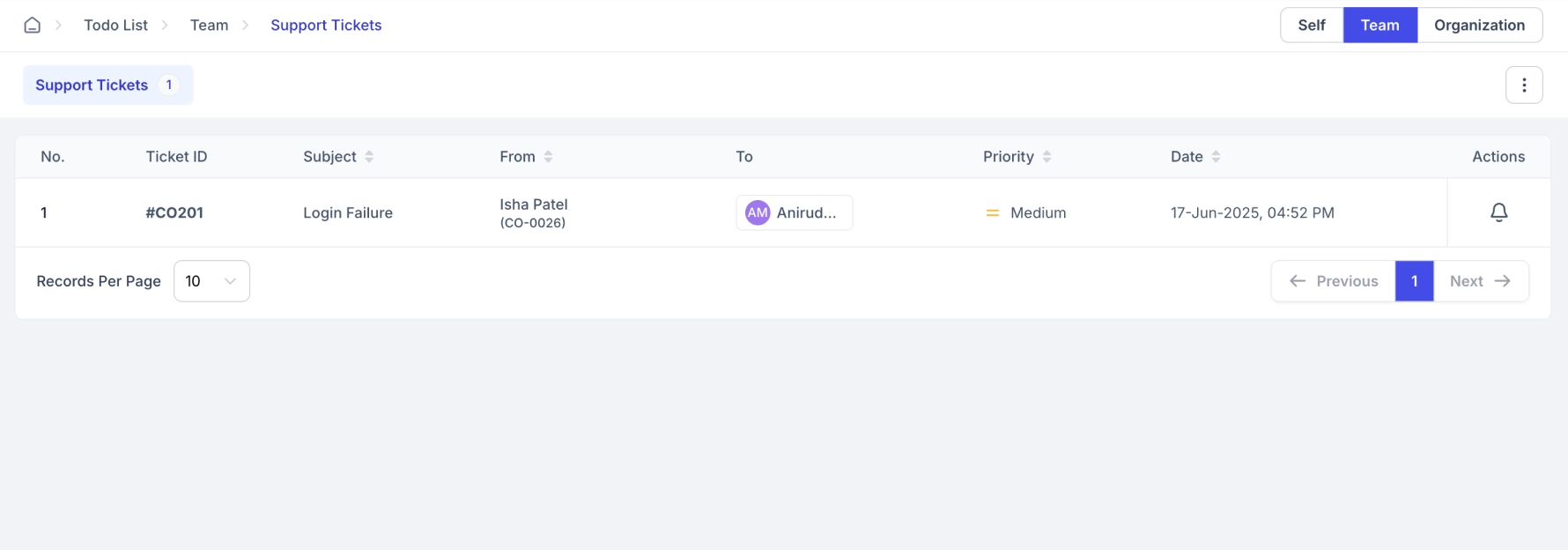
This phase typically runs in iterations. Structured feedback loops allow team members and leads to share input directly on designs and builds, enabling faster course correction and more collaborative, quality-driven development. Continuous feedback helps teams move forward without waiting for lengthy review cycles.
3. Testing and Deployment
Before launch, the website undergoes thorough testing to ensure performance, usability, security, and compatibility across devices and browsers. Functional testing and real-world scenarios help surface issues early.
Once everything is validated, the website is deployed to the live environment. A controlled and well-documented deployment process minimizes downtime and reduces the risk of post-launch issues.
4. Maintenance and Support
Website projects continue well beyond launch. Ongoing maintenance ensures the site remains secure, optimized, and aligned with evolving business needs. This includes updates, bug fixes, performance monitoring, and incremental enhancements.
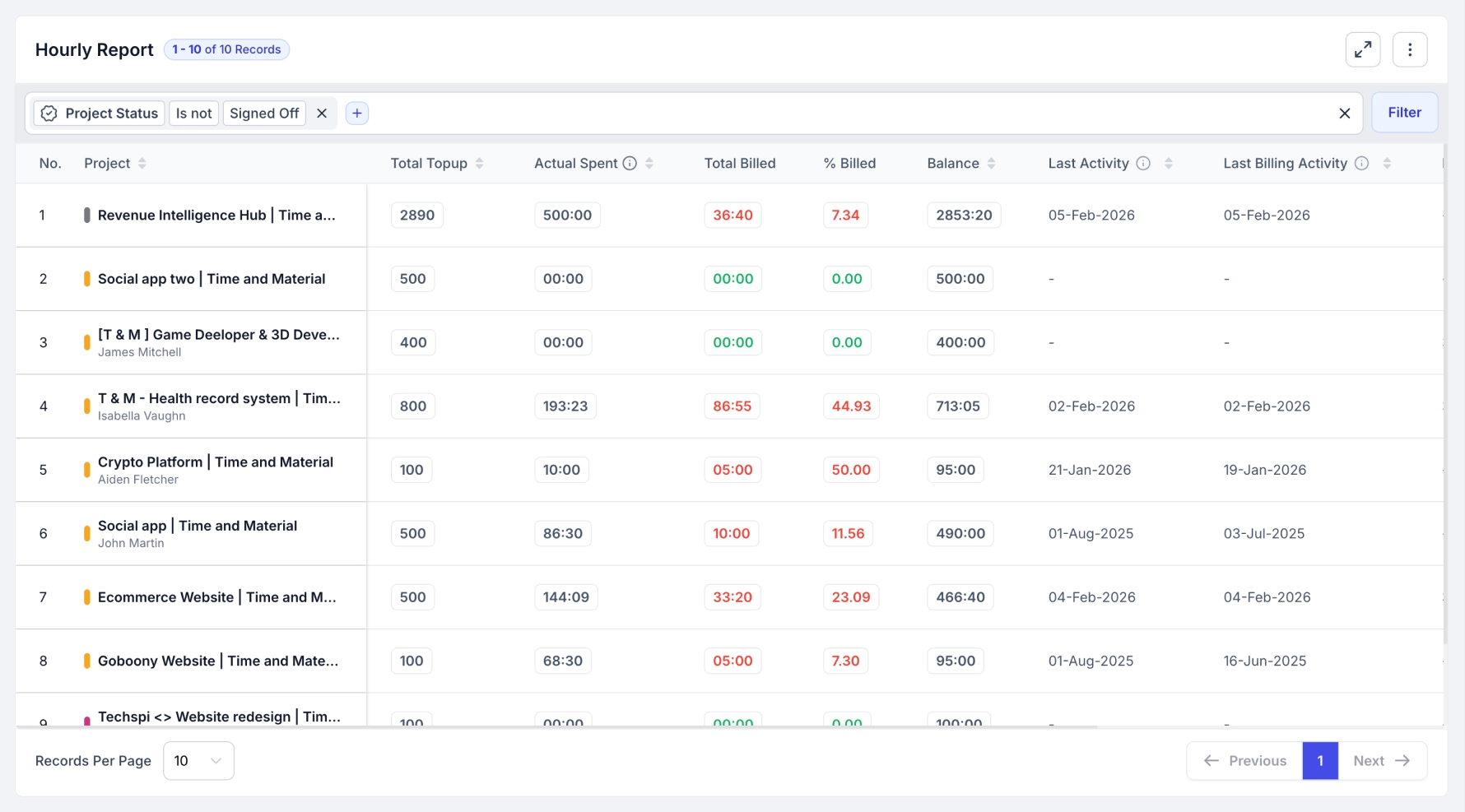
At this stage, visibility into ongoing work becomes essential. Tracking maintenance activity alongside billing and effort helps project managers and decision-makers understand how time and resources are being utilized, making it easier to manage billing while supporting long-term improvements.
How To Manage Successful Website Projects? (Step-by-Step Guide)
Successful website projects are managed by assigning the right resources, controlling timelines and costs, and keeping communication transparent across teams.
A structured, step-by-step approach helps project managers reduce risks, avoid delays, and deliver websites that meet business goals.
Step 1: Assign the Right Resources to the Right Work
Website projects involve multiple roles working in parallel. Designers, developers, content teams, and QA often share responsibilities across projects. Without proper resourcing, teams burn out, and timelines slip.
Start by identifying the skills required for each phase of the project. Assign clear ownership to tasks and balance workloads based on team capacity, not assumptions. Visibility into who is working on what helps prevent bottlenecks and last-minute fire drills.
Effective project resourcing ensures the right people are available at the right time, keeping progress steady and predictable.
Step 2: Manage Schedules and Costs Effectively
Project timelines and budgets are closely linked in website development projects. Delays increase costs, and poor budget tracking limits flexibility.
Break the project into milestones with clear deadlines and deliverables. Regularly track progress against the plan and address deviations early. Small delays caught early are easier to fix than major issues discovered near launch.
Regular budget reviews help teams understand where time and money are being spent and allow informed trade-offs when priorities change.
Step 3: Ensure Transparency Across Teams
Miscommunication is one of the biggest causes of website project failure. When updates live in scattered emails or meetings, teams lose context.
Centralize collaboration around the project. Share progress updates, decisions, and changes in one visible place. Keep stakeholders informed without overwhelming teams with unnecessary meetings.
Transparent communication builds trust, reduces rework, and keeps everyone aligned from planning to launch.

What Are the Top Project Management Methodologies for Website Projects?
Kanban, Agile, Scrum, Waterfall, and Critical Path Method are some of the popular methodologies of project management for web development.
Choosing the right project management methodology plays a major role in how smoothly a website project runs. The right approach helps teams adapt to change, manage risk, and deliver consistent outcomes.
Here’s what each one means and when to use it.
1. Kanban
Kanban is a visual workflow-based approach. Tasks move across stages such as “To Do,” “In Progress,” and “Done.”
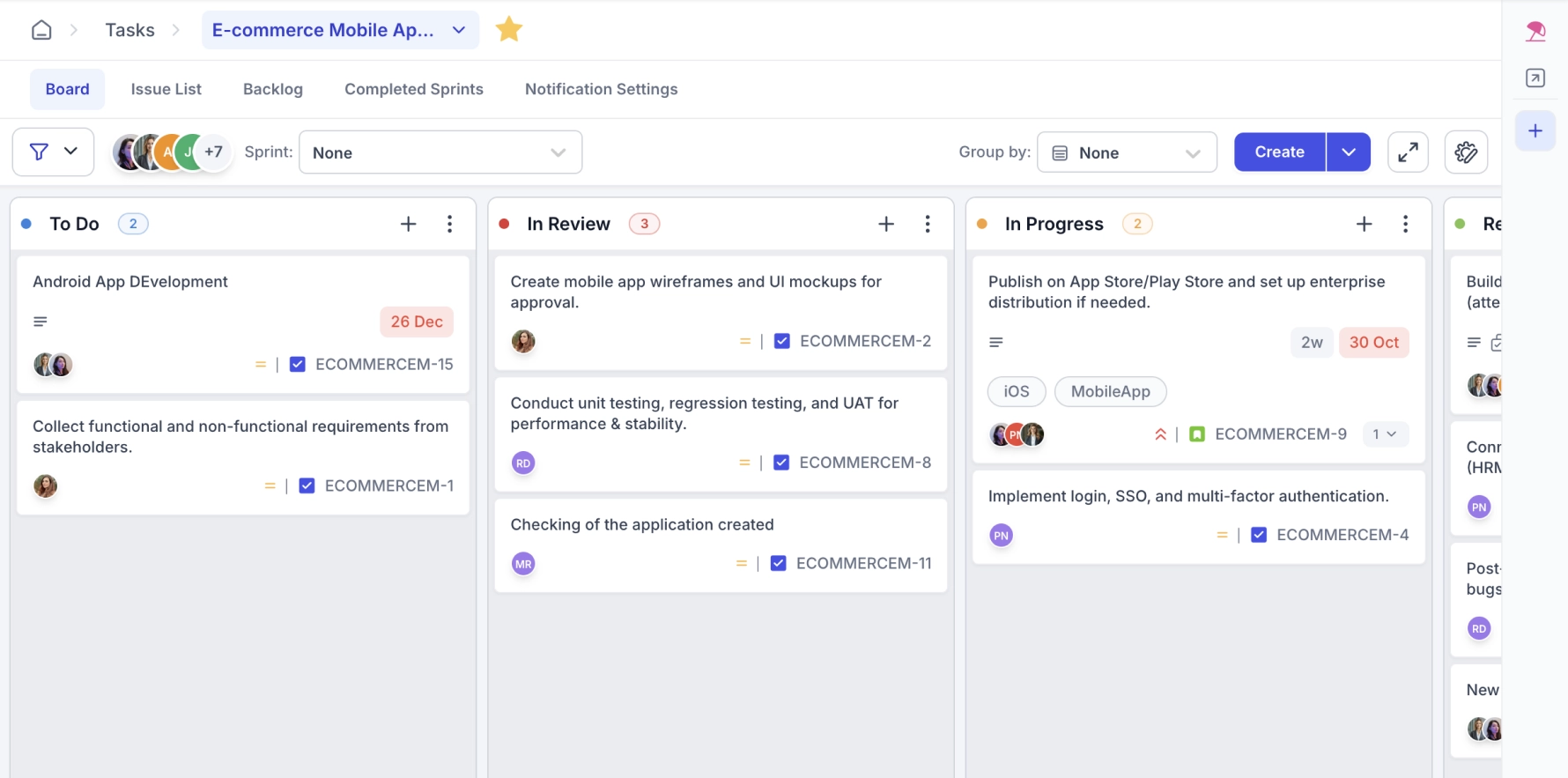
It works best for teams managing ongoing website updates, content changes, or maintenance tasks. Kanban improves visibility and helps teams spot bottlenecks quickly.
2. Agile
Agile focuses on iterative progress and continuous improvement. Website projects are broken into small chunks of work delivered in short cycles.
This approach works well when requirements evolve, feedback is frequent, and speed matters. Agile allows teams to adapt designs, features, and priorities without derailing the entire project.
3. Scrum
Scrum is a structured Agile framework that works in time-boxed sprints. Each sprint delivers a usable part of the website.
Scrum suits teams that need clear roles, regular check-ins, and predictable delivery cycles. It’s ideal for development-heavy website projects where incremental releases are valuable.
4. Waterfall
Waterfall follows a linear, sequential approach. Each phase is completed before the next begins.
This methodology fits projects with well-defined requirements and minimal expected changes, such as small corporate websites or compliance-driven projects.
5. Critical Path Method (CPM)
The Critical Path Method focuses on identifying the sequence of tasks that directly impact the project timeline.
It helps project managers prioritize work, manage dependencies, and prevent delays in complex website projects with multiple parallel tasks.
Factors to Choose the Right Project Management Methodology
To choose the right-fit project management methodology, consider your project scope & complexity, the stability of your requirements, your team size & structure, client’s involvement, and project budget and timelines.
There is no one-size-fits-all methodology for website projects. The right choice depends on the nature of the project, the team involved, and business expectations.
Here are the key factors to consider when selecting a project management methodology for website projects.
1. Project Scope and Complexity
Large, feature-rich websites with multiple integrations often benefit from flexible methodologies like Agile or Scrum. Smaller websites with fixed requirements may work better with Waterfall.
Understanding project complexity helps avoid overengineering or underplanning.
2. Requirement Stability
If requirements are likely to change based on stakeholder feedback or market needs, iterative approaches like Agile or Kanban offer better control. Stable, well-documented requirements support sequential models like Waterfall.
3. Team Size and Structure
Cross-functional teams with designers, developers, and QA working together often perform well with Agile-based methods. Smaller or distributed teams may prefer Kanban for its simplicity and visibility.
4. Stakeholder Involvement
Frequent stakeholder feedback favors Agile or Scrum. Limited stakeholder availability may require more upfront planning and documentation.
5. Timeline and Budget Constraints
Tight deadlines benefit from methodologies that allow parallel work and early delivery. Fixed budgets may require stricter planning and milestone-based tracking.
Choosing the right methodology upfront sets clear expectations, reduces friction, and improves delivery outcomes.
Best Practices for Successful Website Project Management
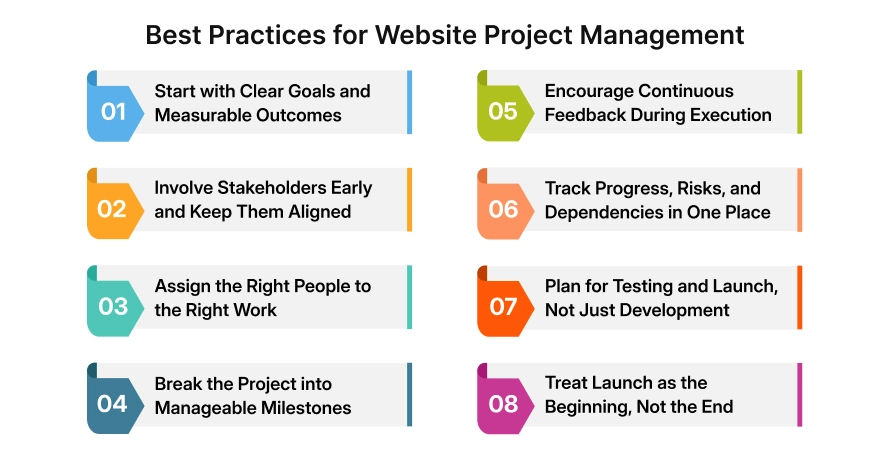
Website project management works best when goals are clear, processes are defined, and teams have full visibility throughout the project lifecycle.
1. Start with Clear Goals and Measurable Outcomes
Before timelines or tasks are defined, align on why the website is being built. Clear business goals, success metrics, and user outcomes help teams make better decisions throughout the project and avoid unnecessary rework.
2. Involve Stakeholders Early and Keep Them Aligned
Early stakeholder alignment reduces last-minute changes and conflicting feedback. Keep communication structured and transparent so decisions, approvals, and changes are visible to everyone involved.
3. Assign the Right People to the Right Work
Effective project management isn’t just about task tracking; it’s about capability matching. Assign resources based on skills, availability, and expertise to ensure quality execution and balanced workloads from day one.
4. Break the Project into Manageable Milestones
Large website projects are easier to manage when broken into clear phases and milestones. Smaller deliverables improve visibility, make progress measurable, and allow teams to course-correct early.
5. Encourage Continuous Feedback During Execution
Waiting until the end for reviews often leads to delays. Regular feedback during design and development helps teams identify issues early, maintain alignment, and move forward with confidence.
6. Track Progress, Risks, and Dependencies in One Place
Centralized visibility into timelines, dependencies, and risks helps project managers anticipate issues before they escalate. A single source of truth reduces confusion and keeps teams focused on execution.
7. Plan for Testing and Launch, Not Just Development
Testing and deployment should be planned alongside development, not treated as an afterthought. Early test planning ensures smoother launches and fewer surprises close to go-live.
8. Treat Launch as the Beginning, Not the End
Post-launch maintenance, performance monitoring, and ongoing improvements are critical for long-term success. Successful teams plan for support, updates, and optimization from the start.
Conclusion
Successful website project management is less about rigid processes and more about clarity, coordination, and continuous visibility. When teams align early, assign the right resources, encourage feedback, and plan beyond launch, website projects move faster with fewer surprises and better outcomes.
Why CollabCRM Is the Ideal Website Project Management Tool?
CollabCRM is the ultimate “all-in-one” business operating system for building websites. It replaces the messy mix of emails, spreadsheets, and CRM tools with a single platform that tracks a project from the first brainstorm to the final launch.
By keeping designers, developers, and clients in the same loop, CollabCRM ensures no features are forgotten, deadlines are actually met, and the transition from “building the site” to “supporting the site” is completely seamless.
The result is better decision-making, smoother delivery, and long-term control across every stage of a website project.
FAQs
Scope creep can be controlled by documenting requirements during discovery, setting clear change-approval processes, and tracking all scope changes against timelines and budgets. Regular reviews help ensure new requests are evaluated before being accepted.
Key decision-makers typically include project managers, product or business owners, design leads, technical leads, and key stakeholders. Clear ownership of approvals helps avoid delays and conflicting directions.
Resources should be assigned based on skill alignment, availability, and project complexity. Matching expertise to project needs early improves execution quality and reduces rework during later stages.
Feedback should be collected continuously through structured review cycles rather than at the end of phases. Early and frequent feedback allows teams to address issues before they become costly to fix.
Key metrics include progress against milestones, task completion rates, dependency risks, resource utilization, and defect trends. These indicators help project managers make timely, data-driven decisions.
A controlled launch process with pre-defined checklists, final testing, rollback plans, and clear ownership helps reduce downtime and post-launch issues. Staggered releases can further minimize risk.
Maintenance tasks should be prioritized based on business impact, user feedback, performance needs, and security requirements. Regular review cycles help balance ongoing support with new enhancements.
Leadership visibility improves when effort, timelines, and ongoing maintenance work are tracked centrally. Clear reporting helps decision-makers understand how resources and budgets are being utilized over time.







 Priority Onboarding