


Operational planning is about turning ideas into action. In simple terms, it helps teams decide what work needs to be done, who will do it, and by when. It connects long-term goals with everyday tasks, so work actually moves forward instead of getting stuck in workforce planning.
For IT and SaaS teams, operational planning is especially critical. These teams work in fast-changing environments. Priorities shift quickly. Resources are limited. Without a clear operational plan, projects slip, teams burn out, and leaders lose visibility into progress.
Strong operational planning creates structure without slowing teams down. It aligns daily execution with business strategy. Teams know what matters most. Leaders can track outcomes instead of chasing updates.
In this blog, we’ll break down operational planning in a practical way. You’ll learn what it is, how it works, and how to build an effective operational plan step-by-step. We’ll also cover benefits, tools, and real-world IT examples to help you apply it immediately.
Operational Planning at a Glance
- What is Operational Planning: A process that turns business strategy into actionable tasks, timelines, and responsibilities.
- Benefits: Improves alignment, accountability, resource use, and risk management, enabling predictable execution.
- Steps: Align with strategy, define priorities, break work into tasks, allocate resources, track progress, and adjust regularly.
- Operational Planning Tools: Platforms streamline task tracking, resource management, and visibility for better execution.
- CollabCRM (Best for IT Enterprises): Offers real-time resource visibility, skill-based allocation, integrated sprints, asset planning, and smooth sales-to-delivery handovers, making operational planning proactive and efficient.
- Monday.com: Supports workflow visualization, task tracking, and team collaboration.
- Asana: Helps coordinate tasks, track deadlines, and monitor milestones across teams.
What Is Operational Planning? A Clear, Practical Definition
Operational planning is the process of deciding how work gets done on a day-to-day basis. It turns business goals into clear actions, timelines, and responsibilities. While leadership sets direction through strategy, operational planning focuses on execution. It ensures teams know what to work on, when to do it, and how success will be measured.
An operations plan definition is simple. It is a documented plan that outlines the tasks, resources, owners, and metrics required to achieve business objectives. It bridges the gap between ideas and action. Without it, teams may stay busy but fail to deliver meaningful outcomes.
| Strategic planning vs. Operational planning Strategic planning involves defining long-term goals and establishing the overall direction of the business. Operational planning supports that strategy by breaking it into practical steps that teams can execute. Strategy answers what the organization wants to achieve. Operational planning explains how those goals will be achieved through daily work. |
Brimco reports that 67% of strategic plans never succeed because execution falls short, emphasizing the role of strong operational planning processes.
Most organizations create operational plans for shorter cycles to stay flexible. These plans often span a quarter, half-year, or a full fiscal year. Shorter planning horizons enable IT and SaaS teams to adapt quickly to changing priorities, customer demands, and market conditions, while maintaining alignment with company goals.
Core Components of a Great Operational Plan
A strong operational plan includes a few essential elements:
- Objectives and KPIs: Set clear goals with measurable outcomes that define success.
- Resource Allocation and Budgeting: Assign people, tools, time, and money realistically.
- Roles, Responsibilities, and Accountability: Define clear ownership to avoid confusion and delays.
- Timelines, Milestones, and Dependencies: Define schedules and task relationships to manage progress.
- Risk Assessment and Contingency Plans: Identify potential challenges early, with backup plans in place.
Together, these components provide structure, visibility, and control across operations.
Step-by-Step Operational Planning Process
A clear operational planning process helps teams move from ideas to execution without confusion. It creates alignment across leadership, managers, and teams. Below is a practical way to build an operational plan that actually works.
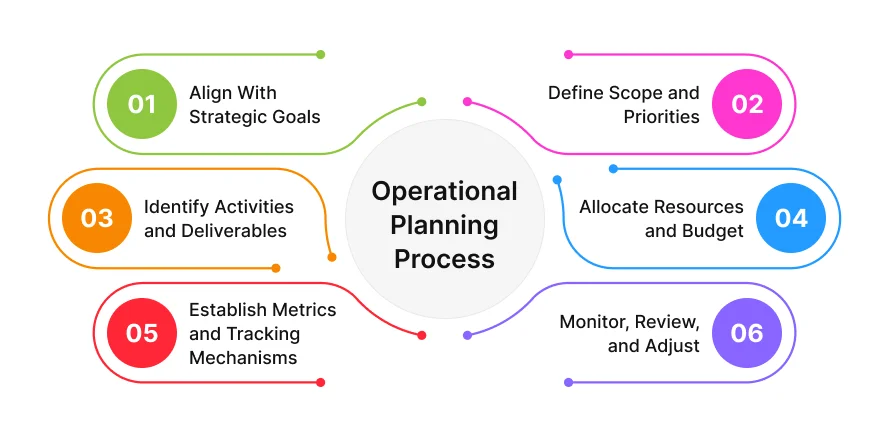
Step 1: Align With Strategic Goals
Every operational plan should start with a strategy. Review the company’s business goals and priorities first. These may include growth targets, product launches, customer retention, or efficiency improvements. The goal here is to ensure operational work supports what the business is trying to achieve. When teams understand the bigger picture, execution becomes more focused and intentional.
Step 2: Define Scope and Priorities
Next, decide what will be included in the operational plan. Not every initiative can be worked on at the same time. Identify high-impact projects and critical activities that must be completed within the planning period. Clear priorities prevent teams from spreading themselves too thin and help leaders make better trade-off decisions.
Step 3: Identify Activities and Deliverables
Break each priority into specific activities and expected deliverables. This step answers the question of how to write an operational plan in practical terms. Each task should be clearly defined, achievable, and linked to a measurable outcome. Clear deliverables reduce ambiguity and make progress easier to track.
Step 4: Allocate Resources and Budget
Once tasks are defined, assign resources. This includes people, time, tools, and budget. Resource planning and allocation should be realistic, based on capacity, not assumptions. For IT and SaaS teams, this step is critical to avoid overload, delays, and burnout. Proper planning ensures work moves forward without constant firefighting.
Step 5: Establish Metrics and Tracking Mechanisms
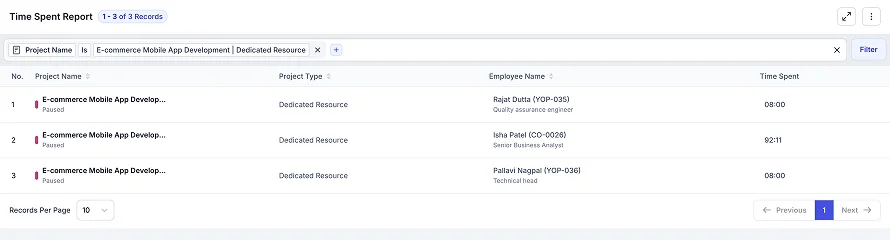
Operational planning in management relies on visibility. Define key performance indicators that reflect progress and outcomes. Set up regular check-ins, dashboards, or report management to track execution. Metrics help leaders identify issues early and keep teams aligned on expectations.
Step 6: Monitor, Review, and Adjust
Operational plans are not static. Review progress regularly and adjust when priorities shift or risks emerge. Continuous monitoring allows teams to respond to changes without losing momentum. This step ensures the operational planning process remains flexible and relevant.
Benefits of Effective Operational Planning
Operational planning helps organizations execute strategy efficiently by bringing structure, clarity, and control to everyday operations.
- Aligns daily tasks with long-term business goals
- Clarifies priorities so teams focus on what matters most
- Defines ownership to improve accountability and follow-through
- Improves visibility into progress, performance, and risks
- Optimizes use of resources, time, and budget
- Reduces delays by identifying issues early
- Supports consistent and predictable execution across teams
| Operational Planning [A Real-World IT Use Case] Scenario: A growing SaaS startup plans to onboard new customers while expanding its team. Challenge: Customer demand is increasing alongside hiring, creating pressure on delivery, onboarding, and internal operations. Operational Planning Approach: Hiring plans, onboarding schedules, asset readiness, and delivery timelines are aligned into a single operational plan. Outcome: The company scales efficiently, delivering new customer projects on time and maintaining high service quality. Growth drives measurable business impact without operational bottlenecks.Teams stay balanced and productive, Onboarding is seamless, and Leadership retains full visibility into resources & progress |
Best Tools for Operational Planning and Execution
Operational planning is far more effective when supported by tools that provide visibility, structure, and execution control. The right platform helps teams plan realistically, track work clearly, and adapt quickly.
1. CollabCRM
CollabCRM is designed specifically for IT enterprises that need proactive operational planning across people, projects, and delivery. It goes beyond task tracking by giving leaders real-time insight into capacity, skills, and execution readiness.
- Daily Allocation and Resource Occupancy
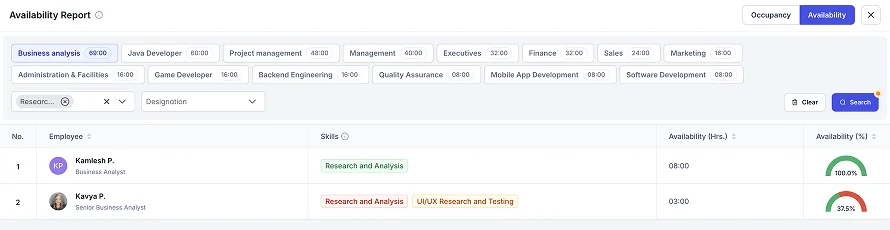
Employees log planned work and hours daily, giving managers real-time visibility into utilization. Occupancy and availability reports show who is fully booked, partially free, or unavailable, enabling smarter workload distribution. - Global Skill Matrix for Talent Matching
A centralized skills database helps managers identify the right talent for each task or project. During planning, required skills can be matched with available resources to avoid misalignment. - Accurate Forecasting and Strategic Visibility
With high forecasting accuracy, leaders can plan staffing and delivery with confidence. Organization calendars and charts help track joiners, exits, and team structures while highlighting unused or leaking capacity early. - Integrated Sprint and Task Management
Backlogs, sprints, and Kanban boards connect operational planning directly to execution. Teams can plan work, track progress, and update status in one place. - Asset and Onboarding Planning
Asset availability is tracked alongside employee movement, helping IT teams plan reallocation instead of making unnecessary purchases. Upcoming joiners are visible in advance for smoother onboarding. - Sales-to-Delivery Handover
Closed deals convert directly into live projects. Delivery teams receive full context, and invoicing starts automatically based on the project model, reducing operational delays.
2. Monday.com
Monday.com supports operational planning at a basic level through flexible workflows and visual organization.
- Allows teams to plan tasks and timelines visually
- Dashboards provide high-level progress tracking
- Supports collaboration across departments
- Suitable for managing workflows without deep resource intelligence
3. Asana
Asana focuses on task execution and coordination across teams.
- Helps teams break goals into tasks and milestones
- Provides visibility into deadlines and dependencies
- Useful for tracking work progress across multiple teams
- Primarily execution-focused rather than resource-centric
Conclusion
Operational planning transforms strategy into actionable work. Without it, even the best business goals can remain ideas on paper. By clearly defining priorities, effective resource planning, setting timelines, and tracking progress, IT and SaaS teams can execute efficiently, reduce risks, and scale predictably.
Get Operational Planning Right with CollabCRM
CollabCRM helps IT enterprises turn operational plans into reality. From real-time resource visibility and skill-based allocation to integrated sprint management, asset planning, and seamless sales-to-delivery handovers, it ensures every project is staffed, tracked, and delivered efficiently. With CollabCRM, teams can plan, execute, and scale with confidence. Make operational planning not just a process, but a competitive advantage!
FAQs
Operational planning is the process of turning strategic goals into actionable tasks, timelines, and responsibilities. It ensures teams stay aligned, resources are used efficiently, and projects are delivered on time, making it crucial for IT and SaaS organizations.
It connects leadership goals to daily execution, provides visibility into workloads, helps allocate the right talent, and reduces risks by anticipating bottlenecks before they impact delivery.
Start by aligning with strategic goals, defining priorities, breaking them into tasks, allocating resources, setting timelines, and establishing metrics. Tools like CollabCRM make this process easier and more accurate.
Yes. By tracking daily allocations, skill sets, and availability, operational planning ensures the right people are assigned to the right tasks, preventing overuse or underuse of resources.
Operational plans should be reviewed regularly- weekly or monthly. This way, teams can adjust to changes in priorities, resources, or project requirements.
CollabCRM is ideal for IT enterprises, providing real-time resource visibility, skill-based allocation, sprint and task management, asset planning, and sales-to-delivery handovers. Tools like Monday.com and Asana can support task tracking and execution visibility.
Absolutely. By aligning hiring, onboarding, assets, and project delivery in one plan, operational planning ensures growth happens smoothly without overloading teams or disrupting service.
No. Any organization, from startups to large enterprises, benefits from operational planning. The scale may differ, but the principles of aligning strategy with execution, tracking progress, and optimizing resources apply to all.






 Priority Onboarding