


Having a sales CRM is crucial for efficient and well-structured sales management in today’s highly competitive marketplace. Now, customers need solutions tailored to their unique needs, and they expect them as quickly as possible, making CRM in sales management a must-have solution.
Equipped with features like contact & lead management, sales pipeline & deal tracking, reporting, and more, a sales CRM works well to streamline the entire sales process in an organization.
From centralizing customer data to enhancing collaboration, tracking leads, boosting conversions, forecasting sales, and making data-driven decisions, CRM software provides deeper insights into customer behavior, enabling businesses to offer services that suit customers’ unique needs and preferences.

This blog explores everything you need to know about the role of CRM in sales management, its features, benefits, popular CRM examples, and the future trends of CRM in sales management. It’ll help you know why you need sales CRM software with the right examples to choose the excellent one and streamline the way you operate sales.
Key Takeaways
- The role of a CRM involves centralizing customer data, enhancing collaboration, tracking leads, and making data-driven decisions.
- The features of a sales CRM include contact and lead management, sales pipeline and deal tracking, and integration with marketing, email, and communication tools.
- The real-life examples of the best CRM software are CollabCRM, Salesforce, and HubSpot.
- A right sales CRM helps analyze data, make data-driven decisions, improve accuracy, and streamline sales management with optimal customer satisfaction.
- The future of CRM in sales involves AI & automation, predictive analytics, conversational intelligence, chatbots, and hyper-personalization.
What is CRM in Sales?
CRM in sales refers to a software platform designed specifically to help businesses manage the entire sales funnel, which includes customer interactions, storing customer data, tracking sales activities, automating tasks, and improving the overall sales process. Sales CRM software helps sales teams work more effectively by organizing leads, monitoring pipeline progress, and forecasting revenue.
To put it in a nutshell, a well-designed and developed CRM helps sales teams sell smarter, not harder.
Role of CRM in Sales Management
A CRM system plays a vital role in optimizing sales operations and improving performance by centralizing customer data, tracking leads, improving conversions, boosting collaboration, forecasting sales, and making data-driven decisions. Here’s how it does so:
1. Centralizing Customer Data
A sales CRM stores all customer-related information, including contact details, communication history, purchase patterns, and support records in one place. This way, it helps sales teams understand customers better and personalize every interaction to suit their needs.
2. Enhancing Collaboration in Sales Teams
With shared dashboards, real-time updates, and activity tracking, customer relationship management software for sales ensures every team member stays aligned, regardless of geography or anything else, enhancing collaboration in sales teams.
3. Tracking Leads & Improving Conversion Rates
CRM software enables detailed tracking from initial inquiry to closing deals, making it easier to identify bottlenecks, prioritize promising opportunities, and take timely follow-ups. It improves conversion rates and boosts sales and business profitability.
4. Forecasting Sales and Performance Analytics
With built-in reporting and predictive models, a sales CRM gives leaders clear visibility into revenue forecasts, KPIs, and team performance. It allows them to forecast sales and performance to make better decisions.
5. Data-Driven Decision-Making
Accurate insights from sales CRM software enable companies to make strategic decisions instead of relying on assumptions. This data-driven decision-making results in growth and reduced business risk, ensuring better profitability.
Key Features of CRM for Sales Teams
The important features of a CRM in sales include contact & lead management, sales pipeline & deal tracking, task & activity automation, reporting & dashboards, and more. These features help sales teams enhance productivity and efficiency for better profitability:
- Contact and Lead Management: This feature of a CRM for sales organizes customer records, tracks interactions, and maintains a complete lead history for better relationship management.
- Sales Pipeline and Deal Tracking: A sales CRM gives real-time visibility into deal stages, expected close dates, and potential revenue for better decision-making based on real-time data.
- Task and Activity Automation: It automates repetitive tasks such as reminders, follow-ups, and email sequences, which enables sales representatives to save time and reduce human error.
- Reporting and Dashboards: Custom dashboards in a customer relationship management system display sales performance metrics, conversion rates, and revenue forecasting.
- Integrations with Marketing, Email, and Communication Tools: CRM works seamlessly with email platforms, marketing automation tools, VoIP, calendars, and AI assistants, easing sales processes.
- Mobile CRM Capabilities: CRM software gives sales teams remote access to customer data and pipeline activities via mobile apps, which is crucial for field sales.
How Does CRM Help Sales Management?
CRM solutions help sales teams with centralized customer data, improved lead & pipeline management, automating repetitive tasks, and more. Here’s how CRM helps sales for better business functionality, productivity, and profitability:
1. Centralized Customer Data
A CRM system acts as a single source of truth for comprehensive customer information, including contact details, purchase history, and communication logs. This centralized data access gives sales representatives a 360-degree view of the customer, enabling more informed and personalized interactions.
2. Improved Lead & Pipeline Management
CRM software solutions help sales teams track leads throughout the sales cycle, from initial contact to closing the deal. These systems allow sales representatives to prioritize leads based on scoring and manage their sales pipeline more effectively.
3. Automation of Repetitive Tasks
Many administrative and data-entry tasks, such as follow-up reminders and logging activities, can be automated using a sales CRM. That level of automation of repetitive tasks frees up salespeople to spend more time engaging with potential customers and building relationships.
4. Enhanced Communication and Follow-Up
Since it backs all interactions, a customer relationship management software ensures no lead falls through the cracks. It helps schedule calls and send reminders for follow-ups, ensuring timely and consistent communication.
5. Actionable Analytics and Reporting
Sales CRM systems provide invaluable data and analytics on sales activities, performance, and trends. This information enables sales managers and representatives to make data-driven decisions and identify opportunities for upselling or cross-selling while refining their sales strategies.
What Are the Benefits of CRM in Sales Management?
The benefits of CRM for sales managers include increased sales, better customer insights & personalization, improved customer experience & retention, reduced manual tasks, and data-driven decision-making. Here’s how these benefits influence sales across organizations:
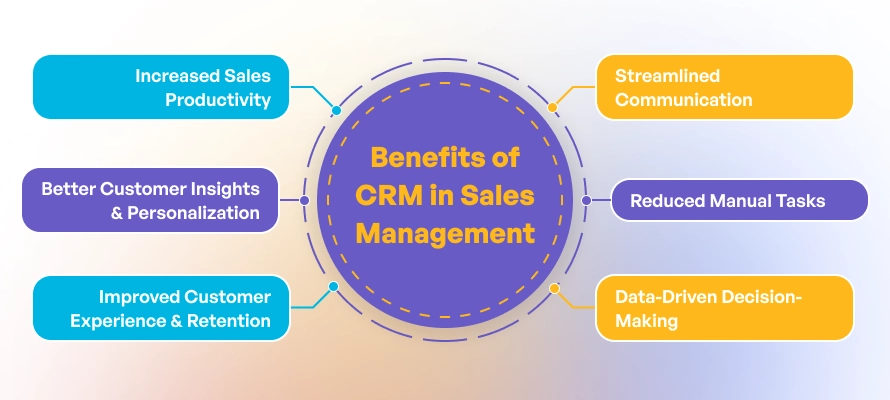
1. Increased Sales Productivity
A Sales CRM automates repetitive administrative tasks, such as data entry, meeting scheduling, follow-up reminders, and email sequences. Since the system reduces manual work, it helps sales teams to focus more time on relationship-building and closing deals rather than getting involved in paperwork.
How CRM does this:
- Automates workflows and routine tasks
- Provides templates for communication
- Tracks tasks and follow-ups automatically
Business Impact:
- Shorter sales cycles
- Higher output per salesperson
- Increased closed deals and revenue growth
2. Better Customer Insights & Personalization
Customer relationship management systems store every interaction, preference, purchase history, and communication record in one unified profile. With this, the system provides sales reps with deep insights into customer needs and behavior, fostering informed decision-making and personalization.
How CRM does this:
- Consolidates data from calls, emails, support tickets, and meetings
- Provides analytics to identify customer patterns
- Enables personalized messaging and offers based on customer history
Business Impact:
- Improved lead conversion rates
- More relevant sales communication
- Stronger long-term customer relationships
3. Improved Customer Experience & Retention
Today’s customers expect fast responses and personalized service, and customer relationship management software enables teams to deliver the best experience possible. CRM systems ensure that every customer gets consistent attention and support throughout the sales journey.
How CRM does this:
- Tracks communication history, ensuring no request or message is lost
- Automates follow-ups and reminders
- Enables proactive outreach based on customer stage and engagement
Business Impact:
- Higher customer satisfaction scores
- Increased repeat business and lifetime customer value
- Reduced churn and improved retention rates
4. Streamlined Communication
A sales CRM provides a shared platform where all departments, including sales, marketing, support, and operations, have access to the same updated customer data. This seamless data access fosters streamlined communication among team members.
How CRM does this:
- Syncs information across teams in real time
- Provides collaborative tools and shared dashboards
- Integrates with communication channels like email, VoIP, WhatsApp, and chat
Business Impact:
- Better team alignment and fewer internal misunderstandings
- Faster decision-making
- More consistent messaging to customers
5. Reduced Manual Tasks
Manual data entry, the use of spreadsheets, and disconnected tools slow down sales efforts; however, with a customer relationship management system, sales teams have everything in one place, reducing manual task management. The centralized and automated tasks minimize errors while improving efficiency and business profitability.
How CRM does this:
- Auto-fills customer profiles
- Digitizes lead capture forms
- Eliminates multiple software dependencies
Business Impact:
- Lower operational costs
- More accurate records and reporting
- Better use of team time and skills
6. Data-Driven Decision-Making
Sales CRM platforms include dashboards, reports, and forecasting tools that enable sales leaders to measure performance and plan strategies based on accurate, real-time data rather than guesswork.
How CRM does this:
- Provides customizable analytics dashboards
- Tracks KPIs like deal stage progress, lead response time, and win rates
- Uses predictive analytics to forecast revenue and identify bottlenecks
Business Impact:
- Smarter planning and resource allocation
- Ability to forecast sales with accuracy
- Identifying high-value opportunities and problem areas early
Real-World Examples of Sales CRM
Real-world examples of top sales CRM software include CollabCRM for IT companies, which is an all-in-one platform for managing everything, Salesforce for large enterprises, tracking leads and deals, and HubSpot for small businesses and marketing automation. Here’s how CRM software streamlines sales and improves business performance:
1. CollabCRM
CollabCRM is a work management software designed specifically for IT companies and technology service providers, offering an all-in-one platform to manage clients, projects, billing, and sales pipelines.
Unlike traditional CRMs built only for lead tracking, CollabCRM helps IT businesses streamline their entire workflow from sales to service delivery and support, helping them get rid of the hidden cost of using multiple tools in ITSM.
Features: CollabCRM provides a unified workspace for IT teams, including sales pipeline management, client communication tracking, project and task management, automated ticketing, and built-in quotation and invoicing tools.
CollabCRM is not only a CRM system but a system that consists of consolidated modules, including project management, people management, HR management, and more, assisting organizations in handling projects and invoices better.
These amazing features of this all-in-one solution help IT companies run every part of their business from one platform.
Best for: CollabCRM is best for IT service providers, software development firms, cybersecurity and network service companies, and technology consulting businesses seeking a complete CRM solution that supports both sales and service delivery in a single tool.
2. Salesforce
When it comes to a sales CRM for enterprise-level businesses, Salesforce is the right solution. Attributed to its wider features for sales, sales teams across enterprises use Salesforce for scalable sales automation and AI-powered insights.
Companies like Amazon use Salesforce to manage leads, track deals, and provide a complete overview of customer interactions across all channels.
Features: Salesforce offers advanced features, such as Einstein Activity Capture for data entry automation and customizable reports for sales data analysis.
Best for: This CRM system is best for large businesses that need a comprehensive, feature-rich, and scalable solution.
3. HubSpot
HubSpot is a customer relationship management system for small businesses, which has evolved from inbound marketing to a full CRM and is known for ease of use. Among its many use cases, small eCommerce businesses use the free HubSpot CRM to track leads from different channels and follow up with automated campaigns, such as sending discount codes to customers who abandoned their carts.
Features: HubSpot offers a free version, which is designed for both marketing and sales and provides tools for managing customer relationships and automating marketing tasks.
Best for: It’s best for those businesses looking for an all-in-one solution with a focus on inbound marketing and sales.
The Future Trends in CRM for Sales
The future of CRM in sales will be influenced by AI & automation, predictive analytics, conversational intelligence & chatbots, and hyper-personalization. Many of these trends already exist; however, they’d be even more impactful in CRM management. Here’s how these trends would be impacting customer relationship management across the industry:
- AI and Automation: AI in CRM systems will predict customer behavior, automate follow-ups, prioritize leads, and reduce manual effort. It’ll help sales teams focus on high-value opportunities and ensure timely engagement, improving conversion rates and overall sales productivity.
- Predictive Analytics: Predictive analytics will use historical data and interaction patterns to forecast revenue, identify sales trends, and highlight potential risks. This enables more accurate planning, resource allocation, and strategic decision-making for growth.
- Conversation Intelligence and Chatbots: Conversation intelligence tools will be analyzing sales calls, emails, and messages to extract insights and identify improvement opportunities. Chatbots will automate initial customer interactions, accelerating response times and supporting lead qualification around the clock.
Hyper-Personalization: Hyper-personalization will customize sales messages, product recommendations, and offers based on real-time customer behavior, preferences, and past interactions. It’ll enable businesses to enhance engagement and increase the likelihood of conversion and long-term loyalty.
Conclusion: Transform Your Sales Team with an All-in-One Sales CRM
CRM is no longer optional; it is a strategic necessity for companies that want to improve sales performance, enhance customer relationships, and make smarter decisions. With centralized data, powerful automation, and accurate forecasting, a sales CRM helps sales teams close more deals efficiently and grow revenue predictably.
There are many reasons why you need a business operating system; however, CollabCRM is the right solution you need to streamline how you conduct sales management. It’s a business operating system designed to manage sales, people, projects, and more in IT companies to ensure efficient business operation, especially sales.
Whether you’re scaling your sales operations or improving sales productivity, adopting the right CRM like CollabCRM definitely helps you transform your business and drive long-term success.
FAQs:
CRM stands for customer relationship management. In terms of sales management, it refers to the strategies, processes, and software used to manage interactions with prospects and customers to improve sales performance and customer satisfaction.
The role of sales CRM is to help sales teams manage leads, centralize customer data, automate tasks, track interactions, forecast revenue, and improve efficiency in conversion and sales.
The four major types of CRM systems are operational CRM for automating sales, marketing, and service processes, analytical CRM, which provides data-driven insights and analytics, and collaborative CRM to improve communication between teams and partners. Besides, strategic CRM focuses on long-term customer value and retention.
A sales CRM improves lead management by capturing, tracking, scoring, and nurturing leads through automated workflows. It helps sales teams prioritize high-quality leads and follow up efficiently.
Yes, a CRM is useful for small businesses and startups because it streamlines operations, saves time through automation, improves organization, and supports growth with scalable features.
The five key steps of CRM implementation include defining goals and business requirements, choosing the right CRM platform, migrating and cleaning existing customer data, training and onboarding users effectively, and monitoring usage, measuring results, and continuous optimization.
When it comes to popular sales CRM platforms, CollabCRM, Salesforce, and HubSpot come at the top preferences of sales personnel across the world.






 Priority Onboarding