


A good manager is one who keeps both happy- their team members as well as the business outcomes. To attain this, you need to keep your team enthusiastic and satisfied with fair work distribution across your team. Poor workload management leads to burnout and stress, which eventually results in productivity loss.
Here is when you need a Workload Management Tool to organize and structure your team’s task allocation fairly, keeping their expertise and availability in mind.
In this guide, you will learn about Workload Management Software, how to effectively manage your team’s workload using the best tools available, practical tips for work management, and top workload planning tools for 2026.
TL;DR Quick Wins
- Work distribution for the team is stressful; Productivity demands an upright Work Management
- Effective work management in 5 steps: Understand Your Team’s Capacity, Work Breakdown Structure, Allot Tasks Sensibly, Improve Team Efficiency, Onboard Workload Management Tool
- Top 5 Picks- CollabCRM, Asana, Jira, Teamwork, Hive
What is Workload Management?
Workload management is the process of strategically planning, allocating, and tracking work across team members to ensure tasks are completed efficiently, without overloading or underutilizing anyone. It involves understanding each person’s capacity, balancing responsibilities, setting priorities, and adjusting workloads as projects evolve.
According to a report from Insightful, around 54% of employees say workload is the main source of stress at work. To resolve this, workload management helps teams work smarter by distributing tasks based on skills, availability, and deadlines, rather than simply assigning work to whoever is free at the moment. It ensures transparency around who is doing what, prevents burnout, and keeps projects moving smoothly.
Effective workload management also includes:
- Clear visibility into ongoing tasks and capacity
- Fair distribution of workload
- Alignment between priorities and effort
- Real-time tracking and adjustments when bottlenecks appear
Simply put, it’s about maintaining a healthy balance between people, time, and tasks. This way, your team can perform at its best without feeling overwhelmed.
Benefits of Workload Management Software
Workload management software offers benefits such as increased productivity, improved collaboration, and reduced employee burnout by providing clear visibility into tasks and resource allocation.
- Prevent burnout & overload: Identify capacity issues before they become problems.
- Improve transparency: Everyone knows who is working on what and what’s next.
- Optimize resource utilization: Ensure balanced workload distribution based on availability and skillset.
- Boost productivity & efficiency: Reduce time spent on manual updates, follow-ups, and unnecessary meetings.
- Improve project predictability: Better planning reduces delays and increases on-time delivery.
- Enhance collaboration & clarity: One shared workspace keeps the team aligned on goals and priorities.
In short, workload management software strengthens performance, supports healthier work environments, and empowers teams to deliver consistent, high-quality results without burning out.
5 Step Guide to Manage Your Team’s Workload
Let’s understand how you can practically handle your team’s work management reasonably, for your teammates as well as for the business.
1. Understand Your Team’s Workload & Capacity
Start by gaining a clear view of what each team member is working on today. Collect all tasks, deadlines, and responsibilities, including daily routine work. This helps you understand the full workload, not just the assigned projects.
Talk to your team to learn how long tasks actually take and what challenges slow them down. Real capacity is more than hours available. It includes skills, focus time, meetings, and personal working pace.
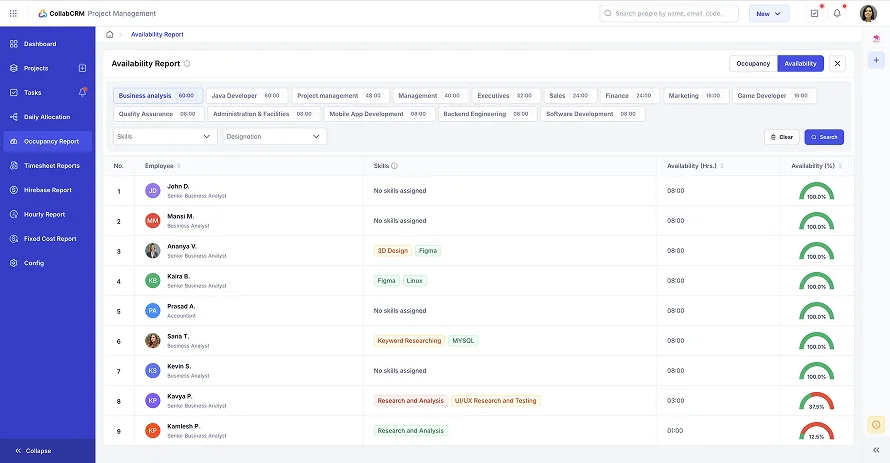
Once you compare workload with capacity, you will see who is overloaded and who can take on more. This helps you plan fairly, prevent burnout, and set realistic timelines. Understanding capacity is the foundation for balanced workload management.
2. Work Breakdown Structure for Team Members
Break large projects into smaller, clear tasks that are easy to track and complete. A Work Breakdown Structure helps divide the project into manageable pieces so everyone knows exactly what needs to be done and in what order.
Assign responsibilities for each task and define expected outcomes, timelines, and dependencies. This removes confusion and prevents overlapping work.
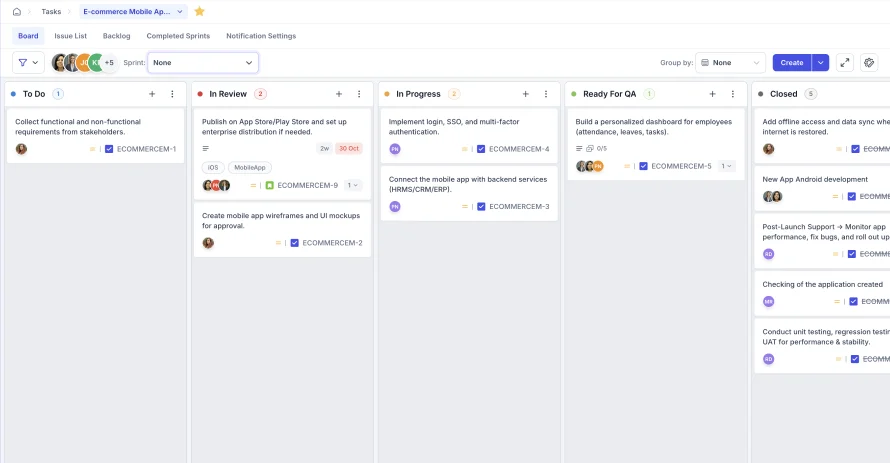
When tasks are broken down clearly, progress becomes easier to monitor, workload becomes easier to distribute, and the team stays aligned from start to finish.
3. Divisions & Allotments of Tasks
Once tasks are clearly defined, divide them based on each team member’s skills, strengths, and availability. Make sure the workload is balanced so no one feels overwhelmed while others are underutilized.
Assign tasks with clear ownership and deadlines. Make sure everyone understands what they are responsible for and how their work contributes to the overall goal.
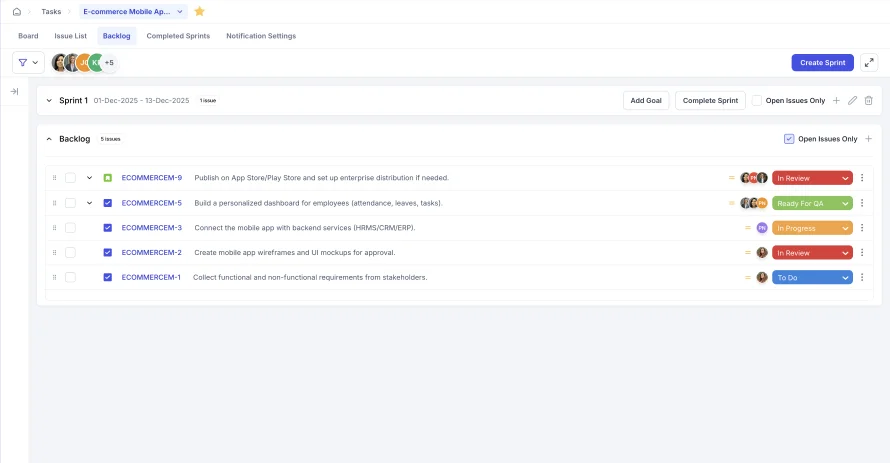
Use capacity planning or a workload overview to allocate tasks fairly. Check for conflicts or overload early and adjust when needed. Clear task allocation helps the team stay focused, organized, and accountable.
4. Improve Team Efficiency
Help your team work smarter by encouraging better planning and time-management habits. Suggest simple methods like time blocking or timeboxing to improve focus.
Reduce unnecessary meetings and switch to quicker communication formats when possible. Keep processes clear and organized so the team spends less time figuring things out and more time executing.
Create templates or standard procedures for repetitive tasks. This saves time and keeps work consistent. A more efficient team can handle the workload better and deliver higher-quality results.

5. Onboard a Work Management Tool
While you can follow the essential steps to handle your team’s workload, the right workload management tool will make your job effortless. As you can see in the above steps, the right workload management software will give you a clear picture of your team’s allocations and tasks.
This way, you can better manage, track, and assign tasks to your team, keeping their time and efficiency high, reducing time waste, and maximizing team productivity.
Before we jump to check the list of top workload management software, let’s go through the best practices and tips for managing your team’s workload.
Best Practices & Tips for Effective Workload Management
Effective workload management involves prioritizing tasks, breaking them down, setting realistic deadlines, delegating, using time management techniques, communicating openly, and avoiding multitasking to prevent burnout and boost productivity. Key practices include assessing team capacity, utilizing tools for organization, monitoring progress, and fostering a culture of well-being, ensuring tasks align with goals without overwhelming individuals
Here are some simple tips you can apply:
- Set clear priorities and communicate them to your team
- Avoid overloading individuals and watch for burnout signals
- Break large projects into smaller, manageable tasks
- Review and adjust workloads regularly
- Use a workload management tool to track tasks and capacity
- Encourage open and honest communication within the team
- Promote flexibility when priorities shift
- Reduce unnecessary meetings to free up focus time
- Create templates or SOPs for repeatable processes
- Celebrate achievements and progress to boost morale.
Top 5 Workload Management Tools
We have handpicked the 5 best workload management software for you so you can manage your team’s workload fairly and deliver efficient productivity.
1. CollabCRM
This all-in-one IT Business Operating System provides work management beyond mere task tracking. It enables role-based access so every team member can plan, track, and manage their individual work, a project/sales manager can delegate tasks to their team based on their availability and skills expertise.
If you are the organization head (CXO), you would have a centralized view of your resources and streamlined management for every team. The Project Management module of CollabCRM removes your guesswork and brings clarity to your decisions.
2. Asana
Asana is a popular work management tool that helps teams organize tasks, timelines, and goals in one place. It offers multiple views like lists, boards, calendars, etc. Managers can assign work, set priorities, and track progress easily. It is suitable for teams that need visibility into project stages and want clear tracking from start to finish.
3. Jira
Jira is widely used by software development and engineering teams. It focuses on agile project management with features like Scrum and Kanban boards, sprint planning, and issue tracking. It helps teams manage complex workflows, release cycles, and product backlogs. Jira is ideal for technical teams that require structure and detailed tracking for development tasks.
4. Teamwork
Teamwork is designed for client service and project delivery teams. It supports project planning, time tracking, resource optimization strategies, and budgeting in one platform. You can track team capacity and billable hours, which makes it great for agencies, professional services, and consulting firms. It helps teams deliver projects on time while keeping operations transparent.
5. Hive
Hive offers flexible project views and collaboration features like messaging, forms, approvals, and business process automation. It allows teams to manage tasks, track workloads, and share updates quickly. Hive’s analytics dashboard gives insights into productivity and resource usage. It works well for cross-functional teams that need speed and simplicity in coordinating tasks and communication.
Conclusion
Managing your team’s workload is not just about assigning tasks. It is about creating balance, clarity, and a healthy work environment where everyone can perform at their best. When you understand capacity, plan wisely, and track work consistently, productivity becomes smoother, and results become more predictable.
Workload management software makes this process easier. It gives real-time visibility into tasks, resources, and priorities, so decisions are fair and informed. It reduces stress on your team and helps you deliver work on time with better quality.
Start small. Apply simple practices. Use the right tools to support your team.
With the right system in place, your team can stay focused, efficient, and motivated to achieve more together.
Why CollabCRM is the best Workload Management Software?
CollabCRM offers to manage your team’s workload in easy steps, like understanding their work capacity, breaking down their work structure, delegating tasks, and improving your overall organizational efficiency. This makes CollabCRM the best tool for workload management.
FAQs:
Workload management is the process of planning, distributing, and tracking work across team members so tasks are completed efficiently without overloading anyone.
Effective workload management helps prevent burnout, improves productivity, balances responsibilities, and ensures deadlines are met without stress or confusion.
Watch for signs like frequent overtime, missed deadlines, low morale, reduced quality of work, and team members expressing stress or frustration. These subtle signs suggest that your team is overloaded with work.
Look for task allocation, capacity tracking, dashboard visibility, time tracking, collaboration tools, reporting, and integrations with other systems.
Yes. They give real-time visibility into work progress, help track responsibilities across locations, and reduce dependency on constant meetings.
Weekly or biweekly reviews work well. This allows you to adjust priorities, check progress, and manage unexpected changes smoothly.
CollabCRM is the best workload management tool for IT companies. Whereas Asana, Jira, Teamwork, and Hive also offer strong project collaboration features. However, the best tool depends on your team size, industry, and workflow style.






 Priority Onboarding