


Modern teams deal with complex workflows. Work moves across people, tools, and departments. Without clear processes, things slow down. Tasks fall through the cracks. Ownership becomes unclear.
Process mapping helps teams understand how work actually gets done. It shows the flow of activities from start to finish. This clarity makes it easier to spot gaps, remove delays, and improve coordination across teams.
For project managers, process mapping supports better planning and smoother execution. For leaders, it offers visibility into operations without constant follow-ups. For IT teams, it creates consistency across projects and helps processes scale as the organization grows.
Process mapping is not just about creating diagrams. It is about creating shared understanding. When teams see the same process, decisions become faster and execution becomes more reliable.
This guide explains what process mapping is, the types of process maps, and how to create one that actually supports daily work.
TL;DR: Process Mapping Essentials
- Process mapping visualizes how work flows, clarifies roles, and improves execution.
- Key users include leaders, project managers, IT teams, and operations groups.
- Types of process maps range from high-level overviews to detailed and cross-functional workflows.
- Steps to create a process map: Set the purpose, assign roles, capture the current workflow, spot gaps, design the improved process, and keep it updated.
- Process maps are useful when deadlines slip, ownership is unclear, tools are overloaded, or operations are scaling.
- IT applications include project delivery, ticket resolution, approvals, and onboarding workflows.
- Tools that connect processes to real work, like CollabCRM, help align tasks, projects, and teams for better visibility and accountability.
What Is Process Mapping?
Process mapping is a visual technique used to show how work moves from start to finish. It creates a step-by-step representation of a process, capturing who is involved, what actions take place, when steps occur, and how tasks are completed.
The purpose of process mapping is to create a clear, shared understanding of a workflow. By laying out each step, teams can analyze how work is done, identify bottlenecks, reduce redundancies, and improve efficiency. It helps turn complex activities into structured processes that are easier to review, manage, and improve.
Process mapping is not just about flowcharts or symbols. It does not need complex diagrams. A good process map is simple, practical, and easy for everyone to understand.
Who Uses Process Mapping?
Process mapping is used by many roles across an organization, including:
- Business analysts
- Managers and leaders
- Operations teams
- HR and training teams
- Project managers
- Quality improvement teams
- Consultants
| Stat Fact “Companies that implement process improvement strategies report that business process management tools can improve process efficiency by up to 30–50%.”Worldmetrics |
Types of Process Maps
Different process maps serve various purposes. The right type depends on the level of detail required and the intended user.
- Basic Process Map: Shows a simple, high-level flow from start to finish. It is useful for leadership alignment and early planning.
- Process Flow Map: Displays steps, decisions, and handoffs. It helps teams identify dependencies and delays.
- Detailed Process Map: Breaks a process into granular steps. It is used by execution teams for standard work and training.
- Cross-Functional (Swimlane) Process Map: Organizes steps by roles or teams. It highlights ownership across departments.
- Value Stream Map: Focuses on how value is delivered to the customer. It helps identify waste and improvement opportunities.
- As-Is Process Map: Shows how a process works today. It is used to understand work management, current gaps, and issues.
- To-Be Process Map: Shows how a process should work in the future. It is used for process improvement and optimization.
- SIPOC Diagram: Outlines suppliers, inputs, processes, outputs, and customers. It is useful for setting process boundaries at a high level.
How to Create a Process Map: Step-by-Step Guide
Creating a process map is more than drawing shapes; it’s about understanding how work actually flows and improving it. Follow these six steps to create a practical, actionable process flow map. Visuals or diagrams can be added to illustrate each step, but the focus should remain on clarity and usability.
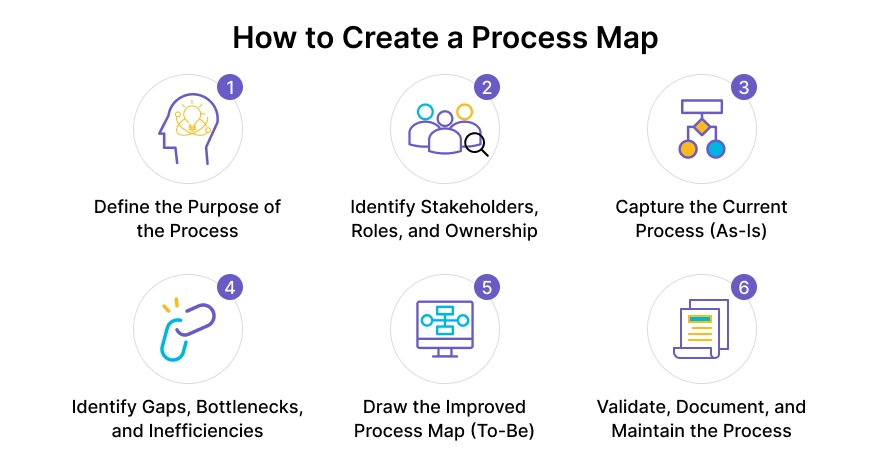
Step 1: Define the Purpose of the Process
Before mapping any process, it’s important to understand why you are doing it. Ask yourself what you want to achieve with this process map. Are you trying to reduce delays, clarify roles, or improve efficiency?
Defining the purpose helps you determine the scope of the map and ensures that everyone understands what the process is supposed to accomplish. Clearly marking where the process begins and ends prevents confusion and keeps the map focused.
Step 2: Identify Stakeholders, Roles, and Ownership
Next, identify everyone involved in the process and define their responsibilities. This includes both individuals and teams who perform or oversee different steps. Assigning ownership to each step prevents tasks from being overlooked and clarifies accountability.
This step also ensures that when you later validate the process, all relevant perspectives are included. Understanding roles is especially critical for IT teams, where multiple departments often interact in a single workflow.
Step 3: Capture the Current Process (As-Is)
Once roles are defined, document how the process actually happens today. This is called the “as-is” process. Talk to the people who perform each step and observe the workflow if possible. Capture all actions, decisions, and handoffs.
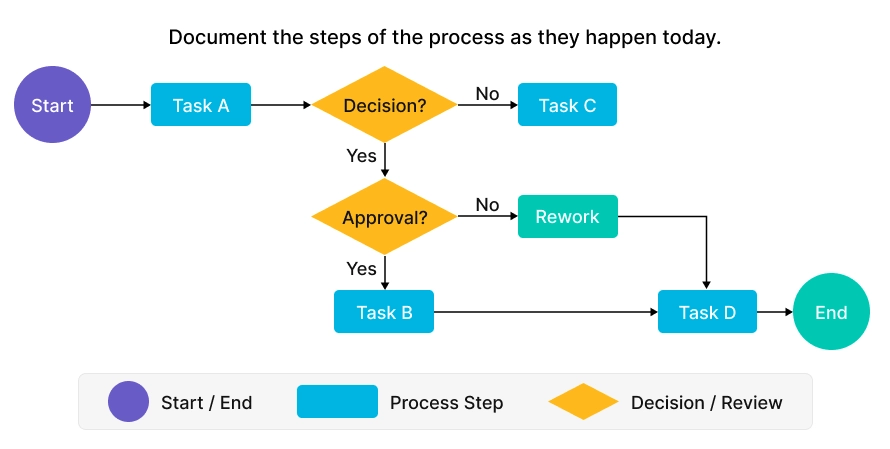
Avoid documenting how the process “should” work; the goal is to reflect reality. Capturing the as-is process provides a foundation for identifying gaps, redundancies, and inefficiencies later.
Step 4: Identify Gaps, Bottlenecks, and Inefficiencies
After mapping the current process, analyze it for pain points. Look for steps that cause delays, areas with unclear ownership, or redundant activities. Highlight points where tasks get stuck, or approvals slow down the workflow, which causes the key challenges of the IT industry.
Identifying these problem areas helps teams focus improvement efforts on the steps that have the biggest impact on efficiency and output.
Step 5: Draw the Improved Process Map (To-Be)
With gaps identified, it’s time to design the improved process, often called the “to-be” process. Simplify steps, remove unnecessary actions, and clearly define decision points and handoffs. Then, create the visual process map to show how the new workflow should operate.
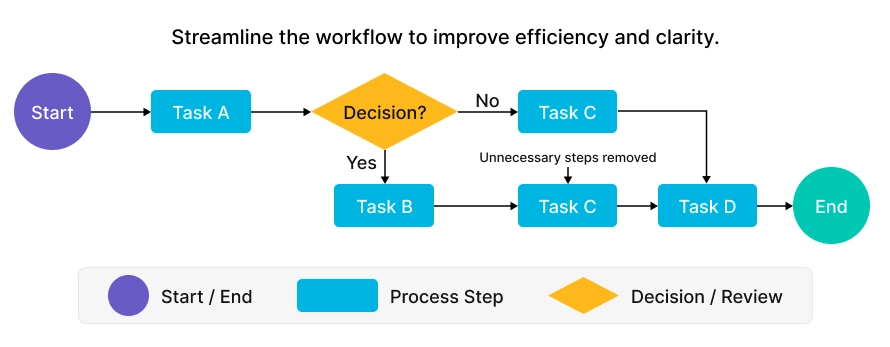
Keep the map simple, easy to read, and focused on actionable steps. Comparing the As-Is and To-Be processes side by side often helps teams understand the improvements and align on changes.
Step 6: Validate, Document, and Maintain the Process
Finally, share the process map with stakeholders to gather feedback and confirm that it accurately represents the workflow. Store the map in a central, easily accessible location so teams can refer to it as needed.
Remember that processes change over time. Regularly review and update the map to reflect new tools, team structures, or business needs. A process flow map is only valuable if it is used and maintained consistently.
| Pro Tip: Focus on clarity and usability rather than perfection in design. A simple, actionable map that everyone understands is more effective than a complex, detailed diagram that few can follow. |
When Should You Create a Process Map?
You should create a process map when a workflow becomes difficult to manage, scale, or explain. Process mapping is especially useful when work involves multiple teams, unclear responsibilities, or frequent delays. It helps teams visualize how tasks move from start to finish and identify where problems occur.
When Do You Need a Process Map?
- Missed deadlines: When tasks frequently slip or timelines are unclear, mapping the process can reveal bottlenecks.
- Unclear ownership: If it’s not obvious who is responsible for each step, process mapping clarifies roles and responsibilities.
- Tool overload: When teams use multiple tools to complete the same process, mapping helps identify redundancies and streamline workflows.
- Scaling operations: As companies grow, processes that once worked may no longer be effective. Mapping ensures scalability.
- Process breakdowns: If a process repeatedly fails or causes errors, a visual map highlights where improvements are needed.
Process Mapping Examples [IT-focused]
- During project delivery, a process map can show the flow from requirements to deployment. This helps teams keep timelines and handoffs clear.
- In IT support operations, process maps can outline how tickets move from creation to closure. This reduces delays and improves consistency.
- For internal approvals, a process map can visualize how requests move between teams. This helps eliminate unnecessary waiting and confusion.
- When onboarding new employees, a process map can define each step clearly. New hires receive timely access to tools and training.

Process Mapping Tools for Teams and IT Projects
Process mapping works best when the tool is easy to use and easy to maintain. The goal is clarity, not complexity. The right tool should help teams document processes clearly and keep them updated as work evolves.
Most process mapping tools fall into two broad categories.
- Documentation Tools:
These tools focus on capturing and standardizing processes. They are useful for creating simple diagrams, writing step-by-step workflows, and sharing documentation across teams. They work well when the primary goal is visibility and reference. - Workflow and Project Management Platforms:
These tools connect process maps to real work. Instead of processes living in static documents, they are linked to tasks, owners, timelines, and teams. This makes it easier to move from planning to execution.
For IT teams and growing organizations, project management platforms like CollabCRM fit into this second category. They allow teams to align processes with projects and people in one place. This reduces handoffs, improves accountability, and keeps processes relevant as operations scale.
Once tools are in place, process mapping becomes part of how work actually gets done, not just how it is documented.
Conclusion
Process mapping is not just a documentation exercise. It is a way to bring structure to how work flows across teams. When processes are clearly defined, teams spend less time guessing and more time executing. Ownership becomes visible. Delays are easier to spot. Improvements become intentional, not reactive.
For IT companies and project-driven teams, this clarity is critical. Processes often cut across tools, roles, and departments. Without a shared view, even well-planned work can break down. Process mapping helps align people, projects, and priorities around a common way of working.This is where all-in-one operational platforms like CollabCRM naturally fit. Instead of processes living separately from daily work, they are connected to tasks, projects, and teams. This keeps execution aligned with defined workflows and supports scale without adding chaos.
When process mapping is supported by the right system, it stops being a one-time activity and becomes a foundation for consistent, accountable operations.
FAQs
Process mapping is a way to visually outline how work moves from start to finish. It helps teams understand steps, roles, and handoffs clearly.
IT work often involves multiple tools, teams, and dependencies. Process mapping improves visibility, reduces delays, and clarifies ownership across workflows.
No. Flowcharts are just one way to show a process. Process mapping focuses on understanding and improving how work actually happens, not just drawing diagrams.
Process maps are most useful when teams face missed deadlines, unclear responsibilities, scaling challenges, or repeated process failures.
The level of detail depends on who will use it. Leaders often need high-level views, while execution teams benefit from more detailed maps.
An As-Is map shows how a process currently works. A To-Be map represents the improved version after addressing gaps and inefficiencies.
Yes. Processes change as teams grow, tools evolve, and priorities shift. Keeping process maps updated ensures they remain useful.
Yes. Clear processes help teams plan better, reduce rework, and execute projects with fewer delays and clearer accountability.






 Priority Onboarding