

Choosing invoice management software for IT business is not as simple as picking the most popular tool in the market.
Some platforms are built for accountants. Some are designed for freelancers. Others focus mainly on collecting payments.
IT companies work differently with different project types. So you either bill by milestones, hours, dedicated teams, time & material, or even all at the same time.
That is the reason it is essential to find the right invoice management software for your IT business.
In this blog, we compare the top 5 invoice management software options that IT business owners commonly consider. Each tool approaches billing differently.
We examine how these tools handle real IT workflows, such as project-based billing, time tracking, recurring and advance invoices, payment visibility, and tax compliance.
This comparison is not about which tool has the most features. It is about which one fits the way IT companies actually operate.
Key Takeaways
- IT companies with multiple billing models need tools that go beyond basic invoice creation
- 5 invoice management software tools commonly used by IT companies: CollabCRM, Zoho Books, RazorpayX, FreshBooks, and Monday CRM
- Zoho Books suits IT companies that need compliant invoicing with accounting support
- RazorpayX focuses on payment collection and payouts, not project-based billing
- FreshBooks works best for small IT teams with simple hourly or retainer billing
- Monday CRM links invoicing to sales workflows, but needs integrations for delivery billing
- CollabCRM offers end-to-end invoice management built for IT companies, connecting projects, time tracking, billing, payments, and compliance in one system
Why Is Invoice Management Software Essential for Indian IT Businesses in 2026?
By 2026, most IT businesses will no longer be competing just on delivery. They are competing on experience.
Clients expect clear invoices, accurate billing, and zero back-and-forth. For many IT companies, invoicing mistakes break things.
As teams grow, managing billing becomes increasingly challenging. More projects. More contracts. More variations in pricing. Manual invoicing cannot keep up with this level of complexity.
At the same time, payment cycles are getting tighter. Clients want detailed breakdowns. They want proof of hours worked. They want visibility before approving payments.
This shift has a real impact. Studies show that about 39% of invoices processed manually contain errors. Errors in invoices can lead to payment delays and additional costs.
Invoicing software helps IT businesses avoid this. It brings structure to billing. Every invoice follows a consistent format. Every charge is traceable. Every payment is trackable.
There is also the internal impact. Finance teams spend less time chasing data. Project managers spend less time explaining numbers. Business owners spend less time firefighting.
In India, compliance adds another layer of pressure. GST, TDS, and e-invoicing rules are strict. Errors can bring in penalties and audits. Modern invoicing tools automate tax calculations and keep records clean.
For IT businesses planning to scale in 2026, invoicing software is not about saving time alone. It is about running a tighter, more predictable operation.
Now that you understand why your business needs the best billing software in India in 2026, let’s look at the top tools available today. These solutions cover a range of needs, from simple billing and GST compliance to project-aware invoicing and cash-flow management.
Top 5 Invoice Management Software
The top five invoice management software for IT companies are CollabCRM, Zoho Books, RazorpayX, FreshBooks, and Monday CRM. Below, we break down their features and highlight what each tool is best suited for.
1. CollabCRM
CollabCRM is an all-in-one Business Operating System built for IT companies that want full control over projects, billing, and payments in one place. Instead of treating invoicing as a standalone task, CollabCRM connects it directly to delivery, time tracking, and client communication, making billing accurate, transparent, and predictable.
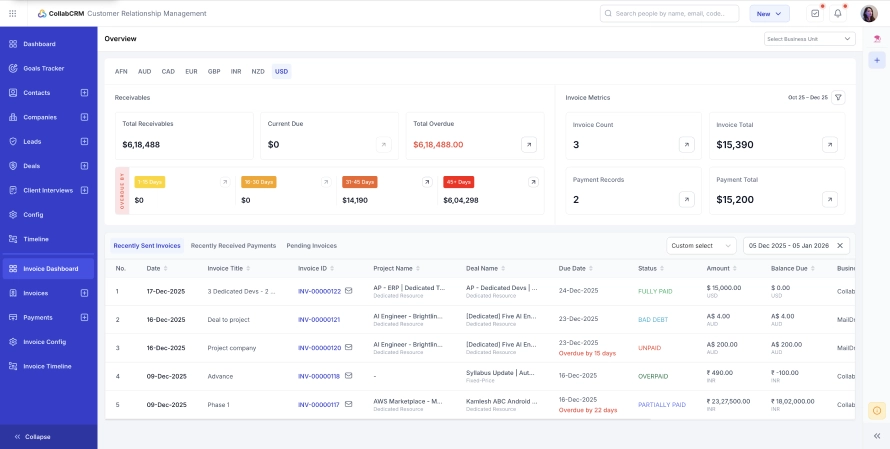
Key Features:
Below are the key features of invoice management module provided by CollabCRM
Dedicated Invoice Dashboard
A real-time view of total receivables, current dues, and overdue amounts. Invoices are grouped into clear aging buckets so teams know exactly which receivables need follow-up.
Support for Multiple IT Billing Models
Auto-formatted invoices for fixed-cost milestones, time-and-material, and dedicated or hire-based contracts. Each invoice matches how the project is actually delivered.
Revenue Leak Detection
Identifies missed billables, unbilled hours, and project overruns. Timesheet entries convert directly into invoices, ensuring no billable work is lost.
CRM to Invoice Automation
Won deals turn into active projects instantly. Advance invoices and billing schedules follow the original deal terms without manual data entry.
Client Transparency Tools
Shareable public timesheet links let clients view billed hours and task logs. Email tracking shows when an invoice is opened, reducing follow-up guesswork.
Invoice Aging and Collections Control
Overdue invoices are categorized by time period, helping finance teams prioritize collections and improve cash flow.
Audit Trails and Compliance Readiness
Every invoice change is logged with date, time, and user details. Built-in GST split logic, TDS handling, and bank account mapping support Indian compliance needs.
Automated Payment Logging
Payments can be recorded instantly, with automatic receipts and thank you notes sent to clients once payment is received.
By connecting delivery, time tracking, and billing, CollabCRM addresses the core challenges of the IT industry and ensures every hour worked is accurately converted into revenue. It is built for IT business owners who need visibility, accuracy, and control, not just invoice creation.

2. Zoho Books
Zoho Books is an accounting and invoicing tool commonly used by small to mid-sized businesses that want structured billing and basic financial reporting. For IT companies, it works best when invoicing needs are straightforward and tightly coupled with accounting.
Key Features:
Below are the key features of invoice management module provided by Zoho Books
Standard Invoice Creation
Create and send invoices with customizable templates, tax settings, and currency support.
Recurring Invoices
Useful for retainer-based clients or monthly service agreements with fixed billing cycles.
Payment Tracking
Track paid, unpaid, and overdue invoices from a central dashboard.
Client Portal
Clients can view invoices, payment history, and make payments through a shared portal.
Basic Reports
Access invoice summaries, receivables reports, and tax-related reports for accounting use.
Zoho Books is often chosen by IT firms that already use the Zoho ecosystem and need a reliable invoicing layer tied closely to accounting, rather than project execution.
3. RazorpayX
RazorpayX is a business banking and payments platform designed for companies that want faster payouts, automated transactions, and better control over cash movement. For IT companies, it works best as a payment and disbursement tool rather than a full invoice management system.
Key Features:
Below are the key features of invoice management module provided by RazorpayX
Invoice Creation and Payment Links
Generate simple invoices and share payment links that allow clients to pay online using multiple payment modes.
Integrated Business Banking
Offers a current account with built-in tools to manage collections, payouts, and vendor payments from one place.
Automated Payouts
Useful for processing salaries, contractor payments, and vendor disbursements at scale.
Payment Status Tracking
Track whether invoices are paid or pending based on incoming payments.
Tax and Compliance Support
Provides basic reports and documentation to support accounting and tax filing processes.
RazorpayX is a strong choice for IT businesses that prioritize payment automation and cash movement. However, it is typically used alongside another system for project-based billing, time tracking, and invoice structuring.
4. FreshBooks
FreshBooks is a cloud-based invoicing and accounting tool popular with freelancers and small service teams. It focuses on ease of use and quick billing, making it suitable for IT businesses with simple service offerings and limited operational complexity.
Key Features:
Below are the key features of invoice management module provided by FreshBooks
Fast Invoice Creation
Create and send professional-looking invoices in minutes using prebuilt templates.
Time Tracking to Invoicing
Track hours worked and convert them into invoices, helpful for hourly-based projects.
Recurring Billing
Automate invoices for retainers or ongoing support contracts.
Online Payments
Accept payments through integrated gateways, allowing clients to pay directly from invoices.
Basic Expense Tracking
Track expenses and attach them to invoices for reimbursement or reporting.
Invoice Status Visibility
See when invoices are sent, viewed, paid, or overdue.
FreshBooks works well for smaller IT teams that want a clean, easy invoicing experience. As project complexity, team size, or billing models grow, many companies pair it with more specialized project or delivery tools.
5. Monday CRM
Monday CRM is a sales-focused CRM built on the Monday.com platform. It is primarily designed to manage leads, deals, and customer interactions, with invoicing added as a supporting function rather than a core capability.
Key Features:
Below are the key features of invoice management module provided by Monday CRM
Basic Invoice Creation
Create invoices directly from deals using customizable boards and templates.
Deal to Invoice Mapping
Convert closed deals into invoices without switching tools, reducing manual handoffs.
Workflow Automation
Automate invoice status updates, reminders, and internal notifications using rule-based workflows.
Third Party Integrations
Connect with accounting and payment tools to extend invoicing functionality.
Custom Dashboards
Track invoice status and payment progress alongside sales metrics.
Monday CRM is best suited for IT companies that want to link invoicing closely with sales workflows. For businesses with complex project billing or delivery-driven invoicing, it typically serves as a front-end system paired with dedicated billing or finance tools.
Best Invoice Management Software: Comparison Table
The table below gives a simple comparison of these five invoice management tools, so you can quickly see which one fits your IT company’s invoicing needs best.
| Feature / Criteria | CollabCRM | Zoho Books | RazorpayX | FreshBooks | Monday CRM |
| Purpose | IT services & billing | Accounting + invoicing | Payments & payouts | Invoicing & time tracking | CRM & workflows |
| Multi-Model Billing(Fixed, Hourly, Dedicated) | ✅ Yes | ⚠️ Limited | ❌ No | ⚠️ Yes | ⚠️ With setup |
| Timesheet to Invoice | ✅ Yes | ⚠️ Basic | ❌ No | ✅ Yes | ❌ No |
| Recurring Invoices | ✅ Yes | ✅ Yes | ⚠️ Limited | ✅ Yes | ⚠️ With automation |
| Cash Flow / Aging View | ✅ Yes | ⚠️ Basic | ⚠️ Basic | ⚠️ Basic | ❌ No |
| GST & Tax Compliance (India) | ✅ Yes | ✅ Yes | ⚠️ Partial | ⚠️ Basic | ⚠️ Through integrations |
| Client Invoice Transparency(Viewable logs/time) | ✅ Yes | ❌ No | ❌ No | ❌ No | ❌ No |
| Ease of Use | ✅ High | ⚠️ Medium | ✅ High | ✅ High | ⚠️ Medium |
How to Choose the Right Invoice Management Tool for Your IT Company
Not all invoicing tools are built for how IT companies actually work. Before choosing one, it is important to look beyond basic invoice creation and focus on how well the tool supports delivery-driven billing, cash flow control, and long-term growth.
Here are the key factors to evaluate.
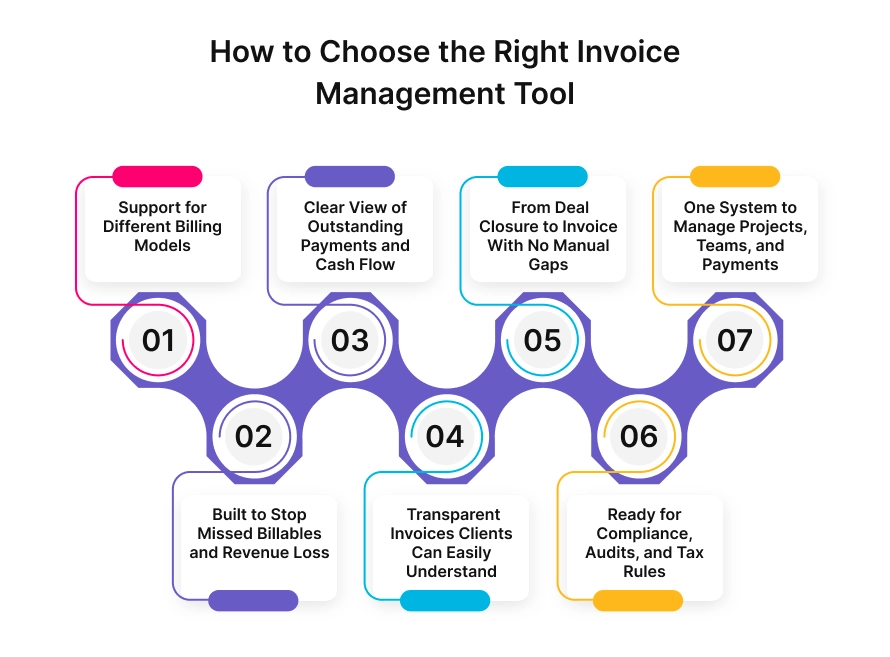
1. Support for Different Billing Models
IT companies rarely follow a single pricing model. You can handle fixed-cost projects, time-and-material projects, retainers, or dedicated resources simultaneously. The right tool should support all these models without manual adjustments or workarounds.
2. Built to Stop Missed Billables and Revenue Loss
Missed hours, delayed invoices, and project overruns directly impact profitability. Choose a system that connects time tracking, project progress, and billing so every billable effort is captured automatically.
3. Clear View of Outstanding Payments and Cash Flow
You should not need spreadsheets to understand who owes you money. A good invoicing tool shows real-time receivables, overdue invoices, and aging buckets so follow-ups are timely and cash flow stays predictable.
4. Transparent Invoices Clients Can Easily Understand
Unclear invoices give rise to disputes and delays. Look for tools that provide detailed breakdowns of hours, tasks, and milestones, so clients know exactly what they are paying for.
5. From Deal Closure to Invoice With No Manual Gaps
Manual data entry between sales, projects, and finance creates errors. The ideal system carries deal details forward into projects and invoices automatically, keeping the billing logic consistent from day one.
6. Ready for Compliance, Audits, and Tax Rules
For Indian IT businesses, GST handling, TDS deductions, and audit trails are essential. Your invoicing tool should support tax rules out of the box and maintain a clear record of every invoice change.
7. One System to Manage Projects, Teams, and Payments
Using separate tools for delivery, billing, and payments creates blind spots. A unified system gives better visibility, fewer errors, and stronger control over revenue as the business scales.
Choosing the right invoice management tool is less about features on paper and more about how well it fits the way your IT business delivers work and collects revenue.
Conclusion
Choosing the right invoice management software can directly impact how smoothly your IT business operates and how reliably you collect revenue. As projects become more complex and client expectations rise, invoicing can no longer be treated as a back-office task. It needs to be closely tied to delivery, time tracking, and client communication.
Many tools handle invoicing in isolation. They work well for simple billing but often fall short when projects, teams, and payment cycles overlap. This is where IT businesses start facing delayed invoices, missed billables, and unclear cash flow.
Why CollabCRM Is the Best Invoice Management Software?
CollabCRM stands out because it is built around how IT companies actually function. It connects sales, projects, timesheets, and invoices into one system, removing manual gaps that cause revenue leakage. Invoices are generated based on real delivery data, not assumptions.
With clear dashboards, aging buckets, and built-in compliance support, business owners always know what is billed, what is pending, and what needs follow-up. Features like public timesheet links and invoice tracking also reduce disputes and improve client trust.
For IT companies looking to scale without losing control over billing and cash flow, CollabCRM offers a structured, transparent, and reliable way to manage invoicing as part of the larger business operation.
FAQs
CollabCRM is one of the best invoice management software options for IT companies because it supports project-based billing, time tracking, and payment visibility in one system. It is designed for IT delivery models rather than generic invoicing.
Yes, invoicing software can handle both fixed-cost and time-and-material projects if it supports multiple billing models. IT companies should choose tools that auto-format invoices based on milestones, hours worked, or resource contracts.
Invoicing software prevents revenue loss by capturing billable hours directly from timesheets and projects. This reduces missed billables, underbilling, and delays caused by manual invoice creation.
Yes, many invoicing tools support GST and TDS for Indian IT businesses. The most effective tools also maintain audit trails and handle tax calculations automatically to reduce compliance risk.
IT companies face invoice disputes due to unclear billing details, missing task information, or mismatched hours. Transparent invoices with time logs and milestone breakdowns reduce disputes.
Yes, invoicing should be connected to CRM and project management. This ensures billing follows deal terms and actual delivery data without manual data entry.
Standalone invoicing software is usually not enough for growing IT companies. As projects and teams scale, businesses benefit from unified systems that connect delivery, billing, and payments.
IT business owners should check billing model support, revenue tracking accuracy, compliance features, reporting clarity, and integration with sales and project workflows.






 Priority Onboarding